
eeionpcnekmdcaakfpdmfflejnfkeoab


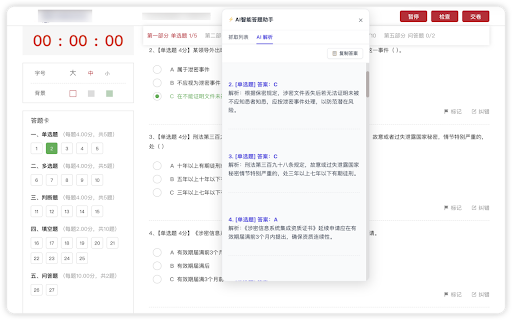
Your AI study companion: capture questions from the web, multi-model support, English UI and English answers. Product Introduction The AI Smart Answer Assistant is a browser extension designed for online learning and professional certification scenarios, offering an all-in-one workflow of "Capture → Parse → Review." Powered by a built-in official AI model, it automatically identifies questions within complex web pages and cross-domain iframes. It also features deep scanning, copy restriction removal, and supports integration with multiple models including DeepSeek, Xiaomi MiMo, OpenAI/Anthropic compatible APIs, and local LM Studio, paired with multi-tier AI tutors to maximize your study efficiency and review quality. Supports Chrome/Firefox dual platforms with one-click Chinese/English UI switching. Try pairing it with "Whisper of Snow · Course Helper" (search this keyword in the app store) for an even smoother learning experience. • Chinese/English Interface: One-click switching for pop-ups and panels; AI output adapts seamlessly to English mode. • More Stable Membership Status: Faster entitlement syncing upon activation; restore access across devices via your Account ID. • Smoother Experience: Optimized manual directory, more reliable settings storage, and clear AI content labeling on parsing results. What You Can Do With It 1. Smart Organization of Learning Content ◦ Automatically identifies and summarizes structured learning content on the current page while browsing. ◦ Remove Copy Restrictions: Restores normal page copying for easy personal note-taking. 2. AI-Assisted Understanding & Analysis ◦ Select content → Send to AI with one click to receive structured key points and explanations. ◦ Long content is automatically segmented for more stable parsing. ◦ VIP Exclusive: Switch to a dedicated private tutor with customizable teaching styles. 3. Efficient Review & Archiving ◦ Keyword Search: Quickly locate target content with highlighted hits and browse item by item. ◦ History: Automatically saves every parsing session for easy review, copying, and retrieval. ◦ Multi-format Export: JSON / Markdown / CSV for convenient personal archiving. 4. Flexible AI Model Selection ◦ Built-in Official Models: Ready to use out of the box. ◦ Supports DeepSeek Official, Xiaomi MiMo, OpenAI/Anthropic compatible interfaces, and local LM Studio. ◦ Supports custom API Key input to suit personal preferences and cost management. Privacy & Security Commitment • Default processing of question capture and scanning is done locally; data is only uploaded when the user clicks send/export. • API Keys and configurations are stored exclusively in the local browser storage. • Data remains within the local network when using local models. Disclaimer This tool is intended solely for learning assistance and knowledge retrieval. Please comply with laws, regulations, and platform rules. Any use for cheating or violating exam regulations is strictly prohibited.

QuestionAI Homework Powered AI Assistant
AI Copilot can answer screenshot queries and assist with writing, summarizing, translating, and grammar checking. Question.AI is your comprehensive AI Copilot, powered by GPT, and accessible in the sidebar for all your needs. It is designed to answer screenshot queries, questions on learning platforms and assist with writing, summarizing, translating, and grammar checking. It's a versatile tool available directly in your browser, ensuring you have the support you need anytime, anywhere. Your Ultimate Homework and Learning Assistant Question.AI, integrated as a ChatGPT plugin, serves as your AI Copilot. It's ready to tackle complex questions and assist with your homework, offering instant, accurate answers. Simply take a screenshot of your query, and Question.AI will provide precise solutions in no time. Key Features 🔥 Get answers to questions with easy screenshots Take or upload a screenshot to receive accurate answers to your learning inquiries. Perfect for all subject questions, espeically mathematical questions. Our AI tutor powered by advanced technology provides precise and step-by-step answers instantly. 💡 Real-Time AI Conversations with no fees Click the Question.AI icon for real-time conversations or select text on any webpage to get instant and detailed AI responses. Stop wasting time searching for answers. Our AI learning tool is available 24/7 to provide answers and support without usage limits or hidden fees whether you're studying late at night or during the weekend. 📏 LaTeX Equation Recognizer Identify LaTeX equations on any webpage and ask AI for explanations. Perfect for students dealing with complex formulas. 📝 Perfectly compatible with learning platforms Get correct answers and suggestions for coursework, quizzes, and tests directly within your learning platforms like Canvas, Blackboard, McGraw, etc. You can use Question.AI on any website. 📚 Supports All Subjects and Grades with High-Quality Answers From math and history to literature and foreign languages, Question.AI covers a wide range of topics for students at all levels. Benefit from our advanced AI technology that ensures accurate and quick solutions to your queries. ✍️ AI Writing Assistance Create high-quality content in seconds. Provide you with intelligent suggestions and create engaging and well-structured content, making writing tasks easier and faster and saving time and effort. 🔗 Easy Chrome Integration Install the Question.AI Chrome extension with a few clicks and start getting answers instantly. 🔒 Safe and Secure We prioritize your privacy. Question.AI ensures the safety and protection of your data. 🚀 Quick Start Tips 1. Click the Question.AI icon on the side of the screen to start a conversation. 2. Select any text on the webpage, click the Question.AI icon that appears, and let the AI give you answers. 3. Press Cmd+E or Ctrl+E to take a screenshot and send your question to Question.AI for immediate answers. 4. Press Cmd+K or Ctrl+K to open Question.AI and ask any question. 5. Use the prompt library with user-provided prompts for inspiration and streamline your ChatGPT interactions. 💻 How to use: 1. Click the "Add to Chrome" button and pin it to your toolbar. 2. Log in to your Question.AI account. 3. Start using Question.AI in the sidebar. It's accessible in the sidebar for all your needs 24/7. ❓ Frequently Asked Questions: 📌 Do I need a ChatGPT/OpenAI account? No, you don't need a ChatGPT account to use this plugin. You can set up a free account directly with us. 📌 Is it free to use? Yes, we offer a free version with limited usage. 📌 What platforms does Question.AI support? Question.AI is available on multiple platforms. You can download our app from the Apple Store for iOS or Google Play for Android. For Windows and Mac users, you can enjoy the extension via Chrome or access our services directly on our webpage. Contact Us For any questions or feedback, reach out to us: ● Email: feedback@questionai.net ● Website: https://www.questionai.com Enhance your learning and productivity with Question.AI, your versatile GPT AI assistant. Start using it today and experience the benefits firsthand!

Test Bro - Smart Web Test Assistant, Exam Helper & Homework Quiz Solver
Smart AI based test assistant, quiz resolver, homework helper. Solve online tests, pass exams, improve skills for skill assessments. Test Bro app is a simple Chrome extension that can assist and help you to pass online tests. It can help you pass all tests containing text-based questions and text-based answer options. ⚡ Just click the ASK button and see the correct answer for apps and websites where Test BRO is fully optimized (see the optimized for section). ⚡ You can use SELECT TEXT and ask Test BRO through the context menu to resolve online tests. ⚡ If text selection is protected, you can SELECT AREA using the context menu to pass the exam. (https://youtu.be/xUwYspJpU_U) ⚡ The Context Menu is also blocked - use the capture feature in the side panel. (https://youtu.be/xUwYspJpU_U) 🚀 NOW TEST BRO OPTIMIZED FOR! 🚀 ✅ For LinkedIn skill assessments. (https://youtu.be/rjKEXb_8tbk) Check out how it works. I think you'll find it enjoyable. Let's try it, and be sure it will help you pass LinkedIn tests. It's not guaranteed to give you a 100% result, but you can watch the video (https://youtu.be/hXI_bKhOsNk). I passed the LinkedIn assignment and ranked in the top 15% of other people. It's a success! I've never read about Django. I don't even know what it is. Is it a programming language? Is it a framework? :) I don't know... 🚨(If you want your quiz site to be fully optimized for Test Bro, please write to me with the quiz site URL.)🚨 Just click the Test Bro button and get the test resolved. 😠 - How do you do the LinkedIn assessment? 🧐 - Use Test BRO, it will increase your productivity and save your time, Bro. 🙄 - Can you cheat on LinkedIn assessments? 🤫 - I ask you a small secret, use Test Bro, to pass axam - save your time... no one else, shh... 🤔 - What about the LinkedIn assessment quiz answers? 🕵 - You don't need answers. Don't waste your time. Use Test Bro. 🤷 - How can I pass the LinkedIn assessment? 🤦🏼 - Seriously? Pass the exam with Test Bro. 🗣 - How often do people fail LinkedIn assessments? 🗣 - Did you score above 70% on the LinkedIn assessment test? 👨👨👧👦 - We never fail assignments; we always score over 70% because we use Test Bro! 🤩 Let's try it out! And please add a 5-star review if it helped you!!! 🤩

AnswerAI - Homework AI Tutor & Study Helper
Your AI assistant ChatGPT Plugin.Answer questions and get AI answers quickly,write emails,articles,chatbot,learning assistant. Ask anything and learn everything with one of the leading AI educational apps for student success. Answer.AI is the only app that is there for students both in and out of the classroom, and revolutionizing the way you learn. With Answer.AI's web extension, your screen will become a powerhouse of personalized education and learning. You can screenshot or highlight any question on your browser and get step-by-step solutions, generate brainstorming drafts for any type of writing, chat with AskAI about tough concepts, master complex math questions with Geometry mode, and more. With over 6 million users, our mission is to help our evergrowing community achieve their milestones and crush their goals both in and out of the classroom. 🥳Here are some features you can look out for: 📍Upload a screenshot for instant answers Easily upload a screenshot of your question, and Answer.AI will analyze it to provide accurate answers—perfect for complex math problems and more. 📍Ask and Answer Click the Answer.AI icon to initiate a real-time conversation, or select any text on a webpage to receive detailed answers instantly. No matter the complexity, Answer.AI offers clear explanations. 📍Writing Assistant Answer.AI also serves as an AI-powered writing assistant, helping you create high-quality content in seconds, making it perfect for essays, articles, and more. 📍Smart Homework Solutions Submit your questions and get step-by-step solutions, ensuring you not only get the correct answer but understand the underlying concepts. 📍Highlight and Solve Answer.AI works on any website you visit and integrates smoothly into your Chrome browser. Simply highlight text or use the extension to get answers quickly and efficiently. 🌟 Getting Started: 1️⃣ Click the Answer.AI icon on your screen to start a conversation. 2️⃣ Highlight text on any webpage, click the Answer.AI icon, and receive an answer immediately. 🧑💻 How to use the Chrome Extension: 1️⃣ Click the "Add to Chrome" button. 2️⃣ Log in to your Answer.AI account. 3️⃣ Start using Answer.AI! You can open the Answer.AI sidebar anytime you need help. Answer.AI offers both free and premium versions. Free users receive limited access, while premium users enjoy enhanced features and unlimited usage. 📍What platforms does Answer.AI support? Answer.AI is available on iOS and Android (download via the Apple Store or Google Play), as well as a Chrome extension for Windows and Mac users. 💯Ready to upgrade your learning experience? Install Answer.AI today and leave your feedback—your suggestions help us continue to innovate. You can contact us at support@answerai.pro or go to our website, https://answerai.pro for more info. We love hearing from you!

SolvelyAI - AI Homework Tutor & Study Helper
SolvelyAI is your AI Homework Helper—instant screenshot solving, step-by-step AI Answers, AI Summary, and Study Helper tools. Capture, Solve, Summarize, and Learn Anytime, Anywhere 🚀 Solvely.ai is the AI learning assistant for solving problems and understanding content faster. Our revolutionary One-Click Solve now gets you answers to an entire page of questions at once. 💬 👉 Your AI Homework Solver Stuck on a tough assignment? Whether it's one question or a whole page, get instant clarity. 🆕 One-Click Solve All : Solve all problems on your screen at once with one click. Press the magic button for instant answers, no screenshots required. ✔️ Take a Screenshot to Get Instant Answers: Quickly capture your homework questions and receive immediate solutions from AI. ✔️ Step-by-Step Solutions: Understand complex problems with detailed, step-by-step explanations that guide you to mastery. ✔️ Save Problems for Later Review: Keep a record of your questions and solutions for future reference and revision. ✔️ Solutions in Various Formats and Languages: Access solutions in different formats and languages to suit your learning preferences. 👉Your AI Content Summarizer Overwhelmed by long videos and articles? Get the key ideas in seconds. ✔️ Real-Time YouTube Summaries: Get AI-generated summaries, key points, and time-stamped chapters while you watch. Instantly grasp the core concepts of any video and jump directly to the most important parts. ✔️ Summarize Any Webpage in Seconds: Instantly distill any article, academic paper, or online report into a concise summary and key talking points. Absorb complex information at a glance and accelerate your research. 📌Pro tip: Use our quick capture shortcuts for faster question solving: 👉Learn Smarter, Not Harder Get the Solvely.ai extension now and embark on an extraordinary journey of knowledge and success. Unlock the power of AI and make every study session count! 💪📚🌟
