
eebaoaeanohonldcbkpnjfkdlcbcaond
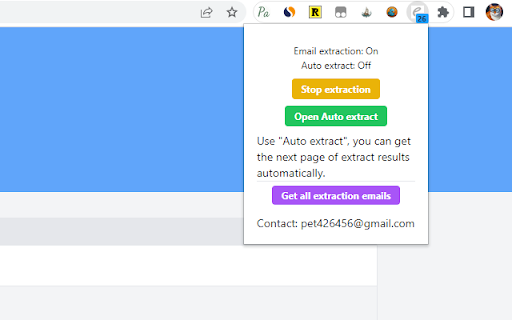
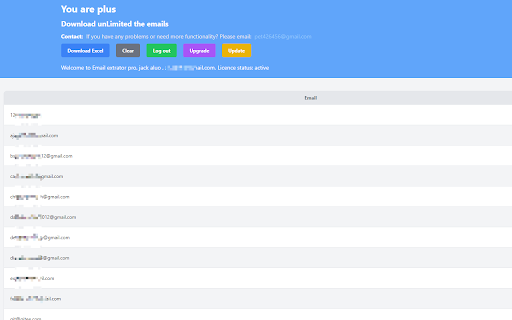
Auto-capture emails from web pages and sync to Notion. Fast and efficient lead collection tool. A powerful email address collection tool designed for sales and marketing professionals. Simply browse web pages to automatically discover and collect potential customer email addresses, helping you efficiently expand your business outreach. • Smart Collection - Automatically extract valid email addresses from visited web pages • Notion Integration - One-click sync of collected emails to Notion for unified data management • Auto Pagination - Supports automatic page turning collection for Google, Bing, and other search engines • Data Export - Export to Excel format for easy filtering and analysis • Blacklist Filtering - Set domain and email blacklists to filter invalid data • Real-time Statistics - Intuitive display of collected email counts 🚀 Latest Updates: • 2025.02 - Optimize the display of the email list. Only display the first 30 items for the first time to avoid slow loading due to excessive content. • 2025.01 - UI optimization • 2024.05 - Enhanced Notion integration functionality, improved sync stability • 2024.03 - Fixed known issues, improved overall performance • 2023.10 - Improved login experience and data synchronization capabilities 🔒 Privacy Protection: We strictly comply with data protection regulations to ensure your data security. All data can be exported and remains completely under your control. 📮 Contact Us: For any questions or suggestions, please contact: chatgpt2notion@gmail.com Install Email Extract Pro now and make email collection simple and efficient!

Email Hunter
Email Extractor tool that save time and efforts. Forget copying and pasting. It collects emails as you browse websites. Email Extractor is a time proven email grabber tool which helps collection emails. Email Hunter easily extracts email addresses from pages as you visit them and auto saves them all. This chrome app finds email addresses scraping and searching source code and no matter what you see on the front. The functions: - extract emails from visited pages - auto search - export collected emails to text file and copy to clipboard - safe checker: unsafe pages skipping without extracting emails In addition, subject to your consent through the prominent notice, we will be accessing and collecting your non-personal web browsing data to use the unsafe pages detection feature called 'Safe Checker' for free. The feature can be disabled on the Options page, if not - we will share the collected web browsing data in an aggregated, anonymized format with our affiliated companies and business partners for commercial use. We wish to make it clear, we do not want to know your identity, preferences or any information about you personally, all as detailed in the Privacy Policy. Our extension collects and uses all web browsing activity as it is needed to improve the function of detecting unsafe pages of our Safe Checker feature.

Email Finder & Email Hunter & Scraper
Email Extractor tool that save time and efforts. Forget copying and pasting. It collects emails as you browse websites. Easily extracts email addresses from pages as you visit them and auto saves them all. - collect leads without effort. Email Extractor tool that save time and efforts. Forget copying and pasting. It collects emails as you browse websites. It is a invaluable tool that can help sales and marketing professionals, recruitment agencies and HR professionals, small business owners, researchers, and digital marketers quickly and easily extract email addresses from various sources, automate email search, and build comprehensive email lists to reach out to their target audience more effectively. Email Finder does NOT copy or scrape emails from you. 🔹Privacy Policy By design, your data stays at all times on your Google account, never saved in our database. Your data aren’t shared with anyone, including the add-on owner. We complies with privacy laws (especially GDPR & California Privacy Act) to protect your data. All data you upload are automatically deleted every day.

AI Email Extractor: Find the Email ID by AI
Extract the email addresses behind any webpage.It uses AI and powerful algorithms to extract email addresses from web pages. Automated Email Extraction Tool which extracts email addresses from web pages and AutoSaves them to use anytime. Collecting email ids, it’s not complicated & time-consuming anymore. Collect more email ids and get more leads with AI Email Extractor! AI Email Extractor is a Powerful Automated Emails Extraction Tool for Chrome and Firefox. It uses AI and powerful algorithms to extract email addresses from web pages. All email ids are filtered through those algorithms. AI Email Extractor goes through every web source it visits and extracts email addresses from those web pages. It also saves email addresses to the user’s account. 🔥 FEATURES ✓ Uses AI And Powerful Algorithms ✓ Extract Email Address from Web Pages Automatically ✓ Support automatic search for "auto search" features, automatically open the next page of search results. ✓ "Automation" feature, support paste website URLs and extract emails in bulk. ✓ Auto-save all Email Address while you browse any website(Professional) ✓ Filters for Duplicate Email ID, so you get only Unique ones ✓ Export Option to export list of your extracted emails to a text or cvs file(Professional) ✓ One click copy your extracted emails (Professional) ✓ Extract Emails from Local HTML Documents ✓ Extract Emails from Text Files ✓ Fast, Light ✓ Automatic adaptation of CSV files with various separators ✓ removes duplicate email addresses 👋 FAQ If you have any questions, please keep in touch via help@extensionsgod.com. 🔒 DATA PRIVACY All data is processed in your local computer, never passing through our web server, and no one knows what you save. 🗓️ CHANGELOG v3.0.1 Add "Automation" feature, support paste website URLs and extract emails in bulk. v3.0.0 Add "auto search" feature, automatically open the next page of search results. v2.0.0 Optimize filtering rules to exclude invalid email addresses.

Email Extractor
Extract email addresses from web pages you visit Email Extractor finds and copies to clipboard valid email addresses from web pages a user visits. Right-click on the extension icon to open an options window. You can select an execution mode and the resulting list options. * In the "once" mode (default), when a user clicks the extension icon, the Extractor collects all emails from the active tab and copies them to the clipboard. * In the 'background' mode, when a user clicks the extension icon, the Extractor starts collecting emails from web sites a user visits. When a user clicks the extension icon again, all collected emails are copied to the clipboard, and the collection process stops. Hovering over the extension icon shows a tooltip with a current mode. An indicator shows a number of emails collected: in black while the Extractor is collecting data, red when the collection is done.
