
edmmkkghhefoooggfpglkmfjconblmij
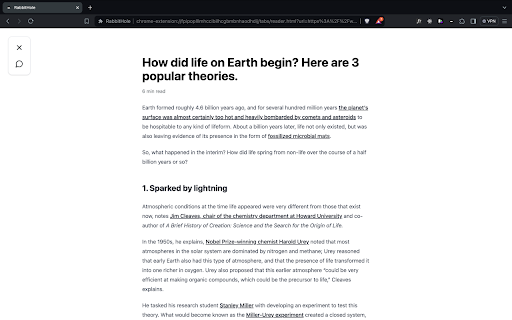
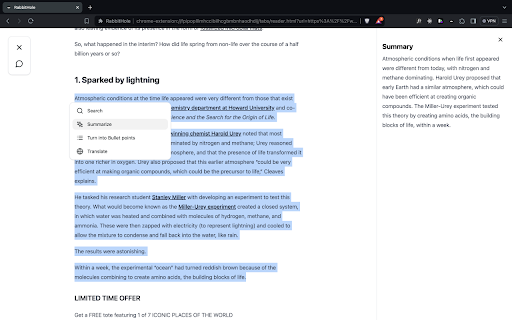
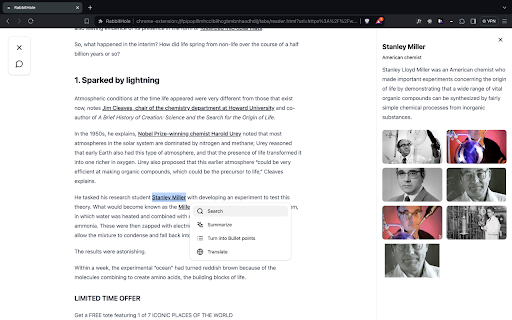
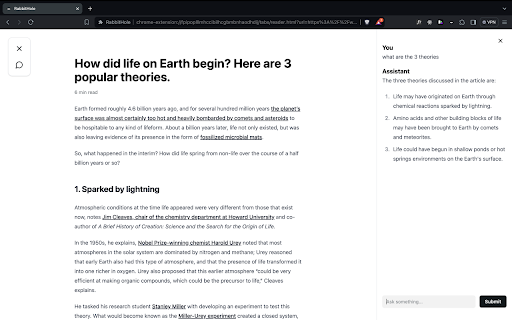
Read and understand articles faster. When you're reading an article online you can press the keyboard shortcut Opt+L (Alt+L on Windows) and this will bring you in "Reading Mode". In "Reading Mode", all the distractions are removed and you can use features to read and understand the article faster. The features include: - summarize paragraphs - turn paragraphs into bullet points - translate sentence into 40+ languages - do a google search for a concept you don't know without leaving the page - chat with the article: ask questions and get clear and direct answers without having to read the entire article

GimmeThat - Universal Wishlist for Shopping
Simplify shopping with a universal wishlist. Save anything you want to buy from any store globally. See your favorites with a click! Tired of forgetting things you want to buy? Too many open tabs and bookmarked product pages? Give GimmeThat a try! It's a universal wishlist that lives right in your browser. You can save anything you want to buy from any store worldwide. All your favorites in one handy wishlist: see them with one click. Save time and stay organized while shopping. GimmeThat puts a handy button next to your browser's address bar. Seen something you like - but aren't quite ready to buy? Those cool shoes? That new phone? Click the GimmeThat button to add it to your universal wishlist. You can save from any store. Want to see your wishlist? Click the GimmeThat button again. You’ll see all your saved products right away. Ready to buy something? Click on the product, and you'll go straight to its store page. Get started with GimmeThat today. Click 'Add to Chrome' at the top of this page. It's easy, and there's a quick guide to get you started. ➤➤ Your Questions Answered Yes. You can save products from stores worldwide. Just click the GimmeThat button on the product's store page to add it to your wishlist. GimmeThat works its magic and grabs all the product's details from the store page. You can fix things easily if needed. Yes. GimmeThat is free to use. And no annoying ads - we make money from affiliate links. We can earn a commission when you click on product links in your wishlist. There may be paid accounts in future for extra features. ➤ Why does GimmeThat need to "Read and change all your data on all websites"? We need some permissions to work, and only ask for what's needed. When you save a product to your wishlist, this permission lets us fetch the product's image from the website. That's it! Yes. Keeping your data safe and private is top priority. We only store the data needed to work, like your email and products you save. All data is securely stored on our cloud servers. GimmeThat only works for desktop and laptop browsers right now. But we do work to make things better, so watch out for updates. If you have any questions, suggestions or problems, email us at support@gimmethat.me. We're here to help!

BoomConsole - Web Organizer & Contact Management
BoomConsole is the organizational tool to capture your online viewing experience with your description and folders. Bank Your Connections with BoomConsole Bank Your Insights, Chats, Contacts and Web views to your personal database, Safe and Secure in the Cloud. BoomConsole is a button and sidebar for your web browser that lets you describe your thoughts on the web page you are visiting, capture texts, images and screenshots of the page and secure the composition of all the captured information in folders you remember in your own personal safe database. Search, Find, Organize, View and Review the insights in your safe. We help you Secure Your AI Chats from Chat GPT, Google Gemini, You Chat and Poe Chat. The Boom Console button known as an ‘‘Extension’’ or ‘Add-on’ that you download from the Google Chrome Web Store. The Boom Console Button works on the Chrome Browser, Edge Browser and Brave Browser. (Firefox and Safari coming soon) --------------------------------------------------------------------------------------------------------------------- Key Features: 1. Bank Your AI Chat Interactions: Save and secure the chats you had with AI Chatbots like: ChatGPT, Gemini, You Chat, Poe Chat, then edit and export memories of your chats into Word, PDF, JSON, and CSV formats. 2. Bank Your Online Contents: BoomConsole helps you to Describe and file the web pages you visit. Capture screenshots, HTML, URLs, images, off a website. Revisit your web pages whenever you need it. 3. Bank your Contact information Import your contacts from social media platforms like: LinkedIn, WhatsApp, Google Maps, Indeed, and Monster. Store phone numbers, emails, map locations into your personal contact manager and find them whenever you need it. 4. Smart Categorization Consolidate all your chats, emails, contacts, and contents into the private organized directory system you create. Assign unique title names to the folders you remember. Who Can Benefit? -> Any internet user can benefit from BoomConsole by using it as a personal memory bank to save and remember important information, web pages, and online interactions. -> Professionals and entrepreneurs can save LinkedIn profiles and industry-related online content for networking, market analysis, and business development enhancing project management and creative workflows. -> Sales professionals can capture business locations, helping them keep track of important addresses and contact information. -> Marketers can benefit from the screen capture feature to save visual elements, such as social media posts or website designs, for inspiration or content planning. -> Professors can use BoomConsole to capture and combine online educational resources and course materials for curriculum development. Disclaimer: BoomConsole is an independent platform and is not affiliated with or sponsored by any of the companies whose data it captures, including LinkedIn, Google Maps, Indeed.com, and Monster.com. The use of trademarks and logos is for informational purposes only and does not imply endorsement.

Save to Beloga
Beloga quick capture extension. The intelligent knowledge hub that transforms how power users and teams capture, connect, and evolve collective wisdom.

Article Summarizer - Gemini
Writes a brief summary under the article title. This helps readers quickly gauge relevance and decide whether to continue reading. ***This version is for Beta testing*** Productivity tool: - Estimates reading time and writes a brief summary under the article title. - This helps readers quickly gauge relevance and decide whether to continue reading.
