
edlbaijpjebfecionlegehagaofhejbn

UPDATED 13/03/2025 - The ability to unfollow friends has been added If the app stop working…

TikTok All Liked Videos Remover
Automatically remove liked videos on TikTok with an in-page control panel and downloadable report. TikTok All Liked Videos Remover clears your TikTok likes in bulk—no more unliking videos one by one. How it works: Click "Start Removing Likes" in the extension popup. A new tab opens your TikTok profile and an in-page panel appears. The extension uses TikTok's own web APIs (the same ones the site uses) to list your liked videos and remove each like. You see live progress: pages loaded, items removed, and any failures. You can pause or resume at any time and download a report (JSON or CSV) of what was removed and what failed. Features: - Optional keyword filter—remove only likes that match certain words, or remove all. - Configurable delays between removals (1–10 seconds) and a pause between pages to reduce the chance of rate limiting. - All processing happens in your browser; no data is sent to any server except TikTok. Your session stays on your device. If TikTok temporarily blocks actions due to too many requests, the extension stops and you'll see a message. Wait about an hour and try again. When finished, refresh your TikTok profile to confirm all likes are gone.

TikTok Bot Pro [Auto Like - Comment - Follow]
Automate TikTok interactions: extract followers, followings, auto like/follow and comment on posts by hashtag or user list Powerful automation tool for your TikTok channel growth. Extract users, auto-engage, auto like, auto comment, and manage bulk follow/unfollow operations with ease. Save hours of manual work and grow your audience efficiently. ❤️ AUTO LIKE - Automatically like TikTok posts/video by hashtag - Like TikTok posts/video from your custom user list - Set custom delay between actions - Like or unlike mode - Configure posts per user 💬 AUTO COMMENT - Post comments automatically - Import comments from TXT file - Rotate through multiple comments - Optional auto-like with comments - Smart delay system to stay safe 👥 BULK FOLLOW/UNFOLLOW - Follow users from your list - Unfollow users in bulk - Configurable delays between actions - Progress tracking in real-time ✅ Floating progress popup - monitor tasks even when extension is closed ✅ Real-time progress tracking with detailed logs ✅ Stop button to cancel operations anytime ✅ User list management - save and organize target users ✅ Import/Export functionality for users and comments ✅ Smart delays to mimic human behavior ✅ Clean, modern dark-themed interface 🔒 FREE VERSION LIMITS - Up to 5 actions per session - Unlock unlimited usage with activation code ⚠️ DISCLAIMER This tool is for educational purposes. Use responsibly and in accordance with platform terms of service. The developers are not responsible for any account restrictions.

Tiktok unfollow all
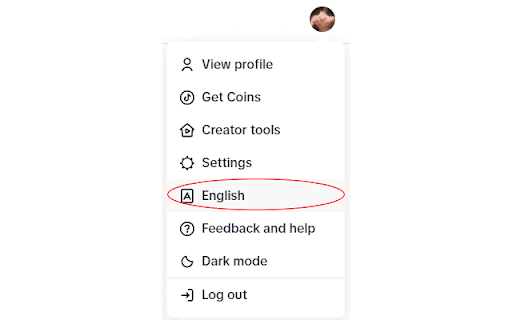
Tiktok unfollow all fast and easy Search for "Tiktok unfollow all" in the Edge browser and Google Chrome web store to obtain the extension and install it Tiktok unfollow all is a convenient and practical browser extension program designed to help users manage their Tiktok following list more efficiently. Through this extension program, users can easily unfollow friends, eliminating tedious manual operation steps and improving the user experience. 1. Batch operation: One click unfollow multiple TikTok friends to improve operation efficiency. 2. Customized selection: Users can flexibly choose to unfollow users according to their own needs. 3. Real time feedback: The extension program will display the progress of unfollowing in real time, allowing users to clearly understand the operation situation. 4. User friendly: The interface is simple and intuitive, easy to use, and even users who are not skilled in technical operations can easily get started. 1.Download the TikTok unfollow all extension from the Chrome Web Store: Search for "TikTok unfollow all" on Chrome Web Store and click install 2.Purchase activation code: Purchase website https://www.unfollow.top/tiktok-unfollow 3.Save activation code: Find the installed extension, click on the extension option, enter the activation code in the pop-up tab, and click save 4.Log in to TikTok in the browser:After logging in, Hover the mouse over the personal avatar to find the language option and switch the language to English. Be sure to switch the language to English 5.Enter personal homepage:Hover the mouse over the personal avatar to click view profile. After entering the personal homepage, be sure to refresh the webpage again for the extension program to work 6.Choose whether to clear friends: The extension program defaults to clearing friends and following.In the pop-up window, choose whether to clear friends or not 7.Loading following: Do not operate the mouse and keyboard, hand over the work to the extension program. The extension program will automatically click "Following" and load all the friends it follows, which takes some time. The more friends it has, the longer it takes 8.Select the someone you want to unfollow:After loading the follow friends, a pop-up window will appear. Friends who do not intend to unfollow can check the corresponding friend name 9.Waitting. It takes about 0.5-2 seconds to unfollow each friend. Do not operate the computer during this process. After completion, the extension program will pop up a prompt 10.Complete. If there are still some friends who have not been cancelled, you can refresh the interface and repeat the above process. After canceling all of them, close the extension program in the browser extension management interface 1. Be sure to switch the language to English 2. After entering the personal homepage, be sure to refresh the page again, otherwise the extension program will not work 3. During the automatic unfollow process of the extension program, a pop-up window will appear that requires manual sliding of the slider for verification, which needs to be completed manually 5. The browser extension will only unfollow friends in bulk and will not collect any personal information. At the same time, it is not responsible for the possible impact of unfollowing friends in bulk on the account

TK Follow Bot - TT Automation Tool
Mass follow and unfollow on TikTok, The best TikTok follower bot for increasing your followers and popularity. Mass follow and unfollow on TikTok. gain more followers with organic growth. v2.0.0 CHANGE LOG - Fix the stuck issue 👋 FAQ https://extensionsfox.com/#faq If you have any questions, please keep in touch via help@extensionsfox.com. 🔒 DATA PRIVACY All data is processed in your local computer, never passing through our web server, and no one knows what you save. 💡 STATEMENT TikTok is a trademark of TikTok, LLC. TKCommentExport is not affiliated with, endorsed, sponsored, or otherwise related to TikTok, Inc. or any of its affiliates or subsidiaries.
