
edaaeabmdcibacnpoepgnpinbokmimim

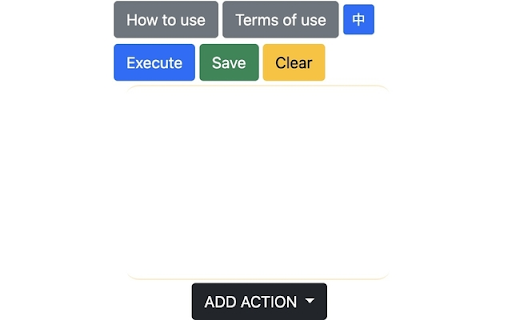
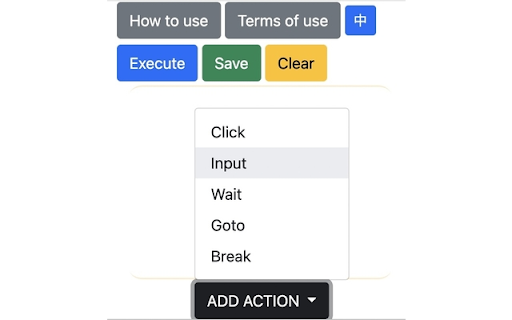

Automaton can click/input on your page and wait-for/repeat those tasks. Four buttons: Execute: Start running the Automaton. Save: Save the current Automaton. Clear: Remove all actions from Automaton. Add Action: Append a new specified action.

Tab Manager for Creators
Clean up & organize browser tabs. Sort tabs, remove duplicates, and manage tab clutter. Perfect for creators and creative workflows. Tab Manager for Creators: The Essential Chrome Extension for Creative Professionals Streamline Your Creative Workflow Are you a creator who constantly juggles multiple browser tabs while researching, creating, and managing your content? Tab Manager for Creators is the perfect solution for maintaining an organized and efficient workspace. This powerful yet simple extension helps you focus on what matters most – creating amazing content. Key Features: - Instant Tab Analytics: Get real-time insights into your open tabs and duplicate counts - Smart Duplicate Detection: Automatically identify and remove duplicate tabs with one click - Intelligent Tab Sorting: Organize your tabs alphabetically by URL for easy access - Window-Specific Management: Keep your workflow organized across multiple Chrome windows - Creator-Friendly Interface: Clean, intuitive design that stays out of your way Why Creators Love Our Tab Manager: ✓ Saves valuable creative time ✓ Reduces browser clutter and mental overhead ✓ Improves system performance by managing tab overload ✓ Simplifies research and content creation workflows ✓ Helps maintain focus during creative sessions Perfect for: - Content Creators: Efficiently manage research materials, inspiration sources, and publishing platforms - Video Creators: Organize your video research, editing tutorials, and upload destinations - Designers: Keep your inspiration boards, resource libraries, and client feedback organized - Developers: Maintain clean workspaces while juggling documentation, Stack Overflow, and GitHub tabs - Writers: Sort through research materials, references, and publishing platforms effortlessly - Digital Marketers: Track multiple campaigns, analytics, and social media platforms - Researchers: Maintain organized sources and reference materials - Podcasters: Manage show notes, guest research, and platform management - Photographers: Keep editing tutorials, inspiration, and portfolio sites organized - Anyone managing multiple tabs for work or creativity About TapeReal: Tab Manager for Creators is brought to you by TapeReal.com, a pioneering video platform built for creators. At TapeReal, we understand the challenges creators face in today's digital landscape. Our mission is to empower creators with a platform and tools that enhance their creative process while maintaining their independence and authentic voice. Our Mission: We believe in building a creator-first platform that champions freedom of thought and expression. TapeReal is more than just a video platform – it's a movement towards authentic, meaningful content creation. The Tab Manager for Creators extension is part of our commitment to supporting creators with tools that make their creative process more efficient and enjoyable. Join thousands of creators who have already discovered the power of organized browsing. Download Tab Manager for Creators today and experience the difference an organized workspace can make in your creative process. Quick Start Guide: 1. Install the extension 2. Click the icon to see your tab analytics 3. Use one-click buttons to remove duplicates or sort tabs 4. Stay focused on creating amazing content 5. Keep the extension pinned to your browser for easy access Looking Ahead: We're constantly working to improve our tools for creators. Please feel free to send us feedback or new feature/product requests. We're here to support you! Support: For assistance or feature requests, visit: https://tapereal.com Join our creator community: https://apps.apple.com/us/app/tapereal-community/id1459260367 Get organized, stay creative. Download Tab Manager for Creators now!

Github Auto Approve
Chrome Extension to automatically approve or merge a PR on click of a button.

Quick Sticky Notes and Todo List
Quick Sticky Notes is the best chrome extension for taking notes and is the best chrome todo list extension. Quick Sticky Notes: Ultimate Chrome Extension for Productivity Overview Quick Sticky Notes is not just another to-do list extension for Chrome. It's a revolutionary tool designed to enhance your productivity, streamline your task management, and seamlessly integrate with your daily browsing experience. Key Features Effortless Task Management Quick Sticky Notes brings the convenience of jotting down tasks right within your Chrome browser. Whether you're a professional, student, or anyone in between, this extension is designed to make your life easier. Intuitive Interface Navigate through a user-friendly interface that makes organizing your tasks feel like a breeze. Perfect for both tech-savvy individuals and those who prefer simplicity. Advanced Tagging System Use #tags to organize your notes and tasks efficiently. This feature is a game-changer for those who love keeping their tasks structured and easily accessible. Archive and Retrieve Completed tasks are just a click away. Archive them for future reference and declutter your workspace without losing any important information. Dynamic Task Editing Edit your tasks as your priorities change. This flexibility is invaluable for those with dynamic schedules and evolving to-do lists. In-Browser Integration Quick Sticky Notes operates within your Chrome browser, eliminating the need to switch between apps or tabs. It's a multitasker's dream come true. One-Click Access Access your to-do list instantly with a single click. Ideal for busy individuals who value efficiency and time management. Data Privacy Your data's privacy and security are our top priority. With Quick Sticky Notes, rest assured that your information is safe. Free For All Users Experience all these premium features at no cost. It's our commitment to enhancing productivity for everyone. Remote Work Friendly Especially designed to cater to the needs of remote workers and freelancers. Stay organized and efficient, no matter where you are. Benefits Stay Organized Never lose track of your tasks again. Quick Sticky Notes helps you stay organized, ensuring you never miss a deadline or forget an important task. Enhance Productivity Boost your productivity by keeping all your tasks in one place. This extension is perfect for those who are looking to make the most out of their day. Simplify Your Life Simplify your daily routine with an easy-to-use interface. It's like having a personal assistant right in your browser. Customize Your Experience Tailor Quick Sticky Notes to fit your unique needs. Customize the look and feel of your task list to make it truly yours. Focus on What Matters With everything organized in one place, you can focus on what truly matters. Increase your efficiency and reduce stress. User Testimonials "A Game-Changer for Productivity" - John Doe, Freelancer "My Go-To Extension for Task Management" - Jane Smith, Student Get Started Download Quick Sticky Notes today and transform your browsing experience. Join thousands of satisfied users who have taken their productivity to the next level.

Smart Click & Type
Click elements or fill text using XPath or CSS selectors with enhanced feedback. Smart Click & Type is a powerful browser extension that lets you quickly interact with web page elements by clicking or typing text based on XPath or CSS selectors. Simply enter a selector and either click the element or input text automatically. Perfect for testers, developers, and power users who want to automate or speed up their web interactions. User-friendly and fast Ideal for web automation and testing Try Smart Click & Type today and save time on repetitive web tasks!
