
ecpiaemaipcbcjkkdjpkakhnekpbehop
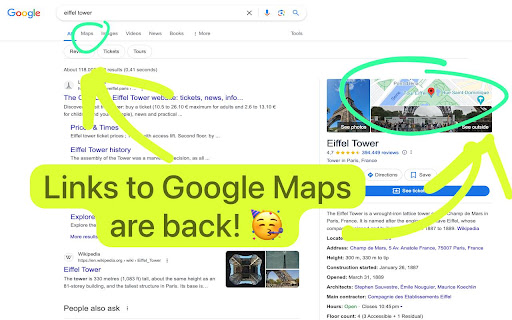
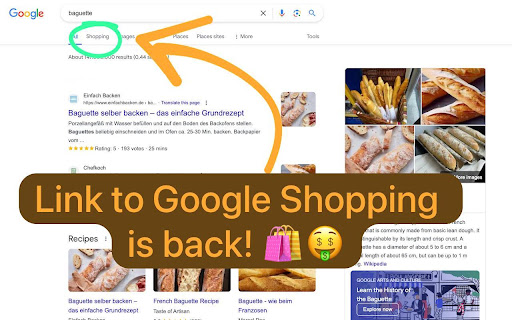
Puts the Google Maps and Shopping links back into Google search results for people in the EU. Not "Thank you, India," as Alanis Morissette sings in "Thank U," we ironically say "Thanks, EU!" for depriving us of the convenient links to Google Maps and Shopping from the Google search results page, to which we've grown accustomed. Recently, Google had to change its linking behavior on the Google search results page due to the EU's Digital Markets Act over concerns about monopolistic, anticompetitive behavior. For those who have become accustomed to clicking on the map picture or the 'Maps' or 'Shopping' tab in Google's search results to get to Google Maps or Shopping respectively, this browser extension is the solution. It restores these links back into the Google search results. Further reading can be found on https://support.google.com/websearch/thread/261655134?hl=en&msgid=263765253 and https://blog.google/around-the-globe/google-europe/complying-with-the-digital-markets-act/.

Open via Google Maps
Open selected addresses in Google maps directly from the same page You can do so today using the context menu when you install this software today. To begin using the software after installation, here is what you need to do. Use your mouse to highlight the address/location you want to find on Google Maps. Right click and choose the option "Open via Google Maps" Our extension will open a new popup window with this address inside Google Maps. This software helps you to save time if you are constantly looking for directions/trying to find how to get to your final destination. Please note this software is NOT made by Google and is an unofficial software made by a group of independent developers. We hope you enjoy using this software.

Clickable Google Maps
Make Google Maps images in Google Search Results clickable and add back the Maps tab for seamless navigation. Open Google Maps instantly from Google Search results either by clicking on a Google Maps image or by clicking on the Maps tab. Enable seamless navigation again between Google Maps and Google Search. This extension is particularly useful for EU users, so if you miss these standard features, this extension is for you. Key features: - Bring back the Maps tab (with multilingual support for all languages in the EU) - Map images (both static and dynamic) are now clickable and bring you directly to the location in Google Maps - Install and forget - no need to adjust any settings, this works out of the box. - Secure - the extension only needs permission for Google Search related domains. - Extremely lightweight - enjoy great performance in Google Search results are the extension is very lightweight and does not consume any meaningful resources. - Supports both Light and Dark mode. For Opera users, you can use this extension too by enabling the "Allow access to search page results" option in the Opera extension settings.

Google Maps Buttons in Google Search
Shows Google Maps links in your search results & makes maps clickable. Designed for EU residents after the Digital Markets Act. In today's digital world, efficiency is crucial, especially when navigating between tools. The EU's Digital Markets Act (DMA) has complicated the once-simple task of moving from Google Search to Maps. This extension solves this by restoring seamless integration. Why Choose This Extension? Key Frustrations Addressed: 1. Missing Direct Links: The extension adds a Google Maps link back to the navigation bar on Google Search pages, eliminating the need to manually open Maps and re-enter queries. 2. Static Map Images: It makes map previews clickable again, allowing users to quickly access detailed maps and directions. Features • Seamless Integration: Automatically adds a Maps link to Google Search pages for one-click access. • Clickable Map Previews: Restores the ability to click on map images in search results. • Intuitive Design: Incorporates search queries into the Maps URL and works automatically without complex setup. • Compliance: Adheres to EU regulations, being an external extension installed manually. Benefits • Enhanced Productivity: Saves time by removing extra navigation steps. • Improved User Experience: Restores lost functionalities for a smoother interaction with Google services. • Accessibility: Designed for all users, regardless of technical skill. Use Cases • Travel Planning: Quick access to route planning from search results. • Business Exploration: Efficient map queries for faster decision-making. • Everyday Navigation: Simplifies commuting and exploring local amenities. Getting Started 1. Installation: Available on the Chrome Web Store; simply click “Add to Chrome.” 2. Set and Forget: Starts working immediately without further setup. 3. Updates and Support: Regularly updated for compatibility and compliance, with support available as needed.

Google Maps Button Reviver
Restore the 'Maps' button in your Google searches & replace the static map with an interactive one. Bring back the original Google Maps experience in your searches with Google Maps Reviver, the essential extension for enriched and effortless navigation. Google Maps Reviver emerges as an elegant solution for everyone who misses the direct integration of Google Maps in Google search results. Specially designed for users in Europe and beyond, our tool restores immediate access to interactive maps, directly from your favorite search engine. ⤷ Seamless Integration: Reintroduces easy and quick access to Google Maps via a "Maps" button directly integrated into the Google search results. ⤷ Dynamic Mapping: Replaces static maps with interactive and dynamic maps, allowing for detailed and immersive exploration. ⤷ Privacy Protection: We take your privacy seriously by not collecting or storing any personal data without your explicit consent. ⤷ Ease of Use: Install the extension and that's it! There's nothing else you need to do. ↻ Update 1.1 : Add onClick action on the little map on the right when you search for a business or for a point of interest such as a monument. ↻ Update 1.2 : Fix issue where search terms were not being properly retrieved. Fix issue when address between minimap and map button were different. ↻ Update 1.3 : Add some language for the store and fix some issue when button didnt appear.
