
ebngeaihhcglhedbgaogppeeofhhbdpm
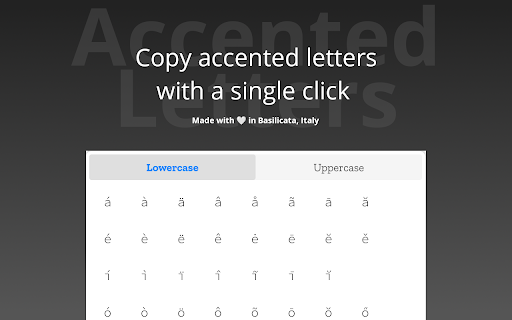
It permits just with a single click to copy an accented letter. This extension permits you to copy an accented letter in the clipboard. You can choose if you want to copy a lower letter or an upper letter. If you want to leave a feedback or just report a bug, please open an issue on Github: https://github.com/Sav22999/accented-letters-addons.

Special Characters: Unicode Symbols & Special Characters Picker
Find, copy, and insert Unicode symbols and special characters instantly from your browser. Unicode Symbols & Special Characters Picker is a powerful Chrome extension that helps you quickly search, copy, and insert thousands of Unicode characters, symbols, and emojis directly from your browser. This tool is ideal for developers, designers, writers, students, and anyone who needs special characters that are not available on a standard keyboard. ✅ Access thousands of Unicode characters and symbols ✅ Search characters by name or keyword ✅ Copy and insert symbols with one click ✅ Includes math symbols, arrows, currency signs, Greek letters, and more ✅ Recently used characters for quick access ✅ Clean and lightweight interface for fast performance Stop searching for special characters online. Install Unicode Symbols & Special Characters Picker and access all symbols in one place.

PostureMinder
Reminds you to sit up straight with pop-up notifications at specified time intervals. Sitting up straight while at your desk can make a big difference to your posture and overall health. This simple, elegant extension is easily customizable. Set how often you'd like to see a PostureMinder, then sit back and let it do its work! Useful features include: == Easy on/off == Turn off the extension so you don't embarrass yourself during a presentation. == Walk reminders == In addition to sitting up straight, you should also step away from your device every once in a while. Set how often you'd like to see a Walk Reminder. == Snarky == Fun, snarky messages will grab your attention and keep you entertained. ==Sync across devices== Your settings will sync if you have the extension installed across multiple instances of Chrome. Changelog: v2.1.3 Remove closing options as its no longer supported by Chrome. v2.1.0 Add "reload app" button to easily resync notifications. Fix compatibility for Firefox. v 2.0.0 Migrate to Manifest v3 and implement cross-device settings sync. v 1.3.3: Add compatibility for Firefox extensions (Thanks to @wzub for the pull request). v 1.3.2: Fix walk reminder bug v 1.3.1: Fix click close bug and add more phrases. v 1.3.0: Sounds! Optionally play a short notification sound each time your reminder runs. (Thanks to @IvanDonat for the pull request). v 1.2.0: Change enable/disable checkbox to on/off switch. 1.2.1: Small update to make all items fit within the options window nicely. v. 1.1.0: Add options to set the time for Walk Reminders and notification fade. (Thanks to @dee-see for the pull request) Submit feedback, bugs, and feature requests or simply learn more at https://postureminder.app.

Anything Copilot: Sidebar, Mini Window, Pip, Split-Screen
AI, right where you need it. Free in the sidebar & Mini Window. Turn your browser into an open AI workspace. Instead of constantly switching tabs, keep your AI assistants, research materials, productivity tools, and favorite websites organized in one place. Whether you're writing, coding, studying, researching, or creating content, Anything Copilot helps you stay focused and work faster. 🧩 Sidebar — Your Persistent Workspace Open almost any website inside a powerful multi-tab sidebar and keep it available while browsing. • Work with multiple AI assistants without losing context • Ask ChatGPT for a draft, validate ideas with Gemini, or explore alternative approaches in Claude • Read documentation, translate content, watch tutorials, or browse references alongside your current page • Open research tools, social platforms, developer resources, and productivity apps without leaving your workflow • Enjoy true side-by-side browsing and multitasking Unlike regular browser tabs, your sidebar stays available as you move across different pages, making research, comparison, and AI-assisted work significantly more efficient. 💡 Mini Window — Your AI Companion Everywhere Need help outside the browser? • Use the same multi-tab experience available in the sidebar • Stay on top of applications such as VS Code, Excel, Word, Figma, and more Your tools remain accessible without interrupting your flow. • Compare responses, reasoning paths, and generated content in real time • Monitor industry news, trending projects, and research sources from one dashboard • Follow product launches, developer communities, and emerging technologies without opening countless tabs Perfect for power users, researchers, developers, creators, and anyone who works with multiple information sources every day. 🔒 Use Your Own Accounts, Not a Middleman Anything Copilot does not replace the services you already use. • Sign in directly through the official websites and accounts you already trust • Continue using your existing subscriptions and premium plans • Conversations go directly to the service provider • Greater transparency, privacy, and reliability Your data stays between you and the services you choose to use. ⚡ Built for Productivity • Lightweight and fast Install Anything Copilot and create your own AI-powered workspace. Organize conversations, research, tools, and websites exactly the way you work.

Easy Accent Marks
For world language class to sending messages, Easy Accent Marks is the simplest solution to type accent marks. From world language classes to sending messages, Easy Accent Marks is the simplest solution to effortlessly type accent marks. Simply click on an accent, and it is automatically copied and inserted to the built-in text area. With this chrome extension, you have access to all the accent marks in these languages:
