
ebkmnfjbmmfeogbaokjedeigicecplje
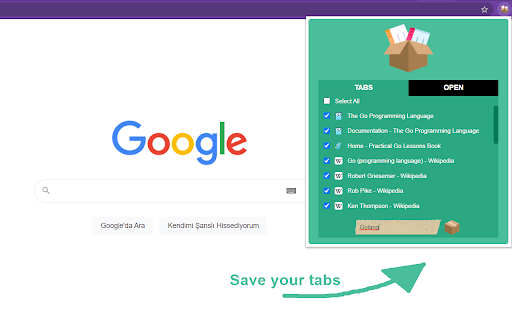
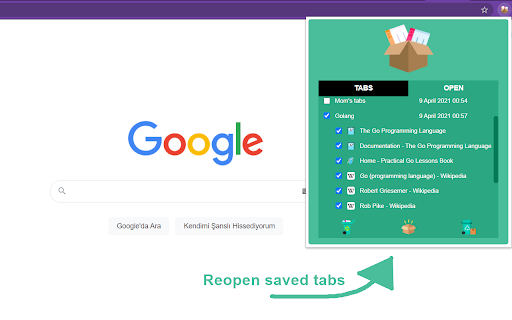

Save your tabs to use them later Tab Saver is an open source tool to save your tabs. You can save your tabs if you want to take a break from a subject when you are using too many tabs related too many different subject. Then you can reopen them as a tab group and continue where you left off! You can use it with a basic popup. Your data is not stored at anywhere but your computer. It's pure, secure and useful. You can contact me for bug reporting, feature demanding etc.

Flash Tab Saver
Simple and easy to use. Save and recover the tabs whenever you want, in just one click, and without pop-ups. Simple, flexible and easy to use! Save, restore and manage your navigation tabs and sessions. Flash Tab Saver is the ultimate tool to declutter your browser, save memory, and boost your productivity. Whether you need to save a session for later, reduce RAM usage, or quickly hide your activity, we've got you covered. 🚀 Key Benefits: - Save Memory & Speed Up Chrome: Instantly free up RAM by saving open tabs into a clean list. Acts like a natural memory saver to keep your computer running smoothly. - Organize Your Browsing: Save entire sessions to the extension or directly to your Chrome bookmarks bar. - Session Management: Create snapshots of your browsing sessions and restore them whenever you are ready. - Restore anytime: Pick up exactly where you left off with a single click. - Productivity Booster: Keep your workspace clean and focus on one task at a time. ✨ Features: Two Powerful Modes: - Simple Mode: Save and retrieve sessions easily within the extension's interface. One-click to save all visible tabs. - Only Save Mode: Automatically save tabs directly to your bookmarks for long-term storage. - Panic Button: Need to hide everything quickly? Save and close all tabs instantly with a shortcut. - Keyboard Shortcuts: Use Ctrl/⌘ + U to manage tabs without lifting your hands from the keyboard. - Context Menu: Right-click options for quick access. 🔒 Privacy Policy: We take your privacy seriously. - No Tracking: We do not track, collect, or sell your web activity. - 100% Local: All your tabs and sessions are saved locally on your device or in your personal Chrome bookmarks. - Transparent: We only ask for permissions strictly necessary to function. Constantly having too many open tabs? Flash Tab Saver is a lightweight session manager and tab suspender designed to reduce Chrome's memory usage and organize your digital life. ⭐⭐⭐⭐⭐ If you like Flash Tab Saver, please rate us!

TabPilot - formerly Tab Group Saver
View all your tabs in one place and manage them with AI 🚀 Your AI-powered copilot for managing tabs and decluttering your browser. Get a bird’s-eye view of all your tabs and let AI help you organize them—so you can stay focused. 👁️ Instant Tab Overview — Press Alt+Shift+G to view all your open tabs and windows in one clean, glanceable dashboard. 🧠 AI Suggestions — Understands your tab activity and proposes grouping, moving, or closing tabs based on their context and purpose. 👆 Drag & Drop Tabs — Easily rearrange tabs, moving them between tab groups or windows. 💾 Suspend Tab Groups — Archive tab groups for later and reduce Chrome’s memory usage. Free to use. Unlock higher limits with Pro.

Save Tabs - Browser Session Manager
A password-protected tab saver and session manager to store tabs in the current window, or all windows with tab grouping support This extension saves tabs for later to prevent cluttering of the tab area. You can request to store tabs and close them to free the memory usage of these tabs when they are not needed. This extension uses the built-in sync API to allow storing in a machine and restoring in another one. Also, it is possible to protect stored tabs with a password. The extension uses the built-in crypto method to encrypt your tab data with the SHA-256 encryption key before storing them in your browser storage to protect data. Stored tabs keep their active and pinned states. Features: 1. Save and store window dimensions 2. Save and restore incognito states 3. Save and restore tab's pinned state 4. Save and restore tab groupings and their properties (color, name, and collapsed state) Notes: 1. There is no way to restore tabs if they are password protected and the password is forgotten. 2. By default, when a new session is restored, the session gets erased from the storage. You can use the Shift key while pressing a session to keep the session in storage. 3. This extension uses synced storage to allow the user to store and restore from multiple computers. 4. you can restore all session tabs in the current window by pressing the Ctrl (Command) key while restoring the session 5. You can edit a session from the popup view or ask the extension to update a session from the currently open tabs. This feature makes it possible to use the extension as a browser session manager. 6. This extension saves and restores tab groups and their properties.

Tab Session Manager
Save and restore the state of windows and tabs. It also supports automatic saving. * Save and restore windows and tabs * Manage sessions with name and tags * Auto save when window is closed * Auto save at regular intervals * Switch workspaces * Import and export sessions * Compatibility with Firefox extension * Cloud sync * Support Tab groups * Import Session Buddy Version 7.3.0 * Added a "Minimum number of tabs" option for automatic session saving when a window is closed * When a window is closed, it will only be saved automatically if it has at least this many tabs. Version 7.2.0 *Added support for saving tab groups in Firefox * In Chrome, saving tab groups no longer requires additional extensions * Fixed an issue where deleting tags could not be undo/redo Version 7.0.0 * Migrated extension from Manifest v2 to v3 * This ensures continued support in browsers! * Changed the minimum interval for regularly autosave from 0.1 minutes to 0.5 minutes * This change is due to limitations in Manifest v3 * Fixed the behavior of tracking sessions * Fixed the issue where windows opened outside of the tracking window were added when the "Track newly opened windows" option was enabled *Fixed the issue where tab groups were not saved in tracking sessions Version 6.12.0 * Implemented Tracking Session * You can set a session as a tracking session from the session menu. * When you open a tracking session, changes in the window are automatically reflected in the session. * This allows for efficient workspace switching! * Added option to track newly opened windows * You can choose if newly opened windows in the tracking session should be included in the tracking Version 6.11.0 * Supported importing Firefox session store backups files * Improved login prompt not to appear during automatic cloud sync * A red badge on the extension icon will notify you when manual login is required. * Improved the appearance of tags in autosaved and startup sessions * Shortened the tag name and changed the tag icon * Adjusted the color of the session list to improve visibility * Fixed an issue where importing Session Buddy files failed * Fixed an issue where upload of sessions with long names failed in cloud sync * Fixed an issue where "Open in current window" opens different order tabs when pinned tabs exists Version 6.10.0 * Added the ability to import and export settings * Supported the import of Session Buddy session files Version 6.9.0 * Added the ability to add the current tab to the session * Right-click on the window title or click on the Edit button to display the menu. * Visualized incognito windows on the toolbar popup * Improved the position of the notification on the toolbar popup * Fixed an issue where the incognito window could not be restored in Chrome * When loading a incognito window, lazy loading is disabled * Fixed an issue where the window title is not displayed in Chrome * Fixed an issue where ignoring URLs in "Replace with current window" was not working Version 6.8.0 * Added option to compress favicons when saving session * Compresses the favicon URL of the data URI scheme. * This will reduce the session size and speed up loading. * You can also compress the favicons of past sessions. * Added option to select the backup type #762 * You can select individual or full backup * Fixed an issue where session list loading was missing * Fixed an issue where session list filtering was reset * Fixed an issue where memory was not released after exporting sessions Version 6.7.0 * Renewed local backup option * Supports incremental backups. * Only sessions that have changed will be saved separately, saving storage. * Fixed an issue where the cloud sync login prompt appears on every reboot (Chrome/Edge) * If you are using multiple browsers, the issue will be resolved only in the first Chrome/Edge you logged in. * The second or later logged-in Chrome/Edge will still show the login prompt. * Firefox does not have this issue. * Improved the open and delete buttons in the session list * Fixed an issue of accidentally opening a session by repeatedly clicking the delete button. Version 6.6.0 * Supported for saving and restoring tab groups (in Chrome) * To save tab groups, you need to install an additional extension. https://chrome.google.com/webstore/detail/aghdiknflpelpkepifoplhodcnfildao/ *Supported for restoring window title (in Firefox) *Fixed an issue where sessions could not be registered to startup Version 6.5.0 * Added auto-sync option for cloud sync * Changed to show cloud sync account names on the settings page * Changed to wait 30 seconds when executing backup on startup * Implemented suggestions for tag input * Implemented double-click to open session * Fixed broken style of lazy loading page * Fixed an issue with lazy loading tabs closing on automatic updates Version 6.4.0 * Supported for dark mode * This is enabled when the OS is set to dark mode. * Fixed an issue where an error appears when disabling/re-enabling an extension * Fixed an issue where multiple pop-ups could not be opened Version 6.3.0 * Implemented undo/redo of the operation * If you've deleted an important session, you can undo it! * Supported for right-clicking on the session list / save button / open button * Right click to open the menu. * Supported for middle-clicking on the tab in the popup * Middle click to open the tab in the background Version 6.2.0 * Speed up session loading when opening the popup. * Enhanced search function * supported search by tab name * Replaced the always displayed search bar with a collapsible button * The search bar will open automatically when you type in the session list * Adjusted the popup style to be keyboard operated * Added extension reload button when IndexedDB cannot be loaded * Added copy URL button when the restored page is not accessible Version 6.0.0 * Added cloud sync function * You can save sessions to Google Drive and sync with other devices. * Added option to add device name when saving session
