
ebhapiodakbafkjhegnfcmohjccfedkm


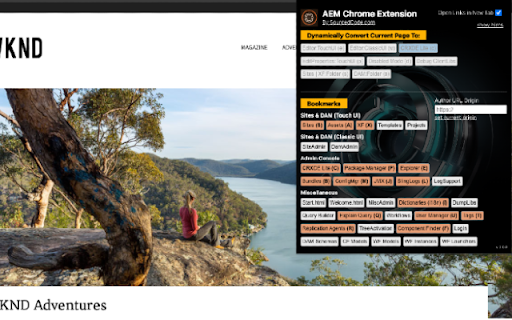
AEM Chrome Extension for AEM Content Authors, Developers, and CMS Admins for the AEM platform, all versions of AEM + AEMaaaCS. As an Adobe Experience Manager (AEM) content author, developer, or administrator, transitioning between pages, the Touch UI Editor, Classic UI Editor, Page Properties, and CRX/DE Lite can become repetitive. This involves manually copying the URL and making subsequent changes to reach the desired destination. Over time, navigating through AEM using this manual approach consumes a significant amount of unnecessary time. The AEM Chrome Extension streamlines this process, saving you time by providing easy navigation within AEM—from the Touch UI Editor, Classic UI Editor, Page Properties, and CRX/DE Lite—with a single click on a button or hotkey! This tool allows you to efficiently navigate through the AEM console, ultimately saving you considerable time in the long run. Main Features: + Dynamic Quick Links From any page under /content/* you can swiftly and quickly navigate to Touch UI Editor, Classic UI Editor, Page Properties, Disabled Mode, Debug Clientlibs Mode, and CRX/DE Lite. On any other page, you can quickly navigate to CRXDE Lite directly to the targeted page or node. + Dynamic Quick Links (Hotkey) Ability to quickly navigate through Dynamic Quick Links: - "e" - switches currentContext to editor.html for Touch UI. - "w" - switches currentContext to editor for Classic AEM. - "c" - switches currentContext to CRX/DE console. - "p" - switches currentContext to pageProperties editor page. - "d" - switches currentContext to disabled mode for XF and Sites Content. - "s" - switches currentContext to Sites or XF folder. - "a" - switches currentContext to DAM folder (but you must be inside of a DAM asset). + Bookmark's Quick Links This tool also has many useful bookmarks. The bookmarks will allow navigating through AEM's core features quickly. Bookmark links are relative paths from the current origin. Make sure to set the Author Url Origin if you have a designated author environment. Other Features: + Open New Tab Enabling this option will ensure that all quick links that are clicked will open a new tab within the browser. + Hide Hints Enabling this option will hide the hinted text in the Chrome extension, giving you a much cleaner layout while using the AEM Chrome Extension tool. Release V 0.0.15 =============================== + Author Environment Label Identifier - the ability to see Production, Staging, Development label based on the current context of the user + Bug fixing Release V 0.0.14.8 =============================== + New Features ++ Dispatcher to Author URL - the ability to switch from author editor url to dispatcher URL. For example, author.prod -> dispatcher URL ++ Author Switcher - the ability to switch from author url to author url. For example. Switch from author.prod -> author.stage to author.dev; maintaining the same context ++ Dispatcher URL Switcher - the ability to switch from registered dispatcher url to Production, Staging, and/or Development Url ++ Supporting more website structures Release V 0.0.7 =============================== + Hotkeys are now visible by default (without the need of clicking on the "show hints". + Bug Fixes. + Performance Fixes. Release V 0.0.6 =============================== + Hotkeys Supported (in show hints). + New quick links, just quick reference OOTB features from AEM. + Indicator when the "origin" has been set. + Bug Fixes. + Performance Fixes. Release V 0.0.4 =============================== + Updated Name of the extension name from "AEM Quick Links" to "AEM Chrome Extension - SourcedCode". + Added Version Indicator. + Bug Fixes. + Performance Fixes. Release V 0.0.3 =============================== + DAM navigation support - in CRXDE /content/dam assets with file extension, can open properties page. - in CRXDE /content/dam assets with file extension, can navigate to DAM parent folder. - in CRXDE /content/dam folder can navigate to DAM parent folder. - in AEM console, from properties page, can navigate to CRXDE console. - in AEM console, from properties page, can navigate to DAM parent folder. + (CTRL + Click) or (CMD + Click) (open new tab support) + Bug Fixes + Performance Fixes *This tool mainly supports Sites and DAM, but will work for most other parts for the AEM console.

AEM Quick Check
AEM Quick Check Instantly access AEM Page data, debug tools, and SEO checks for faster workflows and team collaboration. The AEM Quick Check Chrome extension is a productivity-enhancing solution designed for professionals working with Adobe Experience Manager. It empowers developers, QA engineers, and Scrum Masters to quickly access critical page information, debug components, and perform on-page checks—all from an intuitive interface. This eliminates the need for tedious manual navigation and makes discussions during team meetings or stand-ups more efficient. 1. Domain Management - Add and manage multiple AEM domains. - Quickly switch between configured AEM environments. - Retains the last selected domain for convenience. 2. Page Status - Retrieve and display detailed page information from the `.json` API endpoint, including: - Created By: The user who created the page. - Created On: The timestamp of when the page was created. - Template: The template associated with the page. - Last Published: The last rollout date of the page. - Last Modified: The timestamp of the last modification. - Modified By: The user who last modified the page. 3. Quick Edit - Edit Page Properties: Open the AEM properties editor for the current page. - Edit Page: Launch the AEM editor for quick page modifications. - Edit Template: Navigate to the structure editor of the template associated with the current page. 4. Color Format Switcher - Toggle between `RGB` and `HEX` formats for color values detected on the page. - Displays all the colors used on the page in a visually appealing layout. - Hover over any color to view its value. 5. Component Debugging - Highlight AEM components on the page for easy identification. - Displays component class names directly on the page. 6. Accessibility Checks - External Links: Highlight all external links on the page. - Missing Alt Text: Identify and highlight images missing `alt` attributes. - Image Paths and Resolutions: - View the paths of all images on the page. - Display the rendered resolution of images for performance optimization. 7. SEO Checks - Extract and display meta tags from the current page, including: - Open Graph (`og:*`) properties. - Twitter meta tags. - Standard meta tags like `description` and `keywords`. - Install the AEM Quick Check extension from the Chrome Web Store. - Open your AEM Author page in WCM disabled mode. - Run the extension by clicking on its icon in the browser toolbar. - Config Tab features are only available in the AEM Page Editor and WCM disabled mode. - For non-AEM sites, the Config Tab cannot be utilized, but other features of the extension remain accessible. - Developers: Debug and enhance AEM pages with on-page insights and visual tools. - Content Authors: Quickly access and edit page properties or templates without navigating AEM menus. - Scrum: Speed up team discussions during stand-ups or meetings by instantly accessing required information, reducing time spent manually finding details. - Designers: Analyze brand colors and fonts used on the page. This tool is a joint effort by two AEM specialists with deep experience in enterprise content management, digital experience platforms, and front-end engineering.

Esri AEM Chrome Extension
Switch between AEM Author, Publish, and Live modes. Customize URLs in options. Learn more on the Adobe AEM website. This extension can be used with Adobe Experience Manager (AEM pages). AEM is a Content management system. You can switch between Authoring mode, Publish mode and the Live versions of the page. You can customize the AEM authoring and publishing mode URL's in the extension settings page. you can learn about different environments in Adobe Experience manager Website.

Omnibug
Omnibug is a browser extension to decode and display outgoing digital marketing tool requests. Omnibug is a Chrome extension built to ease developing with, debugging, and providing quality assurance to today's analytics, UX/CRO tools, and many other marketing technologies. These tags include the Google Marketing Cloud (including Google Analytics, Google Tag Manager, Doubleclick, and Google Ads), the Adobe Experience Cloud (including Adobe Analytics, Adobe Launch, Adobe Target, Web SDK), Tealium iQ, and many more! Events sent to these MarTech platforms are captured and decoded into a human-readable format, which can be filtered and/or exported. You can view all of our release notes at https://omnibug.io/help/changelog/ and a list of providers we support at https://omnibug.io/help/supported-tags/

AEM+
An extension to improve AEM authoring productivity AEM is cool, but for heavy users, such as developers and testers, the experience is sometimes not perfect. This extension attempts to make up for these shortcomings to increase the speed of development and testing and enhance the user experience: ★ Useful Links If the extension detects that you are working a AEM page, it will show useful links in the popup: CRX DE, Assets, XF... ★ Double Click+ If the checkbox was checked, you double click the page title, then the edit mode page will be opened. ★ Cloud Server Labeling When you need to use multiple AEM cloud servers at the same time, you will encounter the problem of identifying the project or environment. This extension helps you clearly mark which project it belongs to, whether it is a development environment or a production environment. ★ Double click to open the preview page If you need to preview the page, you have to enter the edit page first. When you double-click the page name, this extension helps you directly open the preview page, saving you valuable time. ★ Recognize and link to JIRA If the page subtitle contains the JIRA ID, this extension will recognize and convert it into a clickable JIRA link. ★ Import and Export Projects & Servers settings Export server settings by project, share your settings with clients or colleagues. ★ Data Security All data is stored in the local system and will not be uploaded to any server. Hope this extension can save you a few minutes every day to have a cup of coffee and keep happy & healthy every day!
