
ebagjefpiapkaedjbgkjmjcgjdnbhdnp
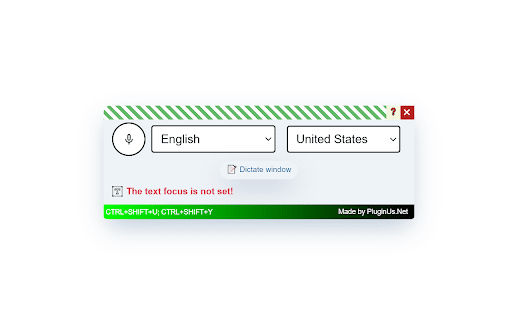
Enables speech (voice) recognition and its conversion into text, with the insertion of this text into the page's text elements "Voice Master" is a free Chrome browser extension that offers speech recognition (voice-to-text) capabilities. It converts spoken words into text, which can be automatically inserted into any text field on a webpage or a dedicated dictation window. This makes it easy to interact with AI platforms like ChatGPT, Claude, and DeepSeek using just your voice. Additionally, the extension includes AI-powered text correction features (e.g., punctuation, formatting, and vocabulary improvements), though a paid key is required to unlock this service. Ideal for boosting productivity, "Voice Master" helps save time on typing and streamlines your workflow. ➤ Installation and Setup Install the "Voice Master" extension as you would any other Chrome extension. After installation, you will see a microphone icon, which we recommend dragging onto the toolbar for quicker access. ➤ Usage - Activate Voice Input: In the pop-up window, switch the toggle to "on," and click on the microphone icon. - Language Selection: Choose your desired input language, whether it be English or any other available language. - Field Selection: Select the input field on the web page where you wish to leave your text – it could be a shop-site search bar, YouTube comment section, Facebook post textarea, WordPress TinyMCE text editor, or any other text field. - Dictation text area: Click on the special button "Dictate window," start speaking, and "Voice Master" will transcribe your speech into text. Use it to verbalize your thoughts. - Voice Input Deactivation: Once done speaking, click on the microphone icon again to stop the process, or use the hotkey CTRL+SHIFT+Y. ➤ Editing with chatGPT (to correct punctuation) If your text requires refinement, take advantage of the integrated AI chatGPT 3.5 turbo (paid API): - Highlight the text and click the button on the toolbar to improve stylistics "Fix spelling and styling by chatGPT." - The first time you use it, you will be asked to enter a key for the GPT API, which will be saved for subsequent use. - The AI will edit and return the text, and you simply confirm to replace the original text. !! With a budget of 5 dollars, using the GPT-3.5-turbo model priced at $0.002 per 1000 tokens, you can process approximately 2,500,000 tokens. This translates to around 1,923,077 words, considering an average of 1.3 tokens per English word. Therefore, with this budget, you will be able to make corrections to a substantial amount of English text. No intermediaries, no additional service fees, you pay only for what you use directly with OpenAI!! ➤ Functionality Disclaimer 1) Limitations of Speech Recognition APIs: Although speech recognition technologies have significantly improved, they still may struggle with accurately identifying punctuation. This is because punctuation marks are not spoken as words, and must be inferred from intonation, pauses, and the rhythm of speech, which can be challenging for algorithms. 2) Complexity of Speech Models: Human speech can be unpredictable and varied. People may speak quickly, merge words, use regional features, or articulate sounds unclearly. All these factors pose challenges for the speech recognition system in accurately recognizing and applying punctuation. 3) Need for Contextual Understanding: Punctuation often depends on the context of a sentence or even a paragraph. AI, such as ChatGPT, is trained to understand large volumes of text and can better determine the need for commas, periods, question marks, and exclamation points based on context. Brief Explanation for Inclusion in Texts: "To enhance the accuracy of punctuation in texts recognized by Speech-to-Text technologies, we apply additional correction using AI ChatGPT. This allows for consideration of the context and nuances of human speech, ensuring high precision in text formatting." Notes: - chatGPT does not work for the YouTube comments section - Maximum text length for chatGPT correction is 4000 symbols. ➤ Dictation in a Separate Window For more convenient text management, use the dictate in a separate window feature: - Press the “Dictate window” button. - Dictate your text, and it will appear in a separate field, from where you can copy it anywhere or use it for personal notes. - You can also edit the text with chatGPT right in this window. - Example of using: dictate email to anybody and correct the text using AI ➤ Additional Features All windows and panels of the plugin are draggable. - Hotkeys: To toggle the panel visibility, use the hotkey: CTRL+SHIFT+U. - When using any textarea or text input, you can enable or disable speech recognition with the hotkey: CTRL+SHIFT+Y. - If you select text and then speak, the selected text will be replaced with what you have spoken. - Additionally, you can close the window or change the language settings at any time. ➤ Feedback and Suggestions If you have any ideas or suggestions, please contact us through contact form on https://pluginus.net/contact-us. We value your input and are always looking to improve "Voice Master" to better suit your needs. ➤ Conclusion "Voice Master" is a handy tool that helps you translate voice to text. With it, you can easily control the Internet with your voice, turn speech into text on command, and, if necessary, correct the text using artificial intelligence. This tool makes using the Internet easier and does not require much effort to manage. Add "Voice Master" to your daily routine to make texting easier with advanced speech recognition technology.

Web Text Expander: Text Shortcuts & Snippets
Work smarter and type faster with text shortcuts! Use text expander to turn text snippets into words or sentences anywhere online Elevate Your Productivity with Web Text Expander: Text Shortcuts & Snippets! Are you tired of repetitive typing while browsing the web? Our Web Text Expander Chrome extension is here to make your daily tasks smoother and more efficient. This extension is your ultimate companion for quick access to text snippets and effortless text expansion. A text expander is a powerful and efficient extension that simplifies typing tasks. It allows you to create shortcuts or abbreviations for frequently used words, phrases, or whole paragraphs. When you type these shortcuts, the text expansion tool automatically changes them into the full content, saving you time. Whether you're responding to emails, filling out forms, or working on various web-based tasks, our free text expander Chrome extension streamlines your workflow, making your digital life more efficient and productive. 1. Install our text expander in Chrome. 2. Create your shortcut and enter the corresponding expanded message in the dashboard 3. When you need to use the snippet, just type your shortcut, and the message will expand automatically. 4. Open the extension to quickly add, edit, and delete text shortcuts. - Text snippets - Instant shortcut expansion - Filtering by tags - Current date placeholders - Caret position control - Quick add - Quick search - Insertion of the current date/time - Designed for Chrome browser - Gmail snippets integration - User-friendly - Private and secure 💡 Unleash the Power of Text Snippets Seamlessly create, manage, and utilize text shortcuts. Say goodbye to typing out the same phrases or addresses repeatedly. With shortcuts, your frequently used phrases are at your fingertips. This feature alone can save you hours! Works like magic: automatically detects your pre-defined snippet, instantly inserting your message. No delays. No additional actions. Whether you're composing emails, filling out forms, or updating social media, Web Text Expander is ready to assist. It seamlessly integrates into your Chrome browser, providing a consistent and user-friendly experience across most websites. Efficiently organize and manage your text snippets with our filtering by tags feature. Assign tags to your snippets for easy categorization, allowing you to quickly find the right snippet when you need it. Whether you have hundreds of snippets or just a few, tags make it simple to keep everything organized and accessible. 💡 Insertion of the Current Date/Time Save time on routine tasks with the ability to insert the current date and time into your snippets automatically. Perfect for time-stamping emails, forms, or logs, this feature ensures that you always have up-to-date information without manually typing it out. Just create a snippet with the date/time placeholder, and let the extension do the rest. 💡 Control of the caret position after expansion Position the caret precisely where you need it once a snippet is expanded. Using a special placeholder within your snippet, the extension will automatically place the cursor at the designated spot, allowing you to start typing right where it matters. This feature eliminates the need to reposition your cursor manually, enabling faster and more efficient workflows. Easily locate the shortcuts and expanded texts you need with the intuitive quick search box. Simply type a keyword, and the extension will instantly surface matching snippets, ensuring you find the right one in seconds. Insert the snippet seamlessly with a single button press. Quickly fill in custom details using Placeholders before expanding. This feature lets you tailor your text with names, numbers, or notes in the moment, so your messages stay personal without slowing you down. Add a shortcut instantly from any webpage with just a right-click. This feature lets you create text expander shortcuts on the fly, so you never lose your flow. Integrate your Gmail snippets into our Chrome extension. Speed up your email communication and enhance your productivity while using Gmail. No need to spend hours learning complex software. You'll be up and running in just a few clicks, saving precious time. 💡 Privacy and Security We take your privacy seriously. Your data is stored securely and never shared with third parties. 🖍 Use Cases: Unlock the Potential of Text Shortcuts Web Text Expander isn't just a convenient tool; it's a game-changer for various scenarios in your digital life. Here are some real-world examples of how you can leverage this Chrome extension for maximum efficiency: In professional life, quick and accurate email responses are crucial. You can set shortcuts for frequently used email templates, signatures, or responses. No more copying and pasting – just a few keystrokes, and your message is ready. 📌 Managing Prompts for LLMs If you often work with AI tools like ChatGPT or Gemini, text shortcuts can make prompt management much easier. You can save your best-performing prompts, style guides, or structured queries as shortcuts. Instead of rewriting the same context every time you start a new chat, just type a few characters and your full prompt appears instantly. This keeps your workflow consistent across different AI platforms and saves time. 📌 Online Forms and Surveys Filling out online forms and surveys can be tedious, especially when they ask for the same information repeatedly. Use shortcuts to input your name, address, or other details. 📌 Code and Programming Web developers and programmers can streamline their workflow using shortcuts for frequently used code snippets. This minimizes the chances of errors and accelerates the coding process. Whether you're a social media professional or an avid user, craft consistent and engaging messages across various platforms (LinkedIn, Facebook, WhatsApp Web, and others) with snippets for hashtags, replies, or product promotions. Students and researchers can create text shortcuts for complex terminology or commonly used phrases. It's a valuable aid for maintaining consistency in academic writing. Customer support agents can improve response times and accuracy by creating shortcuts for canned responses to frequently asked questions. Provide top-notch service without the repetitive typing. 📌 Blogging and Content Creation Bloggers and content creators can maintain a consistent writing style and save time using shortcuts for standard introductions, conclusions, or product recommendations. Streamline your note-taking during meetings using shortcuts for common phrases like "action items," "follow-ups," or meeting agendas. 🚀 Unlock Your Potential with Web Text Expander No matter your digital activities, you should work smarter, not harder. These use cases are just the beginning. With a bit of creativity and customization, you can adapt Web Text Expander to your specific needs, making it an invaluable tool in your daily online life. Say goodbye to unnecessary typing and hello to a more streamlined and productive browsing experience. If you’re looking for an efficient free text expander to make your life easier, install Web Text Expander today and start saving time with every keystroke! Do you have questions, suggestions, or feature requests? Feel free to send a message to info@webtextexpander.com anytime. Let us know what you think! Thank you.

Speech to Text & Dictation - DictationDaddy
Speech to Text & Dictation extension. Convert voice to text in real time with advanced voice recognition. Speech to Text & Dictation -- DictationDaddy is a powerful AI-driven speech to text and voice typing extension that lets you convert voice to text on any website in real time. Using advanced voice recognition and speech recognition technology, it delivers highly accurate AI transcription across 50+ languages and accents. If you are tired of typing long emails, documents, messages, or reports, DictationDaddy allows you to simply speak and instantly turn your voice into text. Whether you need voice to text for productivity, medical transcription, business communication, or daily writing tasks, DictationDaddy helps you work faster and more efficiently. DictationDaddy enables real-time speech to text conversion on virtually any website. Instead of typing manually, just activate voice typing and start speaking. Your speech is instantly converted into text using AI-powered voice recognition models including Whisper, OpenAI, Claude, and GPT-based systems. Compared to built-in dictation tools on Windows and Mac, this extension delivers significantly higher accuracy and better contextual understanding. ● Faster Than Typing Voice typing is naturally faster than keyboard input. Convert speech to text in seconds and complete emails, notes, and documents up to 3x faster. ● 99% Accuracy AI Speech Recognition Our advanced voice recognition engine reduces transcription errors and outperforms traditional dictation software such as built-in OS dictation and legacy tools like Dragon. ● 50+ Languages & Accents Supports global speech to text conversion in multiple languages including Portuguese, German, French, Spanish, Hindi, and more. Designed for international professionals and multilingual users. ● Smart AI Formatting Automatic punctuation, capitalization, and intelligent homophone recognition ensure your voice to text output is clean and readable. ● Personalized Dictation The system learns your writing style and supports custom vocabulary, making it ideal for industry-specific terminology and branded communication. Voice Commands Control formatting using natural speech. Say commands like: "new line" "comma" "semicolon" "open bracket" "happy face" Your speech recognition input instantly converts into the correct symbols and formatting. Medical & Professional Transcription Optimized voice to text for clinical notes, medical terminology, legal documentation, and professional workflows requiring high transcription accuracy. Universal Website Integration Works on nearly every website that supports text input fields through Chrome extension. No complicated setup required. Custom Prompts & Output Formatting Customize how your voice to text output is structured depending on the context -- emails, reports, meeting notes, or structured summaries. Auto-Copy & Seamless Insertion Transcribed text can be automatically copied or directly inserted into input fields for instant use. Install the Chrome extension and start voice typing instantly. Experience next-generation AI voice typing and accurate voice recognition today. Support: rahul@dictationdaddy.com Trusted by professionals who describe it as "magical" speech to text performance and significantly better than standard dictation tools.

Speech to Text
Convert speech to text instantly with this voice dictation extension. Transcribe audio,voice memos files to text with high accuracy 🎙️ Turn Your Voice into Text Instantly with the Speech to Text Chrome Extension 🧾🖱️ Need to transcribe audio to text quickly and accurately? This powerful speech to text Chrome extension is your ultimate tool for effortless voice to text conversion, voice typing, and dictation. Whether it's a quick voice memo, a podcast, or a meeting — we've got you covered 🔥 🚀 Key Benefits of Our Speech to Text Tool 1️⃣ Fast and accurate voice to text transcription 2️⃣ Real-time speech recognition with just one click 3️⃣ Upload audio files for instant audio to text conversion 4️⃣ Full integration with google docs voice typing 5️⃣ Lightweight, fast, and secure — no sign-up needed 🔐 Use your voice to write faster, smarter, and without distractions 🎯 🎧 How It Works – Simple & Efficient ➤ Click the mic icon to start speaking 🎙️ ➤ Watch your words turn into text in real-time 📝 ➤ Upload an audio file to text converter for longer recordings ➤ Copy, export, or edit your content on the spot ➤ Use voice typing in Google Docs like a pro 💼 It’s that simple. No clutter, no confusion — just powerful speech to text software 💪 💡 Use Cases That Make Life Easier • Take hands-free notes with speech to text • Record interviews and transcribe audio recording to text • Create blogs, emails, or books using only your voice 🧠 • Use as a dictation app while multitasking • Turn audio into text for reports, captions, and study notes Whether you’re a student, a journalist, or a busy entrepreneur, this tool saves hours every week ⏳ 🌐 Supported File Formats for Upload You can easily upload and transcribe speech to text using: The audio to text converter processes your files with incredible accuracy using automatic speech recognition 🤖 🗣️ Multiple Languages & Accents Speak your native language with confidence! This speech to text tool supports: ▸ English 🇺🇸 ▸ Spanish 🇪🇸 ▸ French 🇫🇷 ▸ German 🇩🇪 ▸ Portuguese 🇧🇷 ▸ Italian 🇮🇹 ▸ And more 🌍 Perfect for multilingual teams, global meetings, and international content creators 🌐 📓 Compatible With Google Docs and More Unlock the power of google docs voice typing with a single click 🖱️ Just open a doc, activate the mic, and enjoy smooth voice typing ✍️ Great for writing essays, reports, or planning your next big project 📑 📱 Who Is This Extension For? 1️⃣ Content creators needing fast transcribe audio to text 2️⃣ Students who want to transcribe audio to text from lectures 📚 3️⃣ Professionals using dictation software during work 💼 4️⃣ Podcasters and YouTubers who need quick captions 🎙️ 5️⃣ Anyone who wants to save time and boost productivity 🧠 🛠️ Tools All in One: Record, Dictate, Transcribe This isn’t just a voice to text app — it's a complete transcription app: Record with your mic 🎤 Use it as a voice recorder with transcription Store your drafts safely Copy and paste anywhere 📋 🔒 Private, Secure, Reliable We care about your privacy. All data and voice transcription are handled locally or through encrypted channels 🔐 No data is stored or shared — your content stays yours 🛡️ 💼 Perfect for Business, Study, and Everyday Life Whether you’re creating a to-do list, responding to emails, or writing chapters of a book — voice to text software gives you full control, faster than typing ⌨️ ➤ Draft ideas with transcribe audio to text ➤ Create transcripts for meetings ➤ Generate searchable content from audio files to text ⚙️ Why You’ll Love This Extension ✅ 100% Free ✅ Easy to use ✅ High-accuracy speech recognition voice ✅ Full support for audio to text converter needs ✅ Ideal for dictation, transcription, and note-taking ✅ Functions as a reliable text to speech converter if needed 🔥 Start Using Voice to Text Now Don't let your ideas fade — capture them instantly using your voice 🔥 Install our speech to text today and turn your microphone into a productivity superpower ⚡ 📌 Speak. Convert. Save. Repeat. 📌 Your go-to tool for audio into text, anywhere, anytime 📌 Join thousands of users loving this smart voice to text app 🎯 Ready to boost your productivity and eliminate typing fatigue? Install the ultimate speech to text software now and take control of your time ⏱️

Transkriptor Transcribe Audio to Text
Convert audio to text. Automatically record and transcribe your meetings, and other conversations with Transkriptor. Transkriptor: AI-Powered Chrome Extension that Converts Speech to Text Transkriptor provides the best automatic transcription experience for your meetings. Transkriptor takes automatic notes for you in more than 100 languages and dialects, including English, French, German, Spanish, Chinese, and Portuguese. Transkriptor Chrome extension is easy to use. Press record before any virtual meeting, and let Transkriptor work its magic. You can use Transkriptor for any meeting in Google Meet, Microsoft Teams, and Cisco Webex. Transkriptor is also available across Web, iOS, and Android. How to Use Transkriptor? 1. 📥 Download the Transkriptor Chrome Extension 2. 🔕 Turn off all other sounds and notifications on your computer 3. 🎧 Use a headset with a boom to speak directly into the mic and avoid sound echo 4. 🎙️ Test your microphone by talking and ensuring it picks up sound 5. ▶️ Press the record screen button in the extension 6. 📑 After the meeting, press "Transcribe" and get your transcript 7. ✍️ Edit your transcription by fixing punctuation and grammar mistakes Use Transkriptor For: ★ 📄 Taking Automatic Notes for Remote Meetings ★ 🎓 Online Classes/Lectures ★ 📜 Transcribing Video Calls into Google Docs ★ 📊 Summarizing a Speech File ★ ⚡ Running Effective Scrum Meetings Transkriptor is a transcription service that provides secure transcriptions. All transcriptions are securely stored in your browser or Google Drive. Transkriptor is the best transcription software and also offers a subtitle generator and voice-to-text online. 🎥 Transkriptor Extension Transcribes Your Audio and Video Recordings Transkriptor is an AI-powered Chrome extension that converts speech to text files. It's a free online tool developed to make transcription faster and more efficient. The goal was to create something easy-to-use, affordable, reliable, and, most importantly - quick. Transkriptor does not require additional software or hardware for audio conversion; it can be used as soon as you install the extension in your browser. 📝 How to Record Meetings and Transcribe with Transkriptor Chrome Extension? 1. Download and install the Transkriptor Chrome Extension 2. Press the record button before starting your meeting 3. After the meeting ends, press “Transcribe” 4. Edit the transcription for punctuation and grammar 5. Export your transcription in your preferred format ❓ Why Should You Transcribe Your Recordings? Transcriptions are often required by those who are deaf or have difficulty hearing. Manual transcription can be time-consuming, especially for lengthy recordings. Transkriptor simplifies the process by providing an automated solution that requires no human effort, making it faster and more efficient. Transkriptor saves you time by providing an automatic solution that generates transcripts instantly. It eliminates the need to wait for a human transcriptionist and reduces the manual effort required to convert speech into text. It's a cost-effective option for individuals and businesses. 💼 Best Features of Transkriptor ★ 99% transcription accuracy ★ Supports all file formats (.mp3, .wav, .aiff) ★ Voice commands and keyboard shortcuts for faster editing ★ Works with any microphone; no additional hardware needed ★ Online transcription, no installation required 🧠 How to Make the Most of Transkriptor’s Intelligent Features Make sure your recordings are clear and crisp for the best transcription accuracy. Transkriptor’s intelligent word detection automatically detects pauses and breaks in the recording, making the transcription easier to edit. Transkriptor is ideal for students, meeting participants, journalists, and anyone who needs an accurate and fast way to transcribe audio to text. It helps users convert their presentations, interviews, and lectures into text effortlessly. Transkriptor allows you to transcribe audio or video files, making it an invaluable tool for content creators. It offers a highly accurate solution for generating written content from spoken words, even for users with different accents or speaking speeds. 📋 The Full List of Features of Transkriptor ★ Speech-to-text transcription for meetings, classes, and interviews ★ Supports over 100 languages ★ Convert audio and video files to text ★ 99% transcription accuracy ★ Integrated note-taking and in-line commenting ★ Subtitle generation and export options ★ Zapier integration for automated workflows ★ Secure storage in-browser or in the cloud ★ Available across Web, iOS, and Android ★ Collaborative editing for team projects ★ Free trial with 90 minutes of transcription ★ Export to TXT, SRT, and Word formats
