
eapjillhmgpcgfelagikhjeiboocofcm
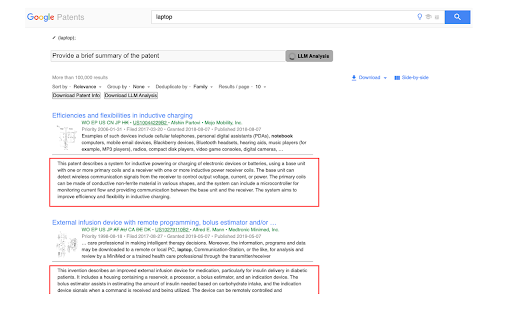


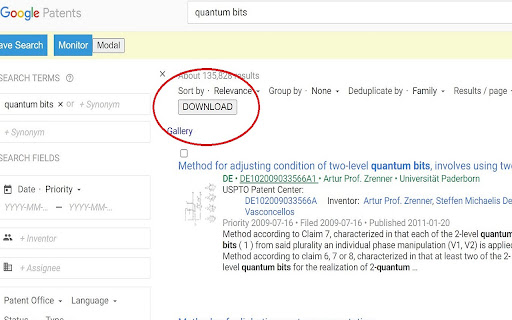
Increase your patent efficiency Increase your patent search and PubMed search efficiency Petapator seamlessly integrates a robust AI Large Language Model (LLM) with leading patent search and biomedical literature search sites, including Google Patents, Espacenet, WIPO*, USPTO*, and PubMed. Through our intuitive Google Chrome extension, patent professionals and biomedical researchers gain access to unparalleled AI-driven analysis directly within your familiar search environments. As a researcher, your time is valuable. Petapator enhances your PubMed search experience by providing instant, accurate summaries and efficient analysis directly on the PubMed search results page. - AI Summaries: Get concise, key-point summaries of research articles without having to open each PubMed search result. - Interactive Interface: Use predefined LLM prompts or create custom queries to extract tailored insights. - Efficient Analysis: Petapator extracts and organizes essential information into a clear, easy-to-read format. Key Features: - LLM Integration: Tailor your patent search experience with LLM directly on patent search sites, effortlessly extracting insights and enhancing efficiency. - Effortless LLM Analysis Management: Streamline LLM analysis organization by seamlessly downloading results into CSV files. - Expertly Engineered LLM Prompts: Leverage pre-defined prompts specifically created for patent professionals, enabling quick and deep analysis of search results. Other features: - Easy Download of Patent Search Results with the most relevant information — Download up to 500 records — Save Detailed Claims information and Image Links — .CSV download format for additional analysis on your favorite tools - Drawing Listing and Image Enlargement for easy comparison of different patents — Compare different patents at a glance — Drawing Summary right at your fingertips — Make patent search more efficient on your favorite sites - One Chrome Extension for all the most popular patent search sites — Build on the most popular patent search sites around the world — Enable new functions right on USPTO, Espacenet, WIPO and Google Patents — Intuitive and easy to use At Petapator, our mission is to empower patent professionals and biomedical researchers. Since 2006, Petapator has been helping thousands of patent professionals and researchers. Our latest version makes searches on USPTO, Espacenet, WIPO, Google Patents and PubMed even more efficient, allowing you to get smarter insights faster. Install now to enjoy the new incredible functions today. Website: http://www.petapator.com Version 11.6 - Added free summary analysis - Now also available for Pubmed - Bug fix Version 11.5 - Bug fix for pre-defined prompts

Omni - Meta Search Engine
Omni allows you to search anything in one click Delivered with actual useful search engines :D - Google - Wikipedia - Collins dictionary - Youtube - The Conjugator - Le Conjugueur - El Conjugador - WordReference - Forvo

Science Research Assistant
Search for scientific information as quickly as possible while researching and writing scientific papers. Save notes for reference. Science Research Assistant is a powerful Chrome extension designed to assist scientists, students, journalists, and anyone seeking reliable scientific research. Whether you're writing a thesis or gathering facts, this tool ensures you find and utilize research efficiently and effortlessly. With a simple selection of any keyword or phrase on a webpage, you can instantly search relevant scientific journals. The extension also offers advanced meta-search options and other valuable tools to enhance your research process. You can easily save text from webpages or PDFs for future reference, and seamlessly export your saved records to PDF for better organization. The built-in algorithm analyzes text from any webpage, identifying the most frequently used keywords and key information, all while highlighting important details. You can even customize the algorithm with your own rules, enabling you to swiftly pinpoint the most crucial insights from lengthy papers or web content. If you're still in the early stages of exploring a research topic or formulating a hypothesis, the Science Research Assistant helps you navigate the overwhelming volume of available information. With its News and Trends feature, you can quickly gauge the popularity and future relevance of a topic, while receiving related suggestions to inspire fresh ideas. This extension is your essential tool for fast, accurate, and insightful research, helping you stay ahead in your field. Science Research Assistant will help you to: · Search and analyze the complex structure of web information · Search scientific journal articles · Search books · Search patents · Search records history · Save notes to record's history · Backup your notes · Compile reports and export to PDF · Use helpful meta-search patterns to dig deeper into the web · Track news and trends Usage: - Save selection text to notes – select text on a web page, click the right mouse button, and choose “Add .. to notes” from your context menu. - Keyword analysis – click the right mouse button and then choose “Keyword frequency analysis (beta)” from the context menu. - Keyword distribution – click on the highlighted keyword to see all its appearances in the text. - Keywords analysis settings overlay – choose the number of words in a keyword phrase (one to five) and the minimum required frequency within the text (from two to 10) you would like to get analysis for. Click the refresh button or remove the results button to remove the analysis. - Selection search – select any word in text on a web page, click the right mouse button, and choose “Science search for ..” from your context menu. This activates a search of various journals and web tools (see Settings). - Settings/Manual search – click on the extension icon in the top right corner of your web browser. - Filter saved records by keyword - Click "A+" button to resize the text - Click "📤 to PDF" button to export selected records and notes to PDF. - Click 🗑️to remove selected records and notes. We always welcome suggestions on what science sources and useful tools to include in future releases of the Science Research Assistant, so do not hesitate to contact us by using the provided form in the settings section. Thanks for all feedback!

Open Google Patents
Opens Google Patents for a selected patent identifier. This solution allows you to quickly open Google Patents for a selected issued patent identifier or pre-grant publication identifier. Select a patent identifier in text, then open the context menu and select "Open Google Patents" from the menu. You can normally open the context menu by right-clicking. For example, selection of "US7654321," and then "Open Google Patents" from the context menu, opens a new tab to the URL https://patents.google.com/patent/US7654321. The solution works for both issued patent identifiers (e.g., US7654321, EP1234567) and pre-grant publication identifiers (e.g., US20240011111). Because the solution uses the identifier in the corresponding Google Patents URL, it is NOT currently possible to use the patent application serial number (e.g., US18/123,456). Note that in the absence of a country code prefix, the presumption is that the identifier is for a US patent document. Be sure that the identifier has the country code included if the associated document is not a US patent document. The extension should work for any webpage loaded after the initial installation of the extension, as long as JavaScript is enabled. Please let me know of any issues you experience before writing a review -- I'm happy to continue to improve the solution. The extension is provided 'As-Is' without any express or implied warranty of any kind. Note that I do not collect any information from the extension -- all handling is done at your local browser. ----------------------------------- v1.9: - Updated to use a window popup instead of a desktop notification for error messages. v1.8: - Updated to use Chrome extension manifest V3 v1.7: - Added selected text to the context menu item. - Updated to force uppercase for country code and kind code since Google Patents doesn't always handle lowercase letters. v1.5: - Modified code to require minimal permissions. - Removed handling of links, as this functionality was of minimal value, and this removal allowed for a reduction in needed permissions. v1.1: - Updated to handle identifiers without country code but with a kind code.

Patent Assignments
Provides USPTO patent assignments for any selected text, such as a selected company name or a patent number. This solution allows you to quickly look up any US patent assignments for a given company name, US patent number, US pre-grant publication number, or US patent application serial number in the USPTO patent assignment database. Select a company name, US patent number, US pre-grant publication number, or US patent application serial number in webpage text, then open the context menu and select "Open USPTO Assignments" from the menu. You can normally open the context menu by right-clicking. The extension should work for any webpage loaded after the initial installation of the extension, as long as JavaScript is enabled. Just let me know of any issues you experience before writing a review -- I'm happy to continue to improve the solution. The extension is provided 'As-Is' without any express or implied warranty of any kind. Note that I do not collect any information from the extension -- all handling is done at your local browser. ----------------------------------- Updates: v1.9: - Updated to use Chrome extension manifest version V3 v1.7: - Added handling of US patent application serial numbers (with '/' in the identifier). v1.6: - Reduced needed permissions. - Improved memory utilization. - Removed link hover handling, as this is not a common use case, and doing so allows for reduced permissions. v1.4: Updated to handle the 10-digit US application publication numbers on Espacenet. v1.3: Updated to also handle US patent and publication numbers
