
eaohhbfnegciobbcgfonhkafeeghgden
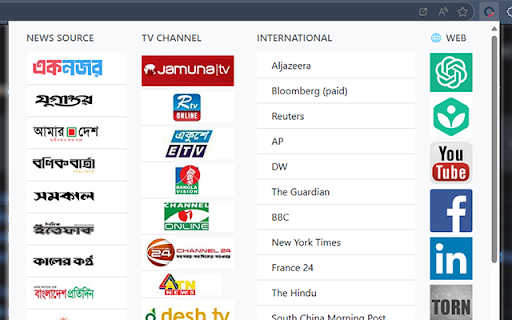
Useful news source and important links by 1NOJOR Important news source and other links for Bangladeshi Nationals

IRCTC Train Info
Check PNR status, live train status, Seat Availibility & Ticket Price for Indian Railways IRCTC Train Info (AI Powered) - Your Smart Travel Companion Transform your Indian Railways journey with our intelligent Chrome extension that makes train travel easier than ever. Get instant PNR updates, live train locations, smart seat suggestions, and accurate fare calculations - all in one place! 1. Smart PNR Tracking - Instant PNR status checks with real-time updates on Confirmation - Train Number - Train Name - Date of Journey (DOJ) - Class Type (1A/2A/3A/SL/CC etc.) - From Station (Code & Name) - To Station (Code & Name) - Boarding Point - Reservation Upto - Chart Status (Prepared/Not Prepared) - Expected Arrival Time - Expected Departure Time 2. Live Train Status & Location - Real-time train tracking with GPS accuracy - Station arrival predictions and delay alerts - Platform number updates - Running status with station-by-station details 3. Seat Availability - Intelligent seat suggestions based on your preferences - Personalized recommendations for families and groups - Seat availability predictions with confirmation chances - Smart alternatives when your preferred class is full 4. Quick Fare Calculator For each Class Types: 1A, 2A, 3A, SL, 2S - Instant fare breakup for all train classes - Base Charges - Reservation Charges - Dynamic pricing updates - GST and service charge details - Compare ticket price/fares across different dates 5. Travel Made Simple - Clean, easy-to-use interface - Works offline for saved PNR numbers - Battery-friendly background monitoring - Regular updates and improvements 🔒 Your Privacy Matters - No personal data storage - Secure API connections - Real-time data processing - Complete privacy protection ⚡ Quick Setup 1. Add to Chrome with one click 2. Pin to toolbar for easy access 3. Start tracking your train journey Perfect For: - Regular train travelers - Family vacation planners - Business commuters - Student travelers - Holiday journey planning Download now and join thousands of smart travelers who make their train journeys stress-free with IRCTC Train Info!

Open via Google Maps
Open selected addresses in Google maps directly from the same page You can do so today using the context menu when you install this software today. To begin using the software after installation, here is what you need to do. Use your mouse to highlight the address/location you want to find on Google Maps. Right click and choose the option "Open via Google Maps" Our extension will open a new popup window with this address inside Google Maps. This software helps you to save time if you are constantly looking for directions/trying to find how to get to your final destination. Please note this software is NOT made by Google and is an unofficial software made by a group of independent developers. We hope you enjoy using this software.

Mask & Blur Pro
Protects sensitive information by masking text and blurring content on webpages. Perfect for screenshots and screen sharing. 🛡️ PROTECT YOUR PRIVACY & BOOST PRODUCTIVITY Mask & Blur Pro is the ultimate privacy tool for protecting sensitive information and reducing distractions on any webpage. Perfect for screenshots, screen sharing, presentations, or focused browsing. ✨ WHAT IT DOES: • Instantly mask selected text with customizable characters (*, #, %, etc.) • Blur selected text or images with adjustable intensity (1-30px) • Click-to-blur pointer mode - click any element to blur it instantly • Persistent masking - masked content survives page refresh • Right-click context menu integration for quick access 🎯 WHY YOU NEED IT: ✓ Take screenshots without exposing sensitive data (passwords, emails, personal info) ✓ Share your screen confidently during meetings and presentations ✓ Create tutorials while protecting private information ✓ Focus on reading by hiding distracting content ✓ Protect personal details in demos and recordings 🚀 HOW TO USE: 1. Select any text → Right-click → Choose "Mask Text" or "Blur Text" 2. Click the extension icon for pointer mode → Click any element to blur it 3. Customize settings: adjust blur intensity and choose your mask character 4. Use "Mask Using..." to mask with any character you want ⚙️ POWERFUL FEATURES: • Customizable blur intensity (adjustable in settings) • Choose any mask character (*, #, %, •, etc.) • Works on all types of content: text, images, buttons, forms • Persistent masking survives page refresh • Clean, professional interface • No data collection or tracking 🔒 PRIVACY-FIRST DESIGN: • Works completely offline - no internet required • Zero data collection or tracking • Settings stored locally on your device • Only accesses current webpage when you use it • No monitoring of browsing history 💼 PERFECT FOR: • Content creators and streamers • Business professionals giving presentations • Educators creating tutorials • Anyone who values privacy and focus • Remote workers sharing screens 🎨 PROFESSIONAL QUALITY: • Smooth, high-quality blur effects • Preserves webpage layout and functionality • Clean, intuitive user interface • Reliable performance on any website Transform any webpage into a privacy-safe, distraction-free environment with one click. Download Mask & Blur Pro today and take control of your digital privacy! Created with ❤️ by Hasin Hayder | MIT License | Version 1.0

Indian Visa Autofill Pro
Uploads and parses Passport/Indian Visa PDFs to autofill the online application, For more info, Visit: soriful.com. The Fastest Way to Apply for an Indian Visa (Now with Fastest and Accurate Passport Scanning!) Stop typing manually! Indian Visa Autofill Pro is the ultimate tool for frequent travelers, families, and travel agents. It instantly scans your Passport (PDF or Image) and uses that data to autofill the entire online Indian visa application form in seconds. ✅ Indian Website Update: We updated our extension as Indian Govt change the visa application website. ✅ UI Changes: We Slidely changes our UI for best experience to our users. ✅ Fully Automated Autofill: No more clicking "Autofill" on every single page! The extension now intelligently fills and transitions through the form for you, controlled by a sleek new Floating UI and mini popup. ✅ Auto-Captcha & Ultimate Control: Automatically solves and fills the Captcha on the first page to get you started instantly! Want to do it manually? You can toggle the Captcha solver, Floating UI, and Auto-filling ON or OFF directly from the Side Panel. ✅ Lightning-Fast Passport AI: We've significantly upgraded our extraction engine. Passport scanning is now faster, smarter, and more accurate than ever before. ✅ PDF Draft Downloads: When you reach the final page, instantly download a PDF draft of your application. Files are smartly auto-named (Name + Passport Number + Draft) for perfect organization. ✅ Smart Temporary ID Tracker: Never lose an application midway! Instantly copy your current Temporary ID, and securely access a history of your last 20 Temporary IDs right inside the Side Panel. ✅ Profile Import & Export: Switching computers, sharing with your team, or backing up data? You can now easily export your saved profiles and import them anywhere. ✅ Expanded Form Support: We've added comprehensive autofill support for "Other Missions" on the first page and "Previous Hospital Details" on the third page to cover all application types. ✅ Smoother UI & Real-Time Sync: Profile editing now features easy-to-use dropdown menus, the custom Hotel page layout is perfectly optimized, and you can instantly refresh your wallet balance with a single click. ✅ Smart Passport Extraction: Just upload your Passport (PDF, JPG, or PNG)! Our advanced AI extracts your Name, DOB, Passport Number, Address, and more—filling the form with accuracy. ✅ Custom Reference Manager: Do you visit the same contacts or stay at specific hotels? You can now Save Your Own References (Hotels, Embassies, Relatives) to a custom list. autofill them instantly on future applications. ✅ Quick-Start Mode: Immediately select your Visa Type (Tourist, Medical, Double Entry) and Email at the start to skip the repetitive first page. Upload: Open the extension and upload your Passport file (or a previous Visa PDF). Extract: The extension securely parses your details. Autofill: Go to the official Indian Visa website. Click "Autofill" on each page, and watch the fields populate automatically! Multi-Page Support: Automates Page 1 (Personal), Page 2 (Address/Family), Page 3 (Visa Details), and Page 5 (Hotel/Reference). Smart Dropdowns: Intelligently handles complex fields like "State" and "District," waiting for them to load just like a human would. Family Friendly: Save profiles for every family member and switch between them instantly. Your privacy is our top priority. Local Storage: Your extracted profile data is saved locally in your browser, not on our servers. Secure Processing: Document extraction is performed via a secure, encrypted connection and files are never stored. Transparency: We do not sell or share your personal data. 👨👩👧👦 WHO IS THIS FOR? Medical Patients: Focus on your health, not the paperwork. Get Indian Visa Autofill Pro today and make your next visa application the easiest one yet!
