
eakajlgalnelcpoblnlbcciidadjoebe
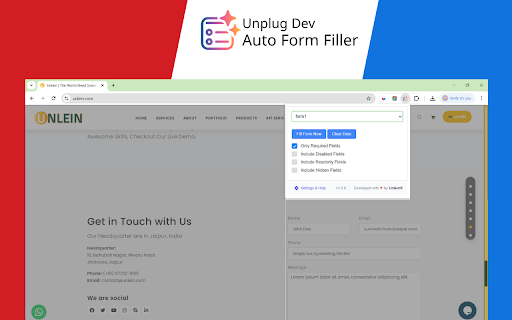
Efficiently fill web forms with smart, customizable data. Save time with form-specific filling, required fields detection. Auto Form Filler Pro lets you quickly fill out any form with flexible, customizable options. Perfect for developers, testers, and productivity-focused users. Auto Form Filler Pro makes filling out web forms effortless, fast, and precise. Whether you're a developer, tester, or everyday user, this tool helps you streamline your workflow with powerful options to control exactly how forms are completed. Features: - One-Click Fill & Clear – Instantly fill or clear form data. - Form Selector – Target all forms or specific ones on a page. - Smart Fill Options: - Fill only required fields - Include disabled, readonly, and hidden fields - Settings & Help built-in Developed with care by Unlein®

FakerFill – Form Filler & Fake Data Generator
Auto-fill forms instantly with realistic fake data. A powerful form filler & test data generator for developers and QA teams. Automatically fill web forms with realistic fake data in one click. FakerFill is a modern browser extension that auto-fills forms with high-quality test data, dummy data, and mock data — designed for developers, QA testers, and anyone who regularly works with online forms. Powered by the open-source Faker.js library, FakerFill generates unlimited, realistic test data directly in your browser. It’s perfect for testing registration forms, checkout flows, login pages, onboarding steps, and all kinds of web applications. One-Click Form Autofill Fill entire forms instantly with realistic first names, last names, email addresses, phone numbers, physical addresses, dates, credit card data, passwords, and more. No manual typing — just click and go. Smart Field Detection (28+ Field Types) FakerFill intelligently detects form fields using multiple heuristics, including input types, field names, placeholders, labels, and ARIA attributes. It works seamlessly with modern JavaScript frameworks such as React, Vue, Angular, Svelte, Next.js, and other single-page applications (SPAs). Realistic Fake Data Generator (Faker.js) Generate high-quality test data using 250+ Faker.js methods across categories like person, internet, phone, company, finance, strings, dates, locations, and more. Every generated value looks realistic and passes most common form validation rules. Multi-Language Data Generation (60+ Locales) Generate fake data in over 60 languages and regional formats. Create realistic names, addresses, phone numbers, and company data for virtually any country — from Japanese, Chinese, and Arabic to German, French, Spanish, Portuguese, and more. Perfect for testing internationalized and localized applications. Translated Interface (6 Languages) The extension interface is fully translated into English, Polish, German, French, Spanish, and Portuguese (Brazil), making FakerFill accessible to international development and QA teams. Reusable Templates Create and save templates for complex or multi-step forms, then reuse them automatically across matching websites. Ideal for repetitive QA workflows, standardized testing scenarios, and complex registration flows. Full Data Customization Take complete control over generated values with advanced configuration options: • Prefixes and suffixes • Letter casing (uppercase, lowercase, capitalize) • Custom patterns using regex-like syntax • Locale selection per field • Seed values for reproducible data • Length limits and repeat counts • Advanced Faker.js method arguments FakerFill supports virtually any type of web form: • Registration and signup forms • Checkout and payment forms • Login and authentication flows • Contact and feedback forms • Surveys and questionnaires • Multi-step wizard forms • Admin dashboards • Enterprise applications • Developer staging and testing environments FakerFill is built with privacy as a core principle: • All data is generated 100% locally in your browser • No tracking, no analytics, no telemetry • No external servers or network requests • No data storage or uploads • No account required — install and use instantly Your data never leaves your device. 💡 Who Is FakerFill For? • Front-end developers testing form validation and user flows • QA testers running manual, exploratory, or regression tests • Product teams creating demo accounts and sample data • Automation engineers preparing consistent test data • DevOps engineers populating staging and development environments • Anyone who needs fast, repeatable, realistic form filling 🧠 Common Use Cases • Speed up development — instantly fill long forms during development • Reproducible testing — generate consistent test accounts using seed values • Validation testing — verify form rules with dynamic fake data • Manual QA workflows — accelerate testing with one-click autofill • Demo environments — create believable demo accounts • Localized testing — test internationalization with 60+ locales • Multi-step forms — reuse templates for complex wizards 🛠️ Technical Highlights • Manifest V3 compliant • Shadow DOM isolation (no CSS conflicts) • Proper support for React-controlled inputs • Optimized MutationObserver for dynamic forms • Lightweight and performance-friendly Download FakerFill today and never manually fill a test form again.

Form Filler Buddy
Autofill forms with saved fields or realistic test data. Supports site-specific fields and secure storage. # Form Filler Buddy - Your Smart Form Assistant A smart Chrome extension that automatically fills web forms with your saved data or realistic test data. Save time, reduce errors, and streamline your form-filling workflow. **The Problem:** - Repetitively typing the same information (email, phone, address, etc.) across multiple forms - Time wasted on manual data entry - Typos and errors from repeated typing - Difficulty testing forms with realistic data - Managing different credentials for different websites **The Solution:** Form Filler Buddy saves your frequently used form data and intelligently fills matching fields across any website. It also generates realistic test data for developers and QA testers. - **Custom Field Management**: Save any form field with custom names and values - **Smart Auto-Fill**: Automatically detects and fills matching form fields - **Website-Specific Fields**: Scope fields to specific domains (e.g., different emails for test.com vs dev.test.com) - **Test Data Generator**: Fill forms with realistic fake data for testing - **Drag & Drop Reordering**: Organize your fields with intuitive drag-and-drop - **Search Functionality**: Quickly find fields when you have many saved - **Password Protection**: Password fields are masked in the UI for security - **Privacy First**: All data stored locally encrypted, never sent to external servers ## 👥 Who Is This For? 2. **Developers & QA Testers** - Generate realistic test data instantly - Test forms without manual data entry - Speed up development and testing workflows 3. **Students** - Apply to multiple programs efficiently - Fill scholarship and application forms faster - Manage different credentials for different portals 4. **Professionals** - Fill CRM and ATS forms quickly - Manage multiple accounts with different credentials - Streamline data entry tasks Your data stays on your device. We don't collect, store, or transmit any of your information. All your data is encrypted using SHA-256 key derivation and XOR cipher, then stored locally in your browser. It never leaves your device and remains secure even if Chrome storage is compromised. **Start saving time today! Install Form Filler Buddy and never type the same information twice.**

FormFully
Automatically Auto fill in input fields with any value you want to save your precious time FormFully – Supercharge Your Productivity with Instant Form Filling FormFully is a cutting-edge browser extension designed to dramatically boost your productivity by automatically filling input fields on any website with your preferred value. Ideal for developers testing web forms, frequent online shoppers, or anyone who regularly completes online registrations, surveys, or input-heavy tasks, FormFully makes it effortless to populate forms with just a single click or keyboard shortcut. This extension saves you from tedious manual typing by allowing you to customize default values or generate random entries across various input types, streamlining workflows and reducing repetitive work. At its core, FormFully enables you to specify default values—whether text, email, numbers, dates, colors, or even random data—that automatically populate every matching input field or text area on a webpage. A standout feature is its intelligent handling of specialized input fields: date inputs are filled with the current time when the fill button is pressed, color inputs receive a randomly generated color, and if the default value is left empty, the extension populates fields with random numbers from 1 to 5. This flexibility makes it a powerful tool not only for everyday users but also for QA testers who require randomized or dynamic form data on demand. The user interface is sleek, modern, and highly accessible. Through a context-sensitive popup, users can easily enter or modify their default auto-fill values, save multiple presets for different use cases, and switch languages instantly for a localized experience. For convenience, form filling can be triggered via the popup button, a context menu action, or a global keyboard shortcut—Alt+Shift+F for Windows/Linux or Option+Shift+F for macOS—allowing users to fill forms swiftly even without opening the popup. FormFully’s behind-the-scenes service worker ensures that filling happens rapidly and reliably, with minimal resource consumption, operating seamlessly in the background without disrupting your normal browsing. Advanced features include support for dynamic and bulk filling, making it ideal for automated registration, QA testing, or any scenario that benefits from rapid data entry. Multiple preset management lets you organize and switch between sets of default values such as names, emails, or randomized strings, enhancing workflow efficiency for diverse tasks. Security and privacy are paramount in FormFully’s design. All fill presets and values are stored locally within your browser’s storage, never transmitted externally, ensuring that your personal data remains under your control. The form-filling process is executed entirely within your device, providing peace of mind when working with sensitive or private information. By automating the repetitive task of form filling and introducing powerful customization and randomization capabilities, FormFully transforms hours of manual input into seconds. You can now reclaim valuable time, reduce errors, and improve productivity across countless web-based activities with a versatile, user-friendly, and privacy-conscious solution. Key Features: - One-click auto-fill: Instantly populate all matching form fields with your chosen value or random data if left blank. - Custom value presets: Save multiple default values suited to different scenarios (e.g., names, emails, numbers, random text). - Smart input handling: Fill date inputs with the current time, color inputs with random colors, and generate random numbers when inputs are empty. - Global keyboard shortcut: Quickly fill forms anywhere using Alt+Shift+F (Windows/Linux) or Option+Shift+F (macOS) without opening the popup. - Multi-language support: Switch interface languages instantly for a localized and comfortable user experience. - Clean, intuitive popup interface: Manage presets, set default values, and view shortcut keys at a glance with a modern design. - Fast and efficient background filling: Utilizes advanced scripting and service worker APIs for reliable, low-resource form completion in milliseconds. How It Works: 1. Install FormFully from your browser’s extension store. 2. Click the FormFully extension icon to open the popup. Enter your desired default value for auto-filling, such as a specific name, email, or test string. 3. Optionally, save multiple presets to handle various fill scenarios, such as random test data or different sets of personal information. 4. Navigate to any webpage with input fields—registration forms, surveys, profile settings, and more. 5. Click the “Fill Form” button within the popup or simply press the global keyboard shortcut (Alt+Shift+F on Windows/Linux or Option+Shift+F on macOS) to auto-fill all applicable inputs on the page. 6. The extension fills date fields with the current time, color fields with random colors, and leaves fields blank are filled with random numbers (1-5), ensuring diverse and useful data entry. 7. Review and submit your form, or edit the auto-filled values as needed. Customize language preferences or manage presets quickly through the intuitive interface. Privacy: - No personal data collected. FormFully securely stores all your fill presets and entered values locally in your browser. Your data never leaves your device, and all form-filling actions are processed entirely on-device for maximum privacy and security.

TextsBert: Smart Auto Fill Assistant
Smart and magical autofill for websites and PDF forms. Save reusable info, fill from copied text, and keep control locally. TextsBert helps you fill browser forms, PDFs, and Excel-style documents from copied text, saved details, and reusable snippets, while keeping the fill path local-only. Copy an email, order request, customer message, invoice details, or any set of data. TextsBert reads the information in your browser, prepares the fill, lets you review what will happen, and then fills the right fields when you trigger it. No cloud AI decides what goes where. TextsBert is built for controlled, reviewable autofill: you stay in charge, and forms are never submitted automatically. Smart Auto Fill Save your details once and fill common browser forms faster, with better context than basic browser autofill. Magical Auto Fill Copy a full message or email instead of copying values one by one. TextsBert can extract names, emails, phone numbers, addresses, order details, billing details, delivery details, and more. PDF Auto Fill Fill compatible PDF forms from copied text and saved profiles without sending the document to cloud AI for processing. Excel Auto Fill Move repeated business details into Excel-style sheets and document workflows with less manual typing. Profiles and Snippets Store reusable identities, business details, addresses, templates, and repeated text so you can fill faster across daily work. Review before filling Preview the planned fill, correct details when needed, and trigger the fill only when you are ready. Built for privacy and control TextsBert’s fill path is local-only. Copied text, visible form content, saved fill data, PDFs, and Excel files are not sent to cloud AI for fill decisions. Internet access is used only for separate product functions such as account sign-in, plan status, billing, optional encrypted Sync, and website handoff features. Good for customer emails and order requests admin forms and internal tools CRM/contact entry service and booking requests PDF forms Excel-style document workflows repeated support, operations, finance, and office tasks TextsBert is made for people who move information from messages into forms all day and want it done faster, with less copy-paste chaos and more control.
