
eaiopmfjdmdalcdlmabkekblibicpeih


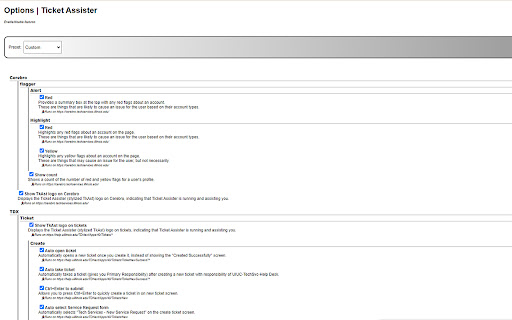
Helping you handle TDX tickets more efficiently. Ticket Assister optimizes your workflow with TDX tickets by setting defaults, filling out forms, and consolidating information. It reduces your cognitive load so that you can focus on getting work done accurately and efficiently. Features: - Automatically fill out defaults when creating a new ticket - Keyboard shortcuts to quickly submit a form and open the edit, update, and reassign menus - Improve layout of ticket by hiding unnecessary information with a toggle to show all - Highlight data in Cerebro that could be causing a client's issue - Adds an option for Dark Mode All features can be toggled on and off in the options page. * This tool is intended for users in UIUC-TechServices-Help Desk within U of I - Main. Some features may not work or be beneficial for users outside of this groups.

Okta Profile reorder
Set Index for order of attributes Okta Profile Editor today does not offer a way to organize the order of attributes in order to display the user profile to an Admin. This extension helps to reorder the profile attributes index in Okta and help solve the problem. The program uses Javascript to use the configured indexes for the order of attributes and retains it as you load the Profile tab of the user. 1. Click on the plugin to Toggle On/Off the Profile Reorder Menu 2. The plugin only loads on the Profile page of a user on the account tab 3. Click on Load Attributes to view the order of attributes 4. Change the index of the attributes from the drop-down and click on Save Order. 5. You can click on Re-Order button to see the saved order in action. Note: This extension was not created by Okta. It is not supported by Okta. It is an unofficial extension created by the community.

TDX Popup to New Tab
TeamDynamix opens all tickets in an annoying popup window by default. Not only does this make it harder to get back to a given ticket if you click away from it, it can also result in popup windows piling up under your main browser window without you noticing. This extension automatically changes many links in TeamDynamix to open in a new tab instead of opening additional windows. This helps you keep better track of what you have open and focus on what matters: helping people more effectively.

Capfizz sentry node
Capfizz sentry node mining for chrome 🚀 Sentry Node Mining Manager - Your All-in-One Mining Dashboard Efficiently manage and monitor your Sentry Node mining operations right from your browser. This extension provides a seamless interface to track your mining activities in real-time. Key Features: ✨ Real-time Mining Monitor • Track mining status and performance • View current hash rates and rewards • Monitor node health and connectivity 📊 Dashboard Analytics • Detailed mining statistics • Historical performance data • Reward tracking and analysis 🔔 Smart Notifications • Instant alerts for important events • Node status changes • Reward distribution notifications 💡 User-Friendly Interface • Clean and modern design • Easy-to-read metrics • Simplified controls Perfect for: • Sentry Node operators • Cryptocurrency miners • Blockchain enthusiasts This extension requires minimal permissions and only connects to authorized mining endpoints to ensure your security and privacy. Note: This extension is designed specifically for Sentry Node mining operations and requires an existing Sentry Node setup to function. Support: For technical support or questions, please visit our website or contact our support team through the extension's help section. Privacy & Security: We prioritize your privacy and security. This extension only collects data necessary for mining operations and does not share any personal information with third parties. Updates: Regular updates ensure compatibility and optimal performance with the latest mining protocols.

Search & Admin Engine
Optimize your browsing experience and save time and effort! 🎉 Welcome to Search & Admin Engine! 🎉 This is a free extension developed with a lot of ❤️ for the community. With this powerful tool, you can easily search 🔍 and manage 📝 your bookmarks and tabs in your browser.
