
eadnknnjeefjgcnpoadelddgjnjkekaa

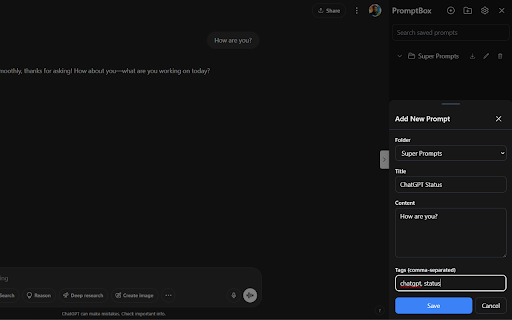

AI PromptBox is a browser extension that helps you save and reuse your best prompts right from ChatGPT, Claude, Gemini and DeepSeek. PromptBox - AI Prompt Management Extension. Save your best prompts on ChatGPT, Claude, Gemini and DeepSeek! PromptBox is a browser extension designed to help users organize, manage, and quickly access their AI prompts across various AI platforms (ChatGPT, Claude, Gemini, DeepSeek). 1. Sidebar Interface Collapsible sidebar that integrates seamlessly with AI platforms Persistent state option to remember sidebar open/close preference Dark/light mode support that automatically matches system preferences Clean, modern interface with intuitive controls Create custom folders to organize prompts by category, project, or purpose Edit folder names to keep organization up-to-date Delete folders with confirmation to prevent accidental removal Export folder contents as CSV for backup or sharing Expandable/collapsible folder view for better workspace management Create and store prompts within organized folders Each prompt includes: Title for quick reference Content (the actual prompt text) Custom tags for additional organization and searchability Edit existing prompts to refine and improve them Quick-copy functionality to instantly use prompts in the AI interface Delete prompts with confirmation Preview prompt content in a compact format Bottom sheet interface for adding/editing prompts and accessing settings Search functionality for finding specific prompts Tag system for cross-folder organization Intuitive icons and buttons for common actions Responsive design that works across different screen sizes Confirmation dialogs for destructive actions Local storage for persistent data across browser sessions Export functionality for data backup and sharing Settings management for user preferences Configurable persistence options TypeScript implementation for type safety React-based component architecture Tailwind CSS for styling Dark mode support with system preference detection Local storage integration for data persistence Modern UI components (floating icons, bottom sheets, toggles) AI Prompt Libraries: Build and maintain collections of effective prompts Project Organization: Separate prompts by project or purpose Team Sharing: Export and share prompt collections with team members Quick Access: Rapidly access frequently used prompts Prompt Iteration: Refine and improve prompts over time with easy editing Cross-Platform Use: Use the same prompt library across different AI platforms The extension serves as a comprehensive prompt management solution, helping users maintain an organized library of AI prompts while providing quick access and efficient management tools.

AI Exporter: Save ChatGPT, Gemini to PDF, Word, MD and Notion
Export ChatGPT, Claude, Gemini and NotebookLM chats to PDF/Word/Markdown/Txt. Supports content selection, and Notion sync, download. 📌 Introduction Want to save your AI conversations forever? AI Exporter is a professional browser extension supporting 10+ major platforms including ChatGPT, Gemini, Claude, and NotebookLM. With just one click, export your AI chats perfectly to PDF (Latex supported), Word, Markdown (MD), JSON, Image, or sync directly to Notion. Never worry about losing your chat history again. Archive, share, and edit your AI knowledge assets with ease. 🔥 Popular Features 🆕 Precise Timestamps: Automatically extracts and displays the exact creation time of each session, making your history fully traceable for better timeline management. 🆕 Super-Long Chat Export: Engineered to handle massive conversations effortlessly without crashing or truncating, ensuring every detail of your deep dives is captured. 🆕 Accurate Model Versioning: Displays the specific AI model version used in each session (e.g., Gemini 3 Pro, ChatGPT 2.5 thinking) in exported docs, making academic research and sourcing more rigorous. 🆕 Cross-Platform Collection: Sidebar mode lets you save chats locally with one click for multi-model comparison and merged exports. 🆕 Deep Research Export: Full support for downloading content from ChatGPT Deep Research and Gemini Deep Research modes. 🆕 Stylish Templates: Choose from Highlight, Dark, Note, and other beautiful templates for a professional look. 🆕 Extensive Compatibility: Supports 10+ sites, including DeepSeek, Perplexity, Copilot, Google AI Studio, and more. ✨ Powerful Export Experience ✅ Perfect PDF Layout: Automatically handles Latex formulas and code highlighting while maintaining the native UI feel. ✅ Sync to Notion: Seamlessly bridge AI and your knowledge base by turning chats into Notion pages instantly. ✅ Flexible Selection: Skip the fluff—select only what you need with multi-selection support. ✅ Image & Text Preservation: Perfectly retains images and charts; supports generating long-image sharing cards. ✅ Local Knowledge Base: Save important AI inspirations to a local database for instant offline preview. ✅ Search Overviews Backup: One-click backup for Google Search AI Overviews results. 📌 Why Choose AI Exporter? 👨💻 Community Focused: We listen to user feedback with frequent updates for a reliable experience. 🎓 Academic Friendly: Precisely identify and export academic discussions with complex Latex formulas. 👨💻 Dev Empowered: Export Markdown with one click; code snippets can be seamlessly integrated into your docs. 📊 Knowledge Accumulation: Quickly backup data analysis and reports to build your personal AI think tank. 📢 Preserve Inspiration: Save full image-text chats as beautifully formatted PDFs for easy sharing. 🌟 Install for free now and give your AI assets a permanent home!

Promptly – AI Prompt Enhancer & Manager for ChatGPT, Claude, Gemini
Optimize, save & reuse AI prompts for ChatGPT, Claude, Gemini & more. Prompt library, one-click enhancer & conversation exporter. Promptly is your all-in-one prompt engineer, enhancer, optimizer, and prompt manager. Write better prompts, get better AI responses — in one click. Whether you're new to AI or an experienced prompt engineer, Promptly helps you craft clear, well-structured prompts that get dramatically better results from the AI tools you already use. Instantly improve any prompt with a single click or keyboard shortcut (Ctrl+M / Cmd+M on Mac). Promptly rewrites your input into a well-structured, context-rich prompt that gets more accurate and useful responses — whether you're working in ChatGPT, Claude, or Gemini. NEW: Highlight any text on any website and optimize it as a prompt. Works everywhere, not just inside AI chatbots. Save your best prompts and build a personal prompt template library. Access everything from a clean side panel. Pin your top prompts for one-click reuse across any AI platform. Save prompts instantly with Ctrl+S (Cmd+S on Mac). Never lose a great prompt again — organize, search, and reuse your templates whenever you need them. Explore our FREE community prompt library at https://www.promptly.fyi/library with hundreds of curated templates for writing, coding, marketing, research, and more. Favorited prompts sync directly to your extension. Save, export, and fork your AI conversations to continue them later or share with your team. Summarize long chats into concise overviews. Export any conversation with Ctrl+E (Cmd+E on Mac). This is perfect for bypassing context window and token limits, saving research sessions and brainstorming threads, creating documentation from AI-assisted workflows, or simply picking up where you left off without losing context. 🧩 COMPATIBLE WITH Works directly inside your favorite AI tools: - ChatGPT (OpenAI) - Claude (Anthropic) - Gemini (Google AI) - DeepSeek - Copilot (Microsoft) 👤 WHO IS PROMPTLY FOR? Content Creators — Write better AI-generated blog posts, social media content, video scripts, and marketing copy with optimized prompts. Students & Researchers — Get clearer, more structured answers from AI. Save and organize research conversations. Export summaries for notes and papers. Developers & Engineers — Optimize technical prompts for code generation, debugging, and architecture decisions. Marketers & Copywriters — Craft sharper ad copy, SEO content, email campaigns, and brand messaging. Product Managers — Summarize meeting notes, automate repetitive tasks, and organize prompt workflows across projects. ✅ Three tools in one — prompt optimizer + prompt manager + conversation exporter ✅ Free community prompt library with hundreds of templates ✅ Keyboard shortcuts for power users — Ctrl+M to optimize, Ctrl+S to save, Ctrl+E to export (Cmd on Mac) ✅ Lightweight and fast — no bloat, no slowdowns ✅ Privacy-focused — your prompts stay yours Install Promptly, pin it to your toolbar, and start getting better AI responses in seconds. Open any AI chatbot, type your prompt, and press Ctrl+M (Cmd+M on Mac) to see the difference instantly.

AI Prompt Manager – PromptIn for ChatGPT, Claude, Gemini & More
AI Prompt Manager for ChatGPT, Claude, Gemini, Perplexity & Grok. Save, organize & reuse your best prompts in one place. AI Prompt Manager for organizing, optimizing, and instantly reusing prompts for ChatGPT, Claude, Gemini, Perplexity, Grok & more — all in one Chrome extension. PromptIn is a powerful AI Prompt Manager and prompt organizer built to help you save, organize, and reuse prompts across AI tools in seconds. Stop copy-pasting messy notes or rewriting prompts — streamline your AI workflow with one clean, fast system. ✅ Trusted by 100+ AI power users ⭐ Rated 5/5 on the Chrome Web Store 🧪 A growing project — join early and help shape the future of prompt workflows 🚀 Why PromptIn Is the AI Prompt Manager You’ll Stick With Bad prompts kill productivity. PromptIn fixes that by giving you a structured, reusable AI prompt library: - Save & Categorize Prompts — Build a personal prompt library with folders, tags, and model labels. - Reuse Prompts in Seconds — Insert prompts instantly via the “/” shortcut in any AI input field. - Highlight-to-Save Anywhere — Select text on any website and store it as a reusable prompt. - Model-Specific Tagging — Track which prompts perform best on ChatGPT, Claude, Gemini, and more. Perfect for prompt engineers, writers, content creators, teams, and AI researchers managing serious prompt workflows. ✨ Core Features for Seamless AI Prompt Management - Export & backup your prompt library - Built-in support: FAQ, feedback, and feature requests 🌐 Works Across Your Favorite AI Platforms PromptIn integrates directly into popular AI tools with save buttons, prompt injection, and model-aware organization. Universal shortcuts keep it flexible for any AI platform. 👨💻 Built by AI Users, for AI Users PromptIn is an independent project with no ties to major AI companies. Join a growing community focused on better prompts, faster workflows, and real productivity. Or use the in-extension feedback tool. ✅ Level up your AI workflow today Install PromptIn — the smart, lightweight way to manage AI prompts and reclaim hours of lost time.

Promptr - AI Prompt Enhancer
Upgrade and save your prompts across ChatGPT, Claude, Gemini, and DeepSeek with one click. 🚀 Promptr is the fastest way to instantly level up any AI prompt. Click once, and get a cleaner, clearer, more effective prompt in seconds, allowing you to consistently produce the high-quality results you are looking for. - One-click prompt enhancement directly inside ChatGPT, Claude, Gemini, and DeepSeek. - Improves clarity, structure, and intent without changing your meaning - Save your best prompts to a personal prompt library and instantly reuse them anytime. - Works anywhere on the page. No switching tabs, no copy-paste. - Saves time and reduces frustration when crafting prompts - Boosts response quality so you get more accurate, actionable outputs Great AI output starts with great input. Clear, well-structured prompts help models understand your goals, reduce ambiguity, and deliver better answers on the first try. Promptr handles that heavy lifting for you. 👥 Made for everyone who uses AI: Students, developers, founders, creators, researchers, power users. If you write prompts, Promptr makes them better. 🔁 Upgrade your prompts. Upgrade your results.
