
eabnmbpmoencafnpbobahdeamaljhoef
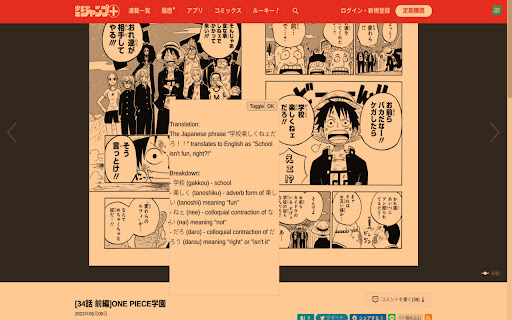
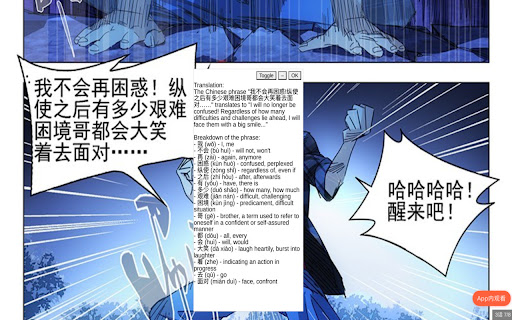
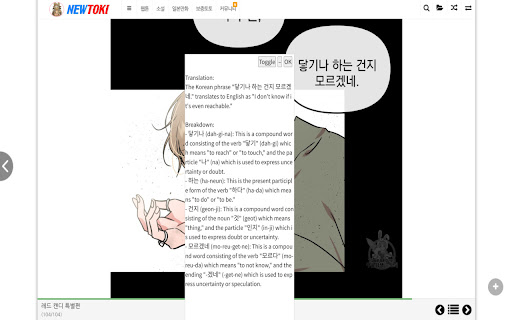
Join the discord at http://discord.veebee.fun to get updates on server status and new features or submit feedback and requests. Support me at https://www.patreon.com/MangaReader276 **What Does this Extension Offer?** This extension offers a unique approach to manga/manhwa/manhua translation and Japanese/Korean/Chinese learning: 1. **Side-by-side translation**: Unlike existing manga translation tools that simply replace Japanese text with English, this extension allows you to see the original Japanese text alongside the translated text. This feature provides a learning opportunity by enabling you to compare and understand the language in its original form. First click on the extension icon or use a keyboard shortcut to initiate cropping. Then crop the text bubble or the phrase to be translated. Feel free to toggle to see the original text to ensure that OCR (Optical Character Recognition) identifies the correct text to be translated. 2. **AI-powered Tutor**: While the extension offers conventional translation, it also provides the option to harness the power of a large language model. This cutting-edge feature breaks down sentences or phrases into easily digestible words or compound words, along with their translations. This approach enables a deeper understanding of the context and nuances within the text. 3. **Not just manga**: You can use this for manhwa and manhua as well since Korean and Chinese are also supported! You can also use this on other platforms like Youtube or Netflix subtitles! 0. Pin the extension 1. Go to https://shonenjumpplus.com/episode/4856001361458138514 2. Right click the extension icon to open the options page from the menu 3. Sign in with google account 4. Feel free to change the other options 5. Go back to the manga 6. Click on the extension icon to start cropping. 7. Crop any text bubbles 8. (optional) switch between gpt/deepl on the options page. Choose the former if you want in depth translation. Choose the latter if you want a quicker translation 9. (optional) choose different capture modes that best suit your reading needs. Single is the most reliable at the moment. Multiple works best on large manga panels or an entire page. 10. (optional) switch between the supported languages on the options page. 11. (optional) enter you own GPT key for faster translations. The key is local to your browser and will not be uploaded to any servers. (This can be publicly verified in the client code.) This is an early prototype. Depending on how many users find this idea useful, I will work on polishing it and adding new features. Please send me feature requests and bugs and I will do my best to fix them. Sometimes the first translation might take a while because the server restarts. Thanks for your patience!

ImageTrans
An image translator. It uses ImageTrans to translate images on websites whether they are posters, brochures, comics, manga, manhua or webtoon. State-of-art OCR and AI translation services are used to guarantee the translation quality. Usage: 1. Install the extension and ImageTrans. 2. Right click on the image to translate it, which will replace the image with a translated version. 3. If the context menu is disabled, use the shortcut (CTRL+SHIFT+F) to call the popup, use Tab to switch operations and press Enter to perform the operation. It supports automatic image translation and screen capture translation, where it is possible to copy text in images. It needs ImageTrans by default. You can use PaddleOCR without using ImageTrans but the functions are limited in terms of accuracy, speed, options and language support. You can set up OpenAI API to use ChatGPT, Gemini, etc, for better translation.

Scan Translator - AI Manga Translator
AI Manga Translator for raw manga, manhwa, scans, and images. Translate in 80+ languages directly from your browser. Scan Translator is an AI manga translator built for raw manga, manhwa, scans, and images. Translate manga panels, screenshots, and image-based text into 80+ languages directly from your browser. Our manga translator uses AI OCR and translation to detect text automatically and deliver fast, clean results in seconds. Whether you read raw manga, manhwa, or scanned pages, Scan Translator helps you understand image-based content more easily, with support for both horizontal and vertical text. Features: - Translate raw manga, manhwa, scans, and images - 80+ supported target languages - Fast AI OCR and translation - Supports horizontal and vertical text - Clean translated panels directly in your browser - Start with 30 free credits when you create an account - Credits sync across your devices when you sign in

Torii Image Translator — AI Manga Translator, Manhwa Translator ...
☆☆ Unlock the Power of Language with Torii Image Translator ☆☆ Ever stumbled upon a manga, manhwa, meme, infographic, or recipe in a language you can't read? Whether it's Japanese, Korean, Chinese, or something else entirely, Torii Image Translator removes the barrier between you and the content you love. Torii is one of the most powerful manga translation extensions available today, designed for accuracy, ease of use, and creative control. It’s also packed with tools that scanlators might find especially useful—the kind of editing and translation features you won’t find anywhere else in a browser extension. ➤ Why Choose Torii Image Translator? ✅ Instant In-Image Translation Just hover and click to translate text inside any image directly on the page. No screenshots or external tools needed. It works anywhere—on manga sites, news articles, or even memes on social media. ✅ Smart Screen Cropping Translate anything on screen by drawing a box around it. Great for translating video subtitles, UI elements, or text in games and apps. ✅ Full Creative Control with Powerful Editing Tools You can now fine-tune every part of your translation: Adjust font size, font family (with 10 fonts to choose from), color, position, and rotation. Use the paint brush tool, erase parts of the image, or clean it up with AI-powered inpainting. Undo any changes with a single click. Simple and powerful. ✅ Multiple AI Models to Choose From Torii supports GPT-5, Gemini, Claude, and Deepseek, letting you pick the model that works best for the type of content you’re translating. ✅ PDF Support Upload full manga or comic PDFs and translate every page with ease. ✅ Download as ZIP Export all your translated pages at once as a zipped image set, ready for archiving or sharing. ✅ User-Friendly Interface Torii is built to feel smooth, fast, and intuitive. Whether you're translating one panel or an entire book, it gets out of your way and lets you focus. ✅ Context-Aware, High-Quality Translations With advanced language models behind the scenes, Torii gives results that preserve tone, nuance, and meaning—not just literal word swaps. ✅ Useful for Scanlators While Torii isn’t a full replacement for dedicated editing software, it’s the only browser extension that lets you edit translated manga pages directly in place. Scanlators who want a fast, flexible tool might find it surprisingly helpful. ✅ Active Developer and Welcoming Community I'm a solo developer and always open to feedback. Whether you have a question, found a bug, or want to suggest a feature, feel free to join the Discord and message me directly. I reply to everyone and love hearing from users. ➤ How Does It Work? Check out the demo video or visit the website for FAQs and guides. Torii is more than a translator—it's a tool for exploring, learning, and even creating. Try the free trial, and if it clicks with you, the full version supports future development and continued updates. Add ☆Torii Image Translator☆ to Chrome and experience a world where every image, in any language, speaks your language. Torii offers a small free trial, and then it requires purchasing credits to keep using it.

Manga Viewer
A book-like viewer to read separate manga page images posted on SNS like reading a real book. Yet only supports weibo. This extension inserts a book-like viewer, which makes it possible to read separate manga page images posted on SNS like reading a real book. The viewer can be opened with the button displayed whithin a post. Currently only supports weibo.
