
dpobhogjdfjlgiejbbojhablmlighflg
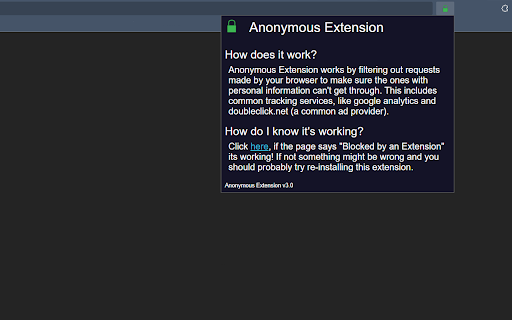
An extension developed to help you stay anonymous online with tracking prevention and ad blocking capabilities! Anonymous Extension is a Chrome extension developed to prevent common trackers from finding you and sharing your personal information. We block many different types of analytics services, ad providers, IP grabbers, and even a few kinds of tracking pixels.

Synk, stay secure and anonymous
Experience unparalleled security and anonymity with our Web3 exploration tool. Your gateway to a limitless, private digital future. Synk Firefox – Secure Your Digital Life Browse with confidence using Synk Firefox: Anonymous, secure, and designed to protect your data and online identity. Detailed Description: Synk Firefox revolutionizes secure browsing by combining ephemeral isolation, integrated VPN and Tor, and total anonymity. Designed to protect Web3 users and beyond, Synk Firefox ensures a malware-free, tracking-free, and uncompromised experience. With Synk, transform your browsing into an unbreachable temporary space, safeguarded by decentralized infrastructure and isolated containers that vanish upon closure. ➤ Our Features ☆ Isolated Browser: Your Disposable Personal Browser - Multi-geo browsing: Access the web as if you were in the US, Germany, the UK, Canada, Australia, India, or Singapore—all in different tabs. - Ultra-fast connection: Enjoy gigabit-speed cloud servers for smooth and responsive browsing. - Secure websites: Safely visit suspicious sites—no malware or exploits can reach your device. - Total anonymity: Protect your privacy with built-in Tor and VPN to hide your identity and location. - Disposable data: On closure, all cookies, history, and digital footprints are deleted. ☆ Disposable File Viewer: Open Files Safely - Maximum protection: View documents from unknown sources without the risk of malware or spyware infections. - Absolute confidentiality: No files or history are stored. Only you have access to your documents. - Auto-destruction: At the end of your session, everything is deleted for total peace of mind. ➤ Why Choose Synk Firefox? - Advanced security: Each session is isolated in an ephemeral container, automatically destroyed after use. - Trace-free browsing: No data is retained. Tor and VPN conceal your activity and location. - Simple and intuitive: No downloads or complex setup required—everything is ready in one click. - Built for Web3: Perfect for interacting with blockchain platforms, dApps, and safeguarding private keys. ➤ Discover Synk Firefox: Browse with confidence and anonymity. Embrace a modern solution tailored to the challenges of Web3 and growing digital threats. For more information, visit synk.ws. Download Synk Firefox now and experience the freedom of invulnerable browsing.

Web3 Vigilance - Browser security
The extension will help you be safe when interacting with web3 DApps. The extension crowdsources active scammers information and alerts you if you open one. Additionally, you can also report fraudulent domains to warn rewards in crypto. The team behind this extension is a blockchain based decentralised autonomous organisation (DAO). The community aims to maintain active information about legitimacy about domains and open source this information for the good of web users.

Faux
Generate temporary accounts on the go! Elevate Your Privacy: Leave behind the worries of sharing your personal data with every website. Faux empowers you to stay incognito, offering the freedom to explore the web without leaving behind a trail of personal breadcrumbs. Your privacy is paramount, and Faux ensures it stays intact. Effortless Management: Faux brings simplicity to the forefront. Access your temporary account information on a dedicated page with just a click. Need to access your temporary emails? The inbox page has you covered. Unlock a World of Content: Researchers, learners, and knowledge-seekers rejoice! Faux breaks down barriers, giving you the power to access gated content without breaking a sweat. Say farewell to roadblocks and hello to seamless discovery. Faux - Redefining Your Online Narrative: Embrace the revolution that is Faux and embark on a journey where your online presence is truly in your hands. Elevate your browsing, safeguard your identity, and unleash a new era of digital exploration. Are you ready to say hello to Faux and bid farewell to compromise? Your online adventure starts now.

FDev Security
You are protected absolutely with our awesome features: Realtime protection, block seen and typing indicator, blur messenger! # INTRODUCTION You are often afraid about "malicious" websites on the internet. It seems that you cannot know when your sensitive data was stolen by attackers. And when your information, data is hacked by someone (such as banks account, Facebook, ...), you just realized that your data is very importance and you begin to care about the security when you browsing in the Internet. Let's CoderDocs Security protect you with real-time protection feature. And we also has another awesome features like: Facebook (+Zalo) privacy, Privacy Web Experience, Blur Messenger, Malware URL scanning, .... # FEATURE 1: REAL-TIME PROTECTION When you install CoderDocs Security extension successfully, this feature will enable real-time immediately. This feature is the most important, so you cannot disable it. When you visit a malware site, the warning popup will be displayed to warning you about this malicious site. # FEATURE 2: FACEBOOK (+ZALO) PRIVACY You can easily enable / disable this feature by check or uncheck the checkbox of every small functions. This feature includes: - Block "Seen" indicator: When you receive a Facebook message, you click to view this message, the sender will see the status "seen" in their message space. But if you enable this function, the sender can not see the status "seen" any more. They never know whether you saw the message or not. - Block "Typing" indicator: Similar with block "seen", the sender can not see the "typing" indicator when you compose the message in Facebook message space (the three dots indicator "..."). - Block "Seen" status in Story: When you click to view the Story of someone, they will know that you have seen their Story. But with this function, nobody can know that you saw their Story. You can click and see your ex-girlfriend any time. - Block "Typing" indicator in Comments space: When you are typing the comment in any post. People can see the indicator "Someone are typing ...". But if you enable this function, this indicator will be disappear forever. - NOW, it support block seen and typing indicators in Zalo web version. Note: Block "Seen" status in Story and block "Typing" indicator in Comments are disable now because some technical problems. # FEATURE 3: PRIVACY WEB EXPERIENCE You can also easily enable / disable this feature by check or uncheck the checkbox of every small functions. This feature includes: - Block important sites when you absent: When you go out, you forgot to lock your computer, someone can open you browser, they can open some important site such as Facebook, Gmail and see your sensitive information. If you don't want that thing happen. Let enable this function. It allow you to block some importance sites that you don't want anyone access to if you have to lend your computer or you go out. - Block tracking Ads Scripts: This function allow you to block the tracking scripts like Facebook, Google. For example, you go to an e-commerce website, when you comeback to Facebook, the previous items in e-commerce website will be display. You can enable this function to block them. - Browser for kids: This function allow you to block almost porn sites in the world. If your kids uses your computer, let enable this function. # FEATURE 4: URL MALWARE SCANNING This is a feature that allow you to operate directly on the user interface. Let go to menu path: TOOLS / SECURITY / MALWARE SCAN and explore this feature. This feature allow you to analyze any URL and inform for you if the URL will be redirected to the website that contains any malware/virus. # FEATURE 5: BLUR MESSENGER This feature allow you to hidden all information when you chat with someone in the Messenger (messenger.com). Just don't care anyone who often peek at your messages. It only work with Messenger - Open Messenger (messenger.com) - Click Settings Icon in the left side bar. - Enjoy the new Messenger feature. More information about CoderDocs Extension: https://lenhatthanh.com/en/coderdocs-security/
