
dpmfigmholpfjckoglkpnhfhghbpgmlc
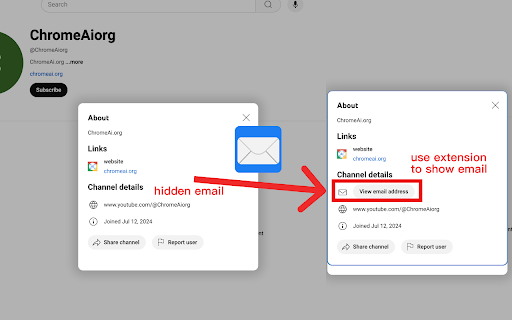
YouTube Email Revealer is a Chrome browser extension designed to help users automatically reveal hidden email information on YouTube channel "About" pages. Simply install the extension and visit the "About" page of any YouTube channel. This extension will automatically attempt to uncover hidden email information, even if the user needs to click the "More" button to view contact details.

TikTok Email Finder for Instant Influencer Contact Info
Connect with Tiktok influencers fast using this free email finder—an easier alternative to Wednesday, Favikon and Kolr. Imagine being able to open an influencer’s social media profile and — bam — their public email address is just sitting there waiting for you. That’s exactly what our Email Finder Chrome Extension does. It's a must-have tool for marketers, agencies, and content creators who are tired of manually hunting down contact details. --- Core Features of Influencer Email Finder 📤 Auto-Detection of Public Emails How it works on social profiles The plugin scans the influencer's bio or profile section and highlights any publicly listed email address. No more right-click > inspect element or digging through posts. Which platforms are supported? At present, this extension supports Tiktok. We also offer additional plugins for Instagram and YouTube, which you can find by searching for our product series in the Chrome Web Store. 🖱️One-Click Copy Functionality See an email you need? Just click the copy icon and it's saved to your clipboard. No highlighting, no right-click, just boom — copied. 🤏Lightweight and Seamless Integration The extension is feather-light and doesn’t slow down your browsing experience. You won’t even notice it running — until you need it. --- How to Use the Extension Installation Process Step-by-step install guide 1. Go to the Chrome Web Store 2. Search "Tiktok Email Finder" 3. Click "Add to Chrome" Permissions required The plugin needs access to read profile content on pages you visit — nothing more, nothing shady. Navigating Influencer Profiles Just visit any profile page — if there’s a public email, you’ll see it directly under the bio. Copying and Saving Emails Click the little copy icon next to the email, and paste it wherever you need — spreadsheet, CRM, or email draft. --- Ethical Considerations What “Publicly Available” Really Means The tool only detects what’s already visible to any user — it doesn’t dig behind the scenes or violate any privacy settings. Respecting Privacy and Platform Rules Always use the extension responsibly. If someone hasn’t listed their contact info publicly, take the hint. --- Comparisons with Competitors Free vs Paid Tools Many paid outreach tools include email finders, but this one’s free and works directly in your browser. What Makes Our Influencer Email Finder Unique? It’s dead simple, super focused, and doesn’t try to be everything — just the best at what it does. --- FAQs Q1: Is the plugin free to use? Yes, the basic version of the plugin is completely free to use. It includes essential features such as email detection and one-click copy. We also offer a premium version with advanced functionalities for professional users. Check EasyKOL. Q2: Does the plugin respect data privacy regulations? Absolutely. The plugin only identifies and displays email addresses that are already publicly available on influencer profile pages. We do not collect, store, or share any personal data or private information. Our operations fully comply with GDPR and other global data privacy laws. Q3: Which platforms does the plugin support? Currently, this plugin supports Tiktok. We also offer additional plugins for Instagram and YouTube with tailored functionalities. You can find them by searching our brand in the Chrome Web Store. Q4: Why is no email showing up on some profiles? If no email is displayed, it means the influencer has not made their email address publicly available on their profile. The plugin does not extract hidden or private data.

SimilarTube - Find Similar YouTube Channels
AI Scanner & Analytics for Finding Niche YouTube Channels SimilarTube is a tool powered by AI (LLM) to scan and find similar channels on YouTube based on a given channel. Unlike searching through third-party influencer databases, which often lag updating information about nano and micro influencers. Our AI bot scans YouTube directly to deliver real-time results in just seconds. FOR MARKETERS SimilarTube helps you find similar influencers using a "look-alike" algorithm, displaying key metrics such as ER(engagement rate) and VVR(video view rate) for quick screening and targeting. AI automatically extracts public email addresses and other social media accounts (Facebook, Instagram, TikTok, etc.), enabling you to find their contact information quickly. With automatic email matching and template filling, you can get the outreach job done 10x faster. FOR SALES Enrich your database with new leads and get more sales. With automatic email match and outreach mail merge, you can get the outreach job done 10x faster. FOR YOUTUBERS SimilarTube helps you find competitors. If you are a new YouTuber hoping to identify ideas or niches, it can help you analyze the competitive landscape and determine if it's worth investing in. If you are a marketer looking to find influencers, you can use it to expand your targets. FOR ANALYSTS The AI Insight feature automatically assesses the value of the niche and highlights differences in core metrics among YouTubers of various tiers. Its filtering and sorting capabilities facilitate convenient analysis.

FREE YouTube Analytics - Auto Influencer Stats & Contact Info Card
Discover YouTube influencer data insights instantly with smart analytics and visualized info cards including key contact details. Influencer marketing success hinges on data-backed decisions. Knowing which influencer aligns with your brand, who engages authentically, and which posts perform best saves you from costly mistakes. Analytics help you understand not just the numbers but the story behind those numbers, turning guesswork into strategy. --- Key Features of the Influencer Analytics Dashboard 📊 Data Summary Card on Profile Pages Right when you visit an influencer’s profile, the extension displays a summary card with essential metrics like median views of their last 10 posts, engagement rates, and median likes count. This snapshot helps you quickly assess whether an influencer fits your campaign goals. 👁️🗨️ Post-Level Data Visibility Want to see how each post is performing? No problem! The detailed stats is displayed directly on the profile page, so you don’t have to dig through each post or switch between analytics tools. 🔍 Multi-Profile Search Many influencers operate across platforms — Instagram, TikTok, YouTube, and more. The multi-profile search feature lets you switch seamlessly between their linked accounts, consolidating data for a holistic view. 📧 Public Email Finder Need to reach out fast? The extension finds publicly available email addresses associated with the influencer, making outreach smoother and more efficient. 🎯 Audience Insights Knowing an influencer’s followers is just as important as knowing the influencer. This tool provides demographics and interest data about the audience, so you can ensure your product or service resonates with the right crowd. #️⃣ Hashtag & Collaboration Analysis Discover the hashtags influencers use most often and see who they’ve collaborated with before. This feature helps you uncover trends and potential partnership opportunities. --- How Influencer Analytics Dashboard Works Using this extension couldn’t be simpler: 1. Install the extension from the Chrome Web Store. 2. Visit the influencer’s profile page on supported platforms. 3. Watch as the data summary card and detailed analytics automatically populate. 4. Use the email finder and multi-profile tools as needed. 5. Export or save the data for your campaigns. The extension is designed to work across multiple social media sites, maintaining consistent data presentation while respecting each platform’s unique metrics. --- Benefits of Using the Influencer Analytics Dashboard Boosting Influencer Marketing Campaigns With instant access to accurate analytics, you can choose the right influencers who genuinely engage their audience, resulting in better campaign outcomes. Saving Time and Improving Accuracy No more juggling multiple tools or guessing engagement quality. Everything you need is right there on the profile page, saving hours of research. Enhancing Outreach with Email and Profile Search The public email finder and multi-profile search streamline contacting influencers and expanding your network. --- Who Should Use This Extension? This tool is perfect for: - Digital marketers looking to optimize influencer partnerships. - Social media managers who monitor multiple influencers. - Influencer agencies managing campaigns for clients. - Content strategists aiming for data-driven content creation. --- How This Tool Compares to Other Influencer Analytics Solutions Unlike bulky standalone software, this extension is lightweight, integrates directly with social media platforms, and requires no extra setup. --- Privacy and Data Compliance The extension only uses publicly available data from influencer profiles, fully complying with platform policies and privacy regulations. No private or hidden information is accessed or stored. --- FAQs Q1: What social platforms does the extension support? At present, this extension supports YouTube. We also offer additional plugins for TikTok and Instagram, which you can find by searching for our product series in the Chrome Web Store. Q2: Is the extension free to use? Yes, it offers a free version with core features; premium tiers may be available for advanced analytics. Q3: Does it store my personal data? No, the extension does not collect or store your personal information. Q4: Can it find emails from private profiles? No, it only detects publicly available email addresses. Q5: How accurate are the engagement metrics? Metrics are based on publicly available data and platform standards, offering reliable but not absolute insights. Q6: Why do some platforms not support displaying the median number of likes or median E.R? The data available varies across different platforms, so the analytics shown will differ accordingly depending on the platform.

Youtube Email Scraper
One-click scrape emails from Youtube specific profile from search engine based on your keyword as Excel/CSV/JSON/HTML/XML file. 🚀 Effortlessly scrape emails from Youtube channel specific profile from search engine based on your keyword as Excel/CSV/JSON/HTML/XML file. 🔧 How it Works: 1️⃣ Click extension icon. 2️⃣ Input keyword and email, then click the "Start" button on extension popup. 3️⃣ Choose to download from the data scraping pop-up or the task list on extension. ✨ Included features: 1️⃣ You can scrape emails as per specified keyword, email domain without duplicate record. 2️⃣ You can export data into Excel/CSV/JSON/HTML/XML, data include Email address, Title, Description, Link url, Keyword, Email domain. 3️⃣ You can manage your history scape task data. Note: This extension is an independent creation and is not affiliated with or endorsed by Youtube❗️🔒
