
dplpkallinkfbekcfikikjhlfimagafo
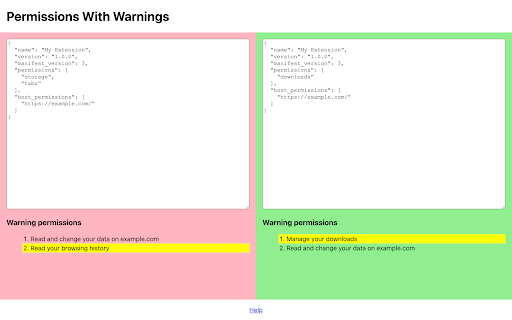
A warning permissions checking tool for extension developers Note: this extension is only for browser extension developers. When users install your extension, some permissions cause a warning to the user. And the extension will be temporarily disabled when upgrading if you add a new warning permission. This tool provides functionality to check and compare warning permissions. Just copy and paste your extension manifest to the input box.

TweakSync
TweakSync lets you style web elements in real-time from Chrome and sync changes with VS Code for a smooth development experience. TweakSync is a powerful tool designed for front-end developers and web designers who want to streamline their styling workflow. This Chrome extension enables real-time styling of web elements directly within Chrome, allowing you to see changes instantly as you tweak styles. Real-Time Styling: Easily select any element on a webpage and adjust its styles on the fly. With live previews, you can see the impact of your changes immediately, making the styling process more efficient and intuitive. Seamless Integration with VS Code: TweakSync syncs your style changes directly with your VS Code environment. This integration allows you to apply and save your CSS changes effortlessly, ensuring that your development process remains smooth and uninterrupted. Efficient Workflow: By bridging the gap between your browser and your code editor, TweakSync eliminates the need to switch back and forth between tools. This results in a more streamlined workflow, saving you time and effort. Boost Your Efficiency: Save time with instant style updates and seamless integration with VS Code. TweakSync helps you make changes faster and more accurately. Improve Your Design Process: Experience a smoother design workflow with live previews and direct synchronization between Chrome and VS Code. Streamline Your Development: Minimize context-switching and keep your development process focused with TweakSync is real-time styling and VS Code integration.

Tabion - tab manager
Tabion - the supercharged tab manager Tabion limits the number of tabs you can see in a window. When you exceed the limit and open a new tab, the oldest one is hidden from the screen and added to your personalized feed. Your Feed remains constant even if you close Chrome or restart your computer.

Faro
Save pages with highlighted taglines - Bookmark manager ⨯ web highlighter Chaos in your bookmarks? Can't find what you want? They end up gathering dust? Or you don't even try and end up with 100s of open tabs? Faro is made to fix that! It's the simplest way to save & keep track of pages. With it, even thousands of saves don't get overwhelming. When saving, you highlight a sentence to act as a tagline. It helps you remember what the page is about and why you saved it. If unsure - just save whatever sentence you're reading. All saves appear on your dashboard. They come most-recent-first by default, so you don't forget what you recently saved. You can pick up your reading where you left off - no need for a separate reading list. You can also pin & archive to further arrange it. Organize them with tags. Since you're reminded what you saved and why, you can do it later. It makes your saves much easier to manage than bookmarks. Faro supports nested tags (eg: recipes/vegan), so combines the best of tags and folders. Clicking a save takes you right back to your highlight - especially useful for longer articles. Also: ➣ export to bookmarks to keep them if you uninstall Faro ➣ copy links to highlights and share them or paste into Notion, Obsidian, etc. ℹ️ About your data: When installing you can read: "it can read and change all your data on all websites" The only information that ever gets uploaded (when signed in) when you use it to save: ➣ Open page address ➣ Saved highlight/quote - what's visible in the sidebar ➣ Timestamp ➣ Debug info e.g. errors The extension also keeps track the currently open tab for each window - to update the sidebar as you navigate - but doesn't save or upload that data.

Tab Master - Save Tabs, Auto Organize & RAM Saver
Got 50+ tabs open? Stop the chaos. Tab Master is your free tab manager that organizes your browser in one click - auto-categorize, suspend unused tabs to save RAM, and restore sessions instantly. Everything stays on your device. No tracking. Zero data collection. Instant Save & Restore Sessions Save all open tabs as a single session with one click. Restore them anytime - all together or pick what you need. Smart Auto-Categorization Automatically sorts tabs into Work, Shopping, Entertainment, Development, Learning, Social Media, and more. Find what you need instantly. Memory Saver Automatically suspend idle tabs to free up 60-80% RAM. Your laptop won't sound like a rocket anymore. Lightning-Fast History Search (v1.4.0) Search your entire browser history in 0.2 seconds. Find that article from 3 months ago instantly. Turn old tabs from history into saved sessions. Smart Suggestions (v1.4.0) Learns your browsing habits. After a few days, suggests saving tabs you open together regularly. Duplicate Tab Detection (v1.4.0) Automatically detects and closes duplicate tabs. Stop wasting memory on multiple copies of the same page. Quick Session Search Search across all saved sessions in milliseconds. Real-time results as you type. Floating Restore Button Small button on every page for one-click access to any saved session. Automatic Backup & Crash Recovery Auto-backup every 5 minutes. Chrome crashed? Everything's still there when you restart. Export & Import Sessions Save sessions as JSON files. Move them between computers or share with your team. Keyboard Shortcuts Alt+Shift+S opens Tab Master Alt+Shift+Q quick saves everything Ctrl+F searches your sessions Complete Privacy Everything stored locally on your machine. No servers involved. Your browsing data never leaves your computer. Language Support Works in English and Arabic with full RTL support. Dark Mode Switches automatically based on your system settings. Perfect For: Researchers managing multiple projects Developers switching between codebases Students organizing course materials Anyone working with 20+ tabs daily People tired of their computer sounding like it's taking off Opens in under 200ms Search results show up in under 100ms History search takes 0.2 seconds Handles thousands of tabs without slowing down Uses less than 50MB memory Built with vanilla JavaScript for maximum performance Everything works right now. Considering adding optional cloud sync later for people who want multi-device support. Core features staying free regardless. Added history search - finds anything in your browsing history in 0.2 seconds Smart pattern detection - suggests saving tabs you open together regularly Duplicate tab detection - automatically closes copies Create sessions from old browser history Various performance improvements If this helps you out, leaving a review really helps. Thanks. Try it and let me know what else would make it more useful
