
dpkbdbpmahebenenkkjenihgfophknbm

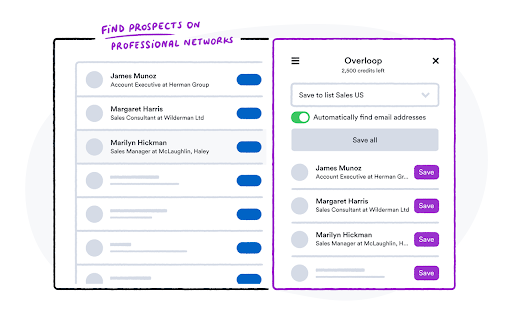


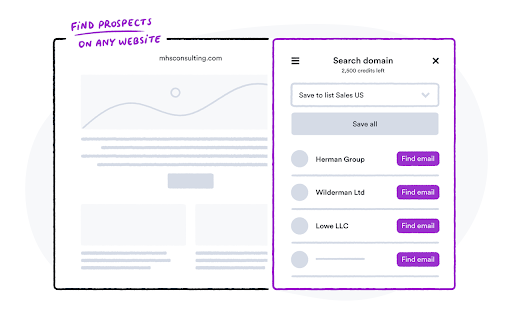
Overloop Extension Find anyone’s email address straight from your browser. Looking for new prospects takes time and effort. The Overloop Chrome extension helps you find prospects in one click and launch cold email campaigns straight from your browser in mere seconds. All that so you can focus on what really matters: selling.

Email Finder by VoilaNorbert
Norbert helps you find any corporate email addresses, manage your leads and gain a lot of time while Norbert work. VoilaNorbert helps you find any corporate email. It is trusted by companies like Intel, Twitter, Oracle, SAP, Airbnb and many more! VoilaNorbert will add a search button on the profile and search pages of popular sites like : - Angel.co - Crunchbase - Buzzsumo ... and many more to come! Find your leads email address and contact information on any websites simply by clicking on my button. All your leads can then be exported, added into custom-made lists and/or contacted directly from Norbert with advanced tracking tools to know if they opened or even clicked on your emails. The 50 first searches are free! You can create an account at https://app.voilanorbert.com — after that, I am charging you either per month or per credits.

Wiza - Phone Number & Email Finder
Find anyone's email and phone number Find real-time verified email addresses from professional social networks for free. Wiza’s free email finder allows you to view accurate work and personal email addresses in seconds. Using the Wiza email finder, you’ll be able to pull up real-time verified email addresses (both business and personal) on any professional social media profile that you view—in a matter of seconds. Wiza’s email finder enables you to export your searches and saved lead lists with real-time verified email addresses (and phone numbers). ✔ Save emails to lists and export to CSV Download your saved lists and exports to CSV in a single click, including contact name, employer, job title, email addresses, phone numbers, and 30+ other data points. ✔ Sync emails directly to your CRM and sales tools in one click Connect Wiza to your CRM (HubSpot, Salesforce, and more) and then instantly sync contacts with email addresses to your platform with one click. Sales teams to prospect and build pipeline Founders to find their first and next customers Agency owners to perform lead generation for clients Marketers to reach out about collaboration and link builder Recruiters to source candidates and acquire talent Join Wiza today and get 25 free credits every month: https://wiza.co/auth/signup We appreciate your support and please feel free to reach out to us with any questions or needs via our live website chat or at hello@wiza.com

Datanyze Chrome Extension
Access contact and company data directly from LinkedIn 🔥 Find and connect with B2B sales prospects within minutes using the Datanyze Google Chrome Extension. Start a free trial today and receive B2B contact details directly from LinkedIn, keeping your prospecting fresh and your sales pipeline hot. ❄️ Capture data from the places you prospect the most Get contact information, including email addresses, direct dial and mobile numbers directly from LinkedIn profiles and company websites, without leaving your browser 💰 Coverage and quality you can count on With data on-file for over 120 million contacts, including over 84 million email addresses and 48 million direct dial numbers, you’ll quickly find and connect with your next customer 🔎 Search and connect with prospects, at scale Don’t waste time using prospecting tools that can’t capture details for a bulk list of contacts. When you click to see all employees for a company on LinkedIn, Datanyze provides all of their contact information directly on the page Break the Ice, Not the Bank. Heat up your sales pipeline with Datanyze today!

Email Finder - GetProspect
LinkedIn Email Finder – Look up emails for free. Find email address in seconds – free email finder. Search emails on website. Extract emails with GetProspect. Our plugin is the fast and easy-to-use LinkedIn email finder tool that helps to get accurate business email addresses in seconds. ✔ Email Finder It is the best solution to find email addresses of your connections for free or any people from LinkedIn search. With GetProspect Chrome extension you can easily find anyone’s email address and generate LinkedIn leads by clicking just one button in users’ profiles. - Easily search for email addresses of your 1st, 2nd and 3rd+ Linkedin connections; - Find business email addresses of any person from the basic LinkedIn or Sales Navigator search based on your specific search filters; - Save leads with emails in bulk from Sales Navigator lead lists or LinkedIn group members; - Get all the obtained email addresses verified for FREE. ✔ Bulk email finder Save hundreds or thousands of contacts at once with our batch email finder by clicking «Select all» → «Save prospects» in LinkedIn search, LinkedIn group members, or LinkedIn events attendees. Add the number of pages you want to save leads from. Our bulk email tool will automatically find and add their verified emails to your list. ✔ Email finder by name and by domain You can generate LinkedIn leads from basic search or with Sales Navigator. You just fill in your search criteria on LinkedIn, then extract hundreds of potential clients into a spreadsheet. You not only get an email address – but also other data from LinkedIn: - first and last name - position - location - summary - company name - industry - company website and address - LinkedIn profile URL ✔ Find email address by name with GetProspect email extractor extension This is how to search email by name in 2 minutes. To look up email addresses by name you enter the first and last names of the person of interest in a LinkedIn search. Go to their profile and click «Get email». The email and other information about the prospect will be saved to your GetProspect account. ✔ CRM contact management software All your saved leads from LinkedIn you will find in GetProspect contact management software. The web-based CRM allows you to: - group your leads in relevant folders; - segment your prospects with dynamic lists; - create custom filters; - cooperate with team members; - export your lists in the necessary format; - integrate GetProspect with Gmail or other sales tools. ✔ Our email finder is ideal for: - Sales teams - Founders and owners - Freelancers - Consultants - Project managers - Digital marketers - Email marketers - Growth marketers - Recruiters - Outbound marketers ✔ Main advantages GetProspect email extractor: - FREE monthly credits - Online human support - Email verification at no additional cost - Compatible with free LinkedIn, Sales Navigator and Recruiter - Pricing beginning with 49$/month - Exporting LinkedIn leads with the data in .csv or .xlsx - Saving numerous LinkedIn pages at once - Integrations with other services ✔ How to use the email address finder plugin? Step 1. Install the GetProspect email extractor Chrome extension. Step 2. Go to any LinkedIn profile and click on the «Get email» button. You will see the GetProspect banner indicating that the email is found and saved. Step 3. Or make a search on basic LinkedIn or Sales Navigator, click «Select all» → «Save prospects» and get multiple pages of leads with emails. ✔ FAQ 1. Can I use GetProspect email finder extension for free? Yes, email extractor plugin is free, but you can use it only in the Google Chrome browser for now. 2. How to find email addresses on LinkedIn? To find email with the GetProspect extension, open any LinkedIn profile and tap on the «Get email» button. The email will be automatically saved. If you want to save many emails, open the list of LinkedIn profiles in LinkedIn search, LinkedIn group, or LinkedIn events and click «Select all» → «Save prospects.» 3. Can I find email address owner with GetProspect? You can find email addresses owners in your GetProspect account with the enrichment feature. Go to the «Enrich» page, choose «Email lookup section», and enter the email of interest. 4. How can I use email extractor software for business? You can use the GetProspect extension to find emails of potential clients to reach them without reputation risks to your email account. 5. Can I extract emails from websites by GetProspect? Yes. Go to the tab with the website and click on the GetProspect icon among your extensions. You will see the panel and field to enter the name you want to find the email for. 6. Which payment methods can I use for GetProspect subscription? You can pay for the GetProspect subscription through the Fondy payment gate or BlueSnap payment gate. By default, our system offers to pay through Fondy. In case you are unable to pay by this method, try to use BlueSnap. 7. How to cancel my email finder subscription? Go to the Settings icon in your GetPropsect account. Choose the Price and billing section. In the Subscription tab, find your plan and click Cancel subscription. For any further questions about email finder, feel free to contact us support@getprospect.com
