
dpfmpmojnekopmaodgdgmimghpdhehnh

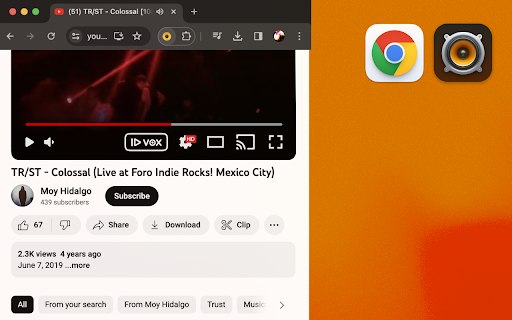
Easy way to import and play any track from YouTube or SoundCloud in VOX Music Player for Mac. Easy and intuitive. VOX Music Helper is an extension designed to import and combine your favorite YouTube and SoundCloud tracks in the VOX Player on your Mac. Effortless YouTube and SoundCloud Import: With VOX Music Helper, listening to your favorite SoundCloud or YouTube tracks through VOX Music Player on your Mac has never been easier. Install VOX Music Helper to import all favorite music tracks to VOX Music Player for Mac, and enjoy a unified music library in one place. Transition and playback: Right after you have an extension installed in your Chrome browser, a functional "Play in VOX" button [ ▶ VOX ] will appear on the track bar of the YouTube or SoundCloud webpages interface. Press this button to launch the VOX Music Player on your Mac and import the chosen track to the Playlist tab in VOX. After the imported track appears in VOX Music Player, the VOX application grants you instant control over playback, creating new playlists, etc. Which means that you can import and combine your SoundCloud favorites with YouTube tracks to mix them all together in a single playback queue in VOX Music Player, enhancing your convenience and overall user experience. VOX Music Helper ensures that your YouTube or SoundCloud tracks are imported to play seamlessly in VOX Player, allowing you to enjoy music effortlessly, without using your browser! You will still need an internet connection though. "Play in VOX" button should be Enabled for YouTube and SoundCloud sources by default, so you can start importing and enjoying your music with VOX Music Player without any technical hurdles. You may find the VOX Helper icon on Chrome extensions list, click on the icon to open settings. Advanced playback tools: Make advantage of the crisp and unique playback experience that VOX Music Player for macOS offers. Various audio tweaks, such as EQ, cross-fade, 200% volume boost, Apple AudioUnits support and more, will definitely make your SoundCloud and YouTube listening sessions more immersive and enjoyable. Discover a more convenient, efficient, and high-quality way to listen to your favorite tracks seamlessly with VOX Player on your Mac. Streamlined, effortless, and enhanced music enjoyment awaits!

Soundmark for SoundCloud
Create and manage SoundCloud timestamps. Soundmark for SoundCloud allows you to easily organize and manage timestamps from your favorite SoundCloud songs and mixtapes.

Music Player - Radio & ASMR
Best Music player for browser. Radio Stations, ASMR, Music, Podcasts, Radio Player Music Player – The Ultimate Radio & ASMR Experience Immerse yourself in a world of music with Music Player, the ultimate radio music player and audio streaming extension for Chrome. Enjoy a vast selection of live radio stations, featuring multiple music genres, from energetic beats to soothing melodies, ensuring the perfect soundtrack for any mood. Designed with a modern and intuitive interface, Music Player offers a customizable color scheme, seamless playback, and high-quality sound for an effortless listening experience. Whether you love discovering new music, tuning in to online radio, or setting the mood with ASMR sounds and white noise, this player has you covered. Looking to relax, focus, or sleep? Dive into the built-in ASMR sound library and white noise generator, perfect for creating a peaceful atmosphere. Whether you’re working, studying, or unwinding, Music Player delivers the best audio experience straight from your browser. Upgrade your listening experience today with Music Player – the ultimate radio music player, ASMR app, and white noise companion for your daily routine!

Bookmark It — Personal & Team Bookmarks
Save, share, and find bookmarks in one click. Personal collections and shared team workspaces, with fast import and instant search. Bookmarks are a necessary evil. Lost in folders. Buried in browsers. Impossible to share. Almost no one bookmarks the way they actually want to — and almost no one can collaborate on bookmarks with their team, family, or friends. It's the only bookmarking app that combines real ease of use, real organization power, and real collaboration in a single place — for yourself, your team, and everyone in between. 🚀 Get started in seconds ● One-click import from your existing Chrome bookmarks bar ● One-click import from your browser history ● No spreadsheets, no copy-paste, no re-saving ● Free plan with no credit card. Ever. 👤 Personal + 👥 Team workspaces ● Keep a private collection just for you ● Spin up a shared workspace for your team, family, or side project ● Invite anyone in seconds — everyone sees the latest version, every time ● No more "send me that link again" in Slack, Messages, or email 🔍 Find anything in one click ● Recently Viewed history puts the page you're looking for one click away ● Instant search across every bookmark in every workspace ● Collections, tags, and notes that scale from 10 bookmarks to 10,000 📌 Bookmark from anywhere ● Browser extension — save the active tab with one click ● Menubar app — save and search without leaving what you're doing ● Web app — organize and manage from any device ● Title, URL, and page details pre-filled so saving really is one click 💬 Built for collaboration ● Share entire collections, not just single links ● Add notes and context so teammates understand why a bookmark matters ● Organize together — for work projects, family hubs, reading lists, travel planning, recipe collections, anything 🪄 More than a bookmark manager ● Boosted productivity — spend less time searching, more time doing ● Onboarding made easy — new teammates get the full knowledge hub on day one ● Cross-platform — your bookmarks follow you across browsers and devices ● Upstream from the browser into a dedicated app you'll actually open Stop losing links in chat threads. Stop emailing yourself URLs. Stop maintaining bookmarks five different places. Bookmark It is the home for every link that matters — personal, professional, and everything in between. 🔒 Privacy first ● We will never sell or share your data ● Imports are optional and read-only — we never modify your native browser bookmarks ● Page content is never sent to our servers

OpenText Core SCA Select Extension
Open Source Select will help developers find and use the right open source and reduce friction between organisations and developers Open Source Select helps you find and use policy compliant and great open-source for any development project. The OpenText Core SCA Select Extension is a free plugin created with developers in mind, enabling you to check the health metrics and license information of an open source project at a glance. If you need more granular data, the extension can lead you to Open Source Select for more detailed information. The three types of metrics you can examine are: Community - How healthy the community around a project is. Popularity - Is it used by many? Is the usage declining? Security - How well does the maintainers apply security best practices. The extension now supports Start Left Policies. This lets you immediately see if the open source you are browsing is compliant with your company’s open source policy, without the need to import and scan code with Software Composition Analysis tools and common source code repositories and package registries such as GitHub, pypi, npmjs, nuget and many others are supported.
