
dpaohcncbmkojcpcjaojcehdlnjfbjkl
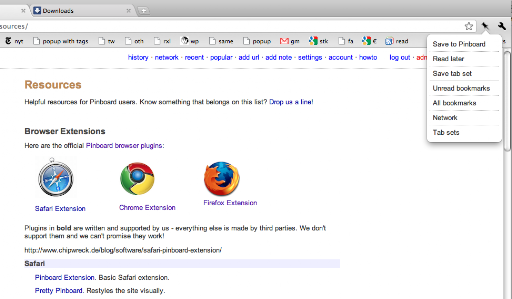

Toolbar actions for Pinboard (http://pinboard.in) Official extension for Pinboard, the beloved personal archive and bookmarking website. This is a fairly minimal extension that lets you save bookmarks and tab sets (a quick way to save browser state if you have a ton of open tabs), and provides convenience shortcuts to your Pinboard account.

Anybox
Browser extension for Anybox. Collect your links and images. Use this extension to easily save links, text and files to Anybox Mac app. You can configure if you want to show the checkmark for existing links in Options page. * This extension is only applicable on macOS and requires the running of Anybox for macOS app.

Save to GoodLinks
* GoodLinks app for iOS or macOS is required to enable this extension. * This extension will stop working if Advanced Data Protection is enabled on your iCloud account. If you have Advanced Data Protection enabled, we recommend using the Share extension (https://goodlinks.app/help/how-to-save/). Use GoodLinks browser extension to save links to GoodLinks app. After installed, click the GoodLinks button to sign in with your Apple ID (please make sure that you select the "Keep me signed in" option when sign in). The extension runs completely client side, communicates only with Apple's iCloud to save your links. It does not collect or pass anything through any other servers. Default keyboard shortcut for the extension are Command+Shift+S (Mac), Ctrl+Shift+S (Windows). You can change it in the Chrome Settings for Extensions.

Inoreader: Read-later and RSS extension
Save articles for later and keep up with your favorite feeds. Discover, preview, and follow RSS feeds while organizing your content. With Inoreader, information comes to you the minute it’s available. Follow your favorite websites, social media feeds, podcasts, blogs, and newsletters – all in one place. Save articles for later, discover inspiring content, and make your time online more meaningful and productive. Enhance your workflow with the Inoreader browser extension without leaving your tab: • Save web pages to read or revisit later. • Annotate texts directly in your browser. • Monitor your unread counter at a glance. • View feeds and tags with recent updates. • Detect and follow RSS feeds effortlessly. • Preview RSS channels in a clean format. • Send articles to Team channels. Inoreader is a trusted RSS and news reader, recognized by professionals and casual users worldwide for its powerful features and intuitive design. It’s a one-stop solution for discovering, organizing, and sharing content online. Access Inoreader on inoreader.com or stay connected with our mobile apps for iOS and Android. Here’s what you get with Inoreader’s Free plan: • One hub for everything: Follow websites, Google News alerts, Reddit feeds, podcasts, blogs, and more. • Real-time updates: Get new content as soon as it’s published without relying on algorithms. • Distraction-free reading: Enjoy articles in a clean, ad-free environment. • Personalized experience: Choose from different themes, layouts, sorting, and grouping options to fit your preferences. • Smart organization: Keep your feeds and articles tidy with folders and tags. • Active reading tools: Highlight, annotate, and take notes while reading. • Content discovery: Explore curated sources and trending articles on different topics. • Save and archive content: Collect web pages and articles to read later. • Article search: Find items quickly across your feeds, folders, and tags. Take your experience to the next level with Inoreader Pro: • Advanced automation: Apply custom filters and rules for precise content curation. • Monitoring feeds: Track specific keywords or phrases in 30 languages. • Web feeds: Follow websites without native RSS support. • Track changes: Get notified for updates to any webpage. • Social feeds: Follow Facebook pages and Telegram channels; sync YouTube subscriptions. • Email newsletters: Receive newsletters in Inoreader without cluttering your inbox. • Offline access: Catch up with the latest news on the go with mobile offline mode. • Public article search: Discover content from all publicly available sources in Inoreader. • Article translation: Instantly translate content into 30 languages. • Text-to-speech: Listen to articles in 30 languages. • Audio player: Create playlists and enjoy podcasts in the background while multitasking. …and so much more! We’re constantly adding features and improving based on user feedback. Got a question or an idea? We’d love to hear from you. Reach out at support@inoreader.com.

1Password Beta – Password Manager
The best way to experience 1Password in your browser. Easily sign in to sites, generate passwords, and store secure information. 🐞 The 1Password beta is for adventurous folks who enjoy living on the cutting edge. Be the first to get the latest features. This extension requires a 1Password membership. If you don't have one yet, you can sign up when you install the extension and try one free. 1Password is a password manager that keeps you safe online. You want to use different passwords for every website, but it can be hard to keep track of them all. With 1Password you only ever need to memorize…one password. All your other passwords and important information are protected behind the one password only you know. 1Password manages everything for you: generating, saving, and filling your passwords. Get to know 1Password in your browser: **About your privacy** 1Password was designed with a deep respect for your privacy. The data you save is encrypted and inaccessible to us. Anything else is only ever used to provide you with service and support. We believe strongly that your data is yours, and we don't want to know anything about it. This is one of the fundamental beliefs 1Password was built upon. That's why our privacy policy is simple: your data is your data. We don't use it, we don't share it, and we don't sell it. You're our customer, not our product.
