
dpadflhmiohjfhhaehelneimpllfbpcg


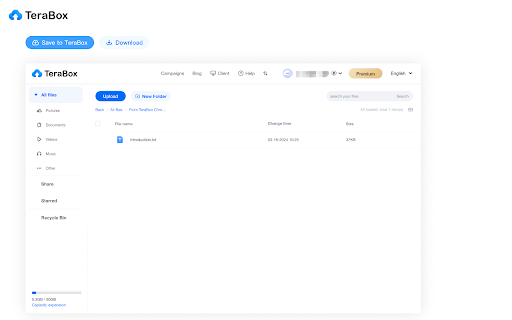
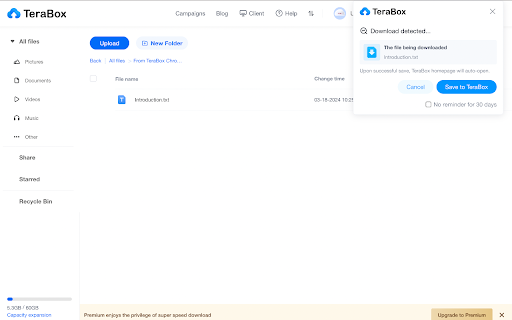
Supports screenshots, uploads, and other TeraBox features TeraBox Download Assistant can detect download requests from a webpage, and save any files you want to your personal TeraBox account. You can also use this extension to capture and save screenshots. All files will be safely stored in TeraBox for you to easily check on any time and anywhere! More efficiency-enhancing features for our users and webmasters are under development. Please stay tuned!

ᐈ TeraBox Viral Video Link Saver ✓
Effortlessly save TeraBox links for future use! This extension adds a convenient "Save TeraBox URL for Later :)" button to supported TeraBox websites. With just one click, you can save the current page's URL to a dedicated list and access it anytime from the extension popup. Duplicate links are automatically filtered, ensuring your list stays clean and organized. Features: One-Click Save: Quickly save TeraBox links directly from the webpage. Avoid Duplicates: Links are saved only once, no matter how many times you click. Modern UI: A sleek and user-friendly popup for managing your saved links. Wide Compatibility: Supports multiple TeraBox-related domains. How to Use: Visit any supported TeraBox page. Click the "Save TeraBox URL for Later :)" button added to the page. Open the extension popup to view and manage your saved links. Simplify managing your favorite TeraBox links today!

Telegram Video Downloader - TG Downloader
Telegram video downloader is a free tool that helps you download videos from Telegram private channels & groups in one click. Telegram Video Downloader - Helps users store audio/video/pictures in Telegram restricted channels/Telegram private groups locally. It is safe and easy to use, and can download all with one click. We recommend that users do not access copyrighted content without permission. ✓ 1G+ video easy download⚡🚀 ✓ Support A version, K version channel/group download ✓ No password, API login or permission required ✓ Safe and easy to use ✓ 24/7 developer support ✓ Free users have 3 daily usage quotas ✓ Subscribers have unlimited daily usage quotas 👉🏻Runs on Chrome webpage, you can use it online on Mac and Windows computers. Just install on the browser, no software required. 1. Install the Chrome extension. 2. Click the "Extension" button next to the avatar, select the plug-in, and click the "Pin" icon on the right to pin it to the toolbar. 3. Open the Telegram web version (https://web.telegram.org/k, https://web.telegram.org/a) 4. Batch download of dialog box content: Browse the dialog box content of a channel or group, the toolbar plug-in icon will show the number of resources that have been captured, click the plug-in icon on the toolbar, open the plug-in window, and perform batch downloads. 5. Batch download of group information content: Open the group information of a channel or group, click Download all media/Download media for the current month. 6. Single download: A "Download" button will appear below the music/audiobook/video/picture in each channel or group dialog box 📝 Disclaimer This extension is not related to the official Telegram app/website. It is an unofficial app developed and maintained independently.

TeraBox Downloader - Stream & Download
Stream and download TeraBox videos instantly. No login required, unlimited usage. Works on all TeraBox domains. The ultimate TeraBox Downloader and Video Player. Stream and download videos directly from TeraBox links without logging in or installing the app. Instant Streaming: Watch videos directly in your browser with our enhanced player. No buffering, no waiting. Fast Direct Downloads: Generate high-speed download links instantly without the need for the official app. No Login Required: We prioritize your privacy. You do not need a TeraBox account to view or download files. Universal Support: Works elegantly with all known TeraBox domains (terabox.com, 1024terabox.com, freeterabox.com, 4funbox.com, and 20+ others). Smart Auto-Paste: Automatically detects TeraBox links from your clipboard for a seamless experience. Dark Mode: A beautiful, responsive interface that's easy on the eyes. 💡 How to use: Click the TeraBoxDL extension icon. Paste a TeraBox link (or let it auto-detect). Click "Stream Video" to watch immediately or "Download" to save the file. Stop struggling with slow speeds and login walls. Get the fastest TeraBox experience today!

FastForward
Don't waste your time with compliance. FastForward circumvents annoying link shorteners. FastForward circumvents sites which make you wait (like adf.ly), make you do something (e.g., show.co and sub2unlock.com) and even trackers (such as bit.ly and t.co)! It also helps to prevent your IP address from being logged by sites by blocking them. Privacy note: When you have the "Crowd Bypass" option enabled, we record some links of link shortners that you visit to allow other uses to bypass them faster. This also collects a hashed version of your public IP address. See our privacy policy for more details. https://fastforward.team/privacy We have a Discord, https://discord.gg/RSAf7b5njt We have a GitHub, https://github.com/FastForwardTeam/FastForward Visit https://fastforward.team/ for more information.
