
doocmbmlcnbbdohogchldhlikjpndpng
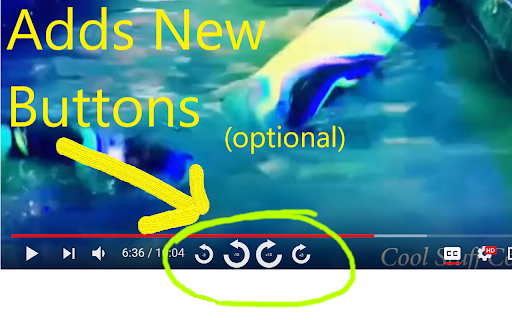

Quickly seek Youtube video playback forwards and backwards by either 3 or 15 seconds. Quickly seek Youtube video playback forwards and backwards by either 3 or 15 seconds. ==================================== What This Extension Does ==================================== This tiny and efficient extension helps you easily seek forwards and backwards in Youtube™ videos. If you ever watch long videos and want to seek backwards a little bit so you can see something again, but get frustrated trying to drag that tiny slider just the right amount, this extension is for you! This extension will add keyboard shortcuts which let you quickly seek ahead or back by either 3 or 15 seconds (configurable). Additionally, it can also optionally add new buttons to the player which you can click to seek ahead or back. 1) Load any web page that contains a YT-video 2) Click the video to make it play 3) The extension will automatically detect the video and add the new seek buttons to it 4) To seek forwards or backwards, you can either click the buttons, or use the Keyboard Controls *Note - like many other extensions, any webpages you loaded before installing the extension must be reloaded before the extension will work. List of Keycombos http://rehfeld.us/browser-extensions/controls-for-youtube/keyboard-controls For example, it's really easy to hold your ctrl key and then press your left arrow key twice to quickly go back 6 seconds! You can configure how far ahead and back each key takes you via the extension config page. Also, if you don't like the buttons that get added to the player, you can disable some or all of them. To see the config page, click the extension icon on the top-right of your browser, then select "options", just like on any other extension. Alternatively, goto the chrome://extensions url, click the "Details" btn for this extension, then click "Extension Options". TIP: You can skip through some advertisements by just fast forwarding! Try using the "Seek forward to end" keycombo. You can also rewind the ad, if you like. TIP2: You can modify the seek duration when you click a seek button using the mouse: ctrl + click will be half the normal duration, shift + click will be double, and shift + ctrl + click will be 5x. Non-Obvious Feature: Note that the keyboard controls work properly even when you're on a non-youtube.com website which embeds the YT-video into their webpage. When using keycombos, you don't need to give the video "mouse focus" by clicking on it, which allows you to freely interact with the parent web page without worrying about losing mouse focus due to clicking something else. This can be handy, for example, if you've scrolled to the bottom of the page to read comments, and suddenly wish to rewind or pause the video without having to scroll back to the top - just use the keys. While native YT-videos do have their own keycombos to pause the video (the space bar), it only works on non-youtube.com pages when the video currently has mouse focus. This extension offers its own pause control (Ctrl + SpaceBar) which works without the video needing focus. The same goes for all the keycombos - they all work without needing the player to have focus! The browser tab does need focus, however. Limitation: -The GUI buttons can only be added to the player if there's enough width - small players may not be wide enough. If you maximize the player, they should show up, or you can always just use the keyboard controls. Youtube™ is a registered trademark. This extension was developed independently, by someone who is not related or affiliated with them, without any help or endorsement from them. http://rehfeld.us/browser-extensions/controls-for-youtube/privacy-policy http://rehfeld.us/browser-extensions/controls-for-youtube/changelog

Video to MP3
Convert any video to MP3 audio. Extract high-quality music and audio tracks with one click. Fast, free, and easy to use. Video to MP3 is the easiest way to extract audio from online videos and save it as high-quality MP3 files. Whether you want to save music, podcasts, lectures, or any other audio content, Video to MP3 handles it all with a single click. Video to MP3 lets you extract the audio track from any supported video and convert it to MP3 format. Instead of keeping large video files when you only need the audio, use Video to MP3 to get just the sound. Perfect for building your music library, saving podcast episodes, archiving lectures, or capturing any audio you want to listen to offline. With Video to MP3, the original audio quality is preserved during extraction. You get clean, high-fidelity MP3 files ready for any music player, phone, or device. No re-encoding losses, no quality degradation — just pure audio extracted directly from the source. Video to MP3 supports all popular video platforms, making it your universal audio extraction tool. 🔘 One-Click MP3 Extraction — Video to MP3 adds a convenient button right on the page. Click it, and the audio extraction begins immediately. No complicated menus or settings to configure. 🎶 High-Quality Audio Output — Get MP3 files with the best available bitrate. Video to MP3 preserves the original audio quality so your music and recordings sound exactly as intended. ⚡ Fast Conversion Speed — Our powerful backend processes your MP3 conversion quickly. Video to MP3 uses optimized servers to extract audio in seconds, not minutes. Even long recordings are processed efficiently. 💻 No Software Installation Required — Video to MP3 works entirely in your browser. No desktop applications to download, no plugins to install, no system resources consumed. Just add the extension and start extracting MP3 audio. 📊 Real-Time Progress Tracking — Watch your MP3 conversion in real time. Video to MP3 shows you exactly how far along the extraction is, with progress percentage and estimated time remaining. 🌐 Multi-Language Support — Video to MP3 is available in 10 languages including English, Spanish, French, German, Portuguese, Chinese, Japanese, Korean, Turkish, and Russian. Use it in your preferred language. 📁 Smart File Naming — Every MP3 file is automatically named after the original video title. Video to MP3 keeps your audio library organized without manual renaming. 🔒 Secure Processing — All audio extraction through Video to MP3 happens over encrypted connections. Your data stays private and secure throughout the entire MP3 conversion process. 1️⃣ Navigate to any supported video page in your browser. 2️⃣ Click the Video to MP3 icon in your toolbar. The extension will detect the available audio tracks. 3️⃣ Press the "Convert to MP3" button. Video to MP3 will begin extracting the audio and show you the conversion progress. 4️⃣ Once complete, your MP3 file downloads automatically. Open it in any music player and enjoy your audio offline. Video to MP3 respects your privacy. We do not collect personal data, browsing history, or track your activity. The extension only activates when you choose to extract audio from a video. No background processes, no analytics, no data harvesting. Your MP3 conversions are processed through secure, encrypted connections and files are automatically deleted from our servers shortly after download. Video to MP3 does not require unnecessary permissions. We only request the minimum access needed to detect videos and perform audio extraction. Video to MP3 is built for speed and reliability. Our dedicated processing servers ensure your MP3 extractions complete quickly, even during peak usage. The extension is lightweight and does not slow down your browser or consume excess memory. Automatic retry logic means that if a conversion encounters a temporary issue, Video to MP3 will handle it gracefully. You get your MP3 file without manual intervention. Video to MP3 ensures a smooth experience from start to finish. ✅ Truly one-click operation — no complicated setup ✅ Best available audio quality preserved in every MP3 ✅ Fast cloud-based conversion — no load on your computer ✅ Clean, intuitive interface anyone can use ✅ Works on all Chromium-based browsers (Chrome, Edge, Brave, Opera) ✅ Regular updates to ensure compatibility ✅ Completely free with no hidden fees ✅ Lightweight — no impact on browsing speed ✅ Automatic file cleanup for your privacy ✅ Active development and support ✅ Trusted by thousands of users worldwide Video to MP3 is the smart choice for anyone who wants to extract audio from videos without hassle. Try it today and build your MP3 collection effortlessly. Install Video to MP3 now and start saving audio from your favorite videos!

YouTube Scoll Seek
Seek YouTube videos by hovering mouse over video and scrolling Up / Down (Forward / Backward) This extension allows you to use your mouse wheel to seek through YouTube videos.

YouTube Fast Forward & Rewind
Fast Forward and Rewind YouTube videos by a customizable amount of seconds! Enhance your YouTube playback with YouTube Fast Forward & Rewind. Add custom skip buttons and configure keyboard shortcuts for precise seeking control. Custom Skip Buttons: Add fast-forward/rewind buttons to the player controls with your preferred skip times. On-Screen Skip Indicator: When you use your keyboard's arrow keys (`←` / `→`) to skip, a sleek new indicator now appears on the video. It shows you exactly how many seconds you're skipping and has smooth animations to give you clear feedback. Usage Statistics: Curious about how much time you've saved? A new "Statistics" panel in the Advanced Settings tracks your total skips. This data is **100% private**, stored only on your computer, and is never collected or viewed by me. You can reset your stats at any time. Action Delay Control: Fine-tune player responsiveness with a new experimental setting to add a small delay (in ms) after a skip command. Perfect for preventing buffering on some systems. Custom Keyboard Seeking: Set custom skip durations for the left/right arrow keys. Integrated Controls: Buttons fit seamlessly into the YouTube player interface. Auto-Save: Your custom skip time settings are saved automatically. Control your YouTube navigation exactly the way you want. View on GitHub: https://github.com/Laskco/YouTube-Fast-Forward-and-Rewind

ScrewMyCode.in: Pitch control for YouTube
Slow down and speed up videos directly on YouTube like you would on a turntable. Slow down and speed up videos directly on YouTube like you would on a turntable. - Users of the extension with the dynamic YouTube URL - Other users through the dedicated website ScrewMyCode.in
