
dojenfpnghafipidpgfplghidgjhbpna
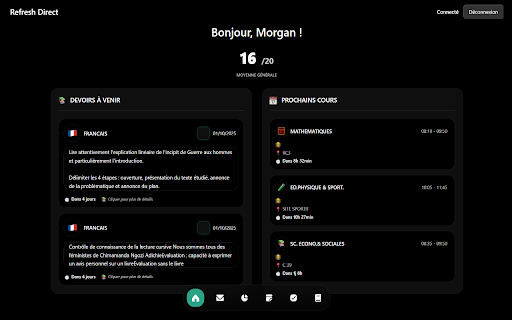


Refresh Direct transforme complètement l'interface d'École Directe en remplaçant le design original par une version moderne, épurée et beaucoup plus agréable à utiliser. Cette extension révolutionne votre expérience scolaire en vous offrant un accueil personnalisé, un mode sombre élégant et une navigation intuitive qui rend l'utilisation d'École Directe enfin plaisante.

EcoleDirecte Ranked
Ajoute un onglet Ranked Cette extention ajoute un onglet "ranked" a EcoleDirecte reprenant les principes de la classification du jeux "VALORANT".

Pix Companion
Browser extension for Pix Pix is the French government's online public service for assessing, developing and certifying digital skills. Within this framework, we organize certification sessions to validate users' digital skills. During these sessions, it is not permitted to consult certain prohibited content or to search for answers directly on the Internet. The extension is designed to be used as part of a “Pix” certification test. Its purpose is to prevent access to websites prohibited by Pix. The filter is automatically activated at test start-up and deactivated at test end. When attempting to navigate to a “prohibited” website, the user is redirected to an extension page. A check is performed at each browsing event, as well as on tabs already open at the time of activation.

1fichier Utils
Bypass le timer, supprime les popups et direct download sur 1fichier.com Bypass le timer, supprime les popups et direct download sur 1fichier.com

SubFlow - Streaming Subtitles
Add custom SRT subtitles to any streaming video with perfect synchronization SubFlow - The Ultimate Streaming Subtitle Tool Add custom subtitles to any video on the web! SubFlow lets you drag & drop SRT files directly onto videos on Netflix, Amazon Prime, YouTube, and more. Features: 🎞️ Universal Support: Works on almost any video player (JWPlayer, VideoJS, HTML5). 🎨 Netflix-Style UI: Beautiful, dark-themed interface that feels native. 🔄 Perfect Sync: Fix out-of-sync audio with ±0.5s or ±5s adjustments. 📝 Customizable: Change font size, position, and choose from 4 professional presets (Netflix, Prime, Yellow, Outline). 🚀 Privacy Focused: Your subtitle files never leave your device. How to use: 1. Open a video on any streaming site. 2. Click the SubFlow icon. 3. Drag & drop your .srt file. 4. Enjoy!
