
dnjfoljmledpdphbilpfcpmgjmcnbiic
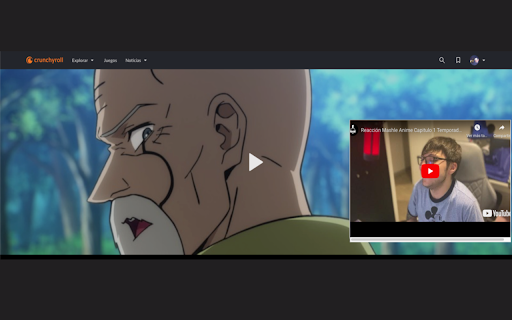
Sync the original copyrighted content with YouTube reaction videos using your own subscription. Free Reaction lets you watch reaction videos the way they're meant to be seen — with the original content playing alongside the reactor, perfectly synced. The problem Reactors can't include copyrighted content in their videos. So you're left watching someone react to something you can't see. You either have to find the original and manually sync it yourself, or just deal with it. The solution When a reactor adds a simple tag to their video description, Free Reaction detects it and shows a "Watch with Anime" button. Click it, and the original video loads in a side panel using your own streaming subscription. Playback syncs automatically — play, pause, seek — everything stays in lockstep. How it works 1. Open a YouTube reaction video that supports Free Reaction 2. Click the sync button that appears below the video 3. The original episode opens in a side panel via your Crunchyroll subscription 4. Playback syncs automatically — the original starts exactly when the reactor starts watching For reactors Add this block to your YouTube video description to make your videos compatible: - episode: Link to the original content - start_at: Seconds into your video when the content begins No piracy. No workarounds. The viewer uses their own paid subscription. The reactor uploads only their reaction. Free Reaction just connects the two.

Tab Trends
Transform your new tab into a window to the world with the latest Google Trends! Transform your browsing experience with our exciting Chrome extension for new tabs! Each time you open a new tab, you'll be greeted with the latest trending topics in your area. Watch as these hot keywords dynamically appear on your screen, and with just one click, dive into the stories behind the trends. Stay informed, entertained, and always in the know with the pulse of the internet right at your fingertips. Install now and make every new tab an adventure!

I MISS MUMEI
Shows time since the last stream from Nanashi Mumei How to use: 1. Pin the addon to your toolbar 2. Click on the icon on the toolbar After a second or two a window should pop up just like in the screenshot showing time passed since last time Nanashi Mumei did a live stream on YouTube. If you encounter any problems feel free to contact me by email

Youtube Reactions
Show reactions to youtube videos Show reactions to youtube videos

ShieldF
ShieldF reduces user fingerprinting when browsing by misinforming OS, browser and hardware attributes/properties of the device Digital advertising is arguably the primary source of funding sustaining the current Internet. The attractiveness of online advertising for advertisers, compared to other traditional forms of publicity (e.g., TV, radio, or newspaper), is its ability to deliver personalized ads. The key point for implementing personalized advertising is the design of techniques that can identify unique users online. These techniques are used for tracking & profiling users, showing targeted or re-targeted ads, implementing attribution models to assess the performance of marketing strategies, etc. The most widely used and known techniques for this purpose are third-party cookies, advertising IDs, and fingerprinting. Third-party cookies and advertising IDs, if properly implemented with the appropriate consent acquisition, comply with the data protection regulations. Instead, fingerprinting is, by definition, an intrusive practice representing a severe threat to end-users privacy. Web browsers have developed a set of functions and APIs that allow accessing different information about the browser, the operating system, or the device. The original goal of these functions is to optimize the functionality of browsers and the user experience. Web fingerprinting is implemented through a script embedded in the HTML code of the web page. This script leverages the different functions and APIs offered by the browser to collect different attributes from the browser configuration (e.g., browser add-ons or configured languages), the OS (installed fonts), and the device (sound device or graphic card information). In conjunction, the values of all these attributes create a fingerprint of the device. If a sufficiently large number of attributes are collected, the resulting fingerprint of the device might be unique even among a large pool of devices. ShieldF is a countermeasure to fingerprinting. ShieldF reduces user fingerprinting when browsing by uninforming OS, browser and hardware attributes/properties of the device accessible with JavaScript and with high entropy without harming the user's browsing experience. Its use lead to a significant improvement in the protection offered by browsers to fingerprinting.
