
dngdopifpnnjoochjeodonmchkmkdpga

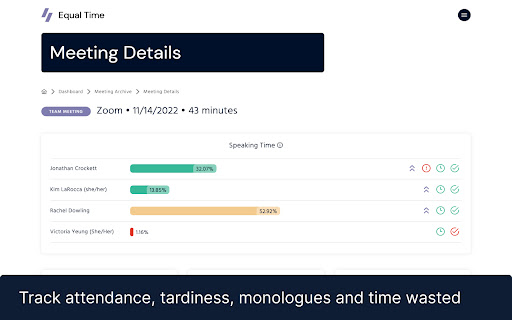


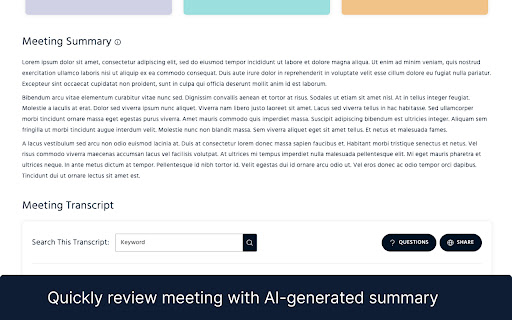
Lead inclusively with participation monitoring, AI-notes, bias detection, sentiment analysis, attendance, speaking time and more! Lead inclusively with participation monitoring, AI-notes, bias detection, sentiment analysis, attendance, speaking time and more! 📊 Keep your meetings fair by tracking speaking time in your Zoom meetings, classes, and webinars. ⏰ Get a full meeting transcript, AI-generated notes, a list of questions asked, DEI Metrics, and sentiment detection. 😊 ⭐️⭐️⭐️⭐️⭐️ Trusted by organizations like Salesforce, Spotify, Netflix, Dandy, George Washington University, NYU, and many more ⏰ Speaking time tracking. Monitor your own and others’ speaking time. ✏️ Full, searchable meeting transcripts. So you can recall what was said. AI summaries. Quickly recap what happened and who said what. 👥 Record when participants join and leave. Keep track of lateness and drop-offs. ⬇️ Download a CSV (excel) so you can sync to an LMS or CRM 🎭 Sentiment detection. Check on the mood of the room. ❓Review questions asked, and jump to answers. 🕺Mansplaining Detection and Interruption Detection 📩 Emailed reports and data in your Equal Time dashboard make review easy. 🔒 Fully GDPR and CCPA compliant. Private and Secure from the ground up. 24-hour support team is available to help Start a free trial (www.equaltime.io/buy) Create an Account and Connect your Google Calendar. Get your notes analytics automatically after your meeting The Equal Time notetaker will automatically join your Google Meet, MSTeams and Zoom calls! You don’t have to be the host of the meeting. After the meeting, you will get an emailed report. Log in to app.equaltime.io to review your meeting data, transcript, and more. By installing the app, you accept our privacy policy ( https://equaltime.io/privacy) and Terms of Use (https://www.equaltime.io/terms )

Fellow: AI Meeting Notes, Agendas, and Action items
Get AI Meeting Notes, Transcripts, AI Action Items and Summaries in Google Meet and Google Calendar Get AI to take meeting notes for you and so much more. Access Fellow AI agendas directly in Google Meet and get the most accurate AI meeting notes, action items and summaries. Get full AI Meeting Notes with Fellow’s FREE Chrome extension including a full transcript, meeting summary, AI action items, highlights, the discussion organized by topics - all available in 36 languages. Fellow’s free Chrome extension takes AI meeting notes so you can stay focused on your meeting. Improve your team’s productivity without leaving Google Meet and Google Calendar. Fellow is trusted by leaders at Fortune 500 and Unicorn companies such as Warner Media, Fanatics, Shopify and Aledade, to run productive meetings. KEY FEATURES Get started with Fellow for FREE and you’ll have access to: - ✨AI meeting notes, transcriptions and summaries - 💼Pre-meeting AI briefs so you’re always prepared for your next meeting - 💬“Ask Copilot” answers questions about any meeting with AI - 🗄️AI Meeting call and clips library to organize your AI meeting calls - 🖊️Collaborate on meeting agendas directly in Google Meet - ✅Build accountability with assigned action items - 🗓️Keep track of due dates directly in your Google Calendar - 📬Easily share the agenda with your meeting attendees - 👨🏫Apply expert-approved meeting templates - 📷Insert images, gifs, Google Drive files and more directly into your meeting notes - 🏃♀️Run effective 1-on-1s with a clear purpose, agenda, and outcome 👩💻 GOOGLE MEET INTEGRATION - Get AI Meeting Notes automatically - Ask the AI Copilot questions during the meeting - Have your shared meeting agendas open automatically when you join your video call - Collaboratively view and add additional meeting minutes and action items in real-time - See your meeting attendees and notes, side-by-side with our intuitive overlay - End the call with clear takeaways and action items to build accountability 🗓️ GOOGLE CALENDAR INTEGRATION - Access AI meeting notes, AI clips, AI recaps and transcriptions directly from Google Calendar - Quickly open your notes by clicking on the button in your calendar event description - Easily add discussion topics to your upcoming meetings and 1-on-1s by using the side panel - Encourage your meeting attendees to collaborate on the agenda by including the link in the calendar invite - See what tasks need to be completed with due date indicators on your calendar - Make the notes easy to find by including a direct link to your meeting agenda in the calendar description. 🔐 SECURITY & PRIVACY Fellow employs security and industry best practices to ensure our product and systems stay secure. Highlights include SOC 2 Compliance, ongoing Vulnerability Scans, and Firewalls + Encryption on our Server Infrastructure. Read more here: https://help.fellow.app/en/articles/4302231-security-compliance Learn more about Fellow and our other integrations at https://fellow.app

AI Note taker for Google Meet, by Noty.ai
AI note taker for Google Meet. Meeting transcription, automatic summaries, and task tracking, powered by Gemini. Noty.ai transcribes and summarizes your meetings in real time — no bot joins your call, ever. Works with Google Meet, Zoom, YouTube, online lectures, webinars, and any audio playing in your browser. 98.6% accurate transcription in 88 languages. Powered by Google Gemini. Backed by Google for Startups. Used by 100,000+ professionals, students, and educators worldwide. 1. Install the extension 2. Join any Google Meet or Zoom call (or open any tab with audio) 3. Noty.ai automatically generates real-time transcription, AI summaries, and action items 4. Review, search, and share from your workspace No setup. No bot in your meeting. No awkward "Who is Noty Notetaker?" - Live transcription as people speak - Speaker identification - Keyword search within any transcript - Time-stamped insights - No bots joining your meeting Perfect for sales calls, team standups, onboarding, HR interviews, research interviews, lectures, seminars, and study groups. One-click AI summaries powered by Gemini: - Key decisions and next steps - Risks and blockers - Client needs and commitments - Lecture summaries and research insights - Custom summary formats Noty.ai detects and extracts tasks, follow-ups, deadlines, client requests, and assignments. Sync to Google Tasks, Gmail, Google Keep, and Docs. Find anything across your entire meeting history — decisions, requirements, quotes, study materials. A searchable knowledge base built from every conversation. Chat with your meeting data: - Ask questions grounded in your actual meetings - Draft follow-up emails - Generate reports and study summaries - Create documentation from transcripts It's ChatGPT — but connected to your meetings. Not just meetings. Transcribe and summarize: - YouTube videos - Online lectures and courses - Podcast episodes - Webinars and live streams - Recorded presentations For Work: Sales call notes, product research transcripts, marketing feedback, customer success tracking, HR interviews, legal meeting records. For Education: Lecture transcription, study notes, research interviews, group projects. Students and educators get 90% off — email natalia@noty.ai. No bot joins your meeting — ever. Encrypted transcripts. Never used for AI training. GDPR compliant. Private by default. Free: 10 meetings/month + 7-day Pro trial Pro: $10/month — unlimited meetings and AI features Pay-as-you-go: $1/hour — no subscription needed EDU / Non-Profit: $25/year (email natalia@noty.ai) Your meetings — captured, summarized, and organized automatically.

Google Meet Transcripts & AI Summary
Google Meet Transcription, AI Summary and Insight. Get the most out of Google Meet! Transform Your Google Meet Experience with Laxis Elevate your Google Meet sessions with Laxis, your advanced AI meeting assistant! This powerful Chrome extension is designed to maximize productivity and enhance meeting management through an array of dynamic features. Pre-Meeting Preparation: • 📝 Customizable Templates and Tags: Easily set up personalized templates and tags for different meeting types. • 📅 Google Calendar Integration: Sync your meetings effortlessly with your Google calendar. During the Meeting: • 💬 Real-Time Transcription: Get accurate transcripts as the meeting unfolds. • 👨🏻💻 Speaker Recognition: Achieve 100% accuracy in identifying speakers. • 🏷️ One-Click Tagging: Mark important segments with tags like “Important,” “Follow up,” or “Action” for easy reference. • ☁️ Flexible Saving Options: Automatically save transcripts to the Laxis cloud or download them in Word, PDF, or TXT formats. Post-Meeting Follow-Up: • 🤖 LaxisChat: ChatGPT like chatbot to answer any questions related to your meetings • ⌨️ AI-Augmented Editor and Smart Summaries: Quickly summarize and edit action items, key points, topics and etc. • ✍️ AI writer: repurpose your conversation into engaging contents with a single click • ✨ Insight and Quotation Management: Organize and manage meeting insights and notable quotes. • 🔎 Advanced Search: Easily retrieve information across all your meetings. • 📥 Seamless Sharing: Distribute meeting outcomes with your team. Getting Started is Easy: 1. Install the Laxis Chrome extension. 2. Open Google Meet in your Chrome browser. 3. Laxis will automatically launch, enabling captions for real-time transcription. 4. Utilize in-meeting highlights and auto-scroll features for a streamlined experience. 5. Choose your preferred file format for downloads, or enjoy auto-saving with a registered Laxis account. Extensive Language Support: Laxis excels in English and supports over 40 languages, including French, German, Portuguese (Brazil), Spanish (Spain and Latin America), and many more. This comprehensive language support ensures that no detail is lost in translation, regardless of your team's linguistic diversity. Some advanced features may vary by language. To change language settings, adjust the captions in Google Meet settings. We Value Your Feedback! Visit our website or contact us for more information and support: • Website: https://www.laxis.com/ • Contact Us: https://www.laxis.com/contact Laxis is here to change the way you use Google Meet—try it today and experience meetings like never before!

AI Context Limit Tracker - ContextPulse
ContextPulse — AI gets worse the longer you talk to it. This extension shows your conversation quality in real time. Not a token counter • Uses a quality degradation model based on context fill, turn count, and task complexity • Detects when platforms silently compress your conversation history Privacy • Runs 100% locally in your browser • No data collection, no analytics, no tracking, no servers
