
dnfohmfimbkmondbppcnkgjlnfnbppok

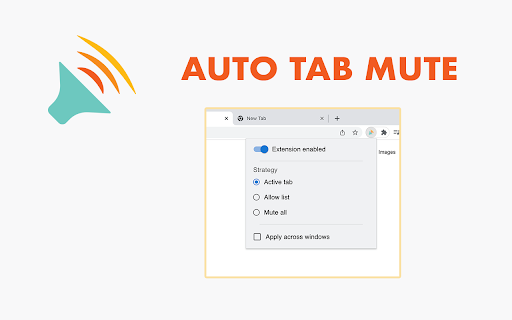
Extension to automatically mute background tabs if the current tab is playing audio. This allows for fast switching between different audio playing tabs without manually muting and unmuting. This extension can be toggled on/off by a button added to the browser interface or by a keyboard shortcut (Ctrl+Shift+U/Cmd+Shift+U). Updates Version 3.1: - Fixed behaviour when "Apply across windows" was selected and the active window was not on an audible tab but a background window had an audible tab Version 3.0: - Added experimental option for 'Active Tab' strategy to apply it across multiple windows (please send any issues to the listed email address) - Added 'Mute All' strategy to mute every tab and prevent any new tabs playing audio - Improved stability of 'Allow List' strategy - Updated logo and branding of the extension - Updated UI - Updated to manifest version 3 and changed to use service workers Version 2.1: - Added workaround for chromium issue 1213925 which prevents fetching tab info when clicking on a new tab Version 2.0: - Added popup upon clicking the tray icon to allow controlling the extensions behaviour - Added ability to select muting strategy, with "Active tab" being equivalent to the behaviour of the original extension and "Allow List" allowing you to select which tabs should be allowed to play audio by selecting the check boxes next to the title of the tab in the popup - The behaviour should be the same as before if the "Active tab" strategy is selected, only difference is an extra click to enable/disable the extension since the tray icon now shows the popup on click - Please contact me at the listed email address if any desired behaviour has been changed or if you have suggestions for other muting strategies to be implemented

Auto Mute Tabs When Multiple Tabs Audible
This extension mutes previous audible tabs when a new tab starts making sound. Toggle mute current tab: Cmd+Shift+8 This extension lets you control mute status of multiple tabs. Often while you're listening to something from one tab, another tab starts to make sound. This can be annoying. So this extension will automatically mute the previous tab that was making sound. It works like a stack - think a stack of cards, only the one on top is visible - similarly, only the last tab that's making sound will be allowed to stay unmuted. Once the current audible tab stops making any sounds, the previous tab will be unmuted again. There are a few keyboard shortcuts you can use: Cmd+Shift+0 -> Mute all tabs. Cmd+Shift+8 -> Mute or unmute the current tab. Cmd+Shift+9 -> Unmute all tabs (although, if you have multiple audible tabs, only one will remain unmuted, rest will be muted by extension.) Any tabs you mute with these shortcuts will not be unmuted by the extension. You have to unmute that tab with one of the shortcuts. Added an Easter Egg feature - press Cmd+Shift+O to try it. It's not very relevant to this extension, but I don't want to create a new extension just for this functionality which I need.

Mute Tab
Convenient and fast to 'Mute Tab' Provide default shortcut keys, Change as you needed - Windows: "Ctrl+T" - Mac: "Command+T" Chrome 71 removed the flag that enables per-tab audio muting. This extension allows you to mute individual tabs by a new context menu option or interacting with the extension icon. Restores the 'Mute Tab' functionality of versions prior to Chrome 71 and Enhance on this. The previous version of the extension used belonged to the v2 level and the developer did not update it, so this v3 extension is now available.

Tab Muter
Re-enables the "Mute Tab" feature once found in Chrome itself. Once upon a time, Chrome had a feature hidden away in chrome://flags to allow users to mute individual tabs by clicking the speaker icon next to the tab's title. This was deemed "not good enough", as the Chrome developers wanted to remove the need for users to manually control tab audio, so it was removed in favour of the "Mute Site" feature. Chrome can't yet automatically determine which tabs should be playing audio, so I made this extension to let the user make that decision. The button's in a different place due to Chrome API limitations, but apart from that, this extension should work exactly as the old "Mute Tab" feature did. If you find Tab Muter useful, feel free to leave me a tip: https://ko-fi.com/sersorrel This extension is free software; the source code is available at https://github.com/sersorrel/mute-tab.

Mute Tabs
Extension tool to mute Chrome browser tabs. **Mute Tabs** is a Google Chrome browser extension that lets you easily control audio playback across your tabs. - Mute or unmute the **current active tab** - Mute or unmute **all open tabs** at once - Control tab audio using **keyboard shortcuts** - Simple and lightweight interface - Helps eliminate unwanted background noise You can quickly control tab audio without using the mouse: Whether a video starts playing unexpectedly or multiple tabs are producing sound, **Mute Tabs** gives you instant control over audio without needing to search for the noisy tab. It improves focus and creates a smoother browsing experience.
