
dnfnnlockpehnpkfdbejdogbfkjfeaan
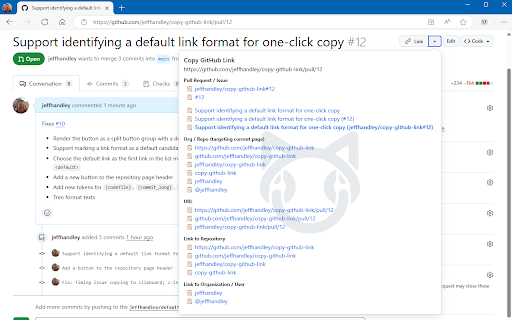
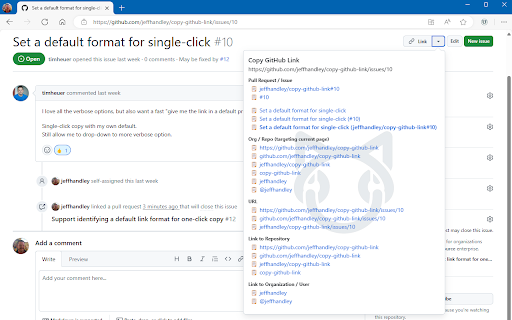

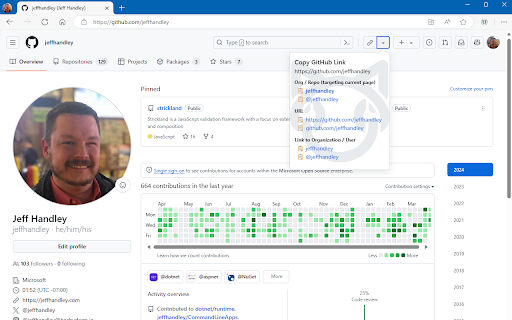

Copy formatted GitHub links for issues, pull requests, repositories, users, and more. Generates formatted GitHub links that can be copied to the clipboard from any github.com page. Using either the extension icon in the toolbar or one of the link dropdown buttons added to the github.com UI, a popup is shown with a list of convenient formats for the current page. Clicking any of the links will copy a link in that format to your clipboard. Links are copied in both plain text format (just the text, without the URL) and as a hyperlink to the current page's full URL for compatibility pasting into any application.

Material Icons for GitHub
Material icons for the file browser of popular websites like GitHub, Azure, Bitbucket etc. Replace GitHub's default icons with icons from Visual Studio Code's Material Icon Theme icons. Use the same icons on your code editor and on github.com, and quickly identify file types, configuration files and project scaffolding at a glance. This extension pull icons and replacement lists directly from the open source vscode extension https://github.com/material-extensions/vscode-material-icon-theme. This extension can replace icons on many other leading source control platforms. For bug reports, please open Issues on the extensions repository at https://github.com/material-extensions/material-icons-browser-extension Don't forget to star the github repository if you like the extension.

Enhanced GitHub
Display repo size, size of each file, download link and option to copy file contents Extension that provides useful features on top of GitHub Website. 1. Displays repo size. 2. Displays each file size in every active branch (not applicable for folder / symlink) 3. Show download link for each individual file (not applicable for folder / symlink) 4. Copy file's contents directly to Clipboard (just won't work for markdown files) 5. Download file 7. Coming soon...please suggest by opening an issue on https://github.com/softvar/enhanced-github/issues Enhanced GitHub Chrome Extension doesn't collect/share/care about your data at all. Asks for GitHub Access Token only for private repos and if Rate Limiting is your concern. 1. "*://*.github.com/*" - for running on github.com domain. 2. storage - for storing GitHub access token on your local system. GitHub Access token is required for private repos and for handling API rate-limiting issues. 3. webRequest - to support GitHub being a single-page-application now. 4. webNavigation - to support GitHub being a single-page-application now. Read the detailed blog to support SPA and for requesting permissions #3 and #4 - https://medium.com/@softvar/making-chrome-extension-smart-by-supporting-spa-websites-1f76593637e8 * Note: From v1.0.0 onwards - Click on download icon/button while pressing Alt / Cmd(for Mac)/ Ctrl(for Windows) because GitHub has stopped downloading of files directly. * From v3.0.0 onwards, this extension wants webRequest permission so that it can properly handle SPA behavior of GitHub website. * From v4.0.0 onwards, it support GitHub New Design. Please check the detailed CHANGELOG - https://github.com/softvar/enhanced-github/blob/master/CHANGELOG.md OPEN-SOURCED and LICENSE: For more updates, please stay tuned! For any queries/issues - open an issue on https://github.com/softvar/enhanced-github/issues For any query, drop me an email at varun2902@gmail.com

GitHub Recommender
Get similar repositories on GitHub page

Le Git Graph - Commits Graph for GitHub
A browser extension that displays the git graph for any GitHub repository. Calling all GitHub enthusiasts! Elevate your coding prowess with our exceptional browser extension, "Le Git Graph" – the ultimate tool that transforms your GitHub journey into a captivating visual spectacle. 🚀 Embrace Visual Clarity: Integrating seamlessly into the GitHub website, "Le Git Graph" introduces a dynamic and interactive Git graph to your repositories. No more deciphering complex commit logs or struggling to make sense of intricate branching patterns. This extension unveils your version control history in a striking, user-friendly graph, making project navigation an absolute breeze. 🎨 A Work of Art: Behold the mesmerizing visual representation of your Git history with "Le Git Graph." Witness branches, merges, and commits come to life in an organized and aesthetically pleasing manner. Analyze project progress, identify code changes, and make informed decisions with unparalleled ease. 🔍 Intuitive Exploration: Experience GitHub navigation like never before! "Le Git Graph" empowers you to explore branches effortlessly, delve into commits, and seamlessly switch between versions. Uncover hidden relationships between code changes and gain valuable insights with just a few clicks. 🛠️ Empower Collaboration: Take collaboration to new heights! "Le Git Graph" facilitates seamless code reviews, efficient conflict resolution, and effective communication among team members. Boost productivity and build remarkable projects together, all while enjoying the delightful visual experience. ⚙️ Hassle-Free Setup: Getting started is a breeze! Download "Le Git Graph" from your browser store, and instantly elevate your GitHub interface with this powerful extension. Lightweight, dependable, and compatible with major browsers, it ensures a smooth coding journey from the get-go. ⭐ Embrace the Revolution: Step into the future of GitHub collaboration and unleash the true potential of your repositories with "Le Git Graph" extension. Experience coding productivity like never before! 👉 Don't miss out on this game-changing tool – download "Le Git Graph" now and embark on an awe-inspiring coding adventure! Happy coding!
