
dnakmmcpobpgknolnfoiagbmpmglnckn
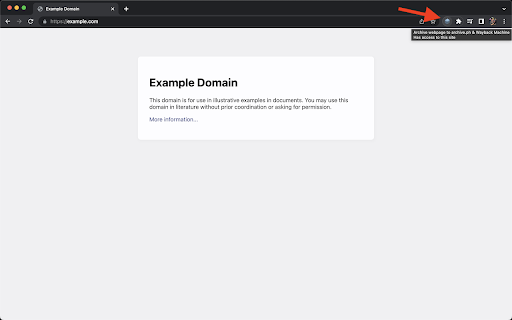
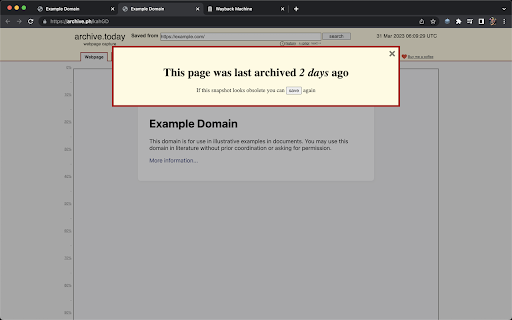
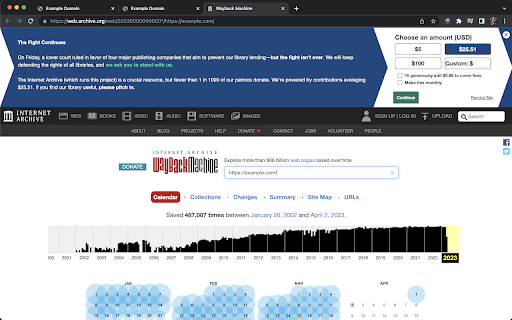
A simple one-click button to archive webpages on archive.ph and the Internet Archive Wayback Machine. A simple one-click button to archive webpages on archive.ph and the Internet Archive Wayback Machine. Ever wanted to visit a website but it's not available? Whether it's either offline or the website is currently broken, it can be frustrating if the content is not available. To avoid issues like this, there is a class of services that have sprung up which save copies of websites and allow you to visit them again later. Archive.ph (aka archive.today) and the Internet Archive's Wayback Machine are two such services. Use this extension to help prevent link rot and allow others to view archived versions of pages!

Web Archives
View archived and cached versions of web pages on various search engines, such as the Wayback Machine and Archive.is. Web Archives is a browser extension that enables you to find archived and cached versions of web pages. Searches can be initiated from the context menu and the browser toolbar. Web Archives is an open source project made possible thanks to a community of awesome supporters. If you'd like to support the continued development of the extension, please check out https://armin.dev/go/patreon A diverse set of archive and cache sources are supported, which can be toggled and reordered from the extension's options. Visit the wiki for the full list of supported search engines. PRO TIP: search for a link without visiting the web page by right-clicking on the link and searching from the context menu. A handful of search modes are offered that serve different use cases. The search mode can be set independently for the context menu and the browser toolbar from the extension's options. Search modes: • Tab: search for the web page opened in the active tab. This is the default search mode. • URL: search for a custom page URL. The extension is also available for Edge and Safari: https://github.com/dessant/web-archives#readme The URL you select during a search is sent to the requested service, such as the Wayback Machine. Visit the extension's privacy policy for more information. Reviews are not monitored for bug reports, please use GitHub for issues and feature requests.

Wayback Machine Link-Checker
Right-click any link or page to check its Wayback Machine archive. Browse cached snapshots, view the timeline, save pages locally. Wayback Machine Link-Checker is a browser extension that enables you to check if the webarchive - wayback machine as an older version of a link available. Simply right-click on a link and select the "Check Wayback Machine" submenu item. If you like the extention and find it useful - feel free to buy me a coffee and support me: https://bmc.link/gaidamarcel

Archive Page
Archive webpage with Archive Today Adds a button to the Chrome toolbar. When clicked, it sends the URL of the current tab to Archive Today to preserve a snapshot of the page, and opens the result in a new tab. NEW: Direct action Shortcuts (with optional Tabs permission) NEW: Customizable Toolbar Button Choose your preferred action for the toolbar icon: • Dropdown Menu: Quick access to Search, Archive, and Options. • Direct Search: Instantly search the current page URL. • Direct Archive: Instantly archive the current page. Features: • Archive Today Integration: Sends the current tab URL to Archive Today to preserve a snapshot and opens the result in a new tab. • Context Menus: Includes Link context menu to Archive or Search, and a Page context menu to Search. • Customizable Behavior: Options to control if the new tab opens adjacent to the current tab, at the end of the tab strip, or replaces the current tab (archive only). • Tab Activation: Control whether new Archive or Search tabs are activated immediately. • HTTPS Security: Uses HTTPS for all archival and search transmissions. • Keyboard Shortcuts: A custom shortcut can be created to archive the current page instantly. (Archive Today is a time capsule for web pages. It takes a 'snapshot' of a webpage that will always be online even if the original page disappears. It saves a text and a graphical copy of the page for better accuracy and provides a short and reliable link to an unalterable record of the web page.) Consent: By using this extension, you consent to sharing your Archive or Search URL with Archive Today when initiated by you. This extension does not otherwise collect or share any user data. Notes: 1. If you get an error, try again later. It's NOT an extension issue—Archive Today sometimes gets overwhelmed. 2. CloudFlare DNS may not resolve Archive Today; if you experience DNS errors, try a different DNS server (e.g., Quad9). 3. For similar functionality on Android, check out Share2Archive in the Play Store. What's New in 1.6.1: * Verify limited permissions update. What's New in 1.6.0: * Restore more limited permissions! What's New in 1.5.1: * Fix Activate Option * Fix Startup Options What's New in 1.5.0: * Direct action Shortcuts (with optional Tabs permission) * Squash some small bugs. What's New in 1.4.9: * Fix activation options. What's New in 1.4.8: * Show Welcome screen only for significant extension releases. What's New in 1.4.7: * Removed redundant optional update notification * Bug fix What's New in 1.4.6: * Change in permissions to avoid silent disabling. What's New in 1.4.5: * Change in permissions to avoid silent disabling. • New Welcome Experience: Dedicated onboarding page for new features and privacy settings. • Customizable Toolbar Actions: Toggle between Dropdown menu, Search-only, or Archive-only modes. • Streamlined Context Menus: Removed redundant right-click items for a cleaner interface. • Auto-Save Options: Settings now save immediately upon change; the "Save" button is now "Close". • Fixed Extension Removal: Restored "Remove" button functionality in Options and Welcome pages. Disclaimers: • Use at your own risk. No liability is accepted for any loss or damage. • This extension is not affiliated with Archive Today. • Trademarks are the properties of their respective owners.

Wayback Machine URL Search
Search the Internet Achieve Wayback Machine for a URL or hyperlink Wayback Machine URL Search lets you quickly find archived versions of URLs via the Internet Archive's Wayback Machine. Right-click any link or selected URL, choose "Wayback Machine URL Search," and instantly explore the web page's history in a new tab.
