
dmpilgggihplnobnhaleacokpfmcnahm

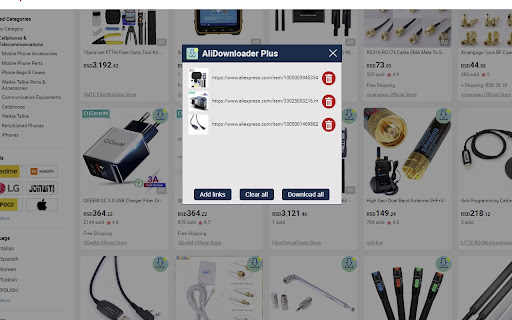
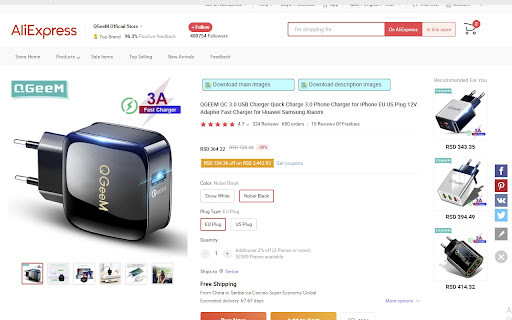
Download product images for your ecommerce. Download AliExpress images and videos. Get all the images of the product. Main, variant, description, feedback images. - Download all images and videos directly from category page without going to product page - Import links or make download list of products, and get all the images on one click By installing the "AliDownloader Plus" extension, you allow the extension to redirect to affiliate program links, including Aliexpress .

AliSave | Download AliExpress Images & Videos
Save Aliexpress Images & Videos. The most popular tool for AliExpress & Alibaba! This extension allows you to easily save AliExpress images and videos to your computer. You will be able to download product images in one click with the best quality possible! 1. Install the extension by clicking the “Add to chrome” button. 2. Open an AliExpress product page. 3. Click on the download buttons next to the product images. You can also the app window by clicking on the icon on the top right of your browser and start downloading! FREE version: - Download main product images, variations images and pictures from description - Save images as ZIP (it’s useful to keep a clean download folder) - Get the best quality image download - Convert webp images to jpg PRO version: - Support all features on AliExpress AND Alibaba! - Save time and download ALL images in one click - Organise downloads with subdirectories - Open download directory after download - Remove images metadatas - Right click to download images with the BEST QUALITY possible - Right click to download REVIEW images - Save product’s VIDEOS If you have any questions, or suggestions to improve the app, please let us know at support@alisave.app! The extension is NOT affiliated with or endorsed by Alibaba Group or any of the other marketplaces like aliexpress.com and alibaba.com

AliSave Plus - Download AliExpress Images
Download Aliexpress Product Images & Videos. The most popular tool for AliExpress! This extension allows you to easily save AliExpress images and videos to your computer Must have for dropshipping business [GETTING STARTED] 1. Install the extension by clicking the "Add to chrome" button. 2. Open an AliExpress product page. 3. Click on the download buttons. [FEATURES] - Download main product images, variations images and pictures from description - Get the best quality image download - Convert webp images to JPG - Remove images metadatas - Save product's video - HTML product description - Download a text file with product information. - Works for both aliexpress.com and aliexpress.ru! [ ___ HOT ___ FEATURES] - Download as .ZIP. - Search similar products by image on AliExpress. - Download images one by one (right click). - Watermark: Automatically adding watermark on image download. - Compress images with the best quality and compression. - Real photos: product photos from customer feedbacks and product reviews. If you have any questions regarding privacy protection when using the service, please contact us by email at [alisaveplus@gmail.com]

AiPrice | Download AliExpress Images & Videos
Download AliExpress Images & Videos in One Click – More Powerful And Free Save product images, variation images, description images, review images and videos from AliExpress with the best possible quality. Perfect for dropshippers, e-commerce sellers, and product researchers. 🚀 Getting Started (3 Steps) Install the AliPrice extension Open any AliExpress product page Click the download buttons next to images or videos That’s it. No setup needed. 🌍 Currency Converter for global sellers 📁Screenshot & Page Translation 📁 Export products, reviews, SKUs, and shopping carts to Excel 🚚 Shipping fee checker & logistics tracking ⚠️ Disclaimer AliPrice is not affiliated with or endorsed by Alibaba Group or AliExpress. By installing this extension, you agree to the AliPrice Terms of Service: https://www.aliprice.com/information/index?page=term_of_use 📩 Need Help? Contact us anytime: https://www.aliprice.com/information/index?page=contact

AliDown - Aliexpress & AliBaba Images & Videos Downloader
One Click: Aliexpress & AliBaba Images & Videos Downloader for Dropshippers. AliDown Chrome Extension: Download Images and Videos from AliExpress and Alibaba AliDown is a powerful and user-friendly Chrome extension designed to make downloading images and videos from AliExpress and Alibaba quick and effortless. Whether you’re a dropshipper, online seller, designer, or just someone who loves saving product media for inspiration, AliDown is the perfect tool for you. With its intuitive interface and seamless functionality, AliDown simplifies the process of downloading high-quality images and videos from product pages. In this detailed description, we’ll cover everything you need to know about AliDown, including its features, how to use it, FAQs, and an affiliate disclaimer. Features of AliDown Easy Image and Video Downloads AliDown allows you to download all images and videos from AliExpress and Alibaba product pages with just one click. No more manually saving each file! Batch Downloading Save time by downloading multiple images and videos at once. AliDown compiles all media files into a single zip file for easy organization. High-Quality Media Download images and videos in their original, high-resolution quality, ensuring you get the best possible files for your needs. Lightweight and Fast AliDown is a lightweight extension that works seamlessly in the background without slowing down your browser. No Data Collection Your privacy is our priority. AliDown does not collect, store, or share any user data. Free to Use AliDown is completely free to download and use. We rely on affiliate support to keep the extension free for everyone. User-Friendly Interface The extension integrates seamlessly into your browser, adding download buttons directly to AliExpress and Alibaba product pages. Affiliate Support By using AliDown, you’re supporting the developers through affiliate links, which help maintain and improve the extension. How to Use AliDown Using AliDown is simple and straightforward. Follow these steps to start downloading images and videos from AliExpress and Alibaba: Step 1: Install AliDown Open the Chrome Web Store and search for AliDown. Click on the Add to Chrome button to install the extension. Once installed, the AliDown icon will appear in your browser’s toolbar. Step 2: Visit a Product Page Go to AliExpress or Alibaba and navigate to the product page you’re interested in. Ensure the page has fully loaded so that all images and videos are visible. Step 3: Download Media Files On the product page, you’ll see download buttons added by AliDown next to the images and videos. Click the Download button to start the process. AliDown will automatically gather all the images and videos and compress them into a zip file. Step 4: Save and Organize Once the download is complete, locate the zip file in your computer’s download folder. Extract the zip file to access the images and videos. FAQs About AliDown 1. Is AliDown free to use? Yes, AliDown is completely free to download and use. We rely on affiliate support to keep the extension free for everyone. 2. Does AliDown work on both AliExpress and Alibaba? Yes, AliDown is compatible with both AliExpress and Alibaba product pages. 3. Does AliDown collect or share user data? No, AliDown does not collect, store, or share any user data. Your privacy is our top priority. 4. Can I download videos with AliDown? Yes, AliDown supports downloading both images and videos from product pages. 5. How do I install AliDown? You can install AliDown from the Chrome Web Store by searching for the extension and clicking Add to Chrome. 6. What happens if a download fails? AliDown will notify you if any items fail to download. You can retry the download or check your internet connection. 7. Can I use AliDown on multiple devices? Yes, as long as you’re signed in to your Google account, you can use AliDown on any device with Chrome installed. 8. How do I update AliDown? AliDown updates automatically through the Chrome Web Store. You can also manually check for updates in your browser’s extension settings. 9. Does AliDown support batch downloads? Yes, AliDown allows you to download multiple images and videos at once, saving them in a single zip file. 10. How can I support AliDown? You can support AliDown by using the affiliate links provided within the extension. This helps us maintain and improve the tool. Affiliate Disclaimer AliDown participates in the affiliate program, a partnership with AliExpress and Alibaba. This means that some of the links within the extension may be affiliate links. When you click on these links and make a purchase on AliExpress or Alibaba, we may earn a small commission at no additional cost to you. These commissions help us maintain and improve AliDown, ensuring that we can continue to offer it to you for free. We want to assure you that AliDown does not collect, store, or share any personal data from our users. Your privacy is important to us, and we are committed to protecting it. By using AliDown and clicking on affiliate links, you are supporting the development and maintenance of this extension. We greatly appreciate your trust and support, which enables us to continue providing this service to you. Why Choose AliDown? Efficiency: Save time by downloading all images and videos in one click. Quality: Download high-resolution media files for professional use. Privacy: No data collection or sharing ensures your information stays secure. Free: AliDown is completely free to use, with no hidden costs. Support: By using AliDown, you’re helping us improve and maintain the extension. Final Thoughts AliDown is the ultimate tool for anyone who shops on AliExpress or Alibaba and wants to save product images and videos effortlessly. With its user-friendly interface, fast performance, and commitment to privacy, AliDown is a must-have Chrome extension for dropshippers, designers, and online shoppers alike. Download AliDown today and experience the convenience of downloading high-quality media files with just one click. If you have any questions or feedback, feel free to reach out to us. Happy downloading! Disclaimer: AliDown participates in the AdmitAd affiliate program. When you click on affiliate links and make a purchase, we may earn a small commission at no extra cost to you. This helps us maintain and improve the extension. Thank you for your support!
