
dmlmenebejdemdbmgldkpckfbmijlchh
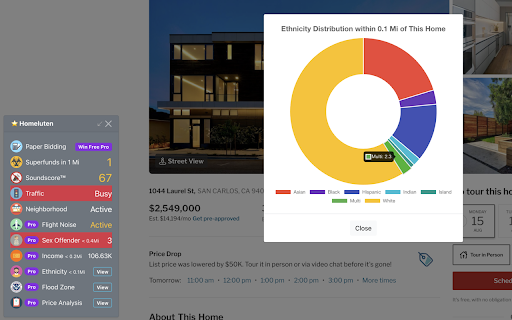
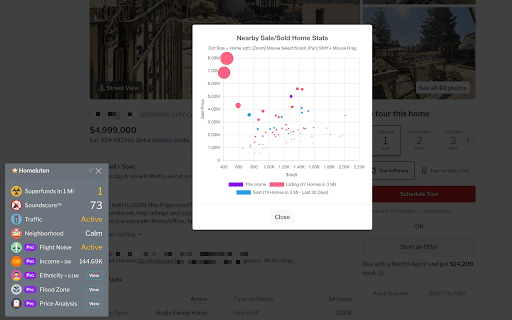


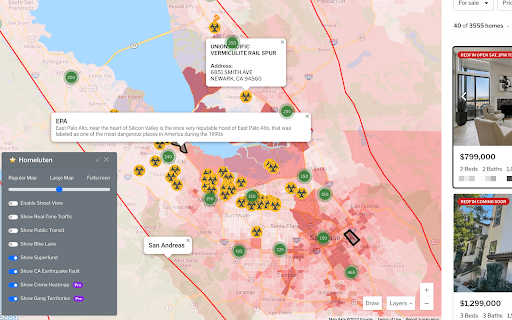
Help you make an informed real estate decision by showing extra data like nearby Natural Hazards and Crimes. Homeluten is a feature-rich Chrome extension that makes your real estate search experience 100x better. No matter you are trying to buy or rent your next place, we help you make an informed real estate renting / buying decision by showing extra data on real estate websites like zillow.com, redfin.com and realtor.com. We do so by adding lots of additional enhancements like neighborhood information such as street view and local traffic data, noise level and crime map etc. to your regular Redfin, Zillow, Realtor website experience. It also highlights critical hazards like Superfunds so you can avoid those no-no homes before wasting time doing a comprehensive research. We've recently added neighborhood median income and ethnicity data to further help your real estate search. ========= Listing Data Enhancement ========= (works on Redfin, Zillow, and Realtor) - HAZARD ALERT - We will alert you if any home you are viewing is close to known EPA Superfunds. Give you peace of mind when you are looking for your next dream home. - HIGH VOLTAGE POWER LINES AND TOWERS - You will be able to view high voltage power lines and power stations across the United States, so you can be aware of the power infrastructures around the house without having to tour it in person. - CELL PHONE TOWERS - Be able to see all the FCC registered cell phone towers on the map. - NOISE LEVEL AT ANY HOME - We will show you the noise level of any home that you are viewing. This includes traffic noise at street level, neighborhood noise (think about bars, shops, etc.), and whether the home will experience any flight noise because of nearby airports. - NATIONAL REGISTERED SEX OFFENDER - Kids safety matters. We will show you the number of registered sex offenders nearby, and alert you if they live within 0.5 Miles of any home that you are viewing. - LOCAL MEDIAN INCOME - We will show you the area median income of any given home. This income data is pulled from the 2020 Census report. - NEIGHBORHOOD ETHNICITY - We will show you the ethnicity distribution at block level of any given home. This ethnicity data is pulled from the 2020 Census report. - PRICE ANALYSIS - See the price distribution of recently listed, pending and sold homes in the area, so you can make an informed decision when putting your offers together. If you are renting, you can get a sense of how much it would cost for you to buy a home, sometimes you might be surprised that you could just buy a home vs rent. - PAPER BIDDING - Practice your home pricing skills with our virtual bidding platform. Submit as many virtual offers as you want, we will send you an email once the home is sold, so you can practice your bidding skills without having to risk any of your real money. Overpaying for real estate is an expensive lesson that you don't want to learn it the hard way, let us help. ========= Map Data Enhancement ========= (works on Redfin.com and our Web App https://web.homeluten.com/) - NATIONAL REGISTERED SEX OFFENDER - Kids safety matters. We will show you the registered sex offenders on the Redfin map, so you can make an informed home buying/renting decision. - CRIME HEATMAP - We will show an enhanced crime heat map overlay on the regular real estate search map, so you can better understand each neighborhood's safety situation. - EPA SUPERFUND SITES ON MAP - This extension will show official EPA Superfunds right on the map to help you narrow down the homes that are away from those hazard areas. - NATIONAL-WIDE GANG TERRITORIES ON MAP - We've collected the gang territories in major US cities, so you can learn about the potential neighborhood that you are interested in. - NATIONAL HIGH VOLTAGE POWER TRANSMISSION LINES AND STATIONS - See the power transmission lines and power stations on the Redfin map. - FCC REGISTERED CELLULAR STATIONS - See the FCC registered cell phone tower stations on the Redfin map. - CALIFORNIA EARTHQUAKE FAULTS - We will show CA earthquake faults right on the map so you can avoid properties that sit on the fault zone. - PUBLIC TRANSIT DATA - Be able to see public transit data anywhere on the map, so you can make an informed decision when it comes to choosing where to live. - REAL-TIME TRAFFIC DATA - We've added real-time traffic data so you can easily check the traffic situation in any neighborhood or area. - LARGER OR FULLSCREEN MAP - You will be able to make the map larger, so it is easier than ever to find the listings you like. You can even make the map full screen if you want. All your preferences are securely stored in our extension, so everything will just be the same way you liked it whenever you open up Redfin's website. We don't upload your personal preference or information online. - STREET VIEW - With Homeluten, you will be able to enable street view on the map search page so you can check the neighborhood right on the map, without having to click through individual listings. - BIKE LANES - For those who love biking, this extension will show the bike lanes on the map so you can locate homes that are biker-friendly. Privacy Disclaimer: We don't sell your data. We do NOT collect any personally identifiable information other than the email address, which is essential when signing up for an account with us. Your email address will only be used for account authentication and transaction communication purposes. Your data will be securely transmitted to our server encrypted via a secured connection (SSL). You can find our complete data privacy terms here: https://homeluten.com/d/4-privacy-policy-of-homeluten

SFR Spotter
The extension helps you find a profitable Single Family Rental on Zillow. Whether you're in wholesaling or a buy-and-hold investor, SFR spotter is the tool for you. Save your time and money by using this extension to "spot" profitable rental properties amongst Zillow search results without having to open each listing's individual page. The extension goes behind the scenes to get the rent Zestimate, does the math for you and present you with cash-on-cash ROI based on your preselected financial criteria. This is done for a whole page of results at a time. Just enter your financial preferences into the extension (down payment, mortgage plan and interest rate, insurance, ... etc), press the "Scout" button and voila!. Seconds later you'll see the expected ROI of each listing in the results right on top of its picture. You can also get into each property page to see a break down of the numbers in two scenarios: a) if you get the property on the asked price, and b) if you get it on Zestimate price. Important to know: - You'll need to sign up before you are able to use the extension. No credit card needed to sign up. - The SFR Spotter extension is in beta and it's free to use till further notice. - For now, the extension works only on Zillow. New sites are coming soon. - You no longer need a Zillow API key to run the extension. Please visit our website for more info and a detailed how-to guide to use the extension.

Z Real Estate Scraper for Zillow
Extract and save Zillow properties data and leads with no code to CSV or Google Sheet. This extension extracts the most comprehensive data from Zillow's real estate listings with one click and no code. You can download the data as a nicely formatted CSV file or Google Sheets organized by price, address, zip, # of beds, baths, square footage, price per square footage, listing URL, etc. for rentals, sold properties, ones for sale, LEADS (owner contact info, agent contact info, etc.) year built and more. It's a very simple extension that is easy to use and gets the job done. 🧪Core Features: ✔️Scrape unlimited Zillow real estate listings from the website - For sale - Sold - For rent - Saved Homes (Favorites) - Real estate agent directory (/professionals/real-estate-agent-reviews) - Mortgage lenders directory (/lender-directory) ✔️Automatically navigate search result pages ✔️Download data into a formatted CSV file or Google Sheets including: - Price - Address, Beds, Baths, Sq. Footage - Listing URL - Price per Footage - Latitude/Longitude - Broker Name - Status (i.e. For sale?) - Property Type (i.e. Condo, SFH, etc.) - Lot Area Size - Rent Zestimate, Actual Rental Price Range - Zestimate - Tax Assessed Value - Latest Price Changes - Date Sold - Time on the Market - Days on Zillow ✔️Customize CSV/Google Sheets exported data format and columns ✔️Extract leads and much more detailed information from individual listing pages: - Listing agent(s) phone and email - Owner phone and email - Mortgage lenders phone and website - HOA fees - Most recent tax assessment value, property taxes - Year built - Garage capacity, # of stories, heating, cooling, and more... ✔️No coding or technical knowledge needed. It's super easy to use! Save hours sending letters of intent to leads! Try Bulk LOI Sender for FREE: https://workspace.google.com/marketplace/app/bulk_loi_sender/313947552675 🔒Permissions: We understand there may be questions regarding the permissions needed to use the extension. We aim to be as transparent as possible hoping to inform you that we have absolutely no intent of using the access you grant to your browser maliciously. Follow the link below to read on: ⭐ How To Use: The extension popup has 3 buttons that control the entire functionality of the app. Each button is to scrape the webpage, clear the data to scrape from scratch, and download the CSV file or save to Google Sheets respectively. To extract data, follow these steps: 1. Go to Zillow.com and search for a location (i.e. Chicago) 2. Open up the extension and click "Scrape". Don't close the pop up while it works. 3. To scrape the next page, left click on page 2 (or automate this in the settings). 4. Then, repeat step 2. (Click "Download" when you're ready to download the data to CSV or Google Sheets) For more info, please see the YouTube video above to learn how to use the extension. If there are any questions or other issues, please contact support@proptierio.com. Also, check the how-to page: https://proptierio.com/blog/z-real-estate-scraper-chrome-extension or the support page: https://proptierio.com/blog/z-real-estate-scraper 🏷️Pricing: Upon installation of the extension, the user will be able to use the basic and free version of the extension indefinitely. This limits the scraped listings to the first 50 listings per page (downloadable CSV file is available with the basic version). Upgrade to the premium version to enjoy scraping unlimited listings from Zillow's website (and other awesome features). 📚Terms and Conditions: By using this extension, you agree to the terms here: https://proptierio.com/legal/z-real-estate-scraper-terms ✋Important: Read more about the extension and its usage here: https://proptierio.com/blog/z-real-estate-scraper-chrome-extension 📘 Change log: 5/25/2026: Fix minor bugs, add foreclosure data for extraction 4/30/2026: Improve automation UIUX 4/24/2026: Fix lot area download from search results 4/15/2026: Fix lot area unit extraction 4/13/2026: Improve error logging and analytics, harden data extraction 4/8/2026: Fix minor UI elements 4/5/2026: UIUX improvement and migration to proptierio.com 3/13/2026: Fix minor bugs 3/6/2026: Improve single page data extraction 3/1/2026: Fix FSBO phone number extraction 2/25/2026: Improve support for newer Zillow format pages 2/15/2026: Minor bug fix 1/29/2026: Refactor code, minor bug fixes 1/26/2026: Fix professionals search result page extraction 1/22/2026: Improve rentals extraction to get per unit data 1/15/2025: Fix professionals search result page extraction 1/03/2025: Fix certain extraction fields, improve scrape 11/12/2025: Fix rental data extraction bug 11/10/2025: Fix minor bug 10/30/2025: Improve oauth flow 10/23/2025: Improve analytics 10/18/2025: Fix most recent listed sale price extraction 9/26/2025: Fix school ratings extraction 9/24/2025: Add most recent listed sale price to data output 8/16/2025: Fix large extraction due to recursion bug 7/23/2025: Fix individual listing page extraction due to Zillow data structure change 6/23/2025: Fix agent directory data extraction 6/20/2025: Add buyer agent name to extraction 6/2/2025: Minor UIUX improvements 5/24/2025: Last date sold extraction bug fix 5/20/2025: Implement side panel, improve UIUX 5/9/2025: Improve date sold extraction, minor UIUX improvements 4/25/2025: Improve purchase flow 4/15/2025: Fix lender directory scrape bug 4/10/2025: Support extract mortgage lenders directory 2/26/2025: Fix saved homes data extraction. 1/27/2025: Minor UIUX improvements. ... 10/25/2022: Initial publish.

Comp Crunch (Analyze Zillow Data)
Get insights on your Zillow search in just a few clicks! With the Comp Crunch Chrome extension, you can easily analyze and/or export any Zillow search. This saves you time spent talking to real estate agents or laboriously copy and pasting data points into excel! We offer the ability to export your Zillow search data as either a PDF or CSV file. Additionally, we provide a quick summary of your searched area by showing the average, median, 25th percentile and 75th percentile prices of the results in your search. You also can see how sold homes have trended in an area over time. How to use (free plan): 1. Conduct your search like you normally would in Zillow 2. Open the Comp Crunch chrome extension 3. Click the "Get Results" button to search over an area 4. Click the "Export CSV" button to export the data as a CSV file or the "Export PDF" button to export results as a PDF If using a paid plan, you can also get advanced results How to use (paid plan): 1. Make sure you have setup a paid account (if not, visit https://www.compcrunch.com/pricing) 2. Conduct your search like you normally would in Zillow 3. Open the Comp Crunch chrome extension and login to your account 4. Click the "Get Results" button to search over an area 5. Click the "Get Advanced Results" button in the extension to initiate a pro export 6. Visit your reports page available at https://app.compcrunch.com/reports to see your advanced results You also can, of course, use all the free features as much as you'd like with a pro plan. *Currently the pro export only supports exporting 250 urls at a time Want to search over a new area? Simply update your search criteria or search boundary, open the chrome extension and click the "Get Results" button again. What type of properties can I analyze? Properties for rent, sale and recently sold properties are all available. We also have introduced the ability to export saved homes. What data points are included? * Beds * Baths * Price (sold and for sale listings only) * Rent (rental listings only) * Date Sold (sold listings only) * Date Sold Numeric (sold listings only) * Sqft * Price Per Sf (sold and for sale listings only) * Rent Per Sf (rental listings only) * Lot Area (sold and for sale listings only) * Lot Area Type (sold and for sale listings only) * Address * Zip Code * City * State * Zillow Url * Latitude * Longitude * homeType * Zestimate * Rent Zestimate * imageUrl Looking for more data? Upgrade to our pro plan. You can see what pro fields are available here: https://www.compcrunch.com/pricing Note that each search result will return as many as 500 listings but possibly less. If you would like to capture all listings, keep changing your search criteria and exporting until you've gathered all your results. Does this cost any money? Nope! While there may be some paid features down the road, all features described above are completely free! Disclaimer: Comp Crunch does not own any of the data displayed in the extension. It simply makes this data easier to analyze and understand. Comp crunch has no affiliation with Zillow.com nor any of its intellectual property. All data and Intellectual property belong to Zillow.com and its owners. Listing data is bound to the data provided by Zillow and may be incomplete. Comp crunch is not legally responsible for the accuracy of the data provided and all information should be double checked.

Offer.love - Bank Merchant Card Offer Collector
Add all your Amex BoA Chase Citi US Bank Paypal offers with a single click, and get notified when you are on offer-eligible websites Collect all your Amex / Chase / BoA (Bank of America) / Citi / Paypal Offers with a single click, and receive notifications when you visit websites that are offer eligible. You can search all your added offers and available offers at https://offer.love/ === How to Use === 1. Open your Bank or Merchant offers dashboard 2. Load the all offers page 3. Click on the extension icon, then click Start 4. Enjoy! You will also receive a pop-up banner to remind you about your saved card offers when you are on an offer-eligible merchant website. That's it! Thank you. Please see the screenshots for details. * Offer.love is not affiliated with any Banks or Stores mentioned above
