
dmlaldcdniomijdemigppfldkdahphib

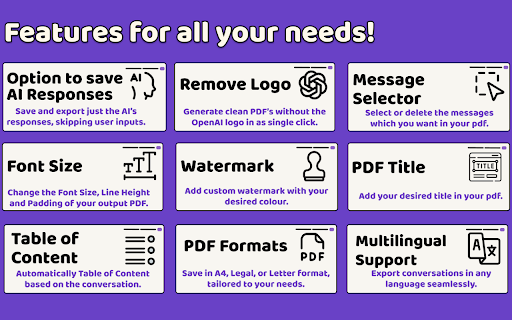


Use ChatGPT to PDF extension to save Images, Math Equations, Save AI responses, tables. Convert ChatGPT to PDF and doc in one click! Introducing the perfect tool to efficiently manage and Save ChatGPT as PDF files or Doc Files, ensuring you can easily keep a detailed record of all your interactions. Whether you're looking to save for future reference or share critical insights with colleagues, this extension is the perfect companion to export your chats to pdf. With just a few clicks, you can convert chat to pdf, securely storing all your essential conversations for easy access anytime. ❇️ Key Features ❇️ - With just a click, you can save as PDF or Doc in a format that is easy to share and reference. - This extension processes everything on your device, offering complete privacy. - This extension is incredibly lightweight, making chat conversions quick and smooth. - The extension integrates perfectly with Chrome, enabling you to export chat conversation instantly. - Don’t need the entire conversation? No problem. The extension export feature lets you select specific parts of your chats. - Tailor your pdf exports to fit your preferences, choosing between page formats like A4, legal, and letter sizes. 🚀 Easy Installation Process Getting started with extension is quick and simple. Head over to the Chrome Web Store, search for the extension, and click install. Within moments, you’ll be ready to save Chat conversations and enjoy the convenience of exporting files. Once installed, you'll see how easy it is to print and preserve your important conversations in PDF format. 🌐 Seamless Browser Integration The extension integrates smoothly with your browser, offering an intuitive user interface that makes saving chat to pdf conversion effortless. There’s no need for additional software or complicated setups the extension works directly with your OpenAI account, allowing you to quickly save chat as PDF files. You can print chats to pdf in a matter of seconds, simplifying your workflow and saving time. 📤 Simple Export Process Exporting conversations is now easier than ever. With this extension, you can choose to save entire conversations or specific sections that matter most to you. Whether you're documenting business discussions or preserving brainstorming sessions, Chats can be exported in just a few steps. The extension offers additional customization options, making it easy to tailor your exports to suit your needs. 💡 Top Benefits for Users Why should you use ChatGPT to PDF and Doc extension? Here are some key advantages: 1️⃣ Easily save important information from your conversations with extension. 2️⃣ Share your conversations in a universally accepted format by using the extension. 3️⃣ Keep a backup of valuable discussions for future reference with downloaded conversation. 4️⃣ Enhance your productivity by having a record of past interactions, accessible through Chat GPT export. 5️⃣ Improve collaboration by sharing pdf files with your team, taking advantage of the extension which is free. 📚 Versatile Use Cases The extension is suitable for a wide variety of users: ➤ Business professionals can archive key meetings and generate PDF reports. ➤ Students can store study sessions or lecture notes using the extension to convert chats to PDF. ➤ Researchers can save detailed conversations for analysis and documentation with Chat GPT extension. ➤ Writers can preserve brainstorming sessions and drafts in pdf format. ➤ Customer service representatives can maintain records of support chats. 🛠️ How to Use the extension to Save chats as PDF a Step-by-Step Guide? Here’s how to get started: ➤ Install: Visit the Chrome Web Store, search for ChatGPT to PDF and Doc, Open the extension and click “Install.” ➤ Open ChatGPT: Start or access any conversation in your interface by logging in to your account. ➤ Click the Icon: In your browser toolbar, click the extension icon, and it will immediately start the export process. ➤ Now Choose the parts of the conversation that you want to include in your export to customize your PDF. ➤ Adjust the layout, such as paper size and formatting for your needs, and then click "Save" to generate your personalized PDF. ➤ Once your PDF is generated, you can easily download it to your device & share it with others via email, or via messaging platforms. ➤ The simplicity of the process ensures that anyone can export the conversations, this makes the tool highly accessible for all users. ➤ Whether you need to save chat as pdf for record-keeping or print the chats for presentations, this offers a quick, hassle-free solution. 🛡 Privacy and Security Your privacy is paramount. All conversations saved are stored locally on your device, ensuring that your data remains secure and private. The AI PDF generator ensures your files are processed on your local machine, adding an extra layer of privacy. 📈 Boost Business Efficiency With the extension, you can streamline documentation, improve team collaboration, and maintain detailed records of conversations. Save conversations with ease, increase productivity, and stay organized. Whether for project management or customer service, this extension simplifies record-keeping and enhances your workflow. 📂 Organize Your Conversations The extension helps you keep all your conversations organized and easily accessible. Whether you’re saving business insights or personal interactions, you can retrieve your files anytime. The AI PDF generator ensures your conversations are stored securely, allowing you to access them whenever needed. 🌟 User-Friendly Interface Designed for a seamless experience, the extension's clean and intuitive interface allows users to quickly navigate and export their conversations. You can easily save chat gpt conversations and print them as needed, all with minimal effort. With the extension, managing your AI-generated conversations has never been easier. Start today and experience the simplicity of saving, sharing, and organizing your interactions. 🌐 Why Save as PDF? The extension offers more than just basic conversation export. It provides an all-in-one solution for exporting conversations in a professional format. Whether you’re a student, business professional, or content creator, this tool makes it incredibly easy to save chat as pdf and keep your conversations organized. Use it to export, organize, and share your conversations in a universally accepted format. 💼 Boost Your Productivity with Key Benefits The extension brings numerous advantages to professionals, students, and everyday users. Maintain a well-organized archive by effortlessly exporting chat conversations. Easily distribute your saved documents to colleagues, friends, or clients with a few clicks. Quickly access past interactions to retrieve important insights and optimize your workflow. Use saved Chats to keep your team informed and engaged, ensuring everyone is on the same page. By enabling seamless Chat to PDF conversion, this tool is designed to meet the needs of users across various industries, enhancing both individual and team productivity. 📚 Ideal Use Cases for the Extension Whether you're in business, education, research, or customer service, the extension offers solutions tailored to your needs. Save meeting notes or critical discussions, and create detailed PDF reports using the extension. 🛡️ Privacy and Performance Rest assured that all your data is processed locally, and no information is stored on external servers, making this tool both secure and reliable. The chat to pdf extension guarantees smooth performance without compromising your privacy. 🌍 Global Reach and Easy Access No matter where you are, the extension provides a seamless experience for exporting, organizing, and sharing your chats into pdf files. Take control of your conversations today with the extension, the most efficient way to manage and archive your AI-generated interactions. ❇️ Advanced Features for the extension ❇️ ★ Customizable PDF Styles : Tools and extensions allow users to customize the style and layout of their PDFs. This is especially useful for people who need to present the document professionally. You can choose between different page sizes, add headers or footers, and even include annotations. ★ Selective Conversation Export : Some tools allow you to export only specific parts of a conversation to PDF. This is a great feature for those who need to save only the most important segments of a chat. Instead of exporting the entire conversation, you can filter and download only relevant sections. ★ AI-Enhanced Formatting : Further enhance the formatting of your documents, ensuring the text flows naturally, is visually appealing, and even includes suggested improvements. These tools can make your exported conversation not only readable but also professional and polished. ➤ How to save ChatGPT as PDF? ✅ Simply install the extension, click the icon after your conversation, select what you want to save, and generate the PDF with ease. ➤ Can I print chats to PDF? ✅ Yes, the extension has a ChatGPT to PDF feature for easy conversion of chats into printable documents. ➤ Is the extension secure? ✅ Absolutely. Your files are saved locally, ensuring complete privacy and data security. ➤ What are the supported devices? ✅ The extension is compatible with desktops, laptops, and other devices, ensuring wide accessibility. ➤ Is the extension Free? ✅ Completely free to use extension. 🛠 Support, Feedback and Feature Suggestions Need help? Our support team is available 24/7 to assist you with any questions or issues. Reach out via email, and we’ll guide you through using the extension to its full potential.

AI Exporter: Save ChatGPT, Gemini to PDF, Word, MD and Notion
Export ChatGPT, Claude, Gemini and NotebookLM chats to PDF/Word/Markdown/Txt. Supports content selection, and Notion sync, download. 📌 Introduction Want to save your AI conversations forever? AI Exporter is a professional browser extension supporting 10+ major platforms including ChatGPT, Gemini, Claude, and NotebookLM. With just one click, export your AI chats perfectly to PDF (Latex supported), Word, Markdown (MD), JSON, Image, or sync directly to Notion. Never worry about losing your chat history again. Archive, share, and edit your AI knowledge assets with ease. 🔥 Popular Features 🆕 Precise Timestamps: Automatically extracts and displays the exact creation time of each session, making your history fully traceable for better timeline management. 🆕 Super-Long Chat Export: Engineered to handle massive conversations effortlessly without crashing or truncating, ensuring every detail of your deep dives is captured. 🆕 Accurate Model Versioning: Displays the specific AI model version used in each session (e.g., Gemini 3 Pro, ChatGPT 2.5 thinking) in exported docs, making academic research and sourcing more rigorous. 🆕 Cross-Platform Collection: Sidebar mode lets you save chats locally with one click for multi-model comparison and merged exports. 🆕 Deep Research Export: Full support for downloading content from ChatGPT Deep Research and Gemini Deep Research modes. 🆕 Stylish Templates: Choose from Highlight, Dark, Note, and other beautiful templates for a professional look. 🆕 Extensive Compatibility: Supports 10+ sites, including DeepSeek, Perplexity, Copilot, Google AI Studio, and more. ✨ Powerful Export Experience ✅ Perfect PDF Layout: Automatically handles Latex formulas and code highlighting while maintaining the native UI feel. ✅ Sync to Notion: Seamlessly bridge AI and your knowledge base by turning chats into Notion pages instantly. ✅ Flexible Selection: Skip the fluff—select only what you need with multi-selection support. ✅ Image & Text Preservation: Perfectly retains images and charts; supports generating long-image sharing cards. ✅ Local Knowledge Base: Save important AI inspirations to a local database for instant offline preview. ✅ Search Overviews Backup: One-click backup for Google Search AI Overviews results. 📌 Why Choose AI Exporter? 👨💻 Community Focused: We listen to user feedback with frequent updates for a reliable experience. 🎓 Academic Friendly: Precisely identify and export academic discussions with complex Latex formulas. 👨💻 Dev Empowered: Export Markdown with one click; code snippets can be seamlessly integrated into your docs. 📊 Knowledge Accumulation: Quickly backup data analysis and reports to build your personal AI think tank. 📢 Preserve Inspiration: Save full image-text chats as beautifully formatted PDFs for easy sharing. 🌟 Install for free now and give your AI assets a permanent home!

ChatGPT to PDF, Word, Markdown & Google Docs
One-click export ChatGPT to PDF, Word, Markdown or Google Docs. Keeps code, tables,math equations and images perfectly formatted. Save ChatGPT conversations in PDF, Word, Markdown and Google Docs format. The ChatGPT to PDF tool allows you to export your ChatGPT conversations into professional, shareable documents. With one click, convert your chat history into PDF, Microsoft Word (.docx), Markdown (.md) files or Google Docs. We maintain 100% of your formatting, ensuring that code blocks, tables, LaTeX math formulas, and images appear exactly as they do on your screen. Whether you need to back up brainstorming sessions, archive study notes, or share technical documentation, this is the fastest ChatGPT converter available. ✅ Export large conversations and logs seamlessly ✅ Preserves code syntax, markdown, math equations, and image layouts ✅ Attach files from Google Drive directly into ChatGPT 🛠️ Key Features 👉 Convert your ChatGPT conversation into multiple formats: ➡️ PDF ➡️ Word (.docx) ➡️ Markdown (.md) ➡️ Google Docs 👉 Save your file (PDF, Word, Markdown) directly to your Google Drive 👉 Attach Files from Google Drive into ChatGPT: ➡️ PDF files ➡️ Images ➡️ Google Docs ➡️ Google Sheets No downloading and re-uploading — pick your file directly from Drive and attach it to any ChatGPT conversation instantly. 👉 Prompt Management: ➡️ Save and organize your best prompts ➡️ Copy your prompts or ChatGPT responses to your clipboard ➡️ Search and navigate prompts or chats easily in long conversations 👉 Export Chat with multiple structures: ➡️ Response (Just ChatGPT's response) ➡️ Conversation (As seen on your screen) ➡️ Q&A (Question and Answer format) ➡️ Only selected section 👉 Customize font size and title 👉 Table of Contents: Automatically generate navigation for long chats in PDF/Word 👉 Math Support: Renders LaTeX and complex math equations perfectly 👉 Privacy Focused: Secure processing with auto-deletion 1. Open any ChatGPT conversation. 2. Click the "Save as PDF/Word/MD/GD" button added by our extension. 3. Select your format: PDF, Microsoft Word, Markdown or Google Docs. 4. Download your file instantly — fully formatted and ready to edit or print. To attach a Google Drive file: Click the Google Drive button in the ChatGPT input area, browse your Drive, and select any PDF, image, Doc or Sheet to attach instantly. 💡 Why Use This ChatGPT Exporter? 🧾 Perfect Formatting: Creates a pixel-perfect backup of your original chat. 👨💻 For Developers: Keeps code indentation, syntax highlighting, and formatting intact. 📚 For Students: Save AI notes, math problems, and explanations clearly. 🧠 For Professionals: Archive vital chat logs, meeting notes, and support documentation. 📂 For Everyone: Access and attach your Google Drive files without ever leaving ChatGPT. 🔒 Privacy First & Secure We are dedicated to protecting your data. When you perform a file conversion, your chat text is securely transmitted via HTTPS to our servers solely for processing. We adhere to a strict no-storage policy: your data is used only for the conversion and is immediately deleted after the file is generated. We never store, read, or sell your chat history.. Q: How do I convert ChatGPT to Microsoft Word? A: Simply open your chat, click our extension icon, and select "Microsoft Word" to download an editable .docx file. Q: Can I backup my entire chat history? A: Yes! You can use the multi-chat feature to export and archive multiple conversations at once. Q: Does this preserve code blocks and math? A: Yes. Our converter is designed for accuracy, keeping all code syntax and math formulas (LaTeX) identical to the web view. Q: How do I attach a Google Drive file to ChatGPT? A: Click the Google Drive button in the ChatGPT input area, browse your files, and select any PDF, image, Google Doc or Sheet to attach it instantly — no downloading required. ⭐ Loved by Users Join thousands of users who trust ChatGPT to PDF for archiving, converting, and saving their AI workflow!

ChatPDF - ChatGPT for PDF
Use ChatPDF: AI summarizer to chat with PDF, extract insights, and get AI summary. Simplify your pdf reading! ⚡ Introducing ChatPDF, the revolutionary Google Chrome extension and powerful AI tool that transforms the way you interact with PDF files (powered by ChatGPT models). ⭐ With ChatPDF, you can now upload file and ask your pdf about its content using AI chat technology. ⭐ This innovative tool is perfect for students, professionals, and anyone looking to streamline their document analysis process. Chat PDF allows you to chat with PDF in a way that feels natural and intuitive. Just upload your file, and you can start asking questions about its contents (like in ChatGPT). The AI understands the context and provides you with precise answers, making information retrieval a breeze. Imagine being able to dive deep into any document without the hassle of manual searching! ✨ 1️⃣ Upload and Ask ChatPDF With Chat to pdf (powered by ChatGPT), you can easily upload any file and ask anything. Want to know specific details? Just type your question, and watch as the AI provides instant answers. 2️⃣ Conversations Our advanced Pdf ai chat capability allows you to engage in meaningful dialogues about the document. Whether you need a quick summary or detailed explanations, AI technology has you covered. 3️⃣ Smart Document Summarization Use the AI summarizer feature to generate concise summaries of your documents. This AI summarizer quickly distills the essential points, helping you grasp the main ideas without spending hours reading. 4️⃣ Versatile Use Cases of ChatPDF Our extension is designed to meet a variety of needs. Here are some practical applications: ▪️ Research Assistance: Quickly extract relevant information from research papers. ▪️ Study Aid: Use AI (ChatGPT) Pdf summarizer notes to aid in exam preparation. ▪️ Contract Review: Get clarity on legal terms in contracts with a simple question. ▪️ Report Analysis: Analyze complex reports effortlessly by asking ChatPDF targeted questions. ▪️ User Manuals: Navigate through user manuals and find instructions with ease. ️ 5️⃣ Engaging With the pdf chat feature, you can transform any document into an interactive experience. Imagine discussing the contents of a textbook or a business report as if you were talking to a knowledgeable friend! 💬 📍 Step 1: Install the extension from the Chrome Web Store. 📍 Step 2: Upload your desired file directly through the extension. 📍 Step 3: Start asking questions about the document. Use prompts like: ➤ What are the main arguments in this paper? ➤ Can you summarize the conclusion? ➤ What statistics are mentioned? 🔍 📃 Time-Saving: No more tedious reading. Get straight to the answers you need. 📃 Convenience: Access ChatPDF free of charge and elevate your document-reading experience. 📃 Enhanced Learning: Great for students who want to maximize their study efficiency. 📃 Accessibility: Perfect for anyone looking to extract information from PDFs without hassle. 💪 The Power of AI Harness the power of AI summary for your needs with ChatGPT. With Doc reading AI capabilities, chat to pdf ai offers a unique blend of efficiency and ease of use. This AI not only helps in summarizing content but also facilitates discussions about the material, making it an indispensable tool for anyone working with documents regularly. 💡 Choosing ChatPDF means opting for a smarter way to handle your documents. Experience the benefits of: 💡 AI tool capabilities for enhanced interaction. 💡 The ability to Chat with any document and get tailored responses. 💡 Comprehensive pdf features that allow for effective learning and information retention. In today's fast-paced world, efficient document management is crucial. ChatPDF provides a groundbreaking solution for anyone looking to optimize their file interactions. Whether you're preparing for exams, conducting research, or managing business documents, Chat PDF is your go-to extension. Upload your files, engage in insightful discussions, and unlock the full potential of your documents today! Start your journey towards more effective text handling and enjoy the seamless integration of AI in your reading experience. Get ready to transform the way you handle documents forever! 🚀

Convert ChatGPT to Google Doc, Microsoft Word, PDF
Convert ChatGPT response (Rich format text, images, tables) to Google doc, Microsoft word, PDF with 1 click. What can you do? 👉🏼 Convert ChatGPT to Google Doc 👉🏼 Convert ChatGPT to Microsoft Word 👉🏼 Convert ChatGPT to PDF Convert Chat GPT to Google Doc - conversations into well-formatted Google Documents with a single click using the "Convert ChatGPT to Google Doc, Microsoft Word or PDF" extension. This powerful tool ensures that all rich text formats, including Math equations, bold, italic, lists, headings, images, and tables, are seamlessly preserved, enhancing your documentation workflow without the hassle of manual reformatting. You can use this extension to export ChatGPT responses to Google Docs, Microsoft Word or PDF Supports Math Equations and Tables Export multiple ChatGPT responses simultaneously with complete formatting and image integration. 💬 Text and 📷 Image Preservation**: Maintain the integrity of all visual and textual content, including complex tables and lists. 1️⃣ One-Click Efficiency: Reduce the time and effort spent on copying and formatting responses manually with our one-click export functionality. 👉🏼 Ideal for Professionals and Students: Whether you're compiling research, documenting interviews, or gathering informational resources, "Convert ChatGPT to Google Doc" makes it easier than ever to transfer insights and data directly into a manageable and editable format. This extension is perfect for professionals, researchers, students, and anyone looking to streamline their workflow. 👉🏼 Get Started Quickly: Simply install the extension, navigate to your ChatGPT conversation, select the responses you wish to export, and click the ‘Create Google Doc’ button. Your new document will be ready in seconds, complete with all original formatting intact. Also works in Brave and Edge browsers! Optimize your productivity today with "Convert ChatGPT to Google Doc" and turn your conversations into action-ready documents with ease.
