
dmimjhbifmjbpikngkachgbfbfmacpfc
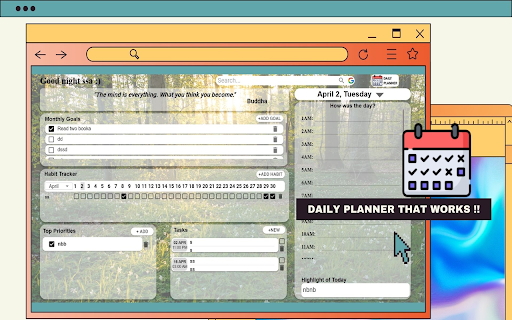
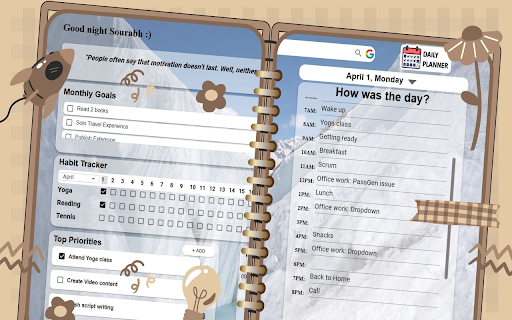
Start your productivity journey by achieve goals, build habits, prioritize tasks, and reflect daily. Start your productivity journey by achieving goals, building habits, prioritizing tasks, managing meetings and reflecting on daily progress. 1. Manifest your monthly goals to achieve personal or professional objective. 2. Build your Habits by tracking and making streaks. 3. Define your top priorities of the day to maintain focus and productivity throughout the day. 4. Set, view and manage upcoming meetings and appointments. 5. Reflect on how your day went, noting achievements and areas for improvement, fostering self-awareness and continuous growth.

Daily Planner
Manage daily tasks with a beautiful calendar. Add tasks with date/time, view on monthly calendar, and mark as completed. Daily Planner - Organize Your Day with Ease Stay on top of your daily tasks with Daily Planner, a beautifully designed Chrome extension! This intuitive tool lets you: Add tasks with specific dates and times. View your schedule on a monthly calendar with highlighted days containing tasks. Expand to see a full task list and mark completed tasks with a simple checkbox (tasks disappear after 0.5 seconds). Drag and drop the interface to any corner of your screen for convenience. All your tasks are securely stored locally on your device using Chrome's localStorage, ensuring your data stays private. No internet connection or external servers are required! Daily Planner automatically updates time based on time zones across the globe, ensuring your calendar and tasks remain accurate no matter where you are. As you move between time zones, the extension adjusts the displayed date and time on the calendar, as well as task schedules, eliminating the need for manual adjustments. For example, if you add a task at 1:00 PM in Vietnam (UTC+7) and later travel to London (UTC+1), the task will automatically update to 7:00 AM local time. This feature operates offline, relying on your device's system time zone. Monthly calendar view with task highlights. Quick task preview and expandable full list. Easy drag-and-drop interface. Local storage for privacy and offline use. Perfect for students, professionals, or anyone looking to stay organized. Download Daily Planner now and take control of your day! Privacy: We don’t collect or share your data. See our Privacy Policy for details.

Eleva: Minimal To-Do List & Planner at Your New Tab
✔️ Handy To Do List at Your Fingertips ✔️ Better Time Management, With Our Easy-to-use Extension ✔️ Minimal Design and User-friendly Planner Key Features: - Create and manage your daily tasks effortlessly - Set specific times and priorities for each task - Enjoy stunning, high-quality backgrounds that inspire productivity - Eye-friendly dark background selection - Jot down quick notes to keep important information at your fingertips - Access your favorite websites with convenient shortcuts Whether you're a busy professional, student, or simply someone looking to optimize their daily routine, Eleva is the perfect tool to help you stay on top of your commitments. With its seamless integration into your new tab page, you'll be reminded of your tasks and goals every time you open a new browser window. Eleva's intuitive interface makes adding, organizing, and completing tasks a breeze. The carefully curated collection of backgrounds provides a visually appealing and motivating environment, while the dark background option offers a comfortable viewing experience of the todo list for those who prefer it. Take control of your productivity and experience the satisfaction of conquering your to-do list with Eleva. Install the extension now and unlock a new level of efficiency and organization in your daily life.

Brite Daily Planner App | To do list, calendar & habits in one app
Get your life organized and achieve your goals with Daily Planner App. Enhance Your Productivity with Brite Daily Planner for Chrome Ranked as the go-to solution for seamless organization, Brite Daily Planner is trusted by users worldwide to streamline their daily tasks and enhance productivity, both in personal and professional realms. Use Brite Daily Planner for Chrome to: • Bookmark pages as tasks: Quickly save important articles, shopping items, or work-related documents to revisit later. • Structure your day: Effortlessly plan and adjust your daily tasks directly from the extension. • Tick off completed tasks: Mark tasks as completed right from your browser, maintaining focus and efficiency. Experience more with Brite on desktop and mobile: • Capture ideas and tasks as soon as they come to mind. • Stay on track with custom reminders and set deadlines. • Foster new habits with recurring tasks like "every Friday". • Work together by sharing tasks and projects with colleagues or friends. • Prioritize tasks with customizable priority levels. • Monitor your personal productivity trends and improvements. With over 50 app integrations including Google Drive, Dropbox, Zapier, and Slack, Brite Daily Planner becomes your central hub for organizing both work and life effortlessly. Get organized, stay focused, and achieve more with Brite Daily Planner! Brite To-Do list, daily planner organizer is a all-in-one productivity app with deep customization that combines features of a task organizer, to-do lists and shopping lists, habit list, simple take notes and a convenient daily schedule planner with smart reminders. Also the most comprehensive daily planner organizer app is finally available for Mac. The main idea of our app is to replace different productivity apps, such as task manager, habit list, appointment reminder, checklist, budget apps, work planner, diary, mood diaries, meditation, and many others, with just one service. You don't need to use many different apps and switch between them to stay updated on your schedule, appointment reminder, checklist, or work tasks. Task organizer, calendar planner, goals, habits, checklist to do list, ideas, chats, notes, knowledge base, storage, diary, finance, projects, mind maps, contacts, passwords, collaboration with colleagues, and more are combined in one product. In Brite task manager you will find everything you need for productive work and happier life. In Brite To-Do list, task organizer app you will: CUSTOMIZE THE INTERFACE WITH EASE Neat and intuitive interface work planner will make the use of the app as convenient and pleasant as possible: task organizer, appointment reminder, checklist to do list, schedule, habits and digital planner will now always be at your fingertips on one screen. And adding or editing new tasks or take notes will be easy. PLAN AND MANAGE YOUR TASKS Create your own schedule and the daily routine planner by adding tasks - type them, add checklist to do list with checkboxes, tags, attachments, life notes, reminders and importance. Mark items as completed with just one tap and track your progress and productivity. DISTRIBUTE WORKLOAD EFFECTIVELY All tasks for the next few days will be shown on the main screen whilst tasks for next weeks and months will be displayed in the daily schedule planner - so that viewing the to-do list on your schedule will be illustrative and convenient and you will be efficient. KEEP A DIARY, MAKE ANY KIND OF LIST OR TAKE NOTES Add lists of subtasks and shopping lists, to-do lists and checklist, interchange files in the daily routine planner to make sure your lists are always up-to-date. FORM HEALTHY HABITS AND STAY MOTIVATED Track healthy habits with our habit list. Drink water, exercise, meditate in the daily routine planner! With regular note reminder from the work planner app doing it will be easy, and compliments upon achieving your goals and fulfilling plans will become extra motivation in daily schedule planner. STORE, MANAGE, AND SHARE FILES You can add any photos and files to the page to share with colleagues, friends from any device thanks to the digital planner. USE SMART REMINDERS Use a system of smart task reminder to make sure you will never forget anything important in daily schedule planner. CREATE WORKING GROUPS AND MANAGE THE PROJECT Create and successfully track projects and complex tasks. Create groups with colleagues and discuss work tasks via messenger. CREATE A VISION BOARD FOR YOUR PLAN OR SCHEDULE Easily create a flowchart things to-do list and share it with colleagues. Tasks will be created automatically based on the flowchart in the calendar planner. CONTROL YOUR PERSONAL AND BUSINESS FINANCES Count your income and expenses, schedule bill payments, and integrate with CRM, task organizer, and timeline in the digital planner. KEEP YOUR CALENDAR PLANNER OF EVENTS Easily put any events, appointments, to-do list into a handy daily planner organizer with reminder and you won't miss anything important in the daily schedule planner. Brite To-Do list will increase your productivity, save you lots of time and will make life time management easy and convenient! Create your first to-do list in task manager Brite. For any feedback about daily planner organizer: hello@britetodo.com

Dreamy Tab - Journal, Calendar & To-Do Dashboard
A calming new-tab workspace with journal, calendar, subtasks, and drag-and-drop lists. Transform your new tab into a dreamy digital haven. DreamyTab is a beautifully designed Chrome extension that replaces your new tab with a calming, elegant workspace — blending calendar, to-do list with subtask support, and a daily journal. Stay productive with intuitive drag-and-drop task reordering, write reflections in your journal, and quickly check your agenda — all in one inspiring view. 🗓️ Built-in calendar to plan your day at a glance ✅ To-do list with subtasks and color tags 🔍 Search function to find tasks, notes, and entries fast 📂 Import/export support — never lose your notes or lists 📸 Custom background support — upload your own dreamy image or rotate designs ⚡ Quick popup access from any page, not just new tabs 🖱️ Drag and drop to rearrange tasks and subtasks seamlessly 🌙 Calm, aesthetic design that helps you stay grounded and focused DreamyTab helps you focus your mind and build intentional days — one tab at a time. v1.3.1 updates - bug fix for user data access issue. reverting to sync - minor ui improvements v1.3 updates - group tasks by color - revamped icons - rearranged to-do page to allow more space for lists. v1.2 features - sync with your Google Calendar and save your journal to Google Drive. - revamped to-do list workflow - color-code task groups.
