
dlkjdkiladlnclocjpcikagojeddmkeh
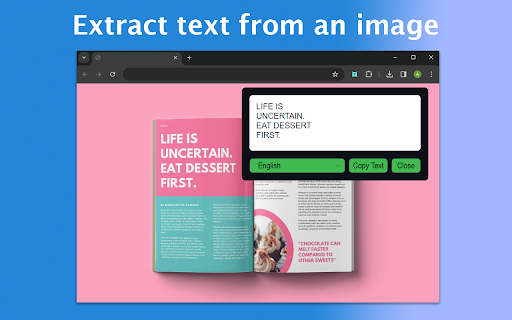
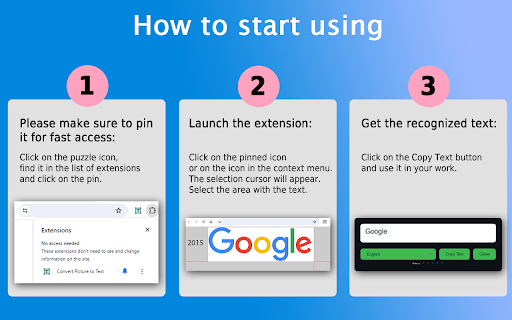
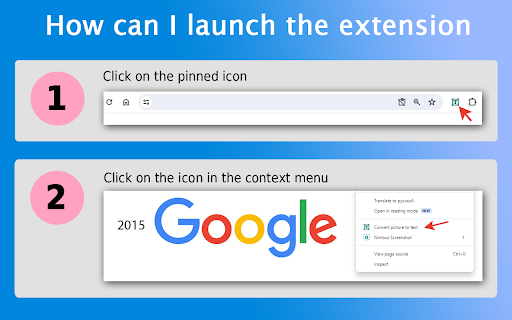
Convert Picture to Text: Effortlessly extract text from picture with our powerful Chrome extension. Simplify convert image to text. 😩 Tired of typing out lengthy text from images? 📷 Wish there was an easier way to extract text from an image? ⏱️ Look no further! Convert picture to text is your go-to solution for effortlessly converting pictures to text in a matter of seconds. 💻 With our user-friendly Google Chrome extension, you can seamlessly convert text in pictures to text, making your work more efficient and saving you valuable time. ❓ How to start using? 📌 Please make sure to pin it for fast access: Click on the puzzle icon, find it in the list of extensions and click on the pin. 💥 Launch the extension: ❶ Click on the pinned icon or on the icon in the context menu. ❷ The selection cursor will appear. ❸ Select the area with the text. ❹ Get the recognized text: ❺ Click on the Copy Text button and use it in your work. 📚 Whether you're a student needing to extract text from scanned notes, a professional converting images to text for reports, or simply someone who wants to quickly extract text from photos, our extension has got you covered. 💫Our advantages: 1️⃣ Easy and convenient interface 2️⃣ Multilingual 3️⃣ Fast recognition 4️⃣ Unlimited number of requests 5️⃣ Lack of registration 6️⃣ Data protection 7️⃣ Using the OCR engine 8️⃣ Image area recognition Key Features: ✨ Effortless Conversion: Our extension simplifies the process of extracting text from a picture. Just install the extension, select the area to be converted, and watch as it swiftly converts from picture to text. 🔍 Accurate OCR Technology: Powered by advanced Optical Character Recognition (ocr online) technology, our extension ensures accurate text extract from image. 🔄 Versatile Compatibility: 🔸 JPEG 🔸 PNG 🔸 BMP 🔸 TIFF 🔸 WEBP 🔸 SVG ⏲️ Time-Saving Solution: Say goodbye to manual typing! Our extension significantly reduces the time and effort required to transcribe text from a picture, allowing you to focus on more important tasks. 🔒 Privacy Protection: We understand the importance of your privacy. Rest assured, your images and extracted text are processed securely, with no risk of data breaches or leaks. 🌐 Online and Offline Mode: Whether you're connected to the internet or working offline, our extension offers seamless text extraction from image, ensuring flexibility and convenience. 🖼️ Intuitive Interface: Our user-friendly interface makes it easy for users of all levels to convert from picture to text effortlessly. No technical expertise required jpg to word! This innovative procedure entails the conversion of visual representations, such as photographs or illustrations, into coherent and understandable written representations. ⚡ Benefits: ✓ Efficiently convert text from images for academic, professional, or personal purposes. ✓ Enhance productivity by eliminating manual transcription tasks. ✓ Accessible and convenient solution for all your needs. ✓ Stay organized by converting pictures to words containing important information. ✓ Compatible with various image formats and accessible directly from your Chrome browser. ✓ Streamline document management process. ✓ Convert scanned invoices, receipts, and contracts using text from image. ✓ Save time and resources. ✓ Improve efficiency and reduce costs by using convert picture to text for data handling. 💡 Whether you need to extract words from: 1️⃣ scanned documents 2️⃣ handwritten notes 3️⃣ images with embedded text Our converter is your reliable companion. 🖱️ Experience the convenience with just a few clicks img to text! 📜 List of features: 🔹 Selecting a fragment of a page. 🔹 Ability to select transcription language. 🔹 Automatic addition of recognized words to the extension window. 🔹 Ability to edit recognized words. 🔹 Possibility of copying. ✍️ Try today and revolutionize the way you pic to text. Say goodbye to tedious manual transcription! 🎓 Image to text converter for learning: 👨🎓 Students: ➤ Digitize printed materials, like textbooks or journal articles, for research purposes using convert pictures to text. ➤ Make printed materials searchable and editable with image text extractor. 👨🏫 Educators: ➤ Convert handwritten notes or diagrams into digital format using convert text in picture to text. ➤ Facilitate sharing and collaboration among students with digitized content. 😎 For professionals: ⚖️ Legal professionals: ➤ Utilize extract text from image to quickly search through case files and contracts. 👩⚕️ Medical practitioners: ➤ Digitize patient records for easy reference using convert picture to text. 📈 Financial analysts: ➤ Extract data from financial statements with ease using picture to text converter. 🧐 FAQs about the extension: ❓ How do I install? 💡 To install convert picture to text, just click on the "Add to Chrome" button. It will be added to your browser, and you can start using it. ❓ How does is it work? 💡 Convert picture to text is a Chrome extension that allows you to convert a picture to text format. ❓ Can I use it for free? 💡 Yes, extension is available as a free Chrome extension. ❓ Can extension transcribe any image? 💡 Yes, It can transcribe any pictures to words format. It supports multiple languages. ❓ Is my privacy protected when using extension? 💡 Absolutely! Extension operates locally within your browser, ensuring the privacy and security of your personal information. It does not collect or store any user data. 📧 Feedback: If you have any questions, please contact us in any way convenient for you.

Photo to Text
Use Photo to Text converter - online ocr: Easily extract text from image with this powerful image text extractor 📝 Photo to text – your ultimate extractor! ➤ Tired of manually typing out content from images? It is the perfect Chrome extension to help you convert photo to text instantly. Whether you're working with scanned documents, screenshots, or photos with embedded content, this powerful photo to text converter gets the job done quickly and accurately. 🔥 Why use photo to text? 1️⃣ Extract content from images effortlessly 2️⃣ Supports all major image formats (JPG, PNG, GIF, etc.) 3️⃣ Fast and accurate photo to text ocr technology 4️⃣ Free photo to text converter online 5️⃣ No sign-ups or additional software required 🔍 Easily convert photo to text ➤ With this tool, you can convert photos to text with just a few clicks. This extension is perfect for students, professionals, researchers, and anyone who needs a fast and reliable photo to text generator. 🛠️ How it works? Using photo to text is as simple as: 📤 Use drag-and-drop functionality. 🔄 Click extract button to process the image. 📋 Copy and paste the extracted content wherever you need it. No complicated settings – just a seamless experience for your tasks! 🌟 Key features of photo to text converter - Advanced ocr technology for precise photo to text conversion - Multiple language support for extracting in different languages - Instant results with fast photo to text ocr processing - Privacy-friendly – no data storage or tracking 👥 Who can benefit from this photo to text converter? 🎓 Students – extract content from lecture slides and study materials 💼 Professionals – convert business cards, invoices, and contracts into editable format 🔬 Researchers – easily extract key information from images and documents ✍️ Content Creators – convert handwritten notes and printed words into digital format 🌎 Anyone – if you need to copy text from image, this tool is for you! 📌 More than just a picture to text converter This tool is more than just a picture to text converter; it’s an all-in-one image to text converter with powerful capabilities: ✔ Extract text from image accurately ✔ Convert image to text without formatting errors ✔ Copy text from picture in a single click ✔ Online ocr technology ensures top-notch accuracy 🎯 Amazing online photo to text tool ➤ Unlike other tools, photo to text converter online with high accuracy. Whether you need to perform scan photo to text, this extension is designed for efficiency. 📂 Works with all image types - JPG, PNG, BMP, GIF, and more - Scanned documents and digital photos - Web images and social media screenshots ⭐ What makes this extractor stand out? ➤ Lightweight & fast – won’t slow down your browser ➤ Accurate results – uses AI-powered photo to text ocr for precision ➤ No watermarks – download and use transcript without restrictions 📥 How to install and use? 🔹 Install Photo to Text – Click “Add to Chrome” to install the extension. 🔹 Select an Image – highlight the desired content area. 🔹 Copy & Use – The extracted words are ready for editing and sharing. 💡 Perfect for everyday use ➤ Whether you need to convert image to text for school, work, or personal projects, this online photo to text tool is designed for everyone. Forget about manual typing – let technology do the work for you! 🌟 Additional Benefits - Save time – no need to manually transcribe content from images. - Improve productivity – quickly extract and use words for notes, reports, or projects. - Universal accessibility – works from anywhere with Chrome. - No software installation needed – works directly in your browser. - Continuous updates – always improving for better accuracy and performance. 💬 Frequently asked questions (FAQ) ❓ Does this extension store my images or data? 💡 No! Everything remain private. We do not store or track any data. ❓ What image formats does this support? 💡 It supports JPG, PNG, BMP, GIF, and more. ❓ Does it support multiple languages? 💡 Yes! Photo to Text can recognize and extract content in multiple languages. ❓ How accurate is the extraction? 💡 Our photo to text OCR technology ensures high accuracy, even for complex fonts. ❓ How do I install tool? 💡 Simply click “Add to Chrome” and start using it instantly. 🚀 Try it today! ✔ Get started with photo to text now and enjoy the best photo to text generator for seamless text from picture extraction. Save time and effort with the most efficient available tool!

Convert Photo to Text
Easily Convert Photo to Text with our image to text converter. Extract text from image and photo using online OCR recognition. 🔄 Our convert photo to text service provides seamless extraction of information from pictures and documents ⚡️ Simply upload any image and get editable content in seconds 🔑 Why Choose our Chrome Extension: 1. Lightning-fast processing speed 2. Recognition history 3. Support for multiple languages 4. Intuitive user-friendly interface 5. Complete privacy protection 📱 Simple steps to extract text from picture: → Upload any file or screenshot → Let our technology process the content → Receive perfectly formatted results → Copy, download or edit as needed 💻 What sets our convert photo to text online tool apart: 📍 No software installation required 📍 Regular updates for improved accuracy 📍 Significant time savings over manual typing 📍 Original formatting preservation 📍 Secure processing of sensitive documents 📁 Supported file types for our picture to text converter: ➤ Digital photographs (JPG, JPEG) ➤ Screenshots (PNG) ➤ Web optimized graphics (WEBP, GIF) ➤ High-resolution professional images (TIFF, BMP) ➤ Mobile phone captures (HEIC) 🛠 Technical Excellence Delivered ▪️ Our convert photo to text technology utilizes cutting-edge OCR algorithms for superior extraction quality ▪️ Swift cloud-based processing for complex conversions ▪️ Regular algorithm updates enhancing recognition precision ▪️ Complete encryption when converting visuals to editable format 📌 Common Use cases for our photo to text converter online: ↳ Extracting content from screenshots ↳ Converting handwritten notes ↳ Capturing information from presentations ↳ Processing business cards and receipts ↳ Digitizing research materials 💡 How to use: 1️⃣ First, select the image fragment you want to extract content from 2️⃣ You can use keyboard shortcuts Ctrl+Shift+Y or ⌘Shift+Y (Mac) to quickly insert images. 3️⃣ Alternatively, upload existing files to extract their content. 4️⃣ The extracted content from your selection will immediately be copied to clipboard. 5️⃣ Finally, use ⌘V/Ctrl+V to paste the content wherever you need it. 📄 Convert photo to text with OCR reader online: 🔸 Printed books and papers 🔸 Business cards and receipts 🔸 Presentation slides 🔸 Handwritten notes (with clear writing) 🔸 Screenshots of digital content 🔸 Product packaging and labels 🔍 Key capabilities of our image text extractor: ◉ Multiple language recognition ◉ Table and layout structure detection ◉ High-resolution image processing ◉ Saving usage history ◉ Batch processing for multiple files 🌎 Our photo to text converter recognizes content in: • English, Spanish, French, German • Chinese, Japanese, Korean • Russian, Arabic, Hebrew • Portuguese, Italian, Dutch • And dozens more languages! 🔒 When you convert photo to text online, we ensure: ✓ Secure encrypted processing ✓ No permanent storage of your files ✓ Complete confidentiality ✓ Enterprise-level security protocols 🤖 Advantages of our AI-powered recognition system: — Continuous learning algorithms — Superior handling of difficult fonts — Enhanced accuracy with low-quality materials — Adaptive processing for various file types 🚀 Benefits of technology: 🔻 Extract content from picture files with perfect accuracy 🔻 Copy text from image without manual retyping 🔻 Save valuable time on document digitization 🔻 Process multiple images in sequence 🔻 Convert photo to text for research and study ❓ Frequently Asked Questions: Q: Is my data secure when using your online photo to text converter? A: Absolutely! We use encryption and temporary processing with no permanent storage. Q: Can I extract text from my screenshots? A: Yes! Our tool converts screenshot to text instantly. Just capture your screen and hit the Pic to Text button. Q: Can I use this tool for languages besides English? A: Yes! Our photo to text online converter supports dozens of languages worldwide. Q: How accurate is your text from image extractor? A: Our tool achieves over 98% accuracy with clear images and standard fonts. 🔹 Try today and join thousands of satisfied users who extract data efficiently! 🔹 With our convert photo to text app, you'll never need to manually type from visuals again. 🔹 Our OCR reader online provides the perfect solution for students, professionals, and anyone needing to copy content from image sources quickly. 🔹 Whether you need to get information from image files occasionally or require extraction functionality regularly, our convert photo to text solution delivers optimal results every time.

Image OCR | Extract text from images
Harness AI with our Image OCR tool—extract text from images, screenshots, and documents to boost productivity. Transform images into actionable text with the most advanced AI-powered OCR tool, designed to work seamlessly with ChatGPT. Whether you're a student, professional, or creator, our tool simplifies text extraction and enhances productivity. ➤ Why Use Image OCR? 🚀 - 📷 Convert images, PDFs, or screenshots into editable text in seconds. - 🏷️ Copy, edit, or share text with ease. - ✍️ Optimize your ChatGPT prompts with clear, extracted content. - 🌍 Supports multi-language OCR for global use cases. 📚 **Students and Researchers** Take photos of textbooks, lecture slides, or research papers and convert them into editable text for summaries, notes, or questions in ChatGPT. 💼 **Professionals** Scan business cards, receipts, contracts, or meeting notes and transfer extracted text directly into reports, presentations, or email drafts. 🌐 **Content Creators** Extract text from inspirational images, quotes, memes, or designs and refine them with ChatGPT for social media posts, blogs, or creative projects. 🖨️ **Office and Document Management** Digitize hard copies of documents, invoices, or forms for archiving or editing, reducing manual effort and errors. ➤ Advanced Use Cases 🔑 - 📲 Integrate extracted text into productivity apps like Notion, Evernote, or Google Docs for seamless workflow management. - 🔗 Use with tools like Jasper AI, Writesonic, or Grammarly to supercharge your content creation. - 🤖 Enhance ChatGPT interactions for brainstorming, summarizing, or translating extracted text. ➤ Key Features 🏆 - 🚀 **High-Accuracy OCR**: Extract clean, error-free text from images, PDFs, and more. - 🌍 **Multi-Language Support**: Recognize text in over 50 languages, from English to Chinese, Arabic, and beyond. - 🔄 **Seamless ChatGPT Integration**: Copy extracted text directly into ChatGPT for instant use. - 🔒 **Privacy First**: All processing is secure and complies with GDPR and California Privacy Act. Tired of manual text entry? Say goodbye to endless typing. With **Image OCR | Image to Text for ChatGPT**, transform photos into actionable text and save hours of work! Perfect for academics, marketers, designers, and busy professionals. ➤ Privacy Policy 🔒 Your data stays private, processed securely within your Google account, ensuring compliance with GDPR and California Privacy Act. 📢 **Optimize Your Workflow Today** Try **Image OCR | Image to Text for ChatGPT** and experience the easiest way to convert images into text and integrate with AI tools like ChatGPT, Jasper AI, or Google Bard. 🚀✨

Screenshot to Text(OCR) - Image text extractor
Optical Character Recogition(OCR). Extract text from screenshot with 1 click. Export text from images, PDFs, etc. Screenshot to Text (OCR) is a tool for extracting text from images, allowing you to effortlessly grab text from any webpage with just a few clicks. Simply take a screenshot of the desired portion of the webpage, and the tool will recognize and extract the text from the image. 1. **Simple Interface**: Screenshot to Text (OCR) boasts a sleek and intuitive interface, making it incredibly easy for users to select and capture specific areas of a webpage. 2. **OCR Technology**: Powered by cutting-edge Optical Character Recognition (OCR) technology, this extension accurately converts captured images into editable text. 3. **Customizable Capture**: Tailor your text extraction experience by selecting the exact portion of the webpage you want to capture. Whether it's a paragraph, a headline, or a snippet of text, Screenshot to Text (OCR) delivers precise results every time. 4. **Instant Clipboard Copy**: Once the text is extracted, Screenshot to Text (OCR) automatically copies it to your clipboard, saving you valuable time and effort. 5. **Efficient Workflow**: Streamline your workflow and boost productivity with this seamless text extraction tool. Whether you're conducting research, compiling notes, or simply need to save snippets of information, Screenshot to Text (OCR) has you covered. **How to Use:** 1. Install Screenshot to Text (OCR) from the Chrome Web Store. 2. Pin the extension, click the extension icon. 2. Select the area of the webpage you want to capture. 3. Let Screenshot to Text (OCR) work its magic – sit back and watch as the text is extracted. 4. Paste the extracted text wherever you need it – it's that simple! **Why Choose Screenshot to Text (OCR)?** - **Efficiency**: Say goodbye to manual transcription and hello to effortless text extraction. - **Accuracy**: With advanced OCR technology, Screenshot to Text (OCR) ensures precise and reliable results. - **Convenience**: Seamlessly copy extracted text to your clipboard for easy pasting into documents, emails, and more. Experience the power of Screenshot to Text (OCR) and revolutionize the way you extract text from webpages. Download now and unleash the full potential of your browsing experience! Feel free to contact us at hi-ocr@iamheretoassistyou.cc if you have any issues or feature requests!
