
dlkhjfihkbikdgbfkfjamhkeilnacigm
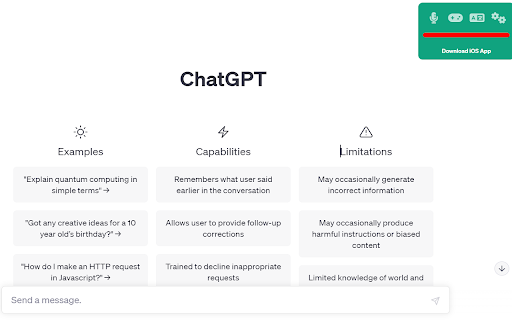
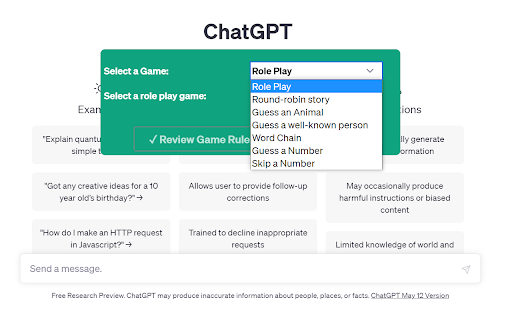
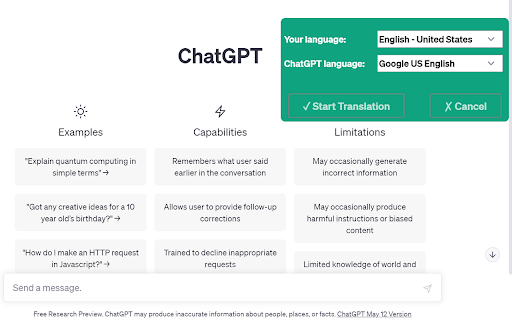
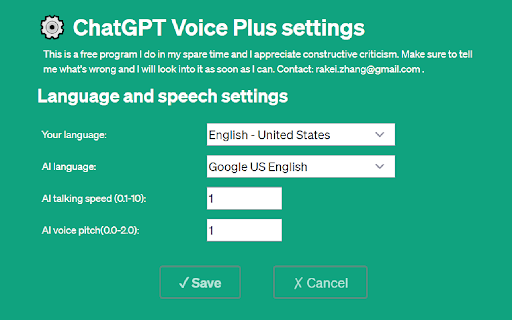
ChatGPT Plus includes voice, AI games and Translation. Welcome to ChatGPT Voice Plus Game and Translation! Say goodbye to the monotony of typing responses to ChatGPT AI and hello to a more engaging and natural interaction. Our Google Chrome extension allow users to speak to the AI and receive spoken responses, making conversations with ChatGPT feel more like talking to a real person. But that's not all, our extension also includes a Game feature that allows you to play fun games with ChatGPT, and a Translation feature that lets you translate text into different languages. Getting started is easy. Download the extension from the Chrome Web Store, and after installing it, open or reload the ChatGPT page to see the 'Start' button on the top right corner of the page. Once you click Start and give permission to use your microphone, you're ready to go! Customizing your experience is a breeze with the settings menu that lets you choose your preferred language, voice type, and speech rate. ChatGPT Voice Plus Game and Translation is safe to use and will only run in the context of the ChatGPT webpage. Please note that compatibility is based on the current HTML structure of the ChatGPT page, and if OpenAI makes changes, the extension may stop working. Join the ChatGPT Voice Plus Game and Translation community today, and experience a more engaging and interactive conversation with ChatGPT. If you enjoy our extension, you can support our project by making a donation. Click the Donate button to proceed.

ChatGPT Automation - Auto ChatGPT on chatgpt.com
Auto ChatGPT for your prompts at scale. Batch generate and auto-download responses and images on ChatGPT.com. ChatGPT Automation is an Auto ChatGPT tool built to fully automate your workflow on OpenAI's chatgpt.com. No more manually typing prompts one by one — let ChatGPT run automatically. This extension turns ChatGPT into a batch-processing engine, allowing you to auto-submit prompts, auto-generate content, and auto-download results at scale. 🔥 What ChatGPT Automation does Auto ChatGPT prompts continuously without manual interaction Batch generate AI text, images, and visual content Automatically download results with smart file naming Handle long prompt queues safely with smart random delays 🤖 Auto ChatGPT Batch Processing Queue dozens or hundreds of prompts and let ChatGPT Automation automatically: - Submit prompts to ChatGPT - Wait for generation to complete - Move to the next prompt No clicks. No babysitting. 🎨 Image to Image Transformation Batch transform and enhance images using AI with text prompts Chain mode: automatically use the previous generated image as input for the next prompt 🧩 Ingredients to Text Mode Upload reference images and batch-process them with prompts Auto-add character images based on filename matching ⚙️ Professional Automation Controls - Smart Random Delay System to avoid rate limits - Configurable min/max delay between prompts - Auto Download once generation completes with custom folder organization - Auto-rename files based on prompt content - Max Retries on failure — automatically retry failed prompts 📊 Real-time Queue Monitoring - Live prompt queue with per-prompt status (Queued → Running → Completed) - Visual progress tracking inside the Side Panel - Retry counter per prompt ✅ Perfect for - Content creators and copywriters - AI image and visual producers - Automation & productivity users - Anyone who wants to Auto ChatGPT at scale

Audio Player for ChatGPT
Adds an audio player for ChatGPT's Read Aloud feature ChatGPT's "Read Aloud" is great, but the lack of basic controls can be frustrating. This extension solves that by adding a simple audio player with play/pause, a seek bar, and duration display. It leverages the browser's built-in audio controls, fulfilling a long-requested feature. This extension is open source at https://github.com/ian-speckart/chatgpt-audio-player

ChatGPT AI assistant for Google Reviews and Questions
Use ChatGPT to automate answering Google Reviews, change tones, work with all languages, and more, all for free. Use ChatGPT AI to reply to Google reviews. Works on Google Map and Google Search. You can change tones, reply in all languages, and more, all for free and powered by MailMagic AI. Reply to Google reviews with ChatGPT AI (privacy-friendly). FREE to use forever and No Ads. 🆓 ✔️ Highest quality responses that outcompete all other tools in the market. ✔️ Select interest level for your response. ✔️ All languages are supported. ✔️ Most stable free AI tool on the market for Google Review. (Do not fully rely on ChatGPT) ✔️ Machine learning on your frequent ask questions. Popular ways our users are using MailMagic's AI Assistant For Google Reviews: ✍️ Reply to Google reviews: Effortlessly craft the perfect message. Convince bad reviewers to remove their reviews. 🔍 Grammar Fixes: Eliminate typos and grammatical errors with ease. 🌐 Translation: Translate an existing review to any language. 🔄 Rephrasing: Make your text clearer and more impactful. 📝 Summarization: Turn lengthy text into concise summaries in seconds. 💼 Tone Adjustment: Adapt the tones of your message in a click (Polite, Professional, Mean, etc).

AI Chrome Extension powered by ChatGPT - Magictool AI
Your All-in-One AI Chrome Extension featuring ChatGPT, AI Writer, Grammar Checker, Paraphraser, Youtube Summarizer +20 more. Get access to ChatGPT and GPT4o (paid), ask questions and get instant answers Proofread your writing with our Grammar Checker. Select any sentence on the page and get instant grammar check Write professionally using our AI Writer and Paraphraser which allows you to choose your writing style Summarize Youtube videos as well as Web Articles and PDF documents with the help of ChatGPT. Take beautiful Screenshots directly from your browser 🎁 Try it out now. You will get free credits "every day" to use our AI Chrome Extension. You need to "create an account" to use the extension. 1- Grammar Checker: Select text on any page to check grammar and spelling using ChatGPT 2- ChatGPT Access: you will be able to use ChatGPT every day 3- Chat with PDF documents using AI and PDF.js 4- Youtube Summary: Summarize Youtube Videos (Transcript and Comments) 5- Summarize Articles and Web Pages 6- GPT4o * 7- Generate AI Images 8- Data Scraper (Extract information from any page) 9- Magic Editor: Private AI Text Editor 10- Explain text 11- Youtube Video Dubbing using AI*: watch Youtube videos dubbed in other languages 12- Improve text: improve your writing including grammar and composition 13- Simplify language 14- Make Shorter 15- Make Longer 16- Paraphraser: paraphrase your writing in different styles 17- Summarize paragraphs 18- Continue writing 19- Add Emojis 20- Translate text (using Google translate) 21- Take Notes 22- String Manipulation (upper and lower case, length ..etc) 23- Magic Shortcut: invoke ChatGPT from any text field on the page by starting your line with the magic word "magic:" 24- Dark mode toggle: Force Dark Mode for any webpage 25- Add your own custom command/prompt 26- Reader View: Read web pages in a clutter-free format by removing ads, header, sidebars, and pop-ups. 27- Data Analysis (CSV/XLS): Analyze CSV and Excel files easily with the help of ChatGPT 28- Timer 29- Todo Checklist 30- AI Writer: write in different styles and lengths using AI 31- AI Paraphraser: Paraphrase your paragraphs to avoid plagiarism using ChatGPT in different writing styles 32- Screenshot Capture and Beautification * Pro & Pro+ plans only (GPT-4o Voice and Video NOT supported yet) ** We utilize ChatGPT Technology to provide our AI features 🙌 There is no other extension available that combines all of these features in one package This extension is free trial, you will receive daily credits to try all our AI tools, if you need more credits then please subscribe to any of our payment plans: https://magictool.ai/pricing 1- All non-AI tools on magictool.ai 2- Text manipulation features (ex: upper and lower case, etc...) 3- Take Notes 4- Magic Editor (without the AI features) 5- Data scraping for pages 6- Night mode toggle for pages 7- Todo list 8- Timer 9- Screenshot Capture and Beautification ⭐ Who is it for? In addition to ChatGPT, our AI tools helps you with the following: AI writer and paraphraser while choosing your style, Use a grammar checker to proofread your writing, spelling checker, simplifying language, and generating AI images, which are beneficial for writers, digital marketers and SEO professionals. Researchers can greatly benefit from the web article summarisation, grammar checking in academic writing, paraphrasing sentences, also summarizing pdf files using AI, enabling them to write and skim through lengthy documents efficiently with the help of ChatGPT. Finally you can also get a summary of a Youtube video to save time. Our AI tools can assist you in doing your homework, studying, essay writing, checking your grammar, paraphrasing, chatting with Chat GPT, summarizing Youtube Videos and PDF documents, note-taking, notepad, todo list and timers You can ask ChatGPT to write code snippets and explain code on Stackoverflow Access quick answers by summarizing web pages and lengthy PDF files. Enhance your workplace communication and write emails in a specific tone with the help of AI and ChatGPT. Conveniently check grammar, paraphrase paragraphs in different styles, and enjoy a smart notepad right in your browser, you can also extract data from pages such as google maps. Finally you generate a summary of Youtube videos. You can also take screenshots for any area in the page and even make it more beautiful before download ⭐ Privacy: why should I trust you with my privacy? 1- Each version of Magictool AI is strictly reviewed by Google 2- You can decide domains in which the extension will not be activated (via the "Private Domains" setting) Video: https://youtu.be/NwT_b5YGHxU 3- We collect minimal user information (only name and email) 4- Our code is minimal - less than 1/2 MB - since we only add the code we need 5- We don't use Google analytics and we don't load any external code in our extension, everything is included in the extension 6- We collect usage data (which features do you use) but we allow you to disable it from the settings, and we share what is sent to our servers with you 7- When using our AI features we send your input to Open AI servers so we can't guarantee how they use your text, please check their privacy policy if you are interested. 8- Please check our privacy policy for more details We really care about your privacy and we consider it our own
