
dlkelkgihafcccdibmkkcneojlefacbn


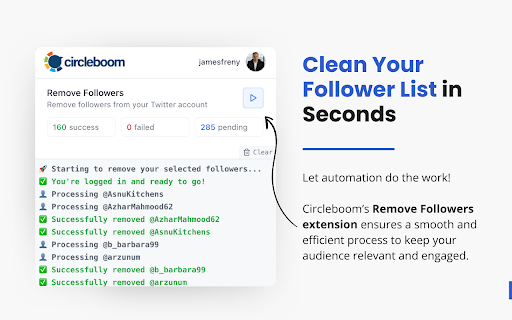

Auto-remove unwanted followers on Twitter/X quickly and safely with Circleboom Circleboom Twitter is the safest and fastest way to auto remove unwanted or bot Twitter/X followers. As an official partner of Twitter/X, it ensures a secure and compliant way to clean up your follower list without risking suspension. Manually managing followers takes too much time. Circleboom Twitter automates follower removal so you can instantly detect and remove spam followers, bot followers, and inactive accounts in bulk. Simply select unwanted, fake or bot followers on Circleboom Twitter, click "Remove Followers", and let the Chrome extension auto-remove them. Open the extension, click "Start Remove," and watch as all selected followers disappear instantly. Key Features: ✔ Mass remove Twitter/X followers – No need for manual unfollowing ✔ Remove bot followers & spam accounts – Clean your follower list fast ✔ Remove inactive followers – Keep an engaged audience ✔ Remove followers without blocking – Maintain account credibility ✔ Whitelist & blacklist options – Full control over your audience ✔ Force Unfollow bot accounts ✔ Delete Bot Followers The Chrome extension and Remove Followers feature requires a Circleboom account – sign up now at Circleboom.com!

X Unfollower | Smart follow / unfollow tool for Twitter
The ultimate unfollow / follow tool for X (Twitter). Filter inactives, small accounts, protect follow backs, and more! Quickly unfollow & follow people on X with smart filters. How to use this extension? Go to your 𝕏 profile and click on the "Open 𝕏 Unfollower" button. Set the filters as you wish to get a refined list of results. Then, simply click the "Unfollow All" button, or manually unfollow specific users. Or go to another users profile and click "Open 𝕏 Follower" button, and similarly follow accounts using our smart filters. Filter accounts by: - Set maximum inactive days - Set minimum follower count for people to be unfollowed - Optionally protect people who follow you back from being unfollowed Want to clean up your following on X (Twitter) ? Sometimes it can be long and tedious to filter through. Let this extension do the work while you sit back and relax.

Twitter Unfollower
A smart unfollowing extension for X (Twitter) that unfollows small accounts, inactive users and protects those who follow back. It's in the open-source code of the Twitter algorithm: If your following-to-followers ratio is too high, your visibility will be limited. Twitter Unfollower can help you unfollow accounts you previously followed, ensuring your following number remains reasonable. 👨🏻💻 Features ✓ Unfollow users who do not follow you ✓ Unfollow users who you are following ✓ Keep a whitelist of usernames to not be unfollowed ✓ Filter accounts by: - Unfollow users based on the range of their account followers - Unfollow users based on the number of days their accounts have been inactive 📌 Strategies to Prevent Being Limited - For every 6 users unfollowed, take a 10 minutes cooldown period - You can customize the number of people and the number of minutes for cooldown in the settings. 🩹 Intelligent error handling - If a request error occurs, pause for 30 minutes before retrying - You can customize the number of minutes for pause in the settings 🟢 indicates the normal time interval for requests 🟠 indicates the cooldown period's time interval 🔴 indicates the time interval for request errors 📃 How to Start Unfollowing? - Choose the type of unfollowing - Click the 'Start Unfollowing' button 📖❓ FAQ ❓Why can't we unfollow an unlimited number of users? Unfortunately, Twitter has limits, and these limits vary from account to account. To prevent future lockouts or account suspension, we limit the processing time and the number of unfollows. We recommend using the extension sparingly to ensure its continuous functionality. 📬 Contact If you have any questions or suggestions to improve the extension, please feel free to contact us at jfl913@gmail.com. 📃 Terms You can automatically unfollow 6 users every day. Upgrade to Pro, you can unfollow 80 users per day. 🔒 Data Privacy All the data you process stays on your local computer and never goes through our servers. ℹ️ Disclaimer Twitter/X is a trademark of Twitter/X, LLC. This extension is not affiliated with, endorsed by, sponsored by, or otherwise related to Twitter/X, LLC or any of its affiliates or subsidiaries.

Wallchain X Score
Measure Real Influence. Cut Through the Noise. Spot Grifters. Wallchain X Score is part of the Wallchain AttentionFi Ecosystem, built to help you identify true crypto thought leaders – and filter out the fake KOLs. – The quality of their followers And on top of that, we’ve added a reward layer— Wallchain Quacks lets you earn from high-quality attention and meaningful contributions.

X (Twitter) Mass Unfollow Pro
Take control of your X (Twitter) following — select users to unfollow 👥❌ or select all to clean your entire list in one click 🧹🚀. 🌟 Advantages of the Extension ⏱️ Save Time on X (Twitter) – Quickly manage your X (Twitter) followings without manual effort. 🖱️ User-Friendly Interface – A simple and intuitive design made specifically for X (Twitter). ✅ Customizable Selection – Select all accounts or only the ones you wish to unfollow. 🔄 Keep or Unfollow Accounts as You Choose – The extension allows you to select all accounts or individual ones to unfollow. 🌟 Unique Features – Exclusive functionality designed for X (Twitter) users to manage their following list. 🎁 Free Trial – Try it free with a limit of 5 unfollows! 🛠️ How the Extension Works on X (Twitter) 📥 Install the Extension – Download it directly from the Chrome Web Store. 🔧 Activate the Extension – Click the extension icon in your browser toolbar to begin. 🧑🤝🧑 Navigate to the X (Twitter) Following Page – If you're not already on your following list, use the "Go to Following List Page" button in the extension popup. ✅ Add Checkboxes to X (Twitter) Following List – Click "Add Checkboxes to Profile" to enable selection on your following list. 🔍 Make Your Selection – Select all profiles or pick specific individuals by checking the boxes next to their names. ❌ Unfollow Selected X (Twitter) Accounts – After making your selection, click "Unfollow Selected Profile" to unfollow the chosen accounts. ⚠️ Note: This extension is not authorized by X (Twitter).
