
dldadkjlkldanpbaicclkikgkgpgpflj
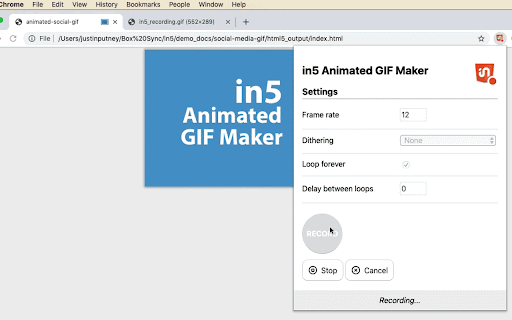
The in5 Animated GIF Maker lets you create animated GIFs (and videos) using Adobe InDesign. The in5 Animated GIF Maker lets you create animated GIFs (and videos) using Adobe InDesign. Take advantage of InDesign's easy-to-use Animation and Timing tools to create animated images for social media (Facebook, Linkedin, Twitter) and email newsletters. The GIF Maker is free to use, but a license is required for in5. More info: http://in5.ajar.pro Note: GIFs only support 256 colors, and in an animated GIF that color palette is shared across all of the frames. So photographic images will look grainy (and they do in all GIFs). v2 now supports recording of images and adds built-in optimization. v3 lets you export video so that you can open in Photoshop and get precious control of your colors before exporting to an animated GIF from there.

Kompositor
Design web animations with ease. Dive into 3D transformations using mouse control to transform and captivate your creations Discover Kompositor, the powerful and user-friendly web extension that revolutionizes the way you create animations and visual effects for your web projects. Design and implement stunning motion graphics, digital visual effects, and compositing applications with just a few clicks. From dragging elements to creating nested 3D transformations, Kompositor offers a world of possibilities for web designers and developers. a. Effortless animations: Craft engaging animations by simply dragging elements into place. Build visually striking designs without the need for complex coding. b. Easy HTML element transformations: Quickly and effortlessly transform any HTML element using your mouse. The extension supports both 2D and 3D transformations, allowing you to create truly immersive and dynamic web experiences. c. Nested transformations: Achieve even more with nested transformations, where transformations sum up from ancestor to child elements. Unlock new creative possibilities for your designs through this advanced feature. d. SVG elements support: Bring your vector graphics to life with support for SVG elements. Animate and manipulate your SVG designs to create interactive and visually appealing web content. e. Animate plain JS objects: Go beyond HTML and SVG elements, animating plain JavaScript objects for a flexible and versatile solution to all your animation needs. Upon completing your design and animations, export your work to the GreenSock Animation Platform (GSAP) effortlessly with just one click. Generate GSAP-ready code to seamlessly integrate your stunning animations into your web projects. Unleash your creativity and transform your web designs with Kompositor. Experience the power of intuitive and dynamic animation creation right at your fingertips.

Video to GIF
Video to GIF unites speed and simplicity! Experience effortless transformations with this top-notch video to GIF converter! ⚡ Video to GIF emerges as the ultimate companion for those aiming to produce captivating looped clips from their beloved recordings. Whether you’re highlighting fun moments, emphasizing crucial frames, or adding flair to creative projects, Video to GIF supports you with reliable functionality. Its user-centric approach makes every stage smooth—so you can pivot from idea to animation without unnecessary hurdles. Embrace memorable loops for work or leisure as Video to GIF turns complex tasks into a breeze. 👉 The extension is designed for: ⏩ Educators & Learners 📖 – Easily create short animated references or tutorial segments ⏩ Marketing Teams 📊 – Craft engaging mini-campaign snippets for brand content ⏩ Freelancers & Designers 🖌️ – Generate looped highlights to enrich portfolios or presentations ⏩ Bloggers & Writers ✍️ – Grab essential frames to illustrate articles or social posts ⏩ Social Media Coordinators 📱 – Convert pivotal footage into shareable, looped content ⏩ Anyone seeking swift animations 🎉 – Showcase comedic bits, dynamic instructions, or micro-stories with minimal effort 🔎 What can this extension do? ✅ Produce moving loops from various clips in record time ✅ Preserve essential quality elements while staying flexible with file size ✅ Offer simple settings for resolution ✅ Safeguard your material with robust protective measures ✅ Operate reliably across diverse platforms and browsers ✅ Guarantee straightforward, daily usage for beginners and experts alike I. Video to GIF: Friendly Onboarding for Newcomers ✨❤️ Installation in Moments ⚙️ • 😊 Add Video to GIF from your preferred browser’s marketplace with minimal clicks • 🏃 Start exploring fundamental features as soon as the extension is active Straightforward Interface 👀 • 💡 Follow an uncluttered layout that helps you spot crucial controls quickly • ⚡ Convert video to GIF with stress-free steps for immediate success Handy Access Placement 📌 • 🔖 Pin your new tool for one-tap usability at any moment • 🚀 Prevent screen overload by reserving space for the essentials Initial Trial Run 🚣 • 🤗 Practice on short segments to get the feel for frame selection and quick loops • 🌈 Build confidence for larger transformations later on Ultra-Fast Workflow 🚀 • ⏱️ Receive your looped output in record time, perfect for urgent tasks • 🪄 Enjoy quick conversions to keep your creativity flowing Top-Tier Visual Preservation 🎯 • 🖼️ Keep frames crisp and colors vivid, suitable for personal or formal usage • 📑 Benefit from minimal pixel loss so each loop stands out Effortless Library Management 📂 • 🍀 Rename, regroup, or tag your fresh loops to maintain easy retrieval • 🔎 Efficiently classify results for streamlined workflows Classroom Simplicity 📚 • 🍎 Condense extended lectures into bite-sized segments for quick reference • 🏆 Save students’ time by illustrating complex topics with looping visuals Collaboration in Offices 💼 • 📧 Share micro-demonstrations within teams for faster feedback • 💼 Change video to GIF for project highlights or presentation intros Creative Outputs & Showcases 👩🎨 • 🎨 Reuse your best visuals in short, repeatable frames for portfolios • 🌐 Amplify reach by posting loops across various digital channels Quick-Fix Editing 🛠️ • 👀 Crop out irrelevant portions, focusing only on crucial frames • 🌀 Keep your final loops compact and to-the-point Dependable Speed 🏎️ • 🤝 Tackle large files or short content with equally swift turnaround • 🍃 Maintain consistent conversions even under tight deadlines Next-Level Enhancements 🔧 • 🚧 Await regular version upgrades shaped by community insights • 🏅 Make video into GIF with advanced features as the extension grows Built-In Protection Measures 🔒 • 🏰 Keep personal media private through fortified conversion processes • 💖 Share only the loops you choose with the outside world Helpful Resources 🧭 • 📜 Access a complete FAQ to ensure no query remains unanswered • 🏹 Learn best practices for perfecting your looped animations Engaged User Community 🤗 • 💬 Swap successful methods or tips with like-minded creators • 🌎 Benefit from active discussions that guide newcomers and veterans alike Swift Setup 💎 • 🙌 Locate Video to GIF under your browser’s recommended tools • ✨ Finish installation and place it in a spot that’s convenient for you Load Your Footage 🚀 • 🍃 Import your chosen recording or pull from an open tab • 🤸 Convertir video a GIF in seconds while your project is still in sight Tune Output Specifications 🎨 • 🎛️ Adjust resolution, frame rate, or loop duration to fit any need • 🎉 Guarantee clarity for comedic sketches, how-to demos, or professional highlights Start the Magic 🎆 • 🗂️ Tap the convert option and witness your brand-new loop forming • 🥳 Celebrate the ease of turning raw clips into shareable animations Save & Disperse 🌩️ • 🌱 Keep loops local or sync with your favorite cloud platform • 🚀 Immediately post to team channels, social feeds, or other mediums Guided Dashboard 📊 • 💥 Watch real-time progress bars for quick updates on each stage • 😎 Easily interpret how the process evolves from loading to final loop Bulk Transformation Mode 💡 • 🌌 Handle multiple recordings at once, perfect for events or big campaigns • 🍇 GIF maker from video for consistent style in your brand’s repeated visuals In-the-Cloud Integration ☁️ • 🛰️ Sync loops across your devices, ensuring you’re prepared for immediate edits • 📱 Access your animated content from any location Reinforced Security 🛡️ • 🔏 Depend on advanced encryption that preserves your raw recordings’ privacy • 🧰 Convert precious materials in confidence Editable Output Formats 🔍 • 💎 Insert tags or watermarks to personalize loops • 🏅 Adapt your final results to align with brand guidelines or personal flair VII. Ideal Users for Video to GIF 💖🌈 Corporate Circles 👔 • 🦾 Turn daily recaps into neat animations for streamlined reports • 🤝 Make a GIF from video so diverse departments stay visually synced Enthusiastic Creatives 🎉 • 🌠 Capture behind-the-scenes glimpses to captivate fans • 🖼️ Provide clients with short, mesmerizing previews of major ideas Investigative Experts 🔬 • 🏅 Retain essential proof-of-concept frames or interview moments • 🕵️ Keep references in simple loops for quick recall Writers & Publishers 🖋️ • 📑 Enliven articles or e-books with enthralling micro-animations • ⭐ Maintain each loop in easily accessible archives VIII. Notable Benefits for Everyday Use 🏆⚡ Drag-and-Drop Ease 🖱️ • 🪄 Just pick your footage and let the extension do the rest • 🔮 Skip manual complexities for a smoother journey Organized Work Canvas 🎀 • 🤸 Keep all loop tasks in a single control panel for maximum clarity • 🍉 How to make a GIF from a video never felt more natural or streamlined Knowledge at Your Fingertips 📖 • 📖 Browse detailed guides or user-submitted stories to expand expertise • 🤗 Embody smart practices to sharpen every frame Swift File Coordination 🤝 • 🏷️ Automate labeling while your final loops populate • ⚡ Retrieve assets effortlessly in large-scale projects Immediate Browser Access 🏁 • 💥 Convert your chosen recording from the comfort of your toolbar • 🙏 Enjoy minimal steps, no extraneous software needed Portable Solutions 🤖 • 🚐 Adapt conversions on phones or tablets to stay productive anywhere • 🌀 Post or share loops on the move with zero hassle Cross-Platform Harmony 🌐 • 🔥 Make GIF out of video on Windows, macOS, and other major systems • 🚦 Bask in consistent performance across every setup Ongoing Development 🔔 • 💡 Benefit from routine patches and overhauls for bug-free functionality • 💬 Track release notes to stay updated On-Demand Loops 🎵 • 🎆 Spin high-grade loops whenever your group requires immediate visuals • 🍭 Sidestep slowdowns as the extension maintains frame clarity Coherent Inter-Team Sharing 🤗 • 👌 Standardize loops for cohesive branding across divisions • 🏙️ Video to GIF maker helps unify everyone’s reference points Sophisticated Encryption 🕹️ • 🏰 Shield your underlying source content while converting • 🔒 Keep private details confined to authorized viewers Streamlined Procedures 🏹 • 💥 Reduce repetitive tasks by scheduling or batching conversions • 🤖 Lessen manual oversight with automatic queue management “Can it handle lengthy recordings?” 🌏 • 💎 Yes! It efficiently processes large files without sacrificing end quality • 🙌 Perfect for major lectures, presentations, or extended events “Is my material private?” 🔒 • ❤️ Absolutely—robust safety measures keep your content out of harm’s reach • 🏵️ How to turn video into GIF while preserving confidentiality “Size constraints?” 📏 • 🎡 Most typical file scales are accommodated, ensuring minimal lag • 🍂 The extension adapts to keep output stable under diverse conditions “Online usage possible?” 🚦 • 🤹 Indeed—simply upload your clip and tailor loop specifications swiftly • 🪁 Ideal if you prefer no local installations “Will it slow my device?” ⚡ • 🏃 Not at all! Its optimized structure ensures fluid performance • 🍂 Execute multiple tasks with minimal system load Simplified Design Tweaks 🏗️ • 🎨 Enjoy a user-friendly editing panel, letting you focus on vital tasks • 💃 Elevate your loops with small but significant enhancements Broad Application Spectrum 🌎 • 🍃 Beneficial for both personal and professional scenarios alike • 🚀 Convert video into GIF for a balanced blend of speed and precision Vibrant User Exchange 👥 • 🏆 Participate in forum threads that detail advanced techniques • ✨ Consistent community input ensures the tool evolves organically Substantial Scalability 📈 • 📂 Tackle big projects or short, fun tasks with the same reliability • 💫 Expand your usage seamlessly XIII. Video to GIF: Your Partner in Animated Endeavors 🌻🏅 Video to GIF stands out as an expert-level solution, committed to turning raw content into visually appealing loops. Whether you’re capturing a comedic highlight or documenting an official demonstration, Video to GIF adapts to your style. Combine swift functionality with robust safety, and you’ve got the ideal partner for repeated conversions. Breathe life into your recorded clips with confidence—Video to GIF will keep your production line smooth. Multi-Source Coverage 🌐 • 📌 Pull from personal drives, live screen captures, or recorded calls • 🏵️ How to make GIF from video across a broad range of input origins Adaptive Framework 🔄 • 🤖 Frequent feedback-driven updates refine each loop’s visual fidelity • 🚤 Amplify results for ultra-HD or standard quality projects Centralized Media Toolkit 🔎 • 🧭 Stay on top of reordering, renaming, or re-tagging your brand-new loops • 🪂 Make your library user-friendly without juggling multiple apps Reliable Cloud Hooks 🛩️ • 🚂 Integrate seamlessly with popular storage sites or drive services • 🍀 Transform video into GIF and find your results right where you need them Consolidate Your Creative Suite 🏠 • 🕹️ Minimize juggling among multiple converters—Video to GIF suffices for loop needs • 🎇 Keep your environment organized for consistent progress Keep Data Secure 🕵️ • 🎀 Let advanced encryption shield sensitive or proprietary footage • 🎶 Concentrate on achieving top results while security runs in the background Stay on Track & Tidy 🗂️ • 💾 Label or archive your loops systematically for immediate retrieval • 💫 Access them swiftly in time-critical situations Bridge Skill Gaps 🏅 • 🧰 Rookies and experts alike can master loop creation quickly • 🌠 Rely on intuitive design that suits all experience levels Consistent Naming Patterns 🏷️ • 🎉 Append project codes or descriptive tags to your loop files • 🍇 Save time by ensuring each piece is quickly identifiable Keyboard Shortcuts 🚅 • 💻 Take advantage of built-in hotkeys to toggle settings seamlessly • ☄️ Alter parameters on the fly for faster turnarounds Routine Updates 🔄 • 🔔 Install fresh versions to harness novel features and security patches • 🏆 Enjoy unstoppable performance with every refinement Connection Modes 🚐 • 🎏 Operate offline when necessary, syncing all changes once you regain internet • 🌟 Maintain unstoppable productivity in any setting Embrace Bulk Actions 🍀 • 🧩 Convert entire libraries at once when deadlines loom • 🪁 Simplify repetitive tasks with minimal user intervention Video to GIF continues to refine its core for a consistently remarkable experience. Whether you’re facing huge archiving challenges or daily loop demands, Video to GIF remains your steadfast ally. Its adaptive coding and dedicated user community ensure that your creative or professional ventures stay robust and forward-thinking. Acquire & Configure 🔍 • 🌌 Find Video to GIF under credible extension listings, then activate in seconds • 🚀 Pin it on your toolbar for swift access to all essential controls Launch & Assess 🤩 • 🔥 Open a cherished clip and initiate loop creation with minimal steps • 🌻 Evaluate the final outcome to verify it meets your visual criteria Organize & Share 🏆 • 📤 Store loops in local or cloud repositories for quick handovers • 🎈 Collaborate by sending them to team chats or social spaces Stay Informed 👀 • 🔆 Keep tabs on patch notes or announcements for new additions • 🏹 Suggest enhancements that streamline your production path 📥 Easy Integration: Aim for more synergy with specialized editing suites and popular sharing portals 🏎️ Enlarged Batch Speed: Enhance parallel processing for even bigger groups of recordings ✨ Preview Before Finalizing: Offer partial loop previews so you can confirm clarity 🚩 Bolstered Collaboration: Refine secure sharing links for cross-team feedback ⚙️ Advanced Algorithmic Tweaks: Continuously improve loop quality for sharper results over time Experience the unmatched convenience of Video to GIF, championing reliable transformations time after time. From routine tasks to major creative events, Video to GIF ensures every loop is both visually striking and easy on your system. Get ready to impress audiences, motivate students, or energize your marketing approach with consistently flawless results! 🎉

GIF Stash
Manage and use your GIF collection easily ! You can display, add and remove GIFs and use them by clicking on the one you want to use: the url will be copied to your clipboard. GIFs are stored in your bookmarks in the "GIF Stash" folder

Chrome Capture - Screenshot & GIF
All-in-one screenshot + GIF capture! Take screenshots (area, full page), record screen & edit instantly. Stop juggling tools! Chrome Capture is the essential all-in-one extension for anyone needing fast, high-quality screen captures, GIF recordings, and short video creation directly in Chrome. Boost your visual communication and productivity! 🚀 (Get Started Immediately - No Signup Required for Core Features!) 📸 Capture Like a Pro: Take screenshots, record your screen to GIF, and create WebM/MP4 videos effortlessly. Choose from various capture modes - selected area, full webpage, or even your entire desktop. Chrome Capture is your all-in-one solution for visual content creation. 🎨 Edit with Ease: Our intuitive editing tools allow you to add text, draw arrows, free-hand sketches, and more. Speed up or slow down recordings, resize elements, and enhance your visuals with a range of SVG icons. Chrome Capture's editing suite is designed for both simplicity and creativity. 🚀 Share in a Flash: Download your creations, copy images to the clipboard, upload to Google Drive and share link or open them directly in your browser. Communicate better with your team by effortlessly sharing your captures on various platforms. 🌈 Why Chrome Capture? ✔️ Selected area screenshots and screen recording. ✔️ Full tab screenshots and recordings. ✔️ Desktop and app recordings. ✔️ Full webpage screenshots. ✔️ Save recordings as GIFs, WebM or MP4 video files. ✔️ Easy-to-use editor for quick edits and annotations. ✔️ Constant updates for the best screen recording experience! 👍 Free Features for All: • 📸 Unlimited screenshots. • 📄 Unlimited full page screenshots. • 🎥 Unlimited short GIF, WebM and MP4 recording. • 🖊️ Editing Tools: Add, resize, rotate, zoom - text, arrows, free-hand drawing. • 🌐 Customizable resolution. • 📥 Download, copy image, open in browser, upload to Google Drive and share link. ⭐ Upgrade to Premium for Exclusive Features: • ♾️ Unlimited Recording Time (No limits!) • 🎥 Silky Smooth Recordings (Up to 24 FPS) • ✍️ Draw & Annotate Directly While Recording • 💾 Share Faster: High-Quality Compressed GIFs (Smaller size, great quality) • 🌈 Customize Your Look: Change editing colors and fonts. • ⏩ Control the Pace: Adjust Playback Speed (Slow-mo & Fast-mo) • 😂 Fun Effects: Add Boomerang loops! • 🎬 Fine-Tune Your Clips: Frame-by-Frame Editing 🏃🏾 Default Shortcuts (Customizable): • Alt + c: Open snipping/cropping tool. • Alt + s: Screenshot visible area. • Alt + Shift + s: Full page screenshot (beta). • Alt + r: Start/stop recording. • Esc: Close snipping tool. (Configure via: chrome://extensions/shortcuts) ℹ️ Permissions Explained: (We only ask for what's needed to make Chrome Capture work!) • activeTab: To insert the cropping tool. • storage: To save your settings. • tabCapture: To capture/record tab content. • contextMenus: To add convenient right-click capture options. 🌟 Install Chrome Capture Now for FREE! 🌟 Click "Add to Chrome" and start capturing, editing, and sharing in seconds. Experience the productivity boost!
