
dkebcocahhdekpncoaliamhajpceckfl
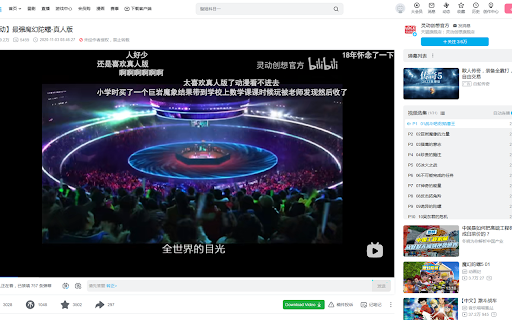



Bilibili Downloader is an amazing Bilibili Downloader helper tool that allows you to Easily Download Bilibili Videos in MP4, WEBM, M4a and more in FHD quality with sound. All resolutions and qualities (720p, 1080p, 2K, 4K, 8K) are supported for both videos with sound & muted videos. Download ultra HD qualities like (1080p, 2K, 4K, 8K) with audio in one click without the need to install any alternative plugins or apps. Features: - Download higher resolutions like (1080p, 2K, 4K, 8K) in one click. - Download Bilibili as audio files in formats (MP3, WebM, M4A). - Download videos from Bilibili withut the background sound or music if you need to. - Download Bilibili videos with different options like (30FPS, 60FPS). - Simple Download button that transfers to all download options available. - Does not require any additional settings. How it works ? A simple green button is added to Bilibili video pages, which enables you to download videos. The button is integrated in a simple manner below the video and next to other Bilibili buttons (see screenshots). Click the button to open a page of available formats to download and choose the suitable download link for you. (You don't need to run or use any other apps to download FHD videos with sound, the Add-on will handle everything for you to download videos in an easy way) Download options These are the most popular video formats and qualities available: - MP4 8K - 4320p - MP4 4K - 2160p - MP4 2K - 1440p - MP4 1080p - MP4 720p - MP4 480p - MP4 360p - MP4 240p - MP4 144p These are the audio formats and qualities available: - AAC 128k - VORBIS 128k Important - How to report bugs If you find any issue or bugs, please feel free to send an email to "support@youtube4kdownloader.com", rather than just give bad reviews with the issue mentioned there :( And we'll do much effort to reply and solve this issue ASAP. How to watch downloaded videos? After downloading videos, you can play them using some of these free apps (or similar to these): - VLC - Windows/Mac/Linux - very popular - Movies & TV - pre installed on Windows 10 - Windows Media Player Windows Media Player 12 - Windows - iTunes - Windows/Mac

Video Downloader Professional
Download videos from web sites or just collect them in your video list without downloading them. - download and save videos playing on a website to hard disk - select between different resolutions if the site supports it ( e.g. at Vimeo) - play found MP4 videos via Google Chromecast on your TV or play it on your Google Home. - add videos easily to your video list. There you have quick access to the videos and you can play them at any time, without having to return to the orignial web page. You also have the option to play the videos in any size (currently available at selected video providers like Youtube and Vimeo) If you have problems or videos which cannot be downloaded please don't give a bad rating but write us an email to support@link64.com and help us to improve this software. Thank you! Important: We had to lock the download of YouTube, Instagram, Dailymotion, Vk and Tiktok videos because of restrictions of the Chrome Store. There are always videos which are protected by the sites and cannot be downloaded. If you still want to download these videos, we recommend our app at www.videodownloaderultimate.com for all browsers. Privacy Policy: Video Downloader professional does not collect or send any personal data. Non-personalized data (which is the address of the video or part of it) is sent in these cases: - When you manually add videos to the video list a request is sent to the origin website to get information about the video (like title, thumbnail) - When you play a video in the video list, then the playing code of the origin website is loaded and executed. - When opening the Video Downloader professional menu a request is send to the origin of the found videos to receive the video length. - On some supported video sites, we are loading additional information from these sites to get the addresses of the video files.

Video Downloader Global - videos & streams
Video Downloader for Any Website – Save Videos and Live Streams Looking for a way to save videos from websites and social media? This extension allows you to download video content from multiple platforms, including Facebook, TikTok, Instagram, Twitch, and many others. Capture live broadcasts or save videos in MP4 or WEBM formats with ease. Whether it’s a short clip, a long video, or a live stream, this tool provides an efficient way to store your favorite content directly to your device. Features and Capabilities ✔ Download videos from a variety of websites and social networks ✔ Save MP4 and WEBM files for offline viewing ✔ Capture live streams and download them later ✔ Works on major platforms, including Facebook, Instagram, TikTok, and more ✔ Quick and simple process – no extra steps required Supported Websites and Platforms This extension provides video saving functionality for various online services, including: - Facebook – Save videos from feeds, pages, and even live broadcasts - Instagram – Download reels, stories, and video posts - TikTok – Capture videos directly from profiles and feeds - Twitch – Record and store live streams for later - Vimeo – Save high-quality clips from different creators How to Use the Video Downloader - Add the extension to your browser - Open a website or social media page containing a video - Check the extension icon – if it turns red, a video is detected - Click to start downloading or recording a live stream All saved videos will be stored in your browser’s default download folder. ✔ Convenient and user-friendly – No complicated settings, just click and save ✔ Works with different formats – MP4 and WEBM supported ✔ Compatible with multiple websites – From social media to streaming services ✔ No account required – Download videos directly without sign-ups Whether you want to store a tutorial, save a favorite moment, or keep an important video, this extension provides a simple and efficient way to do it. Try it now and start saving videos effortlessly!

Pinterest Video Bulk Downloader - HD Video and Images
Bulk download Pinterest HD videos and HD images. Browse and collect, one-click download Pinterest Video Bulk Downloader designed to help users efficiently download videos and images from Pinterest in bulk. Here’s an overview of its key features: 🔧 Key Features 🖱️ One-Click Bulk Download: Quickly download HD videos and images in their original resolution with a single click. 📜 Auto Scrolling: Load more content effortlessly with the "Swipe down" button. 📊 Real-Time Sidebar: Keep track of captured media with a sidebar showing the current number of HD videos and HD images detected. 🔓 Subscription Mode: Free users can perform up to three bulk downloads or "swipe 10" or "swipe 30". Upgrade to a subscription for unlimited access. 📂 Direct Download: Save content straight from the list without opening each item individually. 🛠️ How to Use ▪️Install the extension from the Chrome Web Store. ▪️Open Pinterest and browse a board or search results. ▪️Click the 'Swipe Down' button to automatically load more content. ▪️Monitor captured items in the sidebar and click Download to save them in bulk. ▪️You can click the 'Clean & Refresh' button anytime to clear the captured content and start fresh. ✅ Benefits ⚡ Efficient: Auto-scrolling and batch downloading save valuable time. 🧩 Simple: User-friendly interface suitable for everyone. 🎨 Versatile: Supports both videos and images to meet various needs. ⚠️ Limitations Free version is limited to three bulk downloads. Download speed may vary depending on your network conditions. Install now and enjoy a seamless Pinterest downloading experience! 📥✨

V Video Downloader PoVim
Download tool for saving video from Vi video platform. Video Downloader saves any video to your PC in one click and best resolution Download tool for saving video from V video platform. V video platform Downloader saves any video to your PC in one click and best resolution 🎥 PoVim | Video Downloader for V video platform is a one-stop solution which allows to download any V video. When downloading you can chose resolution of a video file and our Downloader will save the video with desire quality. 🎬 This downloader will be extremely useful when it comes to keeping any V video platform content so you could use it later, watch, repost, share, etc. This is light-weight and RAM saving solution which works like a charm and doesn't load your browser. Using this download manager is as easy as it can be due to it's user-friendly interface and clear UI. Get it to your Chrome and after reloading the page, you will see two Download buttons on every video page: 🟣 One is placed under video next the Video name, 🟣 Another one appears when you hover cursor on the Video itself. It is handy when you watch the video in full screen mode. 🧐 HOW TO: 1) All you need is to click Download button whether you are on main page or specific video page. 2) After clicking the button V Video Downloader selects by default the best video resolution available and starts downloading. 3) You don't need to search for the button or select video resolution among the options. 🎉 NEW: Of course, V Video Downloader can download any embedded V video platform videos too. This means you can save V video platform video from any website where this video is placed as embedded one. V Video Downloader detects such videos automatically and places Download button when you hover the cursor on the video. 📍 NOTE: We cannot influence resolution of the video to be downloaded. It is defined by the video author and we cannot neither degrade nor upgrade it. Video Downloader PoVim may occasionally open a separate tab with promotional content to help keep the extension free. No personal data is used for advertising, and browsing activity is never sold or shared. Promotional content can be disabled at any time in the extension settings.
