
dkdblmigaplabcgnjapehckaldffkdbl

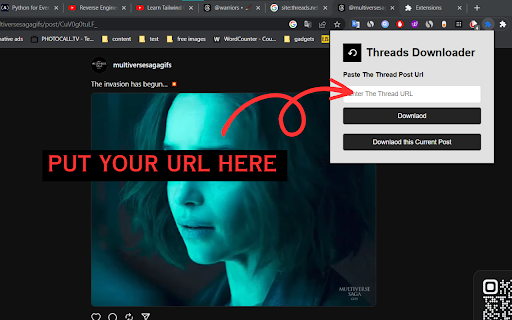
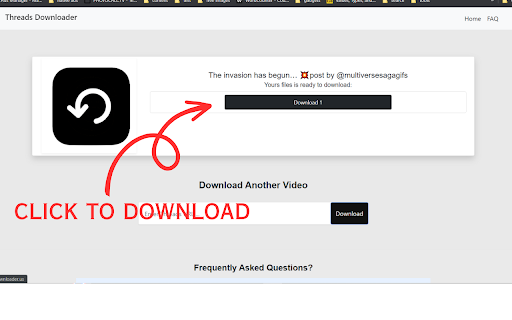
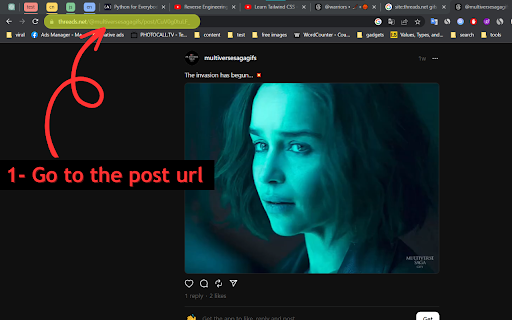
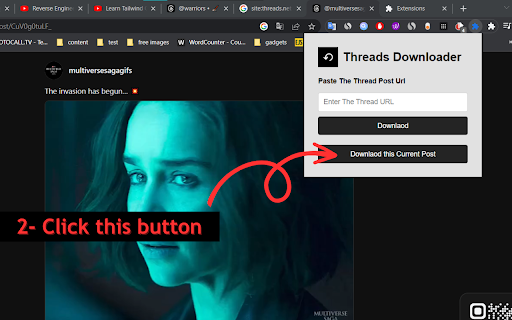
Download videos, GIFS and images from Threads Online Threads video downloader Threads Video Downloader, a free online tool to download and save videos and GIFs from Threads. Our tool lets you download videos from Threads in the fastest way. You don't have to install any software on your computer or mobile phone. All you need is a Threads video Thread link and all the processing is done on our side so that you can be one click away from downloading videos to your smartphones or desktops. How to use Threads Downloader ? 1. Find the Thread that has the video or images of Gifs you want to download. 2. Tap the share icon and copy the Thread link. 3. Paste the Thread link into the URL text box above and click on "Download" button. 4. Click and download the format of your choice to your device.

Video DownloadHelper
Download Videos from the Web. Download videos from the web. Easy, smart, no tracking. Best video downloader for 10+ years! Video DownloadHelper supports 1000+ websites (Dash, HLS, MPD, …), live streaming, high-definition and conversion to your preferred formats (MP4, MKV, WebM, …). Video DownloadHelper also support audio download (extract audio from videos into MP3s). Please note that this extension doesn't support YouTube.

Telegram Video Downloader - Telegram Downloader & Saver
Telegram Video Downloader - Download Telegram Videos, Photos, Music, GIFs from Private/Restricted Channels and Groups Telegram Video Downloader — Download Telegram videos, photos from private/restricted channels and groups, and export chat history. Telegram Video Downloader is a fast, lightweight Chrome extension that helps you download videos, audio, photos, GIFs, music, audiobooks, and other media from Telegram Web. Save Telegram content locally in just a few clicks — no complex setup or technical knowledge required. ✨ Core Features 🎬 Telegram Video Downloader: Easily download videos from chats, channels, groups, private channels, and restricted channels. 🗂️ Telegram Media Downloader: Supports videos, photos, images, GIFs, audio, music, audiobooks, documents, and more. ⚡ Bulk Download: Select multiple files at once and quickly save Telegram videos, images, and audio in batch. 📥 Single-File Download: Download individual videos, images, audio, or documents directly from the Telegram Web chat window. 🔒 Private Channel Downloads: Save media from private channels and personal shares. 🚫 Restricted Channel Downloads: Download media from restricted groups and channels you can access. 🌐 Telegram Web Support: Compatible with Web A and Web K, including https://web.telegram.org/a and https://web.telegram.org/k. 📦 Large File Support: Download large videos and media files over 1GB. 🧩 No API Required: No Telegram Bot API or extra configuration needed. ✅ Easy to Use: Intuitive interface and simple workflow. 🚀 How to Use 🛒 Install the extension from the Chrome Web Store. 📌 Pin it to the toolbar for quick access. 🌐 Open Telegram Web: https://web.telegram.org/k or https://web.telegram.org/a. 🔎 Go to the target chat/channel/group and select the content you want. 🧩 Click the extension icon to view captured media. ✅ Select files: videos, photos, audio, GIFs, or documents. 📥 Click Download to save Telegram media locally. 📁 Supported Telegram Content 🎥 Videos: Chats, groups, channels, private shares 🖼️ Photos: Images and albums 🎧 Audio: Music, voice messages, audio messages, audiobooks ✨ GIFs: Animated GIFs and media previews 📄 Documents: Files and materials 📢 Channel media: Public, private, and restricted channels 👥 Group media: Videos, images, audio, files 🌐 Web A/K support: Compatible with both major versions 👤 Who It's For 💬 Telegram users: Save videos, photos, music, and documents locally 🗃️ Content collectors: Organize media from chats, groups, and channels 📢 Community admins: Back up shared group and channel content 🎓 Students/researchers: Save video, document, and audio courses and study materials 💼 Business users: Organize important media and files offline ⭐ Why Choose Telegram Video Downloader? Quickly collect and bulk-download Telegram videos, photos, and audio without opening files one by one. Supports private and restricted channels — an efficient choice as a Telegram video download extension, media saver, bulk downloader, private/restricted channel downloader, and Web video downloader. ❓ FAQ What is Telegram Video Downloader? A Chrome extension to download videos, audio, photos, GIFs, documents, and other media from Telegram Web. Does it support channels and groups? Yes — chats, channels, groups, private channels, and restricted channels. Does it support bulk download? Yes — select multiple videos, images, and audio files at once. Do I need a Telegram API or Bot Token? No — use it directly in the browser. Can it download large files? Yes — supports videos and media files over 1GB. Does it support private and restricted channels? Yes — as long as you can access them in Telegram Web. Is it affiliated with Telegram? No — it is an independent third-party extension. ⚠️ Usage Notice Please use responsibly and avoid downloading or sharing copyrighted content without authorization. ℹ️ Disclaimer Telegram Video Downloader is a third-party Chrome extension. It is not affiliated with, endorsed by, or sponsored by Telegram Messenger Inc. or Telegram Web.

Telegram Video Downloader - TG Downloader & Media Saver
Telegram Video Downloader - Download Telegram Videos, Photos, Music, GIFs from Private/Restricted Channels and Groups & Export Chats Telegram Video Downloader is a fast, simple, and lightweight Chrome extension designed to help you download Telegram videos, audio, photos, GIFs, music, audiobooks, and media files from Telegram Web in just a few clicks. Whether you want to save media from Telegram channels, groups, chats, private channels, or restricted Telegram communities, this Telegram video downloader makes it easy to download and store Telegram content locally on your computer. No complicated setup, no Telegram API configuration, and no technical skills required. - 🎬 Telegram Video Downloader - Easily download Telegram videos from chats, channels, groups, private channels, and restricted Telegram channels. - 🗂️ Telegram Media Downloader - Save videos, photos, images, GIFs, audio files, music, audiobooks, documents, and other Telegram media resources. - ⚡ Bulk Telegram Download - Select multiple media files and batch download Telegram videos, pictures, and audio content with one click. - 📥 Single File Download - Download an individual Telegram video, image, audio file, or document directly from the Telegram Web chat window. - 🔒 Download from Telegram Private Channels - Save video, audio, photo, and media content from private Telegram channels and personal shares. - 🚫 Restricted Telegram Channel Downloader - Download media from restricted Telegram groups and channels and keep important files locally. - 🌐 Telegram Web Downloader - Fully supports Telegram Web A and Telegram Web K versions, including https://web.telegram.org/a and https://web.telegram.org/k. - 📦 Large File Support - Easily download large Telegram videos, media files, and 1GB+ content from Telegram Web. - 🧩 No API Required - Start downloading Telegram media without Telegram bot API setup, developer configuration, or extra technical steps. - ✅ Easy to Use - A clean and beginner-friendly interface makes Telegram video download simple for every user. 🚀 How to Use 1. 🛒 Install the Telegram Video Downloader Chrome extension from the Chrome Web Store. 2. 📌 Pin the extension to your browser toolbar. 3. 🌐 Open Telegram Web at https://web.telegram.org/k or https://web.telegram.org/a. 4. 🔎 Browse the Telegram chat, group, channel, private channel, or restricted channel you want to download from. 5. 🧩 Click the extension icon to view captured Telegram media resources. 6. ✅ Select videos, photos, audio, GIFs, or files. 7. 📥 Click Download to save Telegram media locally. 📁 Supported Telegram Downloads - 🎥 Telegram Videos - Download videos from Telegram chats, groups, channels, and private shares. - 🖼️ Telegram Photos - Save Telegram images, pictures, and photo albums to your computer. - 🎧 Telegram Audio - Download Telegram music, voice files, audio messages, and audiobooks. - ✨ Telegram GIFs - Save animated GIFs and media previews from Telegram Web. - 📄 Telegram Documents - Download shared files and documents from Telegram conversations. - 📢 Telegram Channel Media - Batch download media from Telegram public, private, or restricted channels. - 👥 Telegram Group Media - Save videos, images, audio, and files from Telegram groups. - 🌐 Telegram Web A/K Media - Works with both major Telegram Web versions. 👤 Who Is This For? - 💬 Telegram Users - Save useful videos, photos, music, and documents from Telegram Web for local access. - 🗃️ Content Collectors - Organize Telegram media files from different chats, groups, and channels. - 📢 Community Managers - Download and back up shared Telegram media from groups and channels. - 🎓 Students and Researchers - Save Telegram videos, documents, audio lessons, and learning materials. - 💼 Business Users - Keep important Telegram media, files, and shared resources organized offline. ⭐ Why Choose This Telegram Video Downloader? Telegram Video Downloader helps users save time when downloading media from Telegram Web. Instead of manually opening each file one by one, you can quickly collect Telegram videos, photos, audio files, and other media resources in bulk. It is ideal for users looking for a Telegram video download extension, Telegram media saver, Telegram bulk downloader, Telegram private channel downloader, Telegram restricted channel downloader, or Telegram Web video downloader. Telegram Video Downloader is a Chrome extension that helps users download Telegram videos, audio, photos, GIFs, documents, and other media files from Telegram Web. Yes. You can use this Telegram video downloader to save videos from Telegram channels, groups, chats, private channels, and restricted channels that you can access in Telegram Web. ⚡ Does this extension support bulk Telegram downloads? Yes. Telegram Video Downloader supports bulk download, allowing you to select multiple Telegram videos, images, audio files, and media resources and download them together. 🎧 Can I download Telegram audio and music files? Yes. This Telegram media downloader supports audio files, music, audiobooks, voice files, and other supported Telegram audio resources. 🌐 Does it work with Telegram Web A and K versions? Yes. The extension supports both Telegram Web A and Telegram Web K, including https://web.telegram.org/a and https://web.telegram.org/k. No. You do not need to configure the Telegram API, create a bot, or enter any API token. The extension works directly in your browser. Yes. Telegram Video Downloader supports large media files, including 1GB+ Telegram videos and other large Telegram files. 🖼️ Can I save photos and GIFs from Telegram? Yes. You can download Telegram photos, images, picture albums, animated GIFs, videos, audio, and documents from Telegram Web. Yes. The extension can help download media from Telegram private channels and groups that are visible and accessible in your Telegram Web account. Yes. Telegram Video Downloader can help save videos, audio, photos, and other media from restricted Telegram channels and groups that you can open in Telegram Web. ℹ️ Is this extension affiliated with Telegram? No. Telegram Video Downloader is an independent third-party Chrome extension and is not affiliated with, endorsed by, or officially connected to Telegram. Please use this Telegram downloader responsibly. Users are responsible for how they download, save, and use Telegram media content. Do not download or distribute copyrighted content without proper permission. Telegram Video Downloader is an independent third-party Chrome extension and is not affiliated with, endorsed by, or officially connected to Telegram Messenger Inc., Telegram Web, or any related Telegram services.

Twitter Video Downloader - Tweeload
Download Twitter videos and GIFs using Tweeload. Tweeload is an online tool to download videos and GIFs from Twitter. The Tweeload extension makes it extremely easy to download media from the Twitter website. A Download button will appear below every Tweet containing any videos. Clicking on the Download button will take you straight to the download page where you can download any video from that particular Tweet.
