
djkpliikoblbphjhnifhlmadkednkmlk

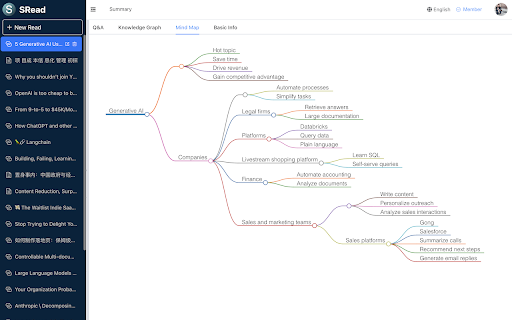
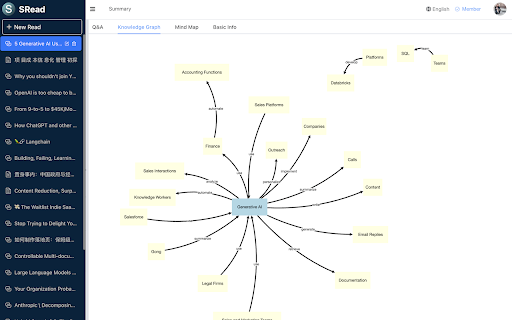
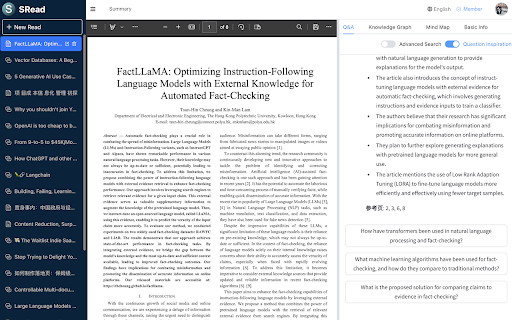
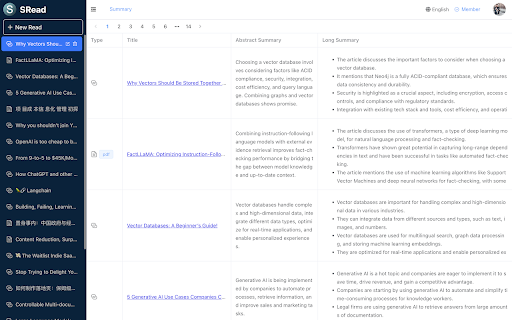
SRead is a smart reading assistant, whether you enjoy reading articles or viewing electronic papers, you can utilize SRead for assisted reading. SRead supports intelligent summarization, capable of extracting key information from the reading material and summarizing it; additionally, it can perform intelligent Q&A, answering any relevant information within the article. Moreover, SRead's mind map feature can help readers quickly grasp the outline of the entire piece. Chrome Extension The new Chrome extension of SRead brings a major upgrade to the browser reading experience. Once this extension is installed, users can directly enjoy all the features of SRead on Chrome browser without the need to download any additional applications. This extension includes a simplified toolbar, making it easy for users to quickly access the intelligent summarization, intelligent Q&A, and mind-mapping features while reading. Another important feature of this extension is that it can automatically recognize web page content, providing real-time intelligent assistance to users, making the reading experience smoother and more efficient. Installation and Usage Installing the SRead Chrome extension is very straightforward. Users first need to log on to the SRead website (https://sread.ai), and register/login with Gmail or WeChat. Then visit the Chrome Web Store, search for "SRead", and click the "Add to Chrome" button. Once the installation is complete, the SRead icon will appear on the toolbar, clicking the icon activates the extension and users can start using it. The SRead Chrome extension can be used for browsing online articles. For instance, when you are reading a technical blog, just navigate to the page of the article, then click the SRead Chrome extension icon, its intelligent summarization feature can help you quickly understand the main points of the article. Meanwhile, if there are contents in the article that you do not understand, you can directly use the intelligent Q&A feature without leaving the current page.

TruthGPT - No Hallucinations, only Truth
Nothing But the Truth TruthGPT aims to be a "maximum truth-seeking" AI. It is designed to prioritize accurate information over anything else, and to be a counterweight to existing chatbots like ChatGPT and Bard, which have been criticized for spreading false information or harmful rhetoric. But TruthGPT uses both ChatGPT and Bard to validate truthfulness of a given information. TruthGPT is a AI chatbot model with the potential to address some of the challenges of AI safety and disinformation. No ChatGPT Plus plan required. Colour Code meaning: * RED - false * YELLOW - it may be true or false(the verifier is not sure) * GREEN - true Make sure you Pin it to use later . Here are some of the key features of TruthGPT: * It is designed to be a "maximum truth-seeking" AI, meaning that it will prioritize accurate information over anything else. * It will be able to access and process information from a variety of sources, including the real world, the internet, and other AI models. * It will be able to generate text, translate languages, and answer questions in a comprehensive and informative way. * It will be able to identify and refute false information. TruthGPT has the potential to be a powerful tool for promoting truth and accuracy in the world. TruthGPT aims to minimize disinformation and hallucinations. It is also important to note that TruthGPT is still in the early stages of development. For feedback or feature requests reach out to us at https://github.com/SingularityLabs-ai/TruthGPT-mini/issues LEGAL: Disclaimer: TruthGPT is not official Google Application or OpenAI. It is an unofficial extension that is developed and maintained independently and has no affiliation to Google or OpenAI .

HN Notifier - Hacker News Reply Notifications
Notifies you via in-app bell and email when you get a new reply on HackerNews Notifies you via in-app notification center and email when you get a new reply on HackerNews (https://news.ycombinator.com). This extension uses Engagespot to deliver notifications. Privacy Note: This extension does not collect any of your private data such as cookies or sessions.

Beamcast
Boost your productivity with Beamcast and AI! ChatGPT at your fingertips, write smarter, code faster and ask questions quicker. Seamless integration with your favorite browsers.

Tabsets.net
Use tabsets.net to safely keep track of all your tabs and links in the Side Panel, stored locally on your browser With the Tabsets Extension, you'll have a new way to organise your Links, Tabs, and Bookmarks - store and find any website quickly. * It runs in the Side Panel :) * Your data is stored solely on your own computer * Integrates Bookmarks: simply use both * Organise your tabs using: tags, domains, folders, colours etc. The code is open source and available at GitHub. Do not navigate through multiple levels of folders of your browsers bookmark manager until you might find what you were looking for. This is what you can do instead: - Organise and Manage everything in your Browser's SidePanel - Utilise multiple windows and access them with inline window manager - Search for websites easily (by URL, title, or even content) - Quick access to your bookmarks (optional feature*) - Conveniently find and open an URL, or open all tabs of a set - Archive Tabsets (for later use) (optional feature*) - Quick access: newest tabs, most used tabs, tabs by domain Further Features: - Dark Mode - Import and export Tabsets as JSON - Use Color Markers for Organising (optional feature*) *) optional features need to be activated in the settings page
