
djhcelgbkggnbipeccnnbafbnljoikkc
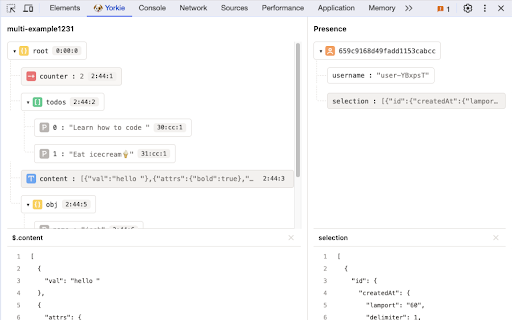
A browser extension that helps you debug Yorkie. With this extension, you can access the "Yorkie 🐾" panel within the Chrome Developer Tools. Here's an overview of the Key features: Left Tab: Document - Instant access to document keys. - Visualize the rootObject structure for a comprehensive understanding. CRDT insights - Clearly display data types for each CRDTElement using intuitive icons and informative tooltips. - Click on any CRDTElement to unveil datatype-specific details tailored to your debugging needs. View Options - By default, enjoy a JSON view for quick analysis. - Explore tree data types with an interactive graph view, offering a deeper understanding of the data structure.

BC Parks Automation
Availability notifications and automatic cart reservation of BC Parks Campsites When the space becomes available, the extension will put it to the cart (thus, securing it for 15 minutes) and send you a notification. Note: the extension does not book the camping for you, it only places it to your shopping cart.

Follows You GitHub
Adds a "follows you" label on a GitHub follower profile or hovercard Follows You GitHub adds a label on a GitHub follower profile or hovercard. It also works on gist.github.com.

ChatGPT Powered Google Search
Upgrade your Google search experience with ChatGPT. Get AI-generated insights alongside search results. Chrome extension for Google Search is fastest way to look at results both from google search and chatGPT on the same page. You can choose to display chatGPT result always or display chatGPT results only when you append your query with a question mark. With this extension, you have the flexibility to decide when you’d like to see ChatGPT results in your Google search. Here’s a quick reminder of the features you now have access to: Choose when ChatGPT results are displayed: You have the option to view ChatGPT results only when you need them, keeping your search experience clutter-free. Use the “?” shortcut: Simply append a “?” to your search query in Google, and the ChatGPT results will be displayed alongside your regular search results. Opt for ChatGPT results with every query: If you prefer, you can enable ChatGPT results to appear with every search query, providing you with more comprehensive information at your fingertips.

Reply Buttons
Simply define your own reply buttons to answer easier and faster Unofficial feature for WhatsApp™ Web Guess you are running a business over WhatsApp Web and your customers ask you the same questions the whole time. Wouldn't it be nice to keep the answers saved and to reply easy and fast? Then this Chrome Extension is exactly what you are looking for. 1. Open the extension to add your answers 2. Have fun! Do you need something more? Write me. ¿Necesitas algo más? Escríbeme. WhatsApp is a trademark of WhatsApp LLC. This extension offers an unofficial feature for WhatsApp™ Web and is not related in any way to WhatsApp LLC.
