
djgpbhajbcpjhjojamgbaklcbkfkdjcg
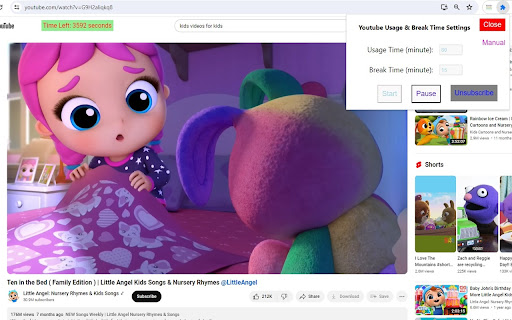

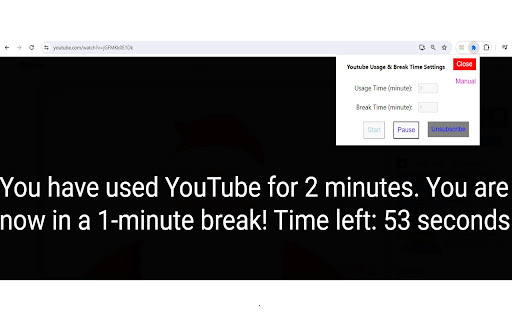
This plugin helps parents manage and limit their children's YouTube screen time for a healthier, balanced digital experience. Introducing "YouTube Time Limiter for Kids" – Your Ultimate Parental Control Chrome Extension! Are you worried about your kids spending excessive hours on YouTube? We understand the importance of responsible screen time management. That's why we've created the "YouTube Time Limiter for Kids" Chrome Extension! 1. Customizable Time Limits: With "YouTube Time Limiter for Kids," you have the power to set personalized daily time limits for YouTube usage. Whether it's 30 minutes, 2 hours, or any duration that suits your family's needs, this extension adapts to your preferences. 2. Encourages Healthy Breaks: When your child's set time limit is reached, the extension automatically overlays the video with a countdown timer. This encourages your child to take a break for a customizable period, promoting physical activity and balanced development. 3. Tailored Configuration: Our extension is designed to fit your family's unique requirements. Adjust time limits based on your child's age, school schedule, or your household guidelines. 4. Parental Empowerment: "YouTube Time Limiter for Kids" puts you in control. You can unlock the overlay when necessary or make real-time adjustments to time limits, ensuring that screen time remains a dynamic and manageable aspect of your child's routine. 5. Peace of Mind: Rest easy knowing that "YouTube Time Limiter for Kids" supports your efforts to strike the right balance between screen time and other essential activities in your child's life. Don't let excessive screen time hinder your child's development. Take control with "YouTube Time Limiter for Kids" and empower your kids to explore, learn, and play responsibly in the digital age. Install "YouTube Time Limiter for Kids" today and provide your child with a responsible and balanced screen time management solution. It's time for a healthier, happier digital experience for your family!

YouTubeFast
YouTube playback speed controller that lets you experience more in less time. YouTubeFast, your time is valuable. Save time while you enjoy your favourite YouTube content with YouTubeFast, the easy-to-use tool that pushes YouTube beyond its 2x speed limit. Enjoy fine-tuned control over video speed using the on-screen panel or keyboard hotkeys. Features: • Suit YouTubeFast to your needs with fully customisable speed, hotkey and visual settings featuring multi-key hotkey support and default video speed options. • Keep your privacy! YouTubeFast collects zero data and requires no permissions. • Seamlessly integrated into YouTube's interface with a modern, minimalist design which takes nothing away from your viewing experience. Notes: • To apply changes in settings, refresh the page. • Open the settings page via: - While on YouTube, click the YouTubeFast icon or press Shift + S. - Click options in the extensions menu. If you have gained any value from YouTubeFast and would like to support my work, you can do so at https://buymeacoffee.com/youtubefast or leave a review! Disclaimer: YouTubeFast is not affiliated with YouTube in any way. As such, any changes made to YouTube may result in the extension not working as expected. In any case, please report the issue.

YouTube Parental Controls
Use YouTube Parental Controls. Secure your kids with a parental lock on youtube and advanced parental filters for youtube easily 🛡️ Ensure a safe digital environment for your family by using our advanced solution for kids safety. This extension is designed for those who need reliable youtube parental controls and want to take full control over available content. You no longer have to worry about your children stumbling upon inappropriate videos. Our tool is the definitive answer to how to put parental controls on youtube effectively and simply. 🔒 Many parents wonder exactly how to block youtube shorts so that children cannot bypass the settings. Our extension includes a robust password-protected interface to secure every session. This is a true parental lock on youtube that prevents access to settings and unauthorized content. The block yt channel feature works instantly and accurately to keep your children safe. 📉 A highly requested feature is the ability to completely disable youtube shorts. Short-form videos often contain unpredictable content and can be addictive for children. Our solution shows you how to block youtube shorts with a single click, allowing your child to focus on long-form educational videos. This is a vital step in how to set parental controls on youtube for healthy habits. 📍 If you are unsure how do you put a parental lock on youtube on a standard browser, our plugin does the heavy lifting for you. It integrates directly into the site, creating powerful parental restrictions on youtube. Now, your child’s learning sessions are under your quiet supervision. This is much more effective than the built-in mode, as our parental controls youtube are far more strict. 🖥️ We have brought the best mobile parental control experiences to your desktop browser. Our extension serves as a comprehensive parental control youtube app for your PC, providing an unprecedented level of filtering. You take the wheel and decide which content is worthy of your family’s time. It is the most direct way to block youtube channels that do not fit your goals. 🛠️ Installation and Setup 1️⃣ Install the extension in your Chrome browser. 2️⃣ Import your favorite educational channels to whitelist. 3️⃣ Toggle the switch to permanently disable youtube shorts. 4️⃣ Set a strong parent password in the settings. 5️⃣ Save changes and launch the secure Child mode. 🧐 If you are still contemplating how to block youtube shorts or unauthorized creators, simply try our tool in action. The filtering system works at the code level, making it impossible to bypass restrictions without the master password. These are the ultimate parental filters for youtube that save your time. You no longer need to sit next to your child to monitor every single click. ✨ Why Parents Choose Our Filter ▸ Guaranteed blocking of unwanted creators and specific videos to ensure only high quality content. ▸ Removal of distracting shorts and clickbait thumbnails that lead children toward non-educational videos. ▸ Easy import and export of your approved lists allowing you to share settings across computers. ▸ Regular updates to stay ahead of platform changes ensuring your parental restrictions on youtube remain active. 🤖 We created a product that makes the process of digital safety automatic and stress-free. By utilizing a powerful parental lock on youtube, you can be confident in the safety of the digital space. This is more than just a plugin; it is your peace of mind in a complex online world. Every parent eventually looks for how to set parental controls on youtube to protect their children. ❓ Frequently Asked Questions ❓ Question: How to put parental controls on youtube using this extension? 💡 Answer: Simply install the plugin, add your child’s favorite channels to the list and set a password. ❓ Question: Can my child block yt channel or change the settings? 💡 Answer: No, all settings are protected by a master password that only the parent knows. ❓ Question: How to block videos on youtube that are not in the whitelist? 💡 Answer: The extension automatically blocks any video that does not belong to an approved channel. ❓ Question: Does this extension help to disable youtube shorts? 💡 Answer: Yes, it completely removes the Shorts tab and all short-form videos from the interface. 🎈 Now you finally know how to put parental controls on youtube and can tailor the system to your child's needs. Our extension allows you to quickly add new videos to the approved list. Try the best parental controls youtube today and feel the difference. High-quality youtube parental controls must be flexible to grow with your family.

YouTube Sleep Timer, Loop & Speed Control
Set a YouTube sleep timer, loop music or videos, and control playback speed easily. Take control of your viewing experience! Master your viewing experience with our all-in-one YouTube sleep timer extension. If you've ever wondered "does YouTube have a sleep timer?" or needed a reliable way to fall asleep peacefully to your favorite playlists, you've found the perfect solution. Beyond relaxation, our tool enhances your daily productivity. It acts as a robust YouTube speed control extension for those asking "why can't I change the playback speed on YouTube?", and features a built-in YouTube video looper to effortlessly keep your favorite tracks on repeat. Introducing a mindful way to manage your entertainment. This extension is meticulously tailored for users who enjoy falling asleep to calming videos or listening to sleep music on YouTube without worrying about autoplay running through the night. 🌙 The Ultimate YouTube Sleep Timer for Relaxation Transform your bedtime routine into a peaceful experience. Our YouTube music sleep timer ensures that your device doesn't stay active longer than necessary, saving both bandwidth and energy. ◆ Personalized Bedtime: Easily learn how to set a sleep timer on YouTube to automatically pause your favorite chill-out playlists. ◆ YouTube Sleeping Music: Perfect for those who use YouTube sleep music or ambient sounds to drift off. No more waking up to loud, unwanted videos. ◆ Energy Efficient: By preventing videos from playing unnoticed, you act as a smart digital citizen, preserving your laptop's battery life. ⏱️ Versatile Timer Presets for Every Occasion Why settle for a simple clock when you can have a dedicated YouTube alarm clock and timer system? Choose from our optimized presets: ➤ 5-Minute YouTube Timer: Ideal for quick power naps or short meditation sessions. ➤ 10-Minute YouTube Timer: Perfect for a brief relaxation break during work. ➤ 15-Minute YouTube Timer: Our most popular setting for a standard pre-sleep routine. ➤ Custom 15-Minute YouTube Timer: Need more time? Set a custom duration for long-form documentaries or study marathons. 🎵 Master the Loop: Seamless Music & Study Sessions Discover the convenience of a YouTube video looper. Whether you need a looper on YouTube for study beats or want to keep a specific track on repeat, our "YouTube loop" feature makes it effortless. 1. How to loop a YouTube video: Simply toggle the loop button to keep any content playing continuously. 2. Looping YouTube Music: Maintain the vibe without manual intervention. Perfect for background music or learning a new instrument. 3. YouTube Video Looping: Ideal for "how-to" tutorials where you need to watch a specific segment repeatedly to master a skill. ⚡ Advanced YouTube Speed Control Extension Stop struggling with issues where YouTube playback speed is not working due to an adblocker. Our extension provides direct, reliable control over your watching habits. 1️⃣ Precision Speed Adjustment: Wondering how to speed up YouTube videos or how to change the speed on YouTube? Use our intuitive slider to find your perfect pace. 2️⃣ Fix Common Issues: If you’ve ever asked "why can't I adjust the speed on YouTube?", our tool bypasses common UI bugs and conflicts with other extensions. 3️⃣ Productivity Boost: Speed up educational lectures or slow down language lessons to catch every word. 🛠️ How to leverage this extension for your lifestyle: • Focus: Use the 15-minute timer for YouTube to implement the Pomodoro technique for deep work. • Education: Master "how do you loop a YouTube video" to repeat complex tutorial steps. • Comfort: Find out "what is a sleep timer on YouTube" and set it to your favorite sleeping music for a worry-free night. ⌛Can you set a sleep timer on YouTube? 🔹Yes! Our extension integrates directly with your browser, allowing you to set a timer in just two clicks. 🧸 What does a sleep timer do on YouTube? 🔹It monitors your playback and automatically pauses the video after a set duration, preventing the "Next Video" autoplay feature from keeping you awake. 🔁 How do you loop videos on YouTube for music? 🔹Activate the YouTube music looper mode in the extension menu to keep any song or background ambiance playing on an infinite loop. ✨Why can't I adjust playback speed on YouTube? 🔹This is often caused by browser cache or adblocker interference. Our YouTube speed controller extension provides a dedicated overlay to ensure you always have control. Take control of your watching habits today! Install the extension now to save energy, boost your productivity, and finally enjoy a peaceful night's sleep without interruptions.

Video Duration for YouTube™
Adjust YouTube video playback speed, save time, and navigate with ease. Whether you want to speed up a lecture or slow down a tutorial, "Video Duration for YouTube™" gives you full control over your video viewing experience. With this extension, you can easily try out different speeds and see how much time you could save or add based on your selection. Also, the remaining video length is shown so you can plan your viewing time more efficiently. 1. Video Speed - Adjust video playback speed to up to 16x - Jump to 1x speed, then switch back to the previous speed in one click - Set the default speed at which every video starts with - Change speed in smaller or bigger increments 2. Video Duration - Find out how much time will be saved or added compared to watching at 1x speed - See your watch progress in percentage - Know how long it takes to watch the rest of the video at current speed - Know your YouTube Shorts: know video length, change video speed, skip through video 3. Flexibility - Continue using your favorite shortcuts already provided by YouTube - Tailor appearance and functionalities to your liking with settings in the extension popup We respect your privacy and don't collect any data. 💥 Keyboard shortcuts 💥 Works with any keyboard layouts. Here are the QWERTY shortcuts for reference: Change speed: A / D Jump to x1 speed: S Restart video: R Rewind / advance 10 seconds: J / L Play / pause: K Mute / unmute: M Show / hide controller: V Left controller: Z Right controller: X Time to end: E Watch progress: P 😦 Troubleshooting 😦 Refreshing the video page should fix most issues. 🚨 Future Release 🚨 Please use the support form to report problems, request features, and make suggestions. If this extension is helpful to you, please leave a rating or review so more people can find it. Thank you for your support!
