
djdlkoihbhgbjfabpgpclknhjoalmkjk
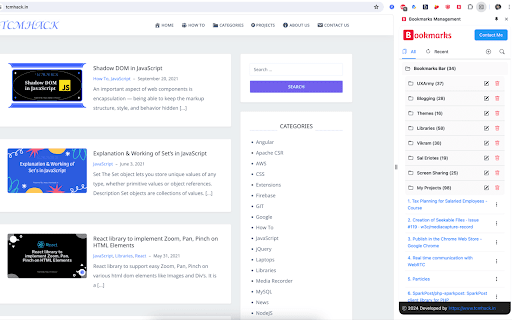
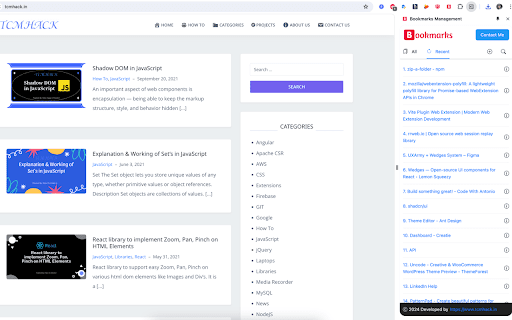
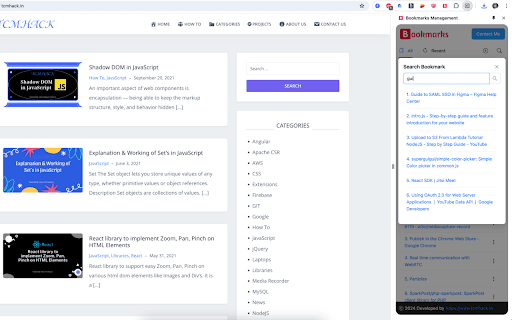
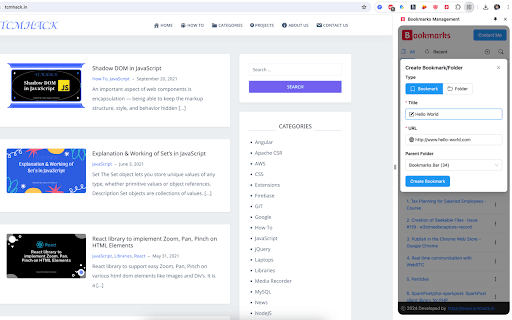
A straightforward tool for organizing your entire bookmark collection. Features: 1. See all bookmarks neatly sorted into folders. 2. Easily add new bookmarks or folders to any category. 3. Quickly search through your bookmarks. 4. Edit or delete any of your saved bookmarks. 5. Delete specific bookmark folders you no longer need. 6. Check out your most recently added bookmarks.

Bookmark Manager + Quick Search
Search, organize, and manage your bookmarks the smart way. Instant results every time. The bookmark manager built for power users. Lightning-fast spotlight search, smart matching, and advanced organization — all without leaving your current page. 🚀 𝗟𝗶𝗴𝗵𝘁𝗻𝗶𝗻𝗴-𝗙𝗮𝘀𝘁 𝗦𝗲𝗮𝗿𝗰𝗵 - Press Ctrl+Shift+K from any webpage to search your bookmarks instantly - Smart intelligent search finds bookmarks even with typos or partial matches - Search commands: Type "open: website.com" to instantly open any website - Open bookmarks in preview windows or new tabs with keyboard shortcuts - Advanced relevance scoring shows most relevant results first 📚 𝗣𝗼𝘄𝗲𝗿𝗳𝘂𝗹 𝗢𝗿𝗴𝗮𝗻𝗶𝘇𝗮𝘁𝗶𝗼𝗻 - Visual tree view with expand/collapse folders - Smart sorting by name, date added, URL, or default order - Drag & drop reordering for intuitive bookmark management - Bulk operations for managing multiple bookmarks at once - Right-click context menus for quick actions - Auto-expand search results to show relevant folders 🎨 𝗖𝘂𝘀𝘁𝗼𝗺𝗶𝘇𝗮𝗯𝗹𝗲 𝗘𝘅𝗽𝗲𝗿𝗶𝗲𝗻𝗰𝗲 - Light, dark, or system theme support - Customizable preview window sizes: Small, Medium, Large, or Custom size - Position control: Left, center, or right placement - Compact mode for power users - Favicon display for visual bookmark identification - Real-time bookmark and folder statistics 🎯 𝗣𝗲𝗿𝗳𝗲𝗰𝘁 𝗙𝗼𝗿 𝗣𝗼𝘄𝗲𝗿 𝗨𝘀𝗲𝗿𝘀 - Researchers and students managing large collections of resources - Developers organizing documentation and tools - Content creators tracking inspiration sources - Business professionals managing industry resources - Anyone with 100+ bookmarks who needs better organization - Users who want to optimize their bookmark workflow 💡 𝗪𝗵𝘆 𝗖𝗵𝗼𝗼𝘀𝗲 𝗧𝗵𝗶𝘀 𝗘𝘅𝘁𝗲𝗻𝘀𝗶𝗼𝗻 - Built specifically for users with large bookmark collections - Privacy-focused: All data stays in your Chrome profile - Regular updates with new features based on user feedback - Clean, modern interface that's easy to learn - Smooth performance and responsive design 🚀 𝗚𝗲𝘁𝘁𝗶𝗻𝗴 𝗦𝘁𝗮𝗿𝘁𝗲𝗱 1. Install the extension and pin it to your toolbar 2. Click the extension icon to open the sidebar panel 3. Start organizing your bookmarks with drag & drop 4. Use Ctrl+Shift+K to search from any page 5. Customize settings to match your workflow Transform how you manage bookmarks with the most powerful and intuitive bookmark manager now! 🚨 𝗟𝗮𝘁𝗲𝘀𝘁 𝘂𝗽𝗱𝗮𝘁𝗲𝘀: - Improved spotlight search on all sites - Tab opening will auto switch if already opened - Smart search support in sidebar - Free user access for spotlight search - Shift shortcut for opening tabs from sidebar

Bookmark Manager per Domain and Page
A Bookmark Manager to list all bookmarks for the domain or page of the current URL as hyperlinks. This Bookmark Manager is special, it displays only bookmarks belonging to the current domain. ie. https://gist.github.com or https://docs.github.com/en will be displayed if you have it as a bookmark and navigate to https://www.github.com Open any URLs from Domains that you have saved within *.domain.com* We will show you only the ones from that domain. The extension does not work across domains from the same brand, such as pinterest.de or pinterest.at, etc. we might add this functionality in a near future update if there is demand. So if you are looking for that best next app to open pages in a new tab, while simply organizing your url in this awesome quick software, with our bookmark manager you will not need more bookmarking apps on your sidebar, forget all the other addons. Save webpages that you find popular, then navigate there with speed, have a look at your bookmarklet and use our free extension to view your custom starred urls, search through them with ease. Updates / Change log: 22.06.2024 / V 1.0.7 - Responsive pop-up added, Extension Icons added, fixed folder view, deleting and editing the URL 25.05.2024 / V 1.0.6 - Updated Manifest to v3 19.07.2021 / V 1.0.5 - Removed "Storage" permission, not needed. 22.12.2020 / V 1.0.4 - Added FOLDER view buttons 14.12.2020 / V 1.0.3 - We added DELETE and EDIT buttons

Bookmark Manager
This is the Chrome extension for BookmarkManager.com, a standalone bookmark manager that uses tags to organize and rediscover links. The extension makes it super easy to add new bookmarks and find existing ones.

Bookmanize - Advanced bookmark manager
Advanced bookmark manager provides tagging, instant sorting, and filtering among all bookmarks on a full list view. Bookmark manager with a clean user interface where all bookmarks can be easily accessed in one full list view with tagging, instant sorting, and filtering. Organize your bookmarks with custom tags and faster navigates between them. We are an independent team of developers who love what they do:) If you want to improve or expand anything - email us bookmanize@gmail.com Support us with a cup of coffee - https://www.buymeacoffee.com/bookmanize ★ All bookmarks on one screen ★ Fast access to all main functions ★ Instant searching, filtering, sorting, adding, deleting bookmarks ★ Drag n drop bookmarks and folders All the features that the default bookmarks have (add, delete, sort, drag and drop bookmarks) in a more user-friendly interface with high performance for a large number of bookmarks Note: Your data (history and bookmarks) is not saved or stored anywhere else but on your computer. Hotkeys: - ctrl+shift+f or command+shift+f — focus the search field
