
djadidbmpgeclcpehfalaoonnnkpdlng
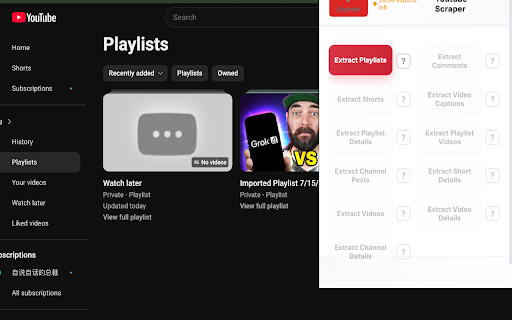
Scrape Playlists, Comments, Channels, and more from Youtube, with options to export in formats such as CSV, Excel, JSON and others ## Transform Your YouTube Data Collection with Professional-Grade Scraping Technology YouTube Data Scraper is the ultimate browser extension designed for content creators, marketers, researchers, and data analysts who need comprehensive access to YouTube's vast content ecosystem. This powerful YouTube scraper tool revolutionizes how you collect, organize, and export YouTube data across multiple content types including comments, playlists, videos, channels, and subscriber information. YouTube Data Scraper is a sophisticated browser extension that serves as your complete YouTube data extraction solution. Unlike basic YouTube downloaders or simple content viewers, this advanced YouTube extractor provides deep access to YouTube's content structure, enabling users to harvest valuable data insights from the world's largest video platform. The extension functions as a comprehensive YouTube exporter, capable of extracting detailed information from various YouTube content types while maintaining data integrity and providing multiple export format options. Whether you're conducting market research, analyzing competitor strategies, or building content databases, this YouTube data scraper delivers professional-grade results. ## Core Features and Capabilities ### Advanced Comment Extraction The YouTube scraper excels in comment data extraction, providing unprecedented access to user engagement data. Extract complete comment threads including: - Original comments and all reply chains - Comment timestamps and engagement metrics - User profile information and verification status - Comment sentiment indicators and interaction data - Nested reply structures with full conversation context This comment extraction capability makes the tool invaluable for social media managers analyzing audience sentiment, researchers studying online discourse, and content creators understanding their community engagement patterns. ### Comprehensive Playlist Data Mining Transform how you analyze YouTube playlists with advanced playlist scraping capabilities: - Complete playlist metadata including titles, descriptions, and creation dates - Individual video information within playlists - Playlist statistics including view counts and subscriber data - Creator information and playlist categorization - Cross-playlist analysis and comparison data The playlist extraction feature enables content strategists to analyze successful playlist structures, educators to organize learning materials, and marketers to understand content organization trends. - Complete video metadata including titles, descriptions, and tags - Engagement metrics including likes, dislikes, and view counts - Video duration, upload dates, and category classifications - Creator information and channel statistics - Video quality options and technical specifications This video data extraction capability supports content creators in competitive analysis, researchers in trend identification, and marketers in campaign planning. ### Channel and Creator Analytics Unlock detailed channel information for comprehensive creator analysis: - Channel subscriber counts and growth metrics - Complete video libraries and upload schedules - Channel description and branding information - Social media links and external connections - Channel categorization and content themes ### Multi-Format Export System The YouTube exporter supports multiple professional data formats: **CSV Export**: Perfect for spreadsheet analysis and database imports **Excel Export**: Comprehensive formatting with multiple worksheets and data organization **JSON Export**: Developer-friendly format for API integrations and custom applications **XML Export**: Structured data format for enterprise systems and data warehouses ### Professional Data Quality Unlike basic YouTube scrapers that provide limited information, this YouTube data scraper ensures comprehensive data extraction with maintained relationships between different content elements. The tool preserves data integrity while providing clean, organized output suitable for professional analysis. ### Scalable Extraction Capabilities Handle large-scale data extraction projects with confidence. The YouTube extractor manages bulk operations efficiently, whether you're extracting thousands of comments, analyzing multiple playlists, or conducting comprehensive channel audits. ### User-Friendly Interface Despite its advanced capabilities, the YouTube scraper maintains an intuitive interface that makes complex data extraction accessible to users of all technical levels. The streamlined workflow guides users through extraction processes while providing advanced options for power users. ### Real-Time Data Processing Access current YouTube data with real-time extraction capabilities. The YouTube data scraper processes live content, ensuring your extracted data reflects the most recent information available on the platform. ## Use Cases and Applications ### Content Marketing and Strategy Marketing professionals leverage the YouTube scraper for: - Competitor analysis and content gap identification - Audience engagement pattern analysis - Trending topic identification and content planning - Influencer research and partnership evaluation ### Academic and Market Research Researchers utilize the YouTube data scraper for: - Social media behavior studies and analysis - Content consumption pattern research - Digital marketing effectiveness studies - Cultural and linguistic analysis projects ### Content Creation and Optimization Content creators benefit from the YouTube extractor through: - Audience feedback analysis and content improvement - Successful content format identification - Community engagement optimization - Content series planning and organization ### Business Intelligence and Analytics Enterprises use the YouTube exporter for: - Brand mention monitoring and sentiment analysis - Market trend identification and forecasting - Customer feedback collection and analysis - Competitive intelligence gathering ## Technical Specifications and Performance ### Browser Compatibility The YouTube data scraper supports all major browsers including Chrome, Firefox, Safari, and Edge, ensuring consistent performance across different platforms and operating systems. ### Data Processing Efficiency Advanced algorithms optimize extraction speed while maintaining data accuracy. The YouTube scraper handles large datasets efficiently, minimizing processing time while maximizing data completeness. ### Security and Privacy Built with privacy-first principles, the YouTube extractor operates locally within your browser, ensuring your extracted data remains secure and private. No data is transmitted to external servers during the extraction process. ### Regular Updates and Maintenance Continuous updates ensure compatibility with YouTube's evolving platform structure. The YouTube data scraper adapts to interface changes and new features, maintaining reliable extraction capabilities. ## Advanced Features for Power Users ### Custom Extraction Filters Configure specific extraction parameters to focus on relevant data: - Date range filtering for temporal analysis - Engagement threshold settings for quality control - Content type specifications for targeted extraction - Language and region filtering for localized research ### Batch Processing Capabilities Handle multiple extraction tasks simultaneously: - Queue multiple channels for sequential processing - Batch playlist analysis with consolidated reporting - Automated extraction scheduling for regular data updates - Progress tracking and completion notifications ### Data Validation and Quality Control Ensure extracted data meets professional standards: - Automatic duplicate detection and removal - Data completeness verification and reporting - Format validation for export compatibility - Error logging and resolution guidance ### CSV Export Features - Customizable column arrangements and data organization - Unicode support for international content - Delimiter options for different regional standards - Header customization for database integration ### Excel Export Capabilities - Multiple worksheet organization for complex datasets - Automatic formatting and data type recognition - Chart and graph generation for visual analysis - Macro compatibility for automated processing ### JSON Export Structure - Hierarchical data organization preserving relationships - API-ready formatting for development integration - Compressed output options for large datasets - Schema documentation for technical implementation ## Installation and Setup Process ### Quick Installation The YouTube scraper installs directly from your browser's extension store with a simple one-click process. No additional software or complex configuration required. ### Initial Configuration Customize extraction preferences during first-time setup: - Select preferred export formats and file locations - Configure extraction parameters and quality settings - Set up automated processing preferences - Establish data organization and naming conventions ### Getting Started Guide Comprehensive documentation guides new users through: - Basic extraction workflows and best practices - Advanced feature utilization and optimization - Troubleshooting common issues and solutions - Professional use case examples and templates ## Performance Optimization and Best Practices ### Extraction Strategy Planning Maximize efficiency with strategic extraction approaches: - Prioritize high-value content for initial extraction - Utilize filtering options to focus on relevant data - Schedule large extractions during off-peak hours - Implement incremental extraction for ongoing projects ### Data Management Recommendations Organize extracted data for maximum utility: - Establish consistent naming conventions for files - Create structured folder hierarchies for different projects - Implement regular backup procedures for valuable datasets - Utilize version control for evolving extraction projects ### Quality Assurance Protocols Maintain high data quality standards: - Verify extraction completeness before analysis - Cross-reference critical data points for accuracy - Document extraction parameters for reproducibility - Establish data validation checkpoints throughout workflows ## Integration Capabilities and Workflow Enhancement ### Database Integration Seamlessly integrate extracted data with existing systems: - Direct CSV import to popular database platforms - API-compatible JSON formatting for custom applications - Excel integration with existing analytical workflows - XML export for enterprise data warehouse systems ### Analytics Platform Compatibility Connect extracted YouTube data with analytical tools: - Business intelligence platform integration - Social media monitoring system compatibility - Customer relationship management system imports - Marketing automation platform data feeds ### Collaborative Features Support team-based data extraction projects: - Standardized export formats for team consistency - Documentation templates for extraction procedures - Quality control checklists for team validation - Progress tracking for collaborative projects ## Future-Proof Technology and Continuous Innovation ### Platform Adaptation The YouTube data scraper continuously evolves to maintain compatibility with YouTube's changing platform: - Automatic adaptation to interface updates - New feature integration as YouTube expands capabilities - Performance optimization for improved extraction speed - Enhanced data accuracy through algorithm refinement ### Feature Development Roadmap Ongoing development focuses on user-requested enhancements: - Advanced filtering and search capabilities - Enhanced export customization options - Improved batch processing efficiency - Expanded data visualization features ### Community-Driven Improvements User feedback drives continuous improvement: - Regular feature updates based on user suggestions - Performance optimizations addressing real-world usage - Documentation enhancements for improved usability - Support system expansion for comprehensive assistance ## Professional Support and Documentation ### Comprehensive Documentation Extensive resources support successful implementation: - Step-by-step extraction guides for all content types - Best practice recommendations for different use cases - Troubleshooting guides for common challenges - Advanced feature tutorials for power users ### Technical Support Professional support ensures successful data extraction: - Responsive customer service for technical issues - Implementation guidance for complex projects - Performance optimization recommendations - Custom solution development for enterprise needs ### Community Resources Active user community provides additional support: - User forums for experience sharing and tips - Template libraries for common extraction scenarios - Case study examples demonstrating successful implementations - Peer-to-peer support for collaborative problem-solving ## Conclusion: Revolutionize Your YouTube Data Collection YouTube Data Scraper represents the pinnacle of YouTube content extraction technology, combining powerful scraping capabilities with user-friendly operation and professional-grade output quality. Whether you're a content creator seeking audience insights, a marketer analyzing competitive landscapes, or a researcher studying digital media trends, this comprehensive YouTube extractor provides the tools necessary for successful data collection and analysis. The combination of advanced extraction capabilities, multiple export formats, and continuous platform adaptation makes YouTube Data Scraper the definitive choice for professionals requiring reliable, comprehensive YouTube data access. Transform your approach to YouTube content analysis and unlock the full potential of the world's largest video platform with this essential data extraction tool. Experience the difference that professional-grade YouTube scraping technology can make in your content strategy, research projects, and business intelligence initiatives. Install YouTube Data Scraper today and discover why it's become the trusted choice for professionals worldwide who demand excellence in YouTube data extraction and analysis.

WA Contacts Extractor
Extract and export all WhatsApp contacts from groups, chats and labels. Choose from CSV, Excel, JSON, or VCard formats. WhatsApp Contacts Extractor is a simple and powerful tool that allows you to extract and export all your WhatsApp contacts, including unknown phone numbers, in just a few clicks. With this extension, you can keep your data secure and choose from CSV, Excel, JSON, or VCard formats to export your contacts. 🔹 Save time and effort: Extract and export your WhatsApp contacts quickly and easily. Keep your data secure: Choose from multiple export formats to keep your data safe. 🔹 Get organized: Export all your WhatsApp contacts, including unknown phone numbers, in just a few clicks. 🔹 Never lose your contacts again: Backup and export your WhatsApp contacts with a click of a button. 🔹 Export WhatsApp contacts to use in other applications. 🔹 Backup WhatsApp contacts in case of data loss or device transfer. 🔹 Organize and manage your WhatsApp contacts more efficiently. Note: WhatsApp Contacts Extractor does not collect any personal data or violate any terms of service. It only extracts and exports WhatsApp contacts that are already stored on your device. # Feature ✅ Export & save contacts ✅ Extract contacts from WhatsApp groups and chats ✅ Filter contacts by country ✅ Save contacts from labeled chats ✅ Export data to XLS/CSV/JSON/VCard ✅ Continued free updates with premium support # Home Page https://wa-contacts-extractor.watool.online We hope you enjoy using WhatsApp Contacts Extractor! If you have any questions or feedback, please don't hesitate to contact us. (Email: hello@watool.online) #Legal WhatsApp is a trademark of WhatsApp LLC. This extension is an unofficial enhacement for WhatsApp™ Web and is not related in any way to WhatsApp LLC.

I-Social Scraper: Export Posts, Profiles, Reels & More
Instagram Scraper: Extract Instagram comments, stories, followers & more. Export to CSV, JSON, XLSX with ease. This extension provides a comprehensive toolkit for extracting publicly available data from Instagram profiles, posts, reels, stories, and comments directly within your browser. All data collection and processing happens locally on your device. Built-in monitoring tools let you track page changes and receive alerts over time. Key Features ✓ Monitor pages for changes and receive alerts via webhook or ntfy.sh ✓ All scraping and exports processed locally in your browser ✓ Export to CSV, Excel (XLSX), JSON, HTML Table, and Raw JSON ✓ Automatic pagination for feeds, follower lists, and comment threads ✓ Batch processing for multiple URLs in a single session ✓ Customizable field selection and conditional formatting What Data You Can Extract Posts and Reels: Author details, post text, media URLs, like and comment counts, timestamps, and accessibility captions. Works on home feeds, profile grids, reels tabs, saved posts, and tagged posts. Post Details: Engagement metrics (likes, comments, views), location data, audio information, tagged users, carousel content, duration, and paid partnership status. Comments: Comment text, timestamps, like counts, reply hierarchies, author usernames, and verification status. Stories: Media URLs, expiration times, story type, accessibility captions, and author information. Profiles: Username, full name, biography, follower and following counts, post count, verification status, privacy status, business category, and external links. Followers and Following: Usernames, full names, profile URLs, verification and privacy status, profile pictures, and latest story timestamps. Monitoring and Alerts Page Watcher lets you track changes on any Instagram page and get notified when something updates. Set conditions on specific fields you care about, such as follower count or new posts, and receive alerts via webhook or ntfy.sh when those conditions are met. Batch Processing Batch URL Opener allows you to queue multiple Instagram URLs and scrape them all in one session. Add URLs manually or auto-collect them from a list page, then batch-process every link and export the combined results. Perfect For This tool is ideal for archiving social media content, tracking public engagement metrics, and compiling profile data from Instagram. It suits researchers, marketers, and anyone who needs structured exports of publicly visible information. Supported Regions This extension works with Instagram globally and is compatible across all regions where the platform is accessible. Privacy and Security All scraping and data exports are processed locally on your machine. General usage metrics are collected to help improve the extension, but no scraped data is transmitted to external servers. Usage Notice This extension provides tools for extracting publicly available data. Users are responsible for ensuring their use complies with applicable terms of service and local regulations. The developer provides the tool and is not liable for how it is used. Technical Support For assistance or questions, contact hello@nifty.codes. Trademark Instagram is a registered trademark of Meta Platforms, Inc. This extension is an independent tool and is not affiliated with, endorsed by, authorized, maintained, or sponsored by Meta Platforms, Inc.

Twitter/X Exporter - Export Tweets, Followers, Bookmarks to CSV
Twitter Exporter: The Ultimate Tool to Export X / Twitter Data Twitter Exporter is a professional browser extension designed for data analysts, marketers, and content creators. It allows you to scrape and export public data from any Twitter / X account into usable file formats with just one click. Whether you need to analyze competitor strategies, backup your own tweets, or monitor brand sentiment, this tool makes it easy to "Export Twitter / X Data" securely and efficiently. 🔥 CORE FEATURES We support comprehensive data extraction for all major X / Twitter modules: ✅ Export X / Twitter Replies Download user replies and comments to analyze interaction patterns and engagement. ✅ Export X / Twitter Followers Quickly export the followers list of any account to identify potential leads and analyze audience demographics. ✅ Export X / Twitter Following Export the list of people a user is following to understand their network and interests. ✅ Export X / Twitter Bookmarks Batch export and backup your saved bookmarks so you never lose valuable content. ✅ Export X / Twitter Search Results Enter any keyword or hashtag and bulk export the search results. Perfect for trend analysis and brand monitoring. 📂 EXPORT FORMATS We offer flexible export options to fit your workflow: • Export X / Twitter Data to Excel (xlsx) Formatted specifically for Microsoft Excel. Data is organized into columns for immediate analysis. • Export X / Twitter Data to CSV Universal comma-separated format. Perfect for importing into databases or processing with Python/Pandas. • Export X / Twitter Data to JSON Includes full metadata structure. Ideal for developers who need raw data for custom applications. ⚡ WHY CHOOSE TWITTER EXPORTER? Privacy First & Secure All data processing happens locally in your browser. We do not require your password, and your data is never uploaded to third-party servers. Rich Data Fields Our export files are packed with details, including: Tweet Content, Creation Date, Like Count, Retweet Count, Reply Count, Permalink, User ID, and more. Easy to Use Clean and intuitive interface. No coding skills required—simply click "Export" to start. Always Updated We actively maintain the extension to ensure compatibility with the latest Twitter (X.com) interface changes. 🎯 USE CASES Marketers: Lead generation and competitor analysis. Researchers: Social media data mining and sentiment analysis. Content Creators: Backup personal archives and track engagement. Install Twitter Exporter now to unlock the power of X / Twitter data! Disclaimer: Twitter Exporter is a third-party extension and is not affiliated with Twitter, Inc. or X Corp.

T-FYP Scraper: Export Videos, Comments, Profiles & More
TikTok Scraper: Collect video details, follower lists & engagement metrics. Export to CSV, JSON, XLSX with ease. Scrape and monitor public data from TikTok with this powerful browser extension. Extract videos from search results, the For You Page, Explore sections, and user profiles. All data processing happens locally in your browser, ensuring your information stays private. Set up automated monitoring to track changes over time and receive instant alerts. ✓ Monitor pages for changes and receive alerts when conditions are met ✓ All scraping and exports processed locally on your machine ✓ Export to CSV, Excel (XLSX), JSON, HTML Table, and Raw JSON ✓ Automatic pagination for continuous data collection ✓ Batch process multiple URLs in a single session ✓ Customizable fields to tailor extracted data to your needs What Data You Can Extract Videos in a List: Captures video descriptions, timestamps, durations, view counts, likes, shares, comment counts, author details including nicknames, bios, verification status, and music metadata such as title, author, and duration. Works on TikTok search results, profiles, the For You Page, and Explore sections. Video Details: Extracts full details from individual TikTok video pages including descriptions, creation time, category type, dimensions, engagement metrics, author information, and associated music data. Video Comments: Collects comment text, timestamps, languages, like counts, reply counts, author nicknames, and reply threading data from TikTok video comment sections. User Profiles: Gathers usernames, nicknames, bios, follower and following counts, like counts, video counts, avatars, verification status, privacy settings, and commercial account indicators from TikTok profile pages. User Follows: Extracts follower and following lists including usernames, bios, engagement metrics, verification status, and account settings from TikTok user profiles. Page Watcher lets you track changes on any TikTok page and get notified instantly. Set conditions on specific fields you care about, such as follower counts or video engagement metrics, and receive alerts via webhook or ntfy.sh when those conditions are met. Schedule regular checks to stay on top of changes. Batch URL Opener allows you to queue multiple TikTok URLs and process them all in one session. Add URLs manually or auto-collect them from a search results page, then batch-process and export all results together. This is ideal for collecting data across many profiles or videos efficiently. CSV, Excel (XLSX), JSON, HTML Table, Raw JSON. Choose the format that best fits your workflow, whether you need spreadsheet-compatible files or structured data for further processing. Perfect For This extension is ideal for social media researchers, content analysts, and marketers who need to collect and analyze public TikTok data at scale. Use it to track trending content, benchmark creator performance, or archive engagement metrics from TikTok. This extension supports TikTok domains globally, including all regional subdomains and the primary web interface at tiktok.com. All scraping and exports are processed locally on your machine. No scraped data leaves your browser. Note that general usage metrics are collected to help improve the extension. This extension provides tools for extracting publicly available data. Users are responsible for ensuring their use complies with applicable terms of service and local regulations. The developer provides the tool and is not liable for how it is used. For assistance or questions, contact hello@nifty.codes. TikTok is a registered trademark of ByteDance Ltd. This extension is an independent tool and is not affiliated with, endorsed by, authorized, maintained, or sponsored by ByteDance Ltd.
