
dildcfjfclfomkiopnjoipceammliokh
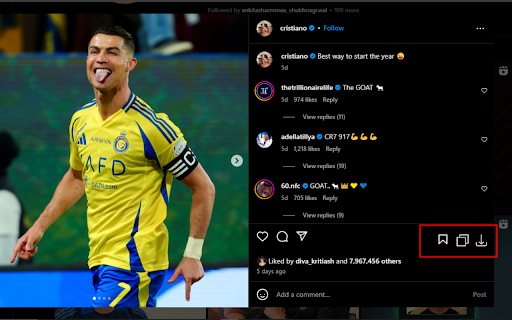

Download and open any Instagram posts, stories, reels and highlights. "Effortlessly download and view Instagram posts, stories, reels, and highlights in high quality. Looking for a simple way to save and access your favorite Instagram content? Our tool lets you download and open any Instagram posts, stories, reels, and highlights hassle-free. Whether it’s stunning images, captivating reels, or unforgettable highlights, preserve them on your device in just a few clicks. Perfect for content creators, digital marketers, and everyday users who want offline access to their favorite moments. Start downloading now and never lose track of the Instagram content you love!

Downloader for Instagram - Promaster
Download Instagram photos, videos, Reels, and Stories in one click. Fast Chrome tool with single and bulk download options Downloader for Instagram – Promaster is a powerful Chrome tool that lets you save Instagram content directly to your device. Whether you're a content creator, social media manager, or just want to archive your favorite posts, this tool makes downloading Instagram photos, videos, Stories, and Reels fast and effortless. • Download Photos and Videos – Save any Instagram post with a single click. • Reels Downloader – Capture Reels from public profiles without quality loss. • Stories Downloader – Save Stories manually or in bulk, including video clips and images. • Bulk Download Mode – Select multiple items from a profile and download them all at once. • Smart Chrome Integration – Access download buttons directly inside the Instagram interface. This tool is designed to be simple, effective, and reliable. Whether you're downloading one image or an entire feed, Promaster keeps the process quick and intuitive. With full support for multiple media formats, it fits seamlessly into your Chrome browser workflow. - Content Creators – Quickly archive or repurpose your own content. - SMM Professionals – Collect user-generated content or client materials. - Everyday Users – Save favorite posts, inspirational Reels, or time-limited Stories. This Chrome tool is an independent extension and is not affiliated with Instagram or Meta Inc. It is intended for personal use only. Please respect copyright laws and do not download content without permission from the original creator. Get Promaster – the all-in-one Instagram download tool built for speed, flexibility, and simplicity.

Save Story for Instagram
Download stories from Instagram, Facebook and also save videos or photos. Run desktop version Instagram with all functions. This very simple Chrome extension for downloading videos and photos or stories from Facebook and Instagram with one click and also allows you to access to the Instagram mobile website like you can do on your smartphone but on your computer! Just click on the extension icon in the toolbar (in the upper right corner of the browser) and get all the functions like in the mobile app. ☑️ Download videos and stories from Facebook One of the key highlights of our extension is its seamless one-click video download feature for Facebook. Whether it's a fleeting yet memorable story from your friends or a favorite page, this extension allows you to save Facebook stories effortlessly in just seconds. ☑️ Download videos and stories from Instagram Instagram is renowned for its stunning photos and videos, and our extension makes downloading them effortless. Whether it's a captivating image or an inspiring short clip, you can save them all with just one click, ensuring you always have access to the content you love. - Upload your photos or videos - Direct Messages are fully supported - Open / Download photos and videos in full HD - Everything you can do normally on your phone on the Instagram mobile website (like, follow, comment, browse, ..) - Comfortable layout for a better experience This app requires only the minimal permissions required to work to improve your security. 📌 Important! Instagram™ is a trademark of Instagram Inc., registered in the U.S. and other countries. This is an independent project and has no relationship to Instagram™ or Instagram Inc. Save Story does not belong or related to the official Instagram application / website in any ways. It is an unofficial app that is developed and maintained independently. ⭐ Please, rate us! We work hard to provide you with the best experience for Instagram. If you like our extension, please provide us with a 5 star rating! If you have any questions, remarks or suggestions, we’d be happy to hear them! Please refer to our contact details below.

Exta: Pro downloader for Instagram
Download Instagram Stories, Photos, Videos & Reels in one click. Fast, secure & easy-to-use Instagram downloader extension Download Instagram Stories, Photos, Videos & Reels in One Click! The most powerful and easy-to-use Instagram downloader for Chrome. Save any photo, video, Story, Reel, or IGTV in high quality. No watermark, no login, 100% free! 📌 Key Features & Benefits: • 📷 Download Instagram Photos & Videos – Save Instagram content directly to your device in HD & 4K quality. • 🎥 One-Click Instagram Reels Downloader – Quickly grab and download Reels from any Instagram account. • 📌 Save Instagram Stories Before They Disappear – Never lose important moments again! Download Stories with just one click. • 📂 Mass Download Support – Download multiple posts, videos, and Stories at once as a ZIP file. Save content from an entire profile instantly. • 🚀 Fast & Secure Downloader – No login required, completely private and ad-free. No tracking, no hidden fees! • 🔄 Supports Multiple Formats – Download Instagram content in MP4, JPEG, ZIP, and other formats for offline access. 🎯 Why You Need This Instagram Downloader? Instagram does not allow direct downloads of Stories, Reels, and videos. Our extension makes it simple to save any Instagram content to your computer in seconds. Whether you’re a content creator, marketer, or just want to store your favorite Instagram moments, this tool makes it quick and effortless. 🖱️ How It Works? • Open Instagram and navigate to the photo, video, Story, or Reel you want to download. • Click the Exta Downloader button in the Instagram navigation menu. • Select: Download single post (for individual downloads) or Download all Stories/posts (for mass downloads). • The file is instantly saved to your device in HD or 4K quality. 💡 Why Choose This Instagram Downloader Over Others? • 🔥 Faster than any other Instagram downloader – Save content in just seconds! • 🔒 No login required – Works directly in your browser without needing your Instagram account. • 📷 Supports HD & 4K downloads – Download photos and videos in their original quality. • ❌ No watermark & no ads – Get clean, high-quality media with no branding. • 📂 Bulk & batch downloads – Save an entire Story series or multiple posts with one click. • 💯 100% free & safe – We do not track, store, or collect any data from your downloads. 📌 Start Downloading Now! Don’t let your favorite Instagram content disappear! Install Exta Downloader now and start saving Instagram Stories, Photos, Videos, and Reels instantly. Works for public & private accounts (from users you follow). 🚀 Click "Add to Chrome" and start downloading today! 🚀 Exta: Pro Downloader for Instagram may occasionally open a separate tab with promotional content to help keep the extension free. No personal data is used for advertising, and browsing history is never sold or shared. Promotional content can be disabled at any time in the extension settings.

IMDownloader | Download story reels highlight image and video
Download original (high resolution) image, video, reels, story and highlight for Instagram™ with one click, free and unlimited. IMDownloader is an extension to help you to download original image, video, reels, story and highlight for Instagram™ with one click, free and unlimited. ▣ You can download by using this extension: ● Image ● Video ● Story ● Highlights ● Reels ▣ The extension adds a download button to a suitable place on instagram interface. You can find the button; ● Under the image/video on homepage page. ● Top-right corner on story/highlight page. ● Hover image/video on profile detail page. ● Under the comments on post/reels detail page. ● Right side of reels page. ▣ Besides; if you right click over any image/video, You will see a menu item "Download | Downloader for Instagram™". You can start downloading by clicking this menu item. To see how you can download, please take a look the extension images and video. ▣ After installing, please reload all tabs for the extension to take effect. For issues/suggestions
