
dikflngfkaandpfjpaonobhjjpdbacni
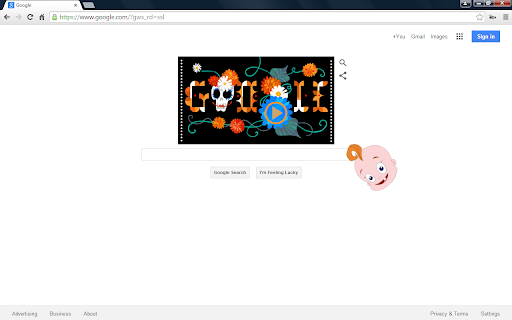
The Giant Floating Baby Head extension makes a baby head randomly cross the browser window for any site. It's a great prank to install on someone's Chrome who's a fan of "Phineas and Ferb." Never heard of it? Check out: http://phineasandferb.wikia.com/wiki/Giant_Floating_Baby_Head Want an image other than the Baby Head? Select your own image on the options page. It could be Worf, a Creeper, Donald Trump, etc. The possibilities are endless. The Giant Floating Baby Head appears at random (every 10-40 minutes after opening a new tab), or according to the settings set on the options page (open Manage Extensions, click on the 'Details' button for the extension, and select 'Extension options'). You can also trigger the appearance manually by pressing Ctrl+Shift+F (configurable) on almost any webpage! (Chrome restricts it from running on certain pages.) Updates: 0.7 - Supports multiple user-defined image URLs 0.10 - Configurable keyboard shortcut 0.12 - Configure which websites the GFBH should not appear on 0.14 - Configure duration Make sure to check out the options page. More settings and options coming soon! Please rate and comment! Let me know what options/improvements you'd like to see and let me know if you encounter any bugs. Permissions: "Read and change all your data on the websites you visit" - GFBH doesn't read any data from the sites you visit. This permission just allows GFBH to display on any website. Note: This extension is not endorsed by or affiliated with "Phineas and Ferb" or "Disney Channel".

Confetti! Confetti all over... What else?
Celebrate on any webpage! Click the icon, use a keyboard shortcut, or set up automatic triggers. Fully customizable with shapes, emojis, colors, and animation directions. Shapes & Emojis - Choose from circles, rectangles, stars, and hearts - Or switch to Emoji mode and pick up to 6 of your favorite emojis - Mix and match shapes for unique confetti styles 4 Animation Directions - Fall Down: Classic confetti rain from the top - Rise Up: Fireworks-style burst from below - From Sides: Confetti streams in from both edges - Center Burst: Explosion from the center of the screen - Random: A different direction every time Custom Colors - Create your own color palette with unlimited colors - Click any color to change it, hover to remove - Reset to defaults anytime Fine-Tune Your Confetti - Adjust particle count (5 to 2000) - Control particle size - Enable repeated confetti with custom repeat count - Live preview of your settings URL Triggers - Automatically fire confetti when visiting specific URLs - Set up to 10 triggers with custom blast count and delay - Celebrate every deploy, every PR merge, every milestone - Settings sync across all your Chrome browsers - Dark and light theme in the settings page - Lightweight and fast - No data collection beyond anonymous usage analytics - Free and always will be - Some websites may block extensions for security reasons - To stop confetti early, simply reload the page - Visit confetti-ce.web.app for more info

wat
WAT wat plays back Gary Bernhardt saying 'wat' during his infamous lightning talk. Source code available here: https://github.com/sl4m/wat

aB Hamster
The official aBowman Hamster Chrome extension. Now working without Flash thanks to Ruffle. This lively pet hamster will keep you company throughout the day. Watch him run on his wheel, drink water, and eat the food you feed him by clicking your mouse. Change the colors of your hamster to make him your own.

Doge My Site
Add 'MUCH WOW' to any page on the web. Add 'MUCH WOW' to any page on the web. If you code, please consider contributing https://github.com/MichaelSolati/doge-my-site
