
diheoehjcpaaapbmalifkhhimmmpblno


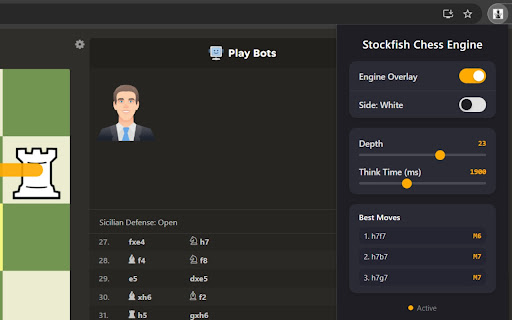
Professional real-time Stockfish chess engine analysis with visual best move overlays for Chess.com Take your Chess.com games to Grandmaster level instantly with the Stockfish Chess Engine Chrome extension: the lightweight, privacy-first tool that brings the world's strongest open-source chess engine directly onto your Chess.com board. No tab switching. No external analyzers. No premium subscription needed. Just pure, lightning-fast Stockfish analysis with beautiful visual best-move overlays, fully customizable controls, and a detailed list of suggested moves that all run locally in your browser. Powerful Features for Every Skill Level: - Real-Time Visual Best Move Overlays: As soon as a move is played, Stockfish instantly highlights the strongest move with a clear arrow highlighted directly on the Chess.com board. Perfect for blitz, rapid, daily games, and any real-time move review. - Choose Analysis Depth: Set the search depth (e.g., 10–30+ ply) where higher depth delivers more accurate evaluations and stronger move recommendations, while lower depths give faster results. - Set Think Time: Adjust the time Stockfish spends calculating (in milliseconds) to balance speed vs. strength based on your hardware and game time control. - Detailed List of Top Moves: The menu displays a ranked list of the best moves with centipawn evaluations, principal variations (multi-line PVs), and scores. Quickly compare alternatives, explore sidelines, and understand why one move outperforms another. - Seamless Chess.com Integration: Works automatically on live games, analysis boards, puzzles, and reviews. Detects the current position via FEN and delivers instant feedback without cluttering the interface. Why Chess Players Love This Stockfish Extension: - Train Like the Pros: See Grandmaster-level insights in real time – improve tactical vision, opening preparation, middlegame planning, and endgame technique. - Flexible & User-Controlled: Whether you want quick suggestions during a 3+0 blitz game or deep 20+ depth analysis during a long think, the menu gives you full control over time and depth for personalized results. - Clean & Non-Intrusive: Visual arrows on the board + a powerful yet simple menu for the move list and settings. No side panels, no bloat – just the engine help you need. - Privacy First & Lightweight: Runs entirely client-side with zero data collection, zero tracking, and minimal permissions. Your games and analysis stay completely private in-browser. - Free & Optimized: Powered by the latest Stockfish engine optimizations. Small footprint (under 513KB) and fast loading. Perfect For: - Blitz & Rapid Training: Quick depth/think time settings for real-time help under pressure. - Opening Repertoire Building: Explore multiple lines from the move list. - Puzzle Solving & Verification: Confirm your ideas against Stockfish’s top recommendations. - Rating Improvement: Faster progress by understanding the “why” behind every best move. How It Works (Super Simple): - Install the Stockfish Chess Engine extension from the Chrome Web Store. - Open any Chess.com game or analysis board. - The extension automatically activates and shows best-move arrow for both sides. - Click the extension icon anytime to open the menu → adjust depth and think time → view the full list of top moves with variations and evaluations. - Play smarter immediately.

Chessvision.ai Chess Position Scanner
Analyze chess positions from any website, book, and video in Chrome Automatically analyze chess positions on any website and video you want. Do you like watching chess videos from Ben Finegold, Agadmator, PowerPlayChess, and others? Now you can analyze their moves and understand the reasoning behind them, all while watching the video! Click on the extension button to open it. Select the options you want and click Scan! The position will open in the Lichess analysis board where you can enable the engine, see the evaluation, and even play. You can also open an external analysis on either Chess.com or lichess.org. Open the extension on the Chess.com Analysis page or Lichess Analysis or Study pages and watch videos explaining the position on the board. Enable chess notation hiding behind spoiler tags, ensuring you're never spoiled while solving puzzles. Help us make Chessvision.ai the most accurate chess board image detector. If you have any suggestions or spotted any issues, email me at pawel@chessvision.ai version 3.6.1 - fixes issue where the Analysis Board was not displayed on some websites after a turn change version 3.6.0 - adds ability to select from multiple analysis boards, providing greater flexibility - adds fallback mechanism that defaults to the most promising analysis board if the selected one is unavailable, providing better usability version 3.3.0 - adds Options page, including settings for Video Search version 3.2.0 - adds Video Search to Lichess Analysis and Study pages version 3.0.0 The update introduces new major features, including: - searching for YouTube chess videos matching the scanned positions - adds Video Search to Chess.com analysis pages version 2.1.0 This update introduces quality of life updates, including: - new rotate board button - now you can rotate the board using the new button in the toolbar - improved initial board rotation detection - now the position will always load in the same rotation as the scanned diagram - updated Help and About sections version 2.0.0 The update introduces many new features and improvements, including: - "Select area" mode to scan manually selected area - finding games matching the scanned position - smart turn detection using the last move squares - modern design - improved scanning speed - quick FEN copying - diagram editor - resizable window

Chess Eval Extension
Chess Eval Extension provides instant, real-time position evaluation for your chess.com games using the powerful Stockfish chess engine. Features: - Real-time position evaluation displayed directly on the board - Powered by Stockfish WASM engine for accurate analysis - Lightweight and fast - runs entirely in your browser - Works seamlessly with chess.com's interface - No data collection or external servers required Perfect for players who want to: - Analyze positions during post-game review - Study opening variations - Understand positional advantages - Learn from engine suggestions The extension automatically detects chess positions on chess.com and provides continuous evaluation as the position changes. All analysis happens locally in your browser - your games and data remain private. Note: This tool is for learning and analysis. Please respect fair play guidelines when using during live games.

ChessHelper.ai
Analyzes chess positions on chess.com and lichess.org using ChessHelper AI engine and displays recommended moves as visual overlays ChessHelper.ai is your AI-powered chess coach that analyzes positions in real time directly on Chess.com and Lichess.org. Smart move suggestions calibrated from 800 to 3200 ELO Real-time board overlays showing best moves with arrows and evaluation scores Human-like play mode that varies suggestion strength for realistic training Autoplay with configurable timing for bullet through classical time controls Game analytics dashboard to track improvement over time Works seamlessly on both Chess.com and Lichess.org How it works: Install the extension, open a game on Chess.com or Lichess, and see the best moves highlighted directly on your board as you play. Adjust the engine strength to match your skill level for a personalized coaching experience. Free: 3 games/day, 10 games/week Pro: Unlimited games with full feature access Visit https://chesshelper.ai to learn more.

Chess Stats
Shows Win/Lose/Draw and average accuracy for players on chess.com - First three numbers are the wins/loses/draws of the player - Percentage in brackets is the average accuracy of the player - Accuracy is only available on reviewed games - Hover over the stats to see information how many games the average is based on Use the icon in the top right corner to adjust the settings. This extension is an independent project and is not affiliated with, endorsed by, or associated with Chess.com in any way.
