
dhpkakcoddfplipjgbhklfgomilbecnj


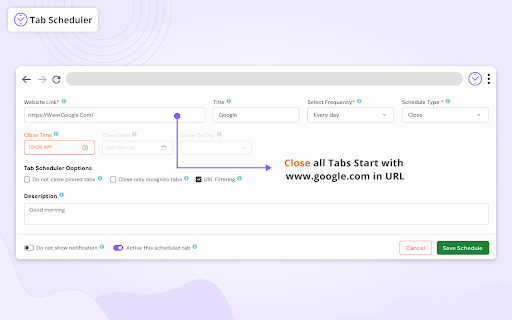


Browser tabs will be open and close automatically at selected time. User can activate/deactive list based on requirement If you ever want to close or open tabs automatically after a few minutes of interval then this extension is helpful for you. With the help of Tab Scheduler you can open your given URL at a selected time, it is also useful to close your tabs, URL at specific date or specified interval, schedule url to open, schedule opened url to close, schedule open tab, schedule close tab. Tab scheduler extension is used to close tab, close url, open tab or open url after a specified interval. You just need to add a URL in the list and need to select the minute or time, after that your added URL will be closed once it's reached the scheduled time. Extension have below Features - Multiple schedule url. - You can use wildcard characters to match your URL , with wildcard URL match chances are highly increased. - If you do not want to remove your list but temporarily want to disable it then you can deactivate it. - You can schedule an open tab and close tab in repeat mode with options like one time, every minute, every 5 minutes, every 30 minutes, every hour, every day, every week and every month. - Import and export the open tab URL or close tab URL with a simple one-click. Make sure to use a valid CSV format when you import your file. New Features - Add option to Open URL in new window - Add Do not close active tab - Add history tab to add, search,delete and clear history - Add option to Open all schedule link - Add option to Close all schedule link - Add auto focus tab in separate schedule - Added option to reload existing tab instead of opening new tab - Added sorting option - Now can schedule url with custom seconds - Fix issue on import/export data - Add Go to URL button to open link in new tab - Import and export the open tab URL or close tab URL with a simple one-click. Make sure to use a valid CSV format when you import your file. - Play notification when scheduled tab is opened - Added support for more URL patterns - Autofocus tab when new tab open On/off - Enable/Disable Schedule in open and close - Enable/Disable Dark Mode - Add Multiple week schedule - Add Title and description in more setting - Added option to open URL in background without open tab in browser - Added schedule option to open tab on browser start - Shows open/close time on scheduled urls with title and description - Added option to Open in incognito mode - Added option to Do not close pinned tabs - Power (System sleep) Mode can On/Off - Search Scheduled URL - Copy Schedule data. - Highlight and scroll Schedule after add/update and copy. - Multiple Schedule Delete - Start/Stop Schedule in popup and also in settings - Fix close tab not working with www

Auto URL Opener
Automatically open specified links in new tabs at fixed or random time intervals, with optional incognito mode. Easily schedule and launch your favorite URLs in the background at customizable intervals with our URL Scheduler extension! Perfect for users who need to periodically open websites, this extension acts as a powerful timer and launcher, letting you automatically open specific links in both standard and private (incognito) windows. With its simple settings panel, you can set up a fixed or random interval timer for each URL, giving you complete control over how often each site is accessed. Ideal for researchers, task managers, and productivity enthusiasts, this scheduler helps streamline repetitive browsing tasks by running quietly in the background. For added privacy, simply enable the option to open links in an incognito window. - Customizable interval scheduler for each URL. - Option to open URLs in incognito (private window) mode. - Background operation so that it works without interrupting your workflow. - Choice between fixed or random intervals to keep your browsing dynamic. Get organized and automate your browsing with this powerful URL scheduler and launcher – a simple way to save time and maintain privacy.

Tab Scheduler
Save and schedule tabs to open at a specific time This extension lets you save the current window open tabs, and schedule them to reopen at a later date. With Tab Scheduler, you can choose which tabs you wish to open, and when, pick from existing tabs or create new ones. When it's time, a new window will open with all your tabs.

Open Specific Time
Open Specific Time is a handy Chrome extension that allows you to schedule a specific webpage to open at a precise time. Whether you need to join an online meeting, catch a flash sale, or access any time-sensitive web content, this extension ensures that you never miss a critical moment. Scheduled Page Opening: Set a URL and a specific time (down to the millisecond) for the page to open automatically. Simple Interface: Easy-to-use interface where you can input the URL and the desired time in the format HH:MM:SS . Visual Confirmation: Get a visual confirmation once your time is set, ensuring you are all set for the scheduled page opening. Persistent Storage: Your URL and time settings are saved and retrieved automatically, so you don't need to re-enter them each time you open the extension. Customizable Appearance: Clean and modern design with a full white background and black text for clear visibility. Never miss an important event or update with Open Specific Time. Set it, and forget it!

Automatic Tab Opener
Enables the user to set specific times to open a tab for a specific URL with options of closing automatically the tab when complete Our extension, "Automatic Tab Opener" allows you to automate the opening of multiple URLs based on a cron expression or predefined intervals (e.g., daily, hourly, every minute). Simply input the URLs you want to open and specify the frequency at which they should be opened. The cron expression follows the standard format, with the ability to specify minute, hour, day of the month, month, and day of the week. For example, to open the URLs every day at 8am, you would enter "0 8 * * *". Or, you can choose one of the predefined intervals (e.g., daily, hourly, every minute, specific days) from the dropdown menu. The extension will then open the specified URLs at the specified frequency, saving you time and effort in manually opening them yourself. With "Automatic Tab Opener" you can streamline your daily tasks and focus on more important things.
