
dhmegdkoembgmlhekieedhkilbnjmjee

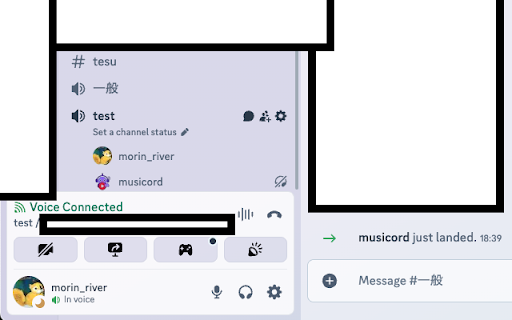


Stream music from YouTube Music, Spotify, Apple Music, and Amazon Music to Discord 🎵 Stream YouTube Music, Spotify, Apple Music, or Amazon Music directly into Discord voice channels — with high-quality, low-latency audio. **⚙️ Requires a companion desktop app (Windows / macOS / Linux).** Trunecord works through a lightweight open-source client running locally on your device. ✨ Features • Direct streaming from major music platforms • Native Discord streaming button inside each player • One-click start — no bot commands needed • Local audio processing for maximum privacy • Real-time sync, minimal delay • Works with your existing Discord permissions and setup 🚀 How It Works 1. Install the Chrome extension 2. Install the 100% open-source local client 3. Select your Discord server & voice channel 4. Press the Discord button on any supported music player 5. Enjoy high-quality synchronized playback with friends 🎯 Perfect For • Gaming communities • Study groups and coworking • Friend groups and long-distance hangouts • Streamers & VTubers 🆘 Troubleshooting • If the bot doesn’t join, check your Discord permissions • If there's no sound, restart both the extension and the local client • Visit our GitHub Issues for support 💻 Open Source The Trunecord local app is fully open-source. Review or contribute on GitHub. ⚖️ Legal Notice Unauthorized retransmission of copyrighted music may violate platform terms and copyright laws. Trunecord does not host or distribute any audio; users are responsible for their own content.

Volume Booster & Sound Equalizer – Bass Boost for Chrome
Boost volume in Chrome tabs! Control sound, EQ, and bass for YouTube, Spotify, and all sites. 🎧 Boost Your Chrome Sound – Louder, Clearer, and Customizable Audio on Every Website! Tired of quiet videos, weak bass, or flat sound in your browser? Audio Control & Volume Booster is your ultimate tool to supercharge tab audio with powerful equalizer presets and full volume control. 🚀 Key Features: ➖Volume Booster – Exceed Chrome's default volume limit for louder audio ➖10-Band Equalizer – Tweak bass, mids & treble with precision ➖Bass Boost & Treble Control – Make music punchy and clear ➖Audio Presets – Choose from rock, EDM, classical, jazz, and more ➖Stereo Panning – Balance left/right channels for headphones or speakers ➖Headphone Amp Mode – Boost output while using headphones ➖Works on All Sites – Spotify, YouTube, Netflix, Twitch, and more 🎯 Perfect for: ➖Streaming music and podcasts ➖Watching low-volume YouTube or Netflix videos ➖Getting powerful sound from your laptop speakers ➖Customizing audio for any content or mood ✅ Install now and turn your browser into a sound powerhouse!

Ultimate 432Hz Converter : Spotify YouTube Tidal & All Web Music Streaming
🎵 Play Every Streaming Service in 432Hz, 528Hz & Solfeggio Frequencies — Right in Your Browser The Ultimate 432Hz Player Extension shifts the pitch of any music playing in your browser tab, in real time, on any website. Install once. Works everywhere. No audio files to convert. No separate apps to open. The extension intercepts audio directly in the tab and applies pitch shifting instantly — zero quality loss, zero delay. It works on every web-based music and video service you already use. 🔢 432Hz, 528Hz & THE FULL SOLFEGGIO SCALE Go beyond a single preset. Choose any frequency from the complete Solfeggio spectrum, or dial in any custom value you want: Search once. Play anywhere. Type any song or artist and instantly get results from all your favorite music services — all in one panel inside the extension. Click play and the track opens already tuned to your chosen frequency. No switching tabs. No searching each service separately. • ☁️ Cloud-synced playlists with instant access across devices • ⭐ Smart Favorites — bookmark any track in one click • 🕓 Recently Played history — always pick up where you left off • 🗂️ Full playlist management built directly into the extension panel Every subscription includes full access to the standalone 432hz.live web app — a dedicated music player built around frequency: • 🎧 Play local audio files (PC & Mac) with real-time pitch conversion • 🎯 Set any base frequency and any target frequency — not limited to presets • 🎛️ Seekbar slider for precise Hz-level control over your pitch • 🎚️ Full equalizer and advanced audio processing • 📻 30,000+ radio stations across 300+ languages and countries, all tuned to your chosen frequency • ⏩ Speed control that does not affect pitch • ⌨️ Fully customizable keyboard shortcuts including global hotkeys • 🌙 Dark theme • ☁️ Cloud sync across all your devices • 🌐 Chrome, Edge, Brave, and Opera fully supported Modern music is tuned to 440Hz — a standard set in 1939. 432Hz is the older, natural tuning that many musicians, sound healers, and listeners find warmer, more resonant, and easier on the ears. 528Hz is known in sound healing as the frequency of restoration and DNA repair. The Solfeggio scale extends this further — each frequency associated with a specific state of mind and body. This extension gives you access to all of it, on every track you already love, without changing anything about how you listen. Audio is processed locally inside your browser tab. Nothing is recorded, stored, or transmitted. Your listening stays entirely on your device. ✅ Free 3-day trial — no credit card required. Try it now and hear the difference on the very first song.

YouTube Musical Spectrum
Audio visualizer for YouTube, YT Music, Spotify, and SoundCloud with musical notes. YouTube Musical Spectrum is an extension that offers audio visualization on your YouTube, YT Music, Spotify and SoundCloud page with nice musical notes. It allows you to see waterfall of spectrogram nicely. You can see not only spectrogram of YouTube video but also spectrogram of your microphone. You need to reload your YouTube page after the installation. By default, the visualizer is visible on YT Music, Spotify, and SoundCloud but hidden on YouTube page. Available shortcuts: - Ctrl+Alt+G: toggle the visualizer's visibility. - Ctrl+Alt+H: toggle the menu's visibility

Song Lyrics
Display current song lyrics for music platforms, such as Spotify, Apple Music, Deezer, YouTube, etc. Chrome Extension for displaying current song lyrics. It supports a lot of music platforms, such as Spotify, Apple Music, Deezer, YouTube (with chapters), SoundCloud, etc. You can check all platforms and other information on GitHub: https://github.com/AlexWayfer/song-lyrics?tab=readme-ov-file#song-lyrics Right now it loads lyrics from Genius, other sources can be added in the future. It also has options for displaying. * Watch for parsed search query change. You can resume watching by pressing "Refresh" button. Works with "Remove (Mix)" checkbox correctly. * Pin correctly with a custom search query. * Fix parsing for YouTube. * Fix parsing for Shazam. * Fix border and background colors opacity for iframe popup. * Add "Clear iframe settings" context menu. When you've messed up with its position or size. * Return regular popup, but add a pin button to display it as iframe. Now you will always open the default popup window, but you can switch to iframe anytime. * Add refresh button for re-parsing song title and artists from a site. * Remake iframe moving actions, adopt it for zoomed pages. * Make popup window as iframe. Resizable and movable. Position and size are saving per site. * Add music platforms for popup iframe on non-supported sites. * Add query form for unsupported sites. * Add an error notice when site doesn't work as expected. With a link to contact the developer. The whole changelog: https://github.com/AlexWayfer/song-lyrics/blob/main/CHANGELOG.md
